WhatsApp has two billion people that cannot be wrong about a messaging app. Or maybe they can?

What Is WhatsApp
WhatsApp is an internet based messaging platform from WhatsApp, Inc. that lets you send messages, photos, videos, voice notes, documents, and location data across devices. It also supports voice and video calling, including group calls. Used for both personal conversations and business communication. End to end encryption is standard on every chat.
You do not pay for texts. You do not pay for calls. You just need a phone number and an internet connection. WiFi or mobile data both work. The app uses your existing contacts, so you do not have to add friends manually. If someone is in your phone’s address book and they use WhatsApp, they show up automatically.
That simplicity is the secret. No usernames. No friend requests. No waiting for approval. Just open the app and start talking.
WhatsApp Main Features That Matter
Text messaging with individual and group chats. Send a quick note to one person or coordinate with twenty. Group chats support up to 1024 people now.
Voice and video calls, including group calls. Up to 32 people on a video call. Audio quality is solid even on slower connections.
Media sharing for photos, videos, voice notes, documents, and live location. Send a PDF. Send a song recording. Share where you are for the next hour.
End to end encryption for message privacy. No one else can read your messages. Not WhatsApp. Not Meta. Not a hacker. Only you and the person you are talking to.
Delete and edit sent messages. Made a typo? Edit it within 15 minutes. Sent something to the wrong person? Delete it for everyone within a few days.
WhatsApp Web and desktop sync for computer use. Type on a real keyboard. See your chats on a big screen. Your phone still needs to be connected.
Disappearing messages and view once media. Messages vanish after 24 hours or 7 days. Photos and videos disappear after being opened once.
Communities, channels, broadcast lists, pinned chats, and starred messages. Keep your important conversations easy to find. Send one message to many people without creating a group.
WhatsApp Looks and Feels
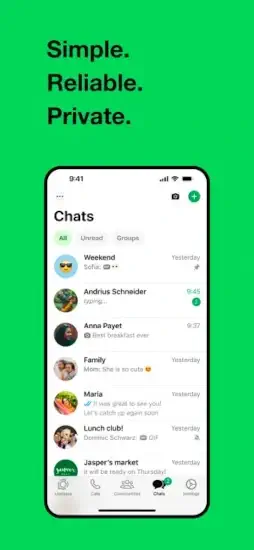
Clean, minimal interface centered on chat lists, conversation threads, and quick access to calls or status updates. The design emphasizes clarity and familiarity. That is one reason it remains easy for almost anyone to use.
Recent interface changes have gotten attention. Some users feel the updates made the app less visually comfortable. Others still find the design practical overall. The core experience remains the same. Open. Chat. Call. Close.
The green color scheme is recognizable anywhere. The chat bubbles are simple. The settings menu is straightforward. You are not fighting the interface to do what you want.
WhatsApp User Reviews
User reviews are generally positive about reliability, ease of use, and privacy. Many users like that WhatsApp feels intuitive and that it continues to improve without becoming overly complicated. The WhatsApp app review threads on app stores consistently praise how well it works across different phones and countries.
The main complaints tend to focus on interface changes, occasional discoverability issues, and preferences around the visual style. Some people miss the old design. Some people cannot find certain settings. Even so, the app maintains a strong reputation because it is dependable and widely adopted. Everyone you know is already on it.
WhatsApp holds a 4.7 star rating on App Store from over 18 million reviews. The app size is roughly 327 MB depending on your device. Age range is listed as Teen due to mature content in some shared media.
Looking for something similar? Try Telegram. It offers faster sync, larger file sharing, and more customization. Smaller user base in some regions, but growing fast.
So here is a question. If every messaging app is free, why does everyone still end up back on WhatsApp?
How WhatsApp App Works
WhatsApp is not a game, so it does not have game mechanics. Its workflow is built around sending messages, making calls, managing chats, and using privacy and organization tools.
The loop is very simple. Open chat. Communicate. Share media. Manage conversations through features like pinning, starring, muting, or creating communities. That simplicity is a big part of its appeal. No learning curve. No tutorial. Just type and send.
Your phone number is your ID. No username to remember. No password to forget. When you install the app, it verifies your number with a text message or a call. After that, you are in. Your contacts who already use WhatsApp appear automatically. The people who do not use it yet get an invite button next to their name.
Calls work over WiFi or mobile data. Voice calls sound clear. Video calls are reliable even on slower connections. Group calls support up to 32 people. That is enough for a family catch up or a small team meeting.
The WhatsApp app backs up your chats to Google Drive or iCloud. Lose your phone? Restore everything on a new one. Your messages come back. Your media comes back. Your settings come back.
WhatsApp Tips That Actually Help
These WhatsApp tips will clean up your chat list and save you time.
Use message yourself for notes, links, and reminders. Send a message to your own number. It stays there forever. Great for shopping lists, links you want to save, or reminders you need later. Pin that chat to the top so you never lose it.
Pin important chats so they stay easy to find. Top of the chat list. No scrolling. No searching. Long press a chat. Tap pin. It stays at the top until you unpin it. You can pin up to three chats.
Star useful messages instead of searching later. Long press a message. Tap star. Find it later under Starred Messages in the menu. Great for addresses, confirmation codes, or anything you need to reference again.
Turn on disappearing messages for sensitive conversations. Chats vanish after 24 hours or 7 days or 90 days. Choose what fits. This does not delete messages already sent. It only applies to new messages after you turn it on.
Use broadcast lists when you need to send the same message to multiple people privately. Each person gets the message as if you sent it only to them. No group replies. No chaos. Recipients cannot see who else got the message.
Save storage by clearing large media files you no longer need. Go to Settings > Storage and Data > Manage Storage. Sort by largest. Delete the big videos and forwarded memes that take up space. You will see how much space each chat uses.
Use WhatsApp Web when typing long messages on a computer. Open web.whatsapp.com. Scan the QR code with your phone. Type with a real keyboard. Your messages stay synced. Your calls do not go through the computer. You still need your phone nearby.
Group busy conversations into Communities if you need more structure. Multiple groups under one roof. Admin controls. Shared announcements. Good for apartment buildings, schools, or large organizations.

Apps Like WhatsApp
Telegram : messaging, groups, channels, and cloud sync. Faster. More features like bots and large file sharing. Less privacy by default because not all chats are encrypted.
Signal : privacy focused encrypted messaging. Open source. Smaller user base. Better for security focused users. All chats are encrypted by default. No data collection.
iMessage : mobile messaging with media sharing and calls. Apple only. Works well if everyone has an iPhone. SMS fallback when internet is not available.
Messenger : social chat, group messaging, and voice or video calls. Facebook integrated. More clutter. More features. Heavier app.
Viber : messaging and calling with group features. Popular in some regions like Eastern Europe and the Middle East. Smaller global reach than WhatsApp.
If you are searching for WhatsApp similar apps, start with Telegram. Same cross platform availability. Faster sync. More power user features.
Conclusion
Every messaging app claims to be private and easy to use.
But only one already has your entire contact list. Does that make WhatsApp the default choice or just the lazy one?
FAQ
Where can I get the WhatsApp download for my phone?
Download WhatsApp from the official Apple App Store.
Is there an official WhatsApp website with feature updates and news?
Yes. Meta maintains an official WhatsApp website with feature announcements, security updates, and company news.
I have an account issue or cannot verify my number. Who do I contact?
For account problems, verification issues, or lost access, contact WhatsApp support directly through the app . The support email is: [Insert developer support email here]. Go to Settings > Help > Contact Us in the app for the fastest response. Include your phone number with country code.
Does WhatsApp work internationally and how much data does it use?
Yes, WhatsApp works anywhere with an internet connection. Calls and messages use data, not your phone plan’s minutes or SMS. A one minute voice call uses about 400 KB. A one minute video call uses about 5 MB. Sending and receiving thousands of messages uses very little data. WiFi is always cheaper than mobile data for calls.