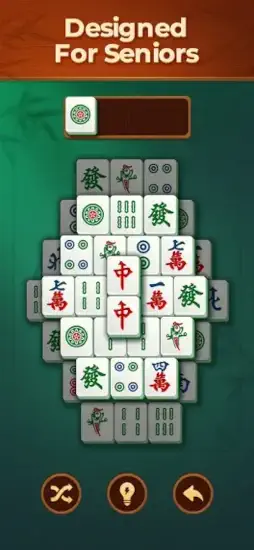
Vita Mahjong takes a different approach to mahjong solitaire. You have played these games before. Small tiles that are hard to see. Timers that stress you out.
Vita Mahjong promises something different. Large tiles designed for easy reading on any screen. No timers rushing your decisions. Just matching at your own calm pace. The question is whether it is the relaxing puzzle game you need or just another tile game with extra ads that interrupt your flow.
Mahjong solitaire apps exploded as people wanted casual brain games they could play anywhere. Mahjong Blast offered classic matching with standard tile sizes. Mahjong Journey added progression systems and story elements. Mahjong Epic had traditional layouts with smaller tiles. Vita Mahjong focused on accessibility with large tiles and simple controls for everyone.
Vita Mahjong is not a complex game. It is mahjong solitaire designed for comfort first. Large tiles reduce eye strain during long play sessions. No timers reduce stress and pressure. Hints and shuffle help when you get stuck on difficult boards. Understanding the basic strategy helps you clear every board and enjoy the relaxation without frustration.
Let us cover the basics before diving deeper. The app holds a 4.9 star rating on the App Store based on over 1.4M reviews. Size sits around 394 MB depending on cached data. Age range stretches from seniors who appreciate large tiles to younger players who want a relaxing break. If you prefer standard tile sizes with similar gameplay, Mahjong Blast offers classic mahjong solitaire
What Is Vita Mahjong?
A relaxing mahjong solitaire puzzle game for casual players. Match identical free tiles to clear them from the board. Play at a calm pace without any rush. Large tiles designed specifically to reduce eye strain. Simple controls for easy tapping on mobile devices.
Who It Is For
Casual players who want a relaxing puzzle experience without pressure. Seniors who need larger tiles for better readability. Anyone who enjoys classic mahjong solitaire without timers. People looking for a brain game that is not stressful or competitive.
The Classic Formula
Match two identical free tiles together. Remove them from the board. Keep matching until all tiles are gone. Uncover hidden tiles as you clear layers from the top. The rules are simple to learn.
Free to Play
Download free. Play free. Ads appear between levels. One-time purchase removes ads permanently for uninterrupted play.
Vita Mahjong 2026: What’s New
Large Tiles
Tiles are bigger than typical mahjong apps on the market. Easier to see patterns and symbols. Reduces eye strain significantly. Good for seniors or anyone with vision issues.
Hundreds of Layouts
Many different board arrangements to challenge you. Hundreds of levels to play through. Fresh challenges every time you play.
Daily Challenges
New puzzle every day to solve. Keeps the game fresh over time. Reason to return regularly.
Hint System
Get a hint when you are stuck on a level. Shows a matching pair you may have missed. Helpful for difficult boards.
Shuffle Feature
Reshuffle remaining tiles on the board. Creates new matching opportunities. Good for dead ends where no matches exist.
Undo Feature
Reverse your last move completely. Recover from mistakes easily. Try different strategies without penalty.
Offline Play
Play without internet connection anywhere. No Wi-Fi needed. Good for commuting on trains or travel on planes.
Vita Mahjong Game Mechanics: How It Plays
Tile Matching
Find two identical tiles on the board. Tap both to match them successfully. They disappear from the board. Clear all tiles to win the level.
Free Tiles
Tiles must be free on at least one side to be selectable. Left or right side must be open. No tile sitting on top. Cannot take tiles trapped under others.
Board Reading
Look at the whole board before matching. Plan ahead several moves. Do not just match the first pair you see.
Layered Layouts
Tiles are stacked in layers like a pyramid. Top tiles block lower tiles underneath. Clear top layers first before bottom.
No Timers
Take as long as you want on each level. No clock counting down your time. Think about each move carefully.
Helpful Tools
Hints show you matching pairs. Shuffle rearranges stuck boards. Undo reverses your last mistake.
Vita Mahjong Strategy and Tips
Start with Top and Edge Tiles
Match tiles on the top layer first because they block others. Match tiles on the edges because they are most accessible. These are usually your only available moves.
Clear Pairs That Unlock Hidden Tiles
Some matches reveal more tiles than others underneath. Choose pairs that open new options. Avoid matches that leave isolated tiles with no partners.
Use Hints Only When Stuck
Hints are helpful but solving yourself is more satisfying. Use when truly stuck for a long time. Learn from the hint for next time.
Save Shuffle for Dead Ends
Shuffle rearranges the entire board randomly. Use when no matches are available at all. Do not waste it early when you still have matches.
Use Undo to Recover
Undo reverses your last move immediately. Use if you realize a match was bad. Try a different approach.
Don’t Rush
No timer means no hurry at all. Scan the board carefully before each move. Think ahead. Rushing causes avoidable mistakes.
Plan Multiple Moves
Look several moves ahead in your mind. Consider what tiles will become free after your current match.
Vita Mahjong Graphics and Design
Visual Style
Clean and readable design throughout. Large tiles are the standout feature. Simple backgrounds that do not distract. No distracting animations.
Tile Design
Traditional mahjong symbols used. Bamboo tiles with lines. Character tiles with Chinese symbols. Dot tiles with circles. Dragon tiles in red, green, white. Wind tiles for directions. Flower tiles for seasons. Large enough to see clearly.
Tile Size
Bigger than typical mahjong apps on the market. Easier to distinguish similar symbols. Reduces eye strain during long sessions. Good for seniors and vision issues.
Board Layouts
Well organized and spaced properly. Tiles are not crowded together. Easy to see which tiles are free. Easy to see which tiles are trapped.
Interface
Simple tap controls throughout. Buttons for hints, shuffle, and undo. Easy to navigate without confusion.
Performance
Runs on most iPhones from iPhone 7 and newer. Lightweight app. No lag during play. Battery friendly for long sessions.
Vita Mahjong Similar Games
| Game | Main Similarity |
|---|---|
| Mahjong Blast | Casual mahjong solitaire with relaxing board clearing |
| Mahjong Journey | Progressive mahjong layouts and chill puzzle play |
| Mahjong Epic | Classic tile matching structure |
| Tile Club | Casual puzzle pacing and simple matching |
| Onet Connect | Easy to learn matching game flow |
The Differentiation
Mahjong Blast offers similar gameplay with smaller tiles than Vita Mahjong. Mahjong Journey adds progression systems and story elements to the classic formula. Mahjong Epic has traditional layouts with frequent ads. Tile Club has social elements and leaderboards for competition. Onet Connect uses connection paths between tiles instead of free tile rules.
Vita Mahjong stands out for its large, readable tiles and accessibility features. It is designed specifically for seniors and anyone who finds standard mahjong tiles too small to see comfortably.
If you search Vita Mahjong similar games, these five appear most often. Each does something well. Vita Mahjong does accessibility and large tiles better than anyone.
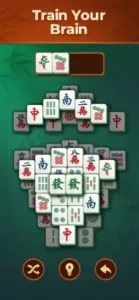
Vita Mahjong Difficulty Levels
Easy Layouts
Fewer tiles on the board. Simpler stacking arrangements. More obvious matches visible. Good for beginners learning the game or for relaxing play without thinking hard.
Medium Layouts
More tiles than easy mode. Deeper stacks with multiple layers. Requires planning ahead. Good for experienced players who want some challenge.
Hard Layouts
Complex arrangements with trapped tiles. Requires careful strategy and board reading. Good for challenge seekers who want to test their skills.
Daily Challenges
Mixed difficulty levels. New layout every day. Good for variety and consistent play.
Hundreds of Levels
Large variety of boards to play. Progress through difficulty over time. Never run out of new challenges.
No Timers
All levels have no time pressure whatsoever. Difficulty comes from the tile layout and stacking, not from speed.
Vita Mahjong Tips and Tricks for 2026
Start by Matching Tiles on the Top and Edges of the Board
Top tiles are most accessible and block tiles below. Edge tiles are often free on one side. Clear them first before anything else.
Clear the Pairs That Unlock the Most Hidden Tiles First
Some matches reveal many tiles underneath them. Prioritize these moves. Avoid matches that leave isolated tiles with no partners.
Use Hints Only When You Are Stuck, Not on Every Board
Hints are helpful but solving yourself is more satisfying. Use only when truly stuck for a long time. Learn from the hint for next time.
Save Shuffle for Situations Where the Board Feels Blocked
Shuffle rearranges the entire board randomly. Use when no matches are available at all. Do not waste it early when you still have matches.
Use Undo to Recover from a Move That Closes Off a Better Path
Undo reverses your last move immediately. Use if you realize a match was bad. Try a different approach without restarting.
Don’t Rush; the Best Games Come from Careful Scanning and Planning
No timer means no hurry at all. Scan the board carefully before each move. Think ahead several moves. Rushing causes avoidable mistakes.
If You Want to Improve Scoring, Focus on Speed and Move Efficiency
For players who care about high scores, move faster between matches. Make efficient matches without wasted moves.
Take Advantage of Offline Mode for Relaxed Practice Sessions
Play without internet connection anywhere. No ads when offline. Good for practicing strategies without interruptions.
Learn Tile Patterns
Recognize tile types quickly by their symbols. Bamboo from characters. Dots from bamboos. Faster recognition speeds up your play significantly.
Restart if Needed
If the board seems impossible to solve, restart the level. A fresh start sometimes helps with a new perspective.
Vita Mahjong Monetization: Free vs Paid
Free Version
Full gameplay is accessible. All levels can be played. Hints, shuffle, and undo features are available. Ads appear between levels.
Ads
Occasional ads appear between levels. Some users find ads long or too frequent. Can be removed with a one-time purchase.
Remove Ads
One-time purchase removes all ads permanently. Also may unlock additional features like unlimited hints.
In-App Purchases
Remove ads permanently. Possibly extra hints or shuffles. No gameplay advantages that affect winning.
Value Proposition
Free version is playable but has ads that interrupt flow. Paid version removes ads for uninterrupted relaxation.
Vita Mahjong Common Issues and Fixes
Ads Are Too Frequent
Some users find ads intrusive between levels. Purchase ad removal as a one-time cost. The free version relies on ads for revenue.
Tiles Still Hard to See
If large tiles are still difficult, adjust device zoom in settings. Increase screen brightness. Use reading glasses if needed.
No Matches Available
Use the shuffle feature immediately. Tiles rearrange randomly. New matches should appear.
Dead End Board
You may have made poor moves earlier in the level. Restart the level completely. Try a different matching strategy.
Hints Not Needed
If you prefer solving without hints, simply ignore the hint button. The game does not force hints on you.
Conclusion:
Vita Mahjong is designed specifically for readability and relaxation. The large tiles reduce eye strain significantly. No timers reduce stress and pressure. Hints, shuffle, and undo help when you get stuck. The free version has ads, but the one-time purchase is reasonable for ad-free play.
What works: Large, readable tiles that reduce eye strain. No timers or pressure to rush. Hints, shuffle, and undo tools for help. Hundreds of levels and daily challenges. Offline play without internet. Relaxing, classic gameplay.
What does not: Ads can be frequent in the free version. Some users find them intrusive. No multiplayer or social features. Traditional mahjong may be too simple for some players.
What do you want from a mahjong solitaire game? If you want large tiles, no timers, and relaxing gameplay, Vita Mahjong delivers. If you want competitive play against others or complex systems, other apps might fit better.
Video by Touch GamePlay Global
Frequently Asked Questions About Vita Mahjong
Is Vita Mahjong free to play?
Yes. Vita Mahjong is free to download and play. The free version includes all levels, daily challenges, hints, shuffle, and undo features. Ads appear between levels. You can remove ads with a one time purchase. Core gameplay is fully accessible without spending. You can start your Vita Mahjong download from the Official App Store.
What makes Vita Mahjong different from other mahjong solitaire apps?
Vita Mahjong has larger tiles than most other mahjong apps. The game is designed specifically for seniors and anyone who finds standard tiles too small. No timers. No pressure. Just relaxing gameplay. It also includes hints, shuffle, and undo features to help when you are stuck.
Can I play Vita Mahjong offline?
Yes. Vita Mahjong works without an internet connection. Download the game, and you can play anywhere. No Wi-Fi needed. No mobile data required. Good for flights, commutes, or areas with poor reception. Ads are also disabled when playing offline.
Is Vita Mahjong good for seniors?
Yes. Vita Mahjong is designed with seniors in mind. The tiles are larger than standard mahjong apps, making them easier to see. No timers mean no pressure. Simple tap controls are easy to use. The game also helps train memory and focus.
Where can I find official information and get support if I have issues?
The official Vita Studio website has information about their games. For technical support, billing issues, or feature requests, contact Vita Studio customer support through the website. Official website: https://www.vitastudio.ai/