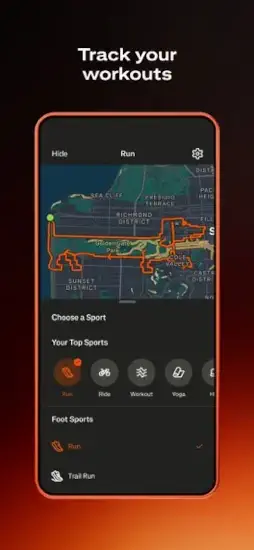
Strava is a social fitness tracking app that records workouts, analyzes performance, recommends routes, connects athletes and turns exercise into a shared experience.
Strava tracks your workouts with GPS. It shows you segments where you can compete against other athletes. It lets you see how you stack up against friends and strangers. The question is whether it is a genuine motivational tool or just another app that turns exercise into a popularity contest.
Strava is a social fitness platform. You record activities anywhere. You compare your times on segments against others. You give kudos to friends who post activities. You join challenges to stay motivated. Understanding the features helps you decide whether Strava or a simpler fitness tracker fits your needs and training goals.
The app holds a 4.8 star rating on the App Store based on over 354,000 reviews. Size sits around 475 MB depending on cached maps. Age range stretches from young runners posting daily activities to older cyclists tracking long rides. If you prefer a simpler running-focused app without social pressure, Nike Run Club offers guided
How Strava Works
Record or sync an activity through Strava, Apple Watch, Garmin, Fitbit or compatible apps. Capture route, time, distance, pace, elevation, heart rate and sport specific details. Review the map, performance data, segments, best efforts, training log and AI insights. Share with followers using titles, descriptions, photos, visibility controls and stickers. Receive kudos, comments and follows from the community. Compete on segment leaderboards. Join challenges and clubs for accountability. Plan future training with routes, goals, progress data and subscriber insights. Manage safety and privacy settings based on comfort level.
Why Strava Became the Default Home for Athletes Who Want Data and Community
Most people reading this run, ride, hike, walk or lift. They have tried tracking apps before. Some felt clinical. Some felt lonely. Some recorded data but gave no reason to come back.
Strava built its reputation on the opposite problem. What happens when exercise becomes social? Users praise the motivation, community, device syncing, gear tracking, and multi sport support. Critics point to subscription value, GPS and segment accuracy issues, route building friction, notification behavior and privacy concerns.
The Activity Tracking Foundation
Strava records runs, rides, walks, hikes, yoga, strength work and 50+ activity types. GPS captures distance, pace, speed, route, elevation and movement data. Apple Watch support lets users leave the phone behind for many workouts. Device syncing pulls in data from Garmin, Fitbit and thousands of compatible services.
Why does this matter? Because Strava works best as a hub, not a replacement for the gear you already own. Your Garmin watch still tracks the run. Strava becomes the place where the run lives, gets shared, and gets compared.
Segments, Leaderboards and Friendly Competition
Segments compare times over specific route sections. Leaderboards show top ten performances and Local Legend status. Personal records and best efforts give long term benchmarks. Competition is optional but deeply motivating for many users.
GPS variance, wind, traffic and device differences can affect rankings. One cyclist described situations where friends started together but the ranking did not reflect their observed finishing order. Treat segments as one signal among many, not as absolute truth.
Challenges, Badges and Accountability
Monthly challenges encourage distance, elevation, activity and consistency goals. Completion earns digital badges and creates shared achievement. One realistic challenge per month beats joining five and abandoning them. Clubs extend accountability beyond individual challenges.
External motivation works until it becomes pressure. Balance matters. Chasing badges is healthy when it gets you outside. It becomes unhealthy when it keeps you training through injury or exhaustion.
Routes and Outdoor Discovery
Route recommendations use de-identified Strava activity data. Hiking route discovery surfaces local trails, scenic routes and long distance climbs. Users can build custom routes for running, cycling and hiking. Useful for travel and exploring unfamiliar areas.
Mobile route building has historically been a friction point. An older review said making routes in the app was annoying and required logging in on the website. Recent updates have improved this, but some users still prefer the desktop version for route planning.
Training Log, Progress Tab and Athlete Intelligence
Training Log stores workout history, trends and progress. The Progress tab gives subscribers a place to review training, streaks and yearly best efforts. Athlete Intelligence uses AI to generate instant workout insights.
AI can highlight patterns, but athletes should weigh fatigue, sleep, terrain, weather and injury status before acting on it. Subscribers can set specific goals and receive tailored suggestions. The AI is a prompt, not a verdict.
Strength Training and Gear Tracking
Strength workouts now show exercises, sets, reps, weights and muscle maps. Users can add multiple exercises manually and control whether muscle maps and lifted weights are visible before posting. Gear tracking monitors mileage and hours on running shoes, bikes and other equipment.
This helps athletes know when to replace shoes or service bikes based on actual use. One reviewer said: “It can also help you keep track of mileage on your shoes or bike… it can prevent injuries and give you an idea of when you need to get new gear.”
Safety Sharing and Privacy Controls
Safety sharing sends real time location to selected loved ones during outdoor activity. Activity visibility settings let users choose who sees what. Start and end point hiding reduces exposure of home and work locations.
Strava collects health and fitness data, precise and coarse location, contacts, user content, device identifiers, purchase data, search history and diagnostics. Because activities reveal routines and routes, users should configure privacy settings actively rather than relying on defaults. Review activity visibility. Restrict followers if appropriate. Hide start and end points near home or work. Be especially careful with accounts for minors.
Free Versus Subscription
The free tier covers activity recording, social sharing, following athletes, joining clubs and basic community features. The subscription unlocks advanced training, route planning, progress insights, safety features and personalized recommendations.
App Store listings show prices ranging from $5.99 for one month** to **$149.99 for a Strava plus Runna bundle. The Strava Family Plan is listed at $139.99. Prices vary by region, promotion and billing method. Confirm your local price before committing.
Design Strengths
Activity centered design turns each workout into a story with maps, distance, elevation, pace and photos. Low friction device syncing pulls workouts from Garmin and other platforms automatically. Clear social feedback through kudos, comments, follows and club updates. Progress tab redesign gives subscribers a cleaner view of trends and streaks. Improved Apple Watch launch flow reduces login friction before workouts. Lock screen shortcuts open Home, Maps, or You directly. Customizable map behavior lets users disable Activity Replay as the default.
Design Limitations
Feature density overwhelms new runners. Segments, Local Legends, clubs, training logs, routes, subscriptions, challenges, gear, privacy, maps and analytics stack up quickly. Notification behavior frustrates some users. Clearing notifications takes multiple steps, and stacked kudos hide individual interactions. Manual entry is limited. One reviewer noted manual runs were restricted to tenths of a mile. Mobile route building has historically pushed users to the web version. No declared accessibility support in the App Store listing.
Strava User Reviews
Positive themes include global motivation, supportive community, excellent for teams, gear tracking, automatic device syncing, multi sport support and social accountability. One reviewer said: “Obviously the best running app with global competition… Love the local legends and top ten segments.” Another praised the team features: “The clubs and groups you can join makes it really easy for my cross country coaches to keep track of everyone on the team’s mileage.” A third said: “I enjoy using this for tracking the distance, elevation gain, and other numbers linked to my cycling.”
Negative themes include subscription value, GPS and segment accuracy, route building frustration, manual upload precision, notification usability and privacy considerations. One reviewer said: “The GPS tracking is not accurate… making a route is quite annoying.” Another said the basic app was fine for keeping up with friends but did not find the subscription worthwhile.
Strava Tips
For Recording and Data Quality
Check GPS lock before starting. Wait a few moments outdoors before pressing record, especially near tall buildings, dense tree cover or steep terrain. This reduces early route inaccuracies that make your warmup look like a teleport.
Use a dedicated GPS watch for longer activities. Garmin, Apple Watch and other compatible devices improve convenience and preserve phone battery. Strava supports broad device syncing, so the watch does the recording and Strava does the storytelling.
Record the correct activity type. Choose running, cycling, walking, hiking, strength, yoga or another accurate sport category so Strava’s analysis and training log stay useful. Misfiled activities throw off your trends.
Review outlier data before sharing. If GPS creates a strange spike in pace, distance, speed, elevation or segment timing, edit or discard that recording rather than drawing conclusions from one bad data point. One corrupted file does not mean you suddenly ran a four minute mile.
Use gear tracking. Add running shoes, bikes, or other equipment and assign them to activities. Replace shoes or service bikes based on actual accumulated use rather than guesswork. One reviewer noted this feature “can prevent injuries and give you an idea of when you need to get new gear.”
For Training and Motivation
Use segments as personal benchmarks first. Focus on improving your own time rather than chasing every leaderboard position. GPS variance, wind, traffic and device differences affect rankings in ways you cannot control.
Join one realistic challenge per month. A 5K, 10K, cycling distance, hiking or consistency goal is more sustainable than joining many challenges and abandoning them. The badge means nothing if the habit collapses.
Use the Progress tab for long term trends. Compare streaks, training patterns and yearly best efforts rather than judging progress only by all time records. Progress is not linear and the tab shows the bigger picture.
Use Athlete Intelligence as a prompt, not a verdict. AI generated insights can highlight patterns, but athletes should still consider fatigue, sleep, illness, terrain, weather, injury status and professional coaching advice. The AI sees your data. It does not see your body.
Set a specific training goal if you subscribe. The newest subscriber workflow lets users state a goal such as building strength or preparing for a race, then receive more tailored suggestions. Vague goals produce vague guidance.
For Routes, Clubs and Community
Use Routes before traveling. Route discovery uses de identified activity data to recommend popular routes, which is helpful for finding run, ride, hike and climb options in unfamiliar places. It beats wandering around a new city hoping to find a good trail.
Create a club for accountability. Clubs work well for running teams, cycling groups, workplaces, friends, neighborhoods, training programs, and event groups. One reviewer said: “The clubs and groups you can join makes it really easy for my cross country coaches to keep track of everyone on the team’s mileage.”
Use Club Messages for logistics. Share routes, run polls, post announcements and organize events directly in club channels. Organizers can control who posts, which keeps coordination clean.
Follow people who motivate you. Friends, teammates, local athletes, coaches and professionals can create a healthier feed than following accounts that trigger unhelpful comparison. Your feed shapes how you feel about your own training.
Use activity privacy intentionally. Consider restricting followers, hiding start and end points, making activities visible only to followers or avoiding live location sharing when privacy is important. Activities reveal routines. Routines reveal where you live and when you are not home.
For Strength and Recovery
Add strength workouts properly. Strava can display individual exercises, sets, reps, weights and a muscle map. Select multiple exercises when manually adding a strength activity. The detail makes the log useful instead of decorative.
Control what you share. You can hide muscle maps and lifted weights before posting strength workouts. This is useful for athletes who want private training data while still sharing the activity.
Do not use Strava as medical advice. Training data can be useful, but pain, injury, abnormal heart rate readings, exhaustion and health concerns should be discussed with a qualified clinician or coach. The app records data. It does not diagnose anything.
Strava Similar Apps
| App | Best For | Main Difference from Strava |
|---|---|---|
| Garmin Connect | Garmin watch owners who want device level health, training, and recovery data | Deeper Garmin hardware integration; Strava has a stronger cross brand social community |
| Nike Run Club | Guided running plans and audio coaching | More coaching focused for runners; Strava is broader across sports and social competition |
| adidas Running | Running, walking, and marathon goal tracking | Strong running oriented tracker; Strava has more club, segment, and multi sport social depth |
| ASICS Runkeeper | Beginner friendly running plans and distance tracking | More straightforward run training; Strava offers broader social and route features |
| TrainingPeaks | Structured training plans for endurance athletes and coaches | Stronger formal coaching and plan analysis; Strava is more community and social oriented |
| Relive | Turning hikes and rides into shareable 3D videos | Better for visual storytelling; Strava is stronger for performance tracking and community |
| Fitbit | Everyday activity, health metrics, sleep and device ecosystem | Broader lifestyle health tracking; Strava is stronger for social endurance sport analysis |
| Apple Fitness | Apple Watch activity and workout ecosystem | Deep Apple integration; Strava offers wider athlete community, clubs, routes and segments |
| Komoot | Route planning for hikes, cycling and outdoor adventures | More route navigation focused; Strava is more social and performance oriented |
| Runna | Running plans and coaching | More plan and coach focused; Strava integrates completed Runna workouts into activity details |
If you want a similar app with a different focus, Garmin Connect is worth a look. It offers deeper device level health and training data for Garmin watch owners and it runs on the same platforms as Strava.
Strava’s strongest differentiator is the combination of multi sport tracking, segments, leaderboards, challenges, routes, clubs, device interoperability and a large athlete social network. No single competitor matches all of those at once. Garmin Connect wins on device specific health data. Nike Run Club wins on guided coaching. Komoot wins on route planning. TrainingPeaks wins on structured coaching plans. But if you want one app that turns exercise into a shared, competitive, community driven experience, Strava occupies a space few others attempt.
Conclusion
Strava rewards athletes who want data, community, friendly competition and a shared record of their training life. It frustrates those who want private tracking without social pressure or subscription prompts.
If you thrive on accountability, segment chasing and seeing your friends’ efforts, Strava delivers. If you want quiet, private workout tracking, Apple Fitness or Garmin Connect may serve you better.
Record a run. Check a segment. Join a club. Give a kudo. The community is the point.
Video by Fix369
Frequently Asked Questions About Strava
Is Strava free to use?
Yes. Strava is free to download and use. The free version includes GPS activity recording, basic stats, social feed, kudos, segment leaderboards (view only), and limited route discovery. Premium subscription adds live segments, offline maps, suggested routes, personal heatmaps, advanced analytics, and Beacon safety. You can start your Strava download from the Official App Store .
What are Strava segments and how do they work?
Segments are specific sections of a route created by users, like a hill climb or a flat straight section. When you run or ride through a segment, Strava automatically records your time. You can compare your time to other athletes who have completed the same segment. Leaderboards show top times, friends’ times, and your personal record.
What is the difference between Strava free and premium?
Free version includes GPS tracking, basic stats, social feed, and segment leaderboards (view only). Premium adds live segments that give real-time feedback during your activity, offline maps for areas without cell service, suggested routes based on your history, personal heatmaps, advanced stats like grade adjusted pace, and unlimited Beacon safety location sharing.
Can I use Strava without internet connection?
You can record activities without internet connection. GPS works offline. However, maps may not load without data. To view maps offline, you need a premium subscription to download maps before your activity. The activity will sync to Strava when you reconnect to the internet.
Where can I find official information and get support if I have issues?
The official Strava website has information about features, updates, and subscription plans. The Strava Support Hub answers common questions about account, privacy, and technical issues. For account recovery or payment problems, contact Strava support through the website. Official website: https://www.strava.com