SmartLife is a practical tool for managing a real one.
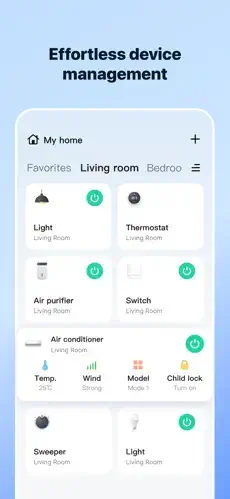
SmartLifel app from Volcano Technology Limited lets you manage compatible devices, create automations, monitor security and energy, and connect household devices from one central dashboard. No more switching between five different apps to turn off a light or check a camera. SmartLife brings everything together. One app. One dashboard. Complete control.
What Exactly Is SmartLife?
SmartLife is a smart home control app designed to make connected homes easier to manage. Think of it as a central command center for every compatible smart device in your household.
The core idea is unification. Instead of opening separate apps for lights, cameras, thermostats, and plugs, you control everything from one place. The app supports device management, home automation, security monitoring, energy insights, and household scheduling.
SmartLife also includes AI features like AI Calorie, AI Note, and AI Translation in some regions. HealthKit integration for body scale data appears in certain listings too. That expands the app beyond basic device control into broader lifestyle management.
At the time of this post, SmartLife holds a 4.7 star rating on the Apple App Store from 267,000 ratings. The app size is roughly 298 MB depending on your device. Age rating is 4+ with no objectionable content. For a similar experience, check out Google Home.
Who Benefits Most From Using SmartLife?
SmartLife is not for everyone. But for certain people, it becomes essential.
Homeowners with multiple smart devices are the primary audience. When you have smart lights, cameras, plugs, thermostats, and sensors from different brands, managing them individually gets frustrating. SmartLife consolidates everything.
Households wanting shared control across family members benefit from the family sharing feature. Everyone can manage the home. No single point of failure. No one person responsible for everything.
People interested in energy tracking and cost savings find value in the usage insights. See which devices consume the most power. Adjust habits accordingly. Save money over time.
Anyone wanting security alerts and monitoring appreciates the real-time notifications. Motion detected. Door opened. Camera triggered. You know immediately.
Users who enjoy automation routines for lighting, climate, and appliances will find the automation engine powerful. Set scenes based on location, schedule, weather, or device status. Let the home run itself.
SmartLife Core Features
Control Compatible Smart Devices From One App
Add and manage lights, plugs, cameras, thermostats, sensors, and more from a single dashboard. No more app switching.
Real Time Security Alerts and Monitoring
Get instant notifications when security devices trigger. Motion alerts. Door open alerts. Camera events. Stay informed even when away.
Energy Tracking and Usage Insights
Monitor energy consumption across devices. See usage patterns. Identify high consumption devices. Make informed decisions about energy use.
Shared Household Schedules and Reminders
Set schedules for devices. Create reminders for household tasks. Keep everyone in the home aligned.
Home Automation Based on Scenes, Location, Schedule, Weather, and Device Status
Create automations that trigger based on conditions. Lights turn on at sunset. Thermostat adjusts when you leave. Devices respond to weather changes.
Voice Control and Smart Speaker Integration
Control devices with your voice through compatible smart speakers. Hands-free operation for everyday tasks.
Family Sharing for Multiple Users
Invite family members to manage the home. Everyone gets their own access. No shared accounts needed.
Camera Features Including QR Scanning
Add cameras easily with QR code scanning. Quick setup. No complicated configuration.
HealthKit Integration for Body Scale Data
Sync compatible body scales with Apple Health. Track weight, body composition, and other metrics alongside home data.
AI Features (Calorie, Note, Translation, and More)
Access AI tools like calorie tracking, note taking, and translation within the app. SmartLiving extends beyond just device control.
SmartLife Graphics and Visual Design
SmartLife uses a clean, functional interface built for clarity and quick access. This is a utility app. It does not need to impress. It needs to work.
The design focuses on usability over visual flair. You open the app and immediately see your devices, rooms, and scenes. Control is one or two taps away. The layout reduces friction for users who open the app repeatedly throughout the day.
Recent listing text mentions UI improvements and smoother performance. The developers are actively refining the experience. Updates bring better navigation and faster response times.
How SmartLife Works
The daily flow is straightforward. Add devices and organize them into rooms or scenes. Group lights by room. Group cameras by location. Create scenes like “Good Morning” or “Good Night” that trigger multiple devices at once.
Set automations for repeating routines. Lights turn on at sunset. Thermostat adjusts when you leave. Devices respond to weather changes. Automations run without your input once configured.
Monitor security, energy, and household schedules from the dashboard. Check camera feeds. View energy usage. See upcoming reminders. Everything visible at a glance.
Control everything manually or through voice assistants. Tap a device to control it. Speak a command to your smart speaker. The app responds either way.
What Users Actually Say about SmartLife App
Many users praise SmartLife for being simple and useful. One review said it can configure a whole house quickly with scenes. That speed and ease of setup is a recurring theme in positive feedback.
At the same time, some users report connection drops, device linking issues, and freezes. These are common pain points in smart-home apps. No platform is perfect. The scale of positive ratings suggests most users find the app reliable enough for daily use.
SmartLife Tips
You could just download SmartLife and start adding devices. But a few SmartLife tips will help you unlock its full potential and make your smart home actually feel smart.
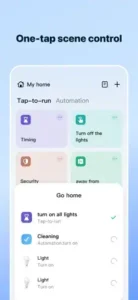
Group devices into rooms and scenes for faster control. Organizing by room saves time. Scenes like “Movie Night” or “Good Morning” trigger multiple devices at once. One tap instead of five.
Use automations for repeating routines like lighting and climate. Set lights to turn on at sunset. Program the thermostat to adjust when you leave for work. Automations handle the repetitive tasks so you do not have to think about them.
Turn on alerts for security devices. Motion detectors, door sensors, and cameras should notify you immediately. Enable push notifications for every security event. You want to know the moment something happens.
Use family sharing for multiple users. Invite everyone in your household to manage the home. No single point of failure. No one person responsible for everything. Everyone gets their own access.
Check device compatibility before purchase. Not every smart device works with SmartLife. Look for the “Works with SmartLife” badge or check the compatibility list before buying. Avoid the frustration of a device that will not connect.
Link health devices to Apple Health if available. If you have a compatible body scale, sync your data. Track weight and body composition alongside your home metrics. Health and home in one place.
Keep the app updated for UI improvements. The developers release updates regularly. New features. Performance fixes. Better interface. Install updates as they appear.
Use voice assistants and widgets for quicker control. Add the SmartLife widget to your home screen. Use voice commands through Google Assistant or Alexa. Hands-free control makes daily use faster.
One more thing. If you are searching for SmartLife codes, here is the reality. The SmartLife app does not rely on promo codes or redemption systems. It is a straightforward utility tool. No codes needed. Just download and start adding devices.
Apps Like SmartLife
If SmartLife does not fit your needs or you want to compare options, you have alternatives. The best SmartLife similar apps share the same focus on device compatibility, automation, alerts, and family sharing.
| App | Main Similarity |
|---|---|
| Google Home | Central control for compatible smart devices with voice integration |
| Amazon Alexa | Device control with voice commands and routine automation |
| Apple Home | iOS native smart home control with HomeKit integration |
| Samsung SmartThings | Cross-brand device compatibility and automation engine |
| Tuya Smart | Same underlying platform as SmartLife with similar features |
None of these replace SmartLife exactly. Each has strengths. Google Home offers excellent voice control. Apple Home works seamlessly across Apple devices. SmartThings has broad brand support.
For most users, SmartLife strikes the best balance between features and ease of use. The AI features and HealthKit integration are standout additions that competitors lack.
If you are already in the Google ecosystem, Google Home makes sense. If you use Apple devices exclusively, Apple Home fits naturally. But for broad device compatibility with useful extras, SmartLife remains one of the strongest options.
Conclusion
SmartLife solves a simple problem that many smart home owners face. Managing multiple devices from different brands is frustrating. This app makes it easier.
The strongest angle is unification. One app controls everything. Lights, cameras, plugs, thermostats, sensors, and even health devices. Automations handle routines automatically. Family sharing keeps everyone in the loop. The AI features add unexpected value beyond basic device control.
Who should download it? Homeowners with multiple smart devices. Households wanting shared control. People interested in energy tracking. Anyone wanting security alerts. Users who enjoy automation routines. People who are tired of switching between five different apps.
Who should skip it? People with no smart devices. Those who prefer manual control of everything. Users who do not want to spend time setting up automations. Anyone who does not trust cloud-connected devices.
SmartLife is not flashy. It does not need to be. It is a practical tool for practical people managing connected homes. If you have ever felt overwhelmed by smart device management, this app will probably help. Try it for a week. See if you stop opening five different apps every day. You probably will.
FAQ
Where can I get SmartLife download for my phone?
You can find SmartLife download on the official App Store
Is there an official website or help page where I can learn more about device compatibility?
Yes. The official SmartLife website. You will find device compatibility lists, setup guides, and automation tutorials. The site also explains how to create scenes and tap-to-run automations.
I have a question about my account or ran into a connection issue. Who do I contact for support?
Send an email to the developer, Volcano Technology Limited, at: support[at]ismartlife.me. For general questions or partnership inquiries, use: support[at]ismartlife.me. Include your device type, app version, and a description of the issue. The team typically responds within a few days.
Can I control devices when I am not at home?
Yes. As long as your phone has an internet connection and your devices are online, you can control everything remotely. Turn on lights, adjust the thermostat, or check camera feeds from anywhere in the world.
What is the difference between Tap-to-run and Automation in SmartLife?
Tap to run requires a manual tap to trigger an action. Scenes like “Go home” turn on all lights with one press. Automations run automatically based on conditions like time, location, weather, or device status. Both make home control faster and easier.