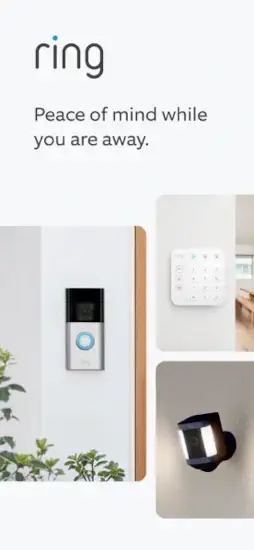
The Ring App functions as a command center.
Ring App main job is to connect you to your devices in real time. Whether you are checking a live camera feed, speaking to a delivery person through two-way audio, or adjusting your security modes, the app puts that control in your pocket. It is not entertainment software; it is a practical tool for monitoring your property. For anyone with a Ring Video Doorbell, Security Camera, Alarm system, or even Smart Lights, this app is how you manage them
What Is the Ring App and How Does It Work?
You are halfway through a grocery run when your phone buzzes. Someone is at your front door. A package has just been dropped off, or maybe a visitor is waiting while you are miles away. That moment of connection, of knowing what is happening at your home when you cannot be there, is what the Ring App delivers. This is the hub for your Ring devices, turning doorbells, cameras, and alarms into a single security system you control from anywhere.
At its simplest, the Ring App is your digital key to home security. It replaces multiple remote controls and physical keypads with a single dashboard on your smartphone. You can see snapshots of recent events, check device status, and access every connected device from one place. This centralization is what makes the app powerful. Instead of opening separate apps for a doorbell, a camera, and an alarm, you have everything in one view.
The app supports a wide range of Ring products, including Video Doorbells, Security Cameras (both wired and battery powered), Alarm systems, and Smart Lights. It works across Android and iOS devices, as well as Amazon Fire devices, making it accessible to most smartphone users. The focus is always on security and awareness, not entertainment. It is a utility, designed for clear, fast access when you need it most.
Ring App Key Features
Real Time Alerts
The app sends instant notifications to your phone when someone presses your doorbell or when motion is detected by your cameras. This is the first line of defense. You can customize which alerts you receive to avoid notification fatigue. For example, you can set motion zones to reduce false alarms from passing cars or trees, ensuring you only get pings that matter.
Live Video and Two Way Talk
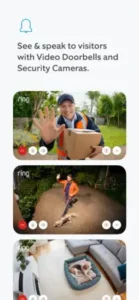
When an alert arrives, you can tap into a live HD video feed of your camera or doorbell. This lets you see exactly what is happening in real time. The two way talk feature is equally useful. You can speak to whoever is at your door, whether it is a delivery driver you want to direct or a visitor you are not expecting. This feature turns a passive camera into an active communication tool. The app’s quick controls even allow you to activate lights or sound a siren directly from the Live View screen if you see a threat.
Device Modes
The app includes security modes, typically labeled Disarmed, Home, and Away. These modes change how your devices behave. For example, in “Away” mode, your cameras and alarm sensors may become fully active, triggering alerts for any detected motion. In “Home” mode, you can keep the system on while adjusting sensors to avoid tripping them as you move around inside. This allows you to tailor your security to your daily routine with one tap.
Video Recording and Storage
By default, the Ring App lets you view live footage, but recording and saving video requires a subscription. With a Ring Home Plan (formerly Ring Protect), you can review, save, and share recorded videos. A subscription also unlocks features like video event history for up to 180 days. Without a plan, your access to recorded footage is limited, though a free trial is often included with new devices.
Smart Lighting and Device Linking
You can schedule your Ring Smart Lights to turn on at specific times, deterring unwanted attention. Devices can also be linked. For example, motion detected by a camera can trigger a smart light to switch on, illuminating the area and providing better video quality. This automation adds a layer of proactive security.
Alarm Monitoring
For those with Ring Alarm systems, the app acts as the monitoring hub. You can arm and disarm the system, check sensor status on doors and windows, and receive alerts if a sensor is triggered. Professional monitoring is also available through the app. With a compatible plan, the app can automatically call emergency responders if an alarm is triggered.
Shared Access
Security is often a household effort. The Ring App allows you to add shared users, giving family members or trusted friends access to your devices and footage. You control the permissions, deciding who can view cameras, arm the alarm, or save videos. This coordination ensures everyone in the home stays informed.
Ring App Interface and Design
The app is designed for clarity, not flashiness. When you open it, you see a dashboard with a snapshot of your devices. You can quickly check recent events, see which devices are online, and access the Live View for any camera. The navigation is straightforward, with menus for devices, modes, and settings. The design focuses on quick actions, especially useful when you need to respond to an alert quickly. The goal is to get you to the information you need without unnecessary steps.
On the App Store, the app has a rating of 4.7 out of 5 stars based on 1.8M reviews, indicating generally positive user feedback.
How to Get Started with Ring App
Download and Install
To begin, download the “Ring – Always Home” app from the Google Play Store for Android devices or the App Store for Apple devices. It is also available on the Amazon App Store for Fire devices. The app itself is free and has a file size of around 408 to 479 MB on iOS. It is rated for ages 13 and older due to user-generated content and advertising.
-
Download: Search for “Ring” and select the official app or use the direct link Download Ring – Always Home from the Official App Store
-
Size: Approximately 479.1 MB on iOS.
-
Rating: 4.7 stars on Google Play (1.8M reviews).
-
Age Range: Rated 13+.
Device Setup
Once the app is installed, create a Ring account or sign in if you already have one. o add a device, tap “Set Up a Device” from the app’s dashboard. The app will guide you through each step, usually starting with scanning a QR code on the device or its packaging. This step links the device to your account and your Wi-Fi network. You will need your Wi-Fi password handy, as most Ring devices require a 2.4 GHz network connection.
Customizing Your Preferences
After setup, you can customize how the app works for you. This includes:
-
Notification Settings: Choose which alerts you want to receive and how you want them delivered.
-
Motion Zones: Define specific areas in your camera’s view that you want to monitor, reducing irrelevant alerts
- Mode Configuration: Set up your Disarmed, Home, and Away modes so they automatically activate on a schedule or when you leave.
What Users Are Saying about Ring App
User opinions on the Ring App are mixed. The convenience and visibility it provides are frequently praised. Many find the app easy to use and reliable for everyday tasks like answering the door remotely or checking a feed. However, there are significant frustrations as well. The most common complaints revolve around reliability, specifically when the app fails to load live video during critical moments or when motion detection misses important events.
Some users also criticize the subscription model for video storage. On Trustpilot, Ring has a 3.8 out of 5 star rating based on over 363,000 reviews, reflecting the wide range of experiences. Despite these issues, the app remains a central tool for millions of Ring users, and the developer actively releases updates to fix bugs and improve performance.
Tips for Getting the Most Out of Ring App
Getting your Ring devices set up is only half the battle. The real value comes from fine tuning the system to match your daily life. A few adjustments can turn a basic security setup into something that feels intuitive and responsive.
Start with motion zones. This is one of the most effective ways to cut down on nuisance alerts. Instead of your camera detecting every car that passes or tree branch that moves, you can draw specific areas on the video feed that you actually want to monitor. A sidewalk, driveway, or front porch makes sense. A busy street does not. Spend a few minutes in the settings to map out what matters.
Smart lights benefit from schedules. If you set your lights to turn on at sunset and off at sunrise, your home looks occupied even when you are away. You can also link lights to motion detection. When your camera spots movement, the lights can switch on automatically, providing better visibility for recordings and discouraging unwanted visitors.
Modes are another area where small adjustments create big results. The Away setting might trigger cameras and alarm sensors fully, while Home mode keeps things active but less intrusive for indoor movement. Some people schedule mode changes based on their work hours, so the system arms itself when they leave and disarms when they return. This removes the need to remember manual changes.
Shared access is a simple but overlooked feature. Adding family members means everyone can view live footage, receive alerts, and arm or disarm the system. You decide who gets which permissions. This turns a personal security tool into a household system.
Reviewing your event history is like checking a security log. Patterns emerge over time. Maybe you notice deliveries always happen at the same time, or you see that motion alerts spike during certain hours. This information helps you adjust zones, schedules, and notification settings for better efficiency.
Privacy matters. The app includes settings to control what data is shared and who can access your videos. Take a moment to review these options, especially if you have shared users or plan to use community features. You stay in control of your footage.
Sensor delays are worth adjusting if you have an alarm system. If you set a short entry delay, you will have less time to disarm the system when you come home, which may lead to accidental triggers. A longer delay gives you a comfortable window to disable the alarm without rushing. Find the balance that suits your household.
Notification management keeps you sane. You can choose to receive alerts for every motion event, or only when certain devices detect activity. You can also select time windows when alerts are allowed. This helps you stay informed without becoming overwhelmed.
Ring offers community features that allow sharing with neighbors. This creates awareness about nearby incidents, from package thefts to suspicious activity. It is an opt in system, so you choose how much you engage.
Before you commit to any subscription, understand what you get. A Ring Home Plan gives you video recording, saving, and sharing options. Without it, you still get live views and alerts, but you cannot review recorded footage beyond the live event. Consider your needs. If you want a full history of activity, the subscription adds significant value. If you mainly use Ring for live monitoring, you may not need it.
How Ring Compares to Other Smart Home Apps
Ring vs Google Home
Google Home takes a broader approach to smart living. It connects thermostats, speakers, displays, and lighting alongside security devices. Ring focuses specifically on home security. This means Ring offers deeper control over cameras, alarms, and doorbells, while Google Home provides wider device compatibility. For someone already using Google products, the integration is seamless. But for dedicated security monitoring, Ring’s interface and alert system are more refined.
Ring vs eWeLink
eWeLink prioritizes automation and device linking, similar to Ring’s smart lighting and scene features. It also supports a wider variety of third party devices. However, eWeLink lacks the dedicated alarm and camera ecosystem that Ring has built. Ring provides more polished video management, two way talk, and professional monitoring options. Both apps work well for automation, but Ring’s strength lies in its cohesive hardware and software integration.
Ring vs Alexa
Alexa is primarily a voice assistant with smart home capabilities. You can use voice commands to check Ring cameras through Alexa devices, but Alexa does not offer a dedicated security dashboard in the same way. The best approach is to use both. Ring handles your security feeds, alerts, and alarm system, while Alexa manages voice control and broader automation routines.
Ring vs Tuya Smart
Tuya Smart supports a massive range of devices from hundreds of brands, making it extremely flexible. The interface is clean and functional. However, Tuya does not offer dedicated camera or doorbell hardware. It works with third party devices, which can lead to inconsistent performance. Ring provides a more focused experience with guaranteed compatibility across its own products. The subscription model is also clearer with Ring, whereas Tuya’s costs vary depending on the device manufacturer.
Ring App Community
Ring includes a neighborhood network that sets it apart from many security apps. You can share footage, post safety alerts, and view incident reports from other Ring users in your area. This creates a layer of collective awareness that goes beyond individual monitoring. If a package is stolen on your street, you might see footage from a neighbor’s camera that helps identify the culprit.
Sharing within your household is straightforward. Add users with different permission levels, from full access to view only. This makes it easy to coordinate security without handing over your personal account details.
The community feature is optional, but many users find it adds genuine value. It turns Ring from a solo tool into part of a connected network. This is especially useful for neighborhoods where safety is a shared concern.
Conclusion
The Ring App puts home security in your hands. It connects your devices into a single dashboard, giving you live video, instant alerts, and control from anywhere. The real value comes from customization, adjusting motion zones, schedules, modes, and notifications to fit your routine.
This app suits anyone who wants visibility and control over their property. Whether you have a single doorbell or a full security system, the Ring App makes it manageable. The optional subscription adds depth for those who want recorded history, but the free version delivers solid functionality.
For those considering alternatives, similar apps include Google Home, Alexa, eWeLink, and Tuya Smart. Each has its strengths, but Ring remains the most integrated solution for its own hardware.
If you want to stay connected to your home, the Ring App is built for that purpose. It is practical, focused, and ready to use. Download it, set up your devices, and start monitoring what matters.
Frequently Asked Questions
Is the Ring App free to download and use?
Yes, the Ring App is completely free to download from Official Apple App Store. You get live video streaming, real time motion and doorbell alerts, and two way talk without paying anything. A subscription adds recorded video history and sharing options, but the core functionality works without one. The app itself is free, with optional paid plans for extra features.
Do I need a Ring device to use the app?
Not necessarily. You can download the Ring App and use the Neighbors feature to stay informed about local crime and safety alerts without owning any Ring devices. The Neighbors feature uses your address to show alerts from nearby Ring users about suspicious activity, package thefts, or safety concerns. However, to access live video feeds, two way talk, or device controls, you do need a compatible Ring device like a doorbell or camera.
Do I need a subscription for Ring to work?
No. The app functions without a subscription. You can still see live video, receive motion and doorbell alerts, and use two way talk. A subscription adds video history, saving, and sharing capabilities.
How many devices can I connect?
Ring supports multiple devices per account. You can add as many cameras, doorbells, alarms, and lights as needed for your property.
Is my video footage secure?
Ring uses encryption and offers privacy settings that let you control access. Shared users have defined permissions, and you can choose which data is shared with the community.
Where can I find official documentation and support?
The official Ring support website at ring.com/support provides detailed articles, troubleshooting guides, and product information. You can also access the Ring Help Center through the app’s menu to find answers about device setup, feature settings, and account management.