DogNote turns pet care chaos into calm coordination.
DogNote is not a game about virtual pets. It is a practical tool for real ones. This pet journal and coordination app helps families, couples, and caregivers track walks, feedings, reminders, weight, and notes in one shared space. No more texting “did you feed the dog?” or guessing when the last walk happened. Everyone sees the same updates instantly. The Family Hub brings all caregivers together. The activity feed shows exactly what happened and who logged it.
What Exactly Is DogNote?
DogNote is a shared pet journal designed for households with multiple people involved in pet care. Think of it as a whiteboard for your pet’s daily routine, but one that fits in your pocket and never gets erased.
The core idea is shared visibility. Everyone in the family sees the same feed. Walk logged at 8 AM. Breakfast at 8:15. Medication given at 9. No confusion. No repeated questions. The app tracks walks, potty times, feeding schedules, training sessions, medication doses, and vet visits. You can also add custom events for anything specific to your pet.
This makes DogNote useful for more than just dogs. Cats, rabbits, birds, and other pets work just as well. The name says dog, but the app adapts to whatever animal needs care.
DogNote holds a 4.7 star rating on the Apple App Store with over 861 ratings in select regions. The app size is roughly 50 MB depending on your device. Age rating is 4+ with no objectionable content. For a similar experience, check out DogLog.
Who Benefits Most From Using DogNote?
DogNote is not for everyone. But for certain people, it becomes essential.
Households with multiple pet owners are the primary audience. When two or three people share responsibility for a pet, coordination gets messy. DogNote eliminates the “I thought you fed them” argument.
Couples splitting pet duties find the app helpful for the same reason. You can both log activities and check what the other person already did. No double feeding. No missed medications.
Pet sitters and dog walkers also benefit. Instead of leaving written instructions, owners can share the app with their sitter. The sitter logs walks, feedings, and notes. The owner checks in remotely. Everyone stays on the same page.
Anyone managing medication schedules or vet appointments will appreciate the reminder system. Set a notification for a monthly flea treatment or an annual checkup. The app handles the remembering so you do not have to.
Core Features That Define DogNote
Family Hub for Multiple Caregivers
Invite everyone involved in your pet’s care into one shared space. Partners, kids, pet sitters, and walkers all contribute to the same feed. No separate apps. No confusion.
Activity Feed With All Logged Events
Every walk, feeding, potty break, and medication dose appears in chronological order. You can scroll back through days or weeks to see patterns. The feed is the single source of truth for your pet’s routine.
Reminders and Notifications
Set reminders for vaccinations, vet appointments, medication schedules, and recurring tasks. The app notifies everyone in the Family Hub. No one forgets.
Notes, Photos, and Memories
Add detailed notes to any event. Attach photos of your pet’s behavior, health changes, or just cute moments. The app becomes a digital scrapbook alongside a practical tool.
Weight Tracking With Graph History
Log your pet’s weight regularly. The app builds a graph over time. Spot trends before they become problems. Share the graph with your vet.
PDF Export for Vet Visits
Export the full activity history as a PDF. Hand it to your vet during checkups. They see eating patterns, medication schedules, and weight changes in one document. No more guessing.
Apple Watch, Widgets, and Siri Shortcuts
Quick logging tools for busy owners. Log a walk from your wrist. Use Siri to add an event. Add a widget to your home screen for one tap access. The app fits into your routine, not the other way around.
DogNote Graphics and Visual Design
DogNote uses a clean, calm, utility focused design. This is not a flashy app. It does not need to be. The interface prioritizes quick logging and easy scanning over decorative visuals.
Everything is organized around feeds, reminders, and histories. You open the app and immediately see today’s activity. Logging an event takes seconds. The layout reduces friction for busy pet owners who do not have time to navigate complex menus.
The color palette stays neutral. The fonts stay readable. The whole experience feels calming rather than chaotic. That matches the app’s purpose. Pet care should feel manageable. DogNote makes it look that way too.
How DogNote Works (The Daily Flow)
The daily flow is simple. Open the app. Log an activity. Add notes or photos if needed. Everyone in the Family Hub sees the update immediately.
Reminders trigger automatically based on your settings. A notification appears when it is time for a walk, feeding, or medication. Tap it. Log the event. Move on with your day.
Over time, the activity feed builds a complete history. Need to know when the last deworming dose happened? Search for it. Need to see weight trends? Open the graph. Need to share everything with a vet? Export the PDF.
The app supports follow up actions through search, filters, and exports. That makes the care record more useful over time, not just a daily log.
What Users Actually Say about DogNote
Users consistently value convenience and organization. Reviews mention how the app simplifies household coordination. One reviewer called it “the best pet app for families.” Another said it “stopped the constant texting about who fed the dog.”
Positive feedback around shared coordination appears repeatedly. People like that everyone sees the same information without needing to ask.
The ratings suggest users find DogNote valuable and trustworthy for managing pet care. No major criticisms appeared in the available review data.
Tips to Get the Most From DogNote
You could just download DogNote and start logging. But a few DogNote tips will help you unlock its full potential and keep your household perfectly coordinated.
Set up Family Hub first. This is the most important step. Invite every person involved in your pet’s care before you log anything. Partners, kids, pet sitters, dog walkers. Everyone needs access from day one.
Use custom events for pet specific routines. The app includes standard options like walks and feedings. But you can create custom events for anything else. Training milestones. Medication schedules. Grooming appointments. Behavior notes. Make the app match your pet’s unique needs.
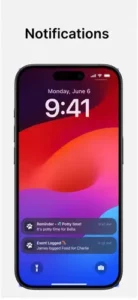
Turn on reminders for repeat tasks. Vaccinations. Vet visits. Monthly flea treatments. Weekly nail trims. Set them once. The app notifies everyone in the Family Hub. No one forgets.
Add photos to notes for richer records. A picture of a rash might help your vet diagnose faster. A photo of your dog’s posture after a walk could show a limp you did not notice in person. Photos add context that text alone cannot provide.
Use filters and search when the activity feed gets long. After a few months, the feed grows. Search by event type, caregiver, or date. Find that one medication dose from three weeks ago in seconds.
Track weight regularly to spot trends. Weekly weigh ins work best. The graph shows gradual changes. A slow increase might mean overfeeding. A sudden drop could signal illness. Share the graph with your vet.
Export PDF before vet visits. The export feature compiles everything into a clean document. Eating patterns. Medication schedules. Weight history. Notes. Give it to your vet at checkups. They get a complete picture without asking twenty questions.
Try quick logging with Apple Watch or Siri. If you have an Apple Watch, log walks from your wrist. Use Siri shortcuts to add events hands free. Widgets on your home screen give you one tap access. The DogNote app fits into your routine, not the other way around.
One more thing. If you are searching for DogNote codes, here is the reality. The app does not use promo codes or redemption systems. It is a straightforward utility tool. You pay once or subscribe depending on your plan. No codes needed. Just download and start tracking.
Apps Like DogNote
If DogNote does not fit your needs or you want to compare options, you have alternatives. The best DogNote similar apps share the same focus on reminders, family sharing, and pet care tracking.
| App | Main Similarity |
|---|---|
| DogLog | Pet journal with activity tracking and reminders |
| PetNoter | Shared pet care coordination with notes and photos |
| Pet Note | Simple tracking for walks, feedings, and medication |
| 11pets Care | Comprehensive pet health tracker with vet records |
| Pawtrack | GPS tracking plus care logging for active dogs |
None of these replace DogNote exactly. Each has strengths. DogLog offers strong reminder customization. PetNoter focuses on simplicity. 11pets Care includes medical record storage.
For most families, DogNote strikes the best balance between features and ease of use. The Family Hub and PDF export are standout features that many competitors lack.
If you want something simpler, Pet Note works well for single caregivers. If you need more medical detail, 11pets Care goes deeper. But for shared household coordination, DogNote remains the strongest option.
DogNote Community
DogNote is not a social network. You will not find public feeds, followers, or sharing buttons. The app focuses on something more useful for pet owners. Private family collaboration.
The Family Hub is the core social feature. Every caregiver sees the same activity feed. Everyone can log events. Everyone receives reminders. That shared visibility creates accountability without anyone feeling watched. You are not checking on each other. You are checking the app.
This works especially well for couples and households. No more “I thought you walked the dog” arguments. The app shows who did what and when. It removes the guesswork from shared pet care.
Pet sitters and dog walkers can join temporarily. Invite them during your vacation. They log activities. You check in remotely. When you return, remove them from the hub. Their access ends automatically.
There is no public sharing. No social media integration. No way for strangers to see your pet’s data. That is intentional. Pet care involves medication schedules, health notes, and personal routines. That information should stay private.
Conclusion
DogNote solves a simple problem that most pet owners do not realize they have. Coordinating pet care across multiple people is harder than it looks. This app makes it look easy.
The strongest angle is clarity. Everyone sees the same information. Reminders prevent forgotten tasks. History builds over time. The PDF export gives you a complete record for vet visits. All of this adds up to less stress and more confidence in your pet’s care routine.
Who should download it? Households with two or more pet caregivers. Couples who split pet duties. Anyone managing medication schedules or vet appointments. Pet sitters and walkers who want clear communication with owners. People who have ever texted “did you feed the dog?” and waited for a reply.
Who should skip it? Single pet owners with no shared responsibilities. People who prefer pen and paper tracking. Anyone who does not want to log daily activities. Users looking for a social pet community or entertainment.
DogNote is not flashy. It does not need to be. It is a practical tool for practical people. If you have ever felt overwhelmed by pet care coordination, this app will probably help. Try it for a week. See if the arguments about who walked the dog disappear. They probably will.
FAQ
Where can I get DogNote download for my phone?
DogNote download from the Official App Store
Is there an official website or help page where I can learn more about the features?
Yes. The official DogNote website is here: Official DogNote Website. You will find detailed guides, feature breakdowns, and setup instructions. The site also explains the Family Hub and how to invite multiple caregivers.
Is DogNote only for dogs, or can I use it for other pets?
The app works for any pet. Cats, rabbits, birds, horses, and even reptiles. The name says dog, but you can customize events and reminders for any animal. Multiple pets are supported in the same account.
Does DogNote work offline, or do I need an internet connection?
You can log events offline. The app stores everything locally and syncs when you reconnect. That means you can track walks even without cell service. All family members see updates once everyone is back online.