Amazon Prime Video probably was ignored by you wile you have used Amazon Prime for the free shipping. Two day delivery and same day in some cities. Maybe you watched The Boys or The Marvelous Mrs. Maisel. Maybe you scrolled through the homepage once and closed it.
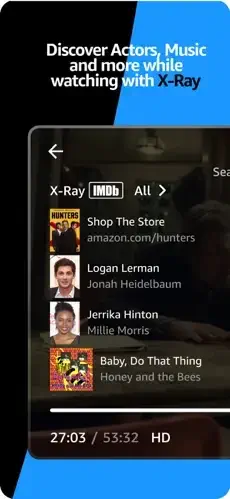
Amazon Prime Video app is more than that. Live sports. Downloadable movies for flights. X-Ray trivia that tells you who that actor is. Add-on channels like Max and Paramount+.
Amazon Prime Video is not just a Netflix clone. It is a hybrid. Streaming library with thousands of included movies and shows. Rental store where you can pay for new releases not included. Live sports with Thursday Night Football and Premier League matches. Add-on channels that let you subscribe to other services inside one app. One app that tries to be everything. Understanding what it does well helps you decide whether to make it your primary streaming app or just use it for specific shows.
The app holds a 4.8 star rating on the App Store based on over 1 million reviews. Size sits around 200 MB depending on cached content. Age range stretches from children watching kids shows to adults streaming live sports. If you prefer a streaming service focused purely on originals and licensed content, Netflix offers a different experience.
What Is Amazon Prime Video?
Amazon Prime Video is a free to download streaming app developed by AMZN Mobile LLC that offers thousands of movies, TV shows, Amazon Originals, live sports, and premium channel add-ons. It is included with an Amazon Prime membership ($14.99/month or $139/year) or available as a standalone subscription ($8.99/month).
Think of it as a streaming service that combines a massive library of movies and TV shows, exclusive Amazon Originals, live sports, and the ability to add premium channels like Max and Starz. It is like Netflix, but with more options and integration with Amazon’s ecosystem. Unlike Netflix, Prime Video lets you rent new releases, buy digital content, and add channels from other services.
Movie and TV fans enjoy the vast library. Sports viewers watch NFL and Premier League. Families appreciate the multiple profiles and parental controls. Cord cutters use it as their primary streaming service. Anyone who wants a comprehensive streaming experience with premium channel options will find value.
The platform is available on iOS, Android, web, Fire TV, Roku, Apple TV, PlayStation, Xbox, and most smart TVs. The app is free to download with subscription required for content.
Here is the honest upfront limitation. Amazon Prime Video has confusing content labeling, intrusive ads, subtitle glitches, buffering issues, and poor customer support. Many users report ads every 5 minutes, subtitles resetting every episode, and difficulty canceling subscriptions.
How Amazon Prime Video Works
Amazon Prime Video operates through twelve interconnected systems: content library, Amazon Originals, live sports, 4K HDR streaming, downloads, profiles, X-Ray feature, premium channels, rent/buy options, casting, parental controls, and Freevee integration. The content library includes licensed movies and TV shows. Amazon Originals are exclusive productions. Live sports include NFL and Premier League. 4K HDR streaming provides ultra-high quality. Downloads enable offline viewing. Profiles personalize recommendations. X-Ray shows IMDb trivia. Premium channels add content from other services. Rent/buy options expand availability. Casting streams to TV. Parental controls restrict mature content. Freevee provides ad-supported free content.
The basic flow is straightforward. Open the app and sign in with your Amazon account. Browse the Home, Discover, or Store tabs to find movies and TV shows. Use filters (genre, rating, release year) or search to find specific titles. Add titles to your Watchlist for later viewing. Start streaming a title, with optional subtitles, audio description, or X-Ray info. Download titles to watch offline. Create multiple profiles for personalized recommendations. Subscribe to premium channels for additional content. Rent or buy new-release movies not included with Prime. Cast to your TV using Chromecast, Fire TV, or AirPlay.
The platform’s strength is integration of licensed content, Originals, live sports, premium channels, and rental/purchase options.
Amazon Prime Video Key Features
Thousands of Movies and TV Shows
Stream licensed content from major studios and networks, plus Amazon Originals. The library includes thousands of titles across every genre.
Amazon Originals
Exclusive series and films produced by Amazon Studios, including The Boys, Reacher, Fallout, The Lord of the Rings: The Rings of Power, and The Marvelous Mrs. Maisel.
Live Sports
Stream NFL Thursday Night Football, Premier League soccer, and other live events (varies by region).
4K HDR Streaming
Ultra-high-quality 4K, HDR, Dolby Vision, and Dolby Atmos support (requires Ultra tier after April 2026).
Download to Watch Offline
Download movies and TV shows to watch without an internet connection (up to 25 downloads for standard Prime, 100 for Ultra tier).
Multiple User Profiles
Create up to six profiles per account for personalized recommendations and watchlists.
X-Ray Feature
Go behind the scenes with IMDb-powered trivia, cast info, and music credits while watching.
Premium Channel Add-Ons
Subscribe to over 100 additional channels (Max, Starz, Paramount+, Apple TV+, Hallmark+, etc.) directly within Prime Video.
Rent or Buy
Rent new release movies or buy popular TV shows and films (availability varies by marketplace).
Cast to TV
Stream from your phone or tablet to the big screen with Chromecast, Fire TV, or AirPlay.
Parental Controls
Set PINs to restrict access to mature content and manage kids’ profiles.
Freevee Integration
Access ad-supported free content from Amazon Freevee (formerly IMDb TV) within the app.
Amazon Prime Video Graphics and Design
Amazon Prime Video uses a clean, Netflix-style interface with large poster art, horizontal rows, and minimal text. The design prioritizes visual discovery, with prominent banners for Originals, trending titles, and personalized recommendations.
Visual Strengths
High quality poster art and trailers make browsing appealing. Clean, uncluttered interface reduces distraction. Intuitive browsing and search make finding content easy. Smooth playback with 4K HDR support enhances viewing. X-Ray overlay for cast, trivia, and music credits adds depth. Multiple profile avatars and kids’ profiles personalize the experience. Consistent performance on most devices ensures reliability.
The X-Ray feature is a major visual draw. Unlike other streaming apps, Prime Video shows real-time IMDb trivia, cast info, and music credits while you watch, enhancing the viewing experience.
Design Weaknesses
Confusing content labeling for free vs paid vs rental frustrates users. Subtitle glitches resetting every episode disrupt viewing. Buffering and playback issues affect reliability. Ad intrusiveness every 5 minutes interrupts enjoyment. Slow and clunky interface, especially with voiceover active, reduces usability.
What Users Say About Amazon Prime Video App
What Users Appreciate
Users value the vast content library with thousands of movies and TV shows. High-quality Amazon Originals like The Boys, Reacher, Fallout, and The Lord of the Rings keep viewers engaged. 4K HDR streaming with Dolby Vision and Dolby Atmos (Ultra tier) provides exceptional quality. Download to watch offline (up to 25–100 titles) adds convenience. Multiple user profiles personalize recommendations. X-Ray feature for IMDb trivia, cast info, and music credits enhances viewing. Premium channel add-ons (Max, Starz, Paramount+, etc.) expand options. Live sports (NFL Thursday Night Football, Premier League) appeal to sports fans. Freevee integration provides ad-supported free content. Parental controls ensure safety for kids.
What Users Complain About
Confusing free vs paid vs rental content labeling creates frustration. Intrusive ads every 5 minutes, even with paid subscriptions, interrupt viewing. Subtitle glitches (resetting every episode, missing spaces, running off screen) disrupt enjoyment. Buffering and playback issues (quality drops, audio out of sync, crashes) affect reliability. Slow and clunky interface, especially with voiceover active, reduces usability. Poor customer support and difficult cancellation process create frustration. Unauthorized charges and unexpected subscriptions undermine trust. Limited download capacity (25 titles for standard Prime) restricts offline viewing.
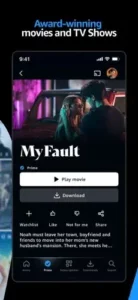
Amazon Prime Video Tips That Improve Your Streaming Experience
Starting with Amazon Prime Video feels overwhelming. Thousands of titles, confusing labels, and ads everywhere. But most users miss the habits that make the platform enjoyable and cost effective. Here is how experienced viewers get the most out of Prime Video.
Use filters and search. Use genre, rating, and release year filters, or search for specific titles, to find content quickly. Filters save time. A specific search returns better results than browsing endlessly.
Add titles to your Watchlist. Add movies and TV shows to your Watchlist for later viewing. A Watchlist keeps you organized. You will never forget what you wanted to watch.
Create multiple profiles. Create up to six profiles for personalized recommendations and watchlists. Profiles improve recommendations. Each family member gets their own tailored experience.
Download titles for offline viewing. Download movies and TV shows to watch without an internet connection. Downloads are essential for travel. Watch on planes, trains, and areas with poor connectivity.
Use X-Ray for behind the scenes info. Enable X-Ray to see IMDb trivia, cast info, and music credits while you watch. X-Ray adds depth. Learning about what you are watching enhances enjoyment.
Subscribe to premium channels wisely. Subscribe only if you plan to watch their content regularly. Cancel when done to avoid charges. Premium channels are great, but only if you actually use them.
Rent or buy new releases. Rent new release movies or buy popular TV shows and films not included with Prime. Rentals expand your options. New releases are often not included with the base subscription.
Cast to your TV. Use Chromecast, Fire TV, or AirPlay to stream from your phone or tablet to the big screen. Casting is great for groups. A bigger screen enhances the viewing experience.
Set parental controls. Set PINs to restrict access to mature content and manage kids’ profiles. Parental controls ensure safety. Kids should only see age appropriate content.
Access Freevee for free content. Use Freevee integration to access ad-supported free movies and TV shows. Freevee adds free options. You can watch without spending extra.
Check subtitle and audio settings. If subtitles reset every episode, manually turn them on each time. Settings can be finicky. Double check before starting a new episode.
Report bugs and glitches. Use the Prime Video support site to report subtitle glitches, buffering issues, and playback problems. Reporting helps fix issues. The more reports, the faster problems get resolved.
Amazon Prime Video Similar Apps
Prime Video offers content variety and flexibility, but it is not the only streaming service. Here is how it compares to other popular options.
| App | Best For | Main Difference from Prime Video |
|---|---|---|
| Netflix | Originals and global content | No premium channel add-ons, no rental/purchase options |
| Disney+ | Families, Marvel, Star Wars, Pixar | Focused on Disney franchises, no live sports |
| Max (HBO Max) | Prestige TV and cinema | No premium channel add-ons, no rental/purchase options |
| Hulu | Current TV and live sports | No premium channel add-ons, no rental/purchase options |
| Paramount+ | CBS, Paramount, and live sports | Smaller content library, no premium channel add-ons |
| Peacock | NBCUniversal content and live sports | Smaller content library, no premium channel add-ons |
| Apple TV+ | Apple Originals | Smaller content library, no premium channel add-ons |
| Sling TV | Live TV and sports | Focused on live TV, no on-demand library |
| YouTube Premium | Ad-free YouTube and Originals | Focused on YouTube content, no premium channel add-ons |
| Tubi TV | Free ad-supported streaming | Smaller content library, no premium channel add-ons |
Which one wins? It depends on your needs. The Amazon Prime Video app wins on content library variety, premium channel add-ons, and rental/purchase options. Netflix wins on Originals and global content. Disney+ wins on family friendly franchises. Max wins on prestige TV and cinema. Hulu wins on current TV and live sports. Paramount+ offers CBS and Paramount content with live sports for fans of those networks. Peacock provides NBCUniversal content and live sports for viewers who prefer that library.
Conclusion
Amazon Prime Video is an outstanding streaming platform that successfully combines licensed content, Amazon Originals, live sports, premium channel add-ons, and rental/purchase options. Its core strength is the vast content library, high quality Originals, 4K HDR streaming, and download features. For viewers who want a comprehensive streaming experience with the option to add premium channels, it is one of the best options available.
Its greatest strength is content variety and flexibility. Its main weakness is that flexibility comes with confusion and interruptions. Confusing content labeling, intrusive ads, subtitle glitches, buffering issues, and poor customer support are common concerns. Many users report ads every 5 minutes, subtitles resetting every episode, and difficulty canceling subscriptions. Additionally, the Ultra tier pricing increase to $4.99/month for ad-free 4K streaming frustrates users.
Amazon Prime Video fits movie and TV fans, sports viewers, families, cord-cutters, and anyone who wants a comprehensive streaming experience with premium channel options. It does not fit users who want a truly ad-free experience without paying extra. It does not fit users who dislike confusing content labeling. It does not fit users who prefer simpler streaming services without add-ons.
Amazon Prime Video gives you a massive library of content with the flexibility to add premium channels and rent new releases. But the platform comes with confusion and interruptions. You browse, watch, and download. The result is a powerful streaming service that rewards exploration but tests your patience with ads and interface issues.
You have probably tried streaming services that felt limited or confusing. What if the solution was not more subscriptions, but one platform that combines everything? Prime Video solves that by offering content, add-ons, and rentals in one place. But the solution only works if you can navigate the confusing interface and tolerate the ads. The question is not whether Prime Video works. The question is whether you are ready to stream through the confusion.
Frequently Asked Questions About Amazon Prime Video
Is Amazon Prime Video free with my Prime membership?
Yes. If you pay for Amazon Prime, Prime Video is included at no extra cost. The same membership that gives you free shipping also gives you access to thousands of movies, TV shows, and Amazon Originals. You do not need to pay separately. Some titles require rental or purchase, and add-on channels cost extra, but the core library is free with Prime. You can start your Amazon Prime Video download from the App Store.
What is X-Ray and how does it work?
X-Ray is a unique feature powered by IMDb. Pause any movie or show. X-Ray shows you the actors in the current scene, character names, trivia, and even the soundtrack information. Good for when you recognize a face but cannot remember the actor’s name. No other streaming service has this feature.
Can I download movies and watch them offline?
Yes. Download movies and shows to your device for offline viewing. Good for flights, commutes, or areas with poor internet. Downloads expire after 30 days. Once you start watching a downloaded title, you have 48 hours to finish it before it expires. Go to the download section in the app to manage your saved content.
What is Watch Party and how do I use it?
Watch Party lets you watch movies or shows with friends and family who are not in the same room. The host controls playback. Guests join with a link. Everyone watches the same thing at the same time. There is a chat feature for talking during the show. Up to 100 people can join a Watch Party.
Where can I find official information and get support if I have issues?
The official Amazon website has information about Prime Video features and content. The Prime Video Help Center answers common questions about playback, downloads, and account issues. For technical problems or billing questions, contact Amazon customer support through the website. Official website: https://www.amazon.com/primevideo.