Airtable is for people who need more structure than a spreadsheet and more flexibility than a project management app.
Spreadsheets are flexible but disconnected. Project management tools are connected but rigid. You need something that combines the structure of a database with the familiarity of a spreadsheet, without requiring coding knowledge.
Airtable offers a different approach. A cloud based productivity platform that blends spreadsheet-style tables with relational databases, forms, automations, dashboards, and collaboration tools. It is designed for organizing structured information without traditional database or coding knowledge.
The app currently holds a 4.8 out of 5 rating on the App Store from roughly 25,000 user ratings. The app size is approximately 140 MB depending on your device and iOS version. It is rated for users aged 4 and older. It is free to download with optional paid plans for advanced features.
For users who prefer a more document focused approach with database capabilities, Notion offers a compelling alternative with stronger writing and knowledge management features.
What Is Airtable?
Airtable is a cloud based productivity platform from Formagrid Inc. that blends spreadsheet-style tables with relational databases, forms, automations, dashboards, and collaboration tools.
Think of it as a spreadsheet that actually understands relationships. Airtable looks like a spreadsheet but behaves like a database. You can link tables together, create different views, and automate repetitive tasks. Unlike Google Sheets, Airtable lets you connect data across tables. Unlike traditional databases, it does not require coding knowledge.
Content teams use it for editorial calendars and content planning. Marketing departments use it for campaign tracking and asset management. Product managers use it for roadmaps and feature tracking. Researchers use it for data collection and analysis. Event planners use it for guest lists and schedules. Recruiters use it for candidate pipelines and interview tracking. Small business owners use it for inventory, clients, and project management.
The platform is available on iOS, Android, web, and desktop. The app is free to download with optional paid plans for additional features.
Here is the honest upfront limitation. Airtable’s mobile experience is more limited than its web and desktop environment. It is best built and maintained from a desktop browser, then used on mobile for updates, approvals, and quick reviews.
How Airtable Works
Airtable organizes information through six core elements: workspaces, bases, tables, records, fields, and views. A workspace is a top level work area. A base is a project database. A table is a set of related records. A record is one row of data. A field is a data column. A view is a different way to display data.
The simplified structure looks like this:
| Airtable Term | Simple Meaning | Example |
|---|---|---|
| Workspace | A top level work area | Marketing Team |
| Base | A project database | 2026 Content Calendar |
| Table | A set of related records | Articles |
| Record | One row of data | Airtable App Review |
| Field | A data column | Status, writer, date, keyword |
| View | A different way to display data | Grid, calendar, Kanban, gallery |
The spreadsheet like database approach is Airtable’s defining strength. Airtable looks similar to a spreadsheet, but it behaves more like a lightweight relational database. It supports common field types such as single line text, long text, checkboxes, dates, attachments, URLs, email addresses, phone numbers, single select and multi select fields, ratings, formulas, linked records, lookups, rollups, collaborators, and created time and last modified fields.
Linked records are the major difference from a basic spreadsheet. Airtable can link one table to another. For example, an Articles table can connect to tables for Writers, Keywords, Categories, and Sources. Changing a writer’s name in one place updates it everywhere. This relational power eliminates duplication and ensures data consistency.
Airtable Key Features
Spreadsheet-like Databases
Airtable supports common field types such as single line text, long text, checkboxes, dates, attachments, URLs, email addresses, phone numbers, single select and multi select fields, ratings, formulas, linked records, lookups, rollups, collaborators, and created time and last modified fields.
The major difference from a basic spreadsheet is that Airtable can link one table to another. For example, an Articles table can connect to tables for Writers, Keywords, Categories, and Sources. This relational structure means you update data once and it reflects everywhere.
Multiple Views
Airtable views show the same data in different ways. Its official documentation lists Grid, Form, Calendar, Gallery, Kanban, Timeline, List, and Gantt views.
This is useful because one content calendar can be displayed as a grid for detailed editing, a calendar for publication dates, a Kanban board for Draft, Editing, Scheduled, and Published stages, a gallery for visual product or app listings, a timeline for campaign planning, and a Gantt view for larger project schedules.
Views can be collaborative, personal, or locked. A locked view prevents contributors from accidentally changing filters, field order, sorting, or visibility. This consistency is valuable for team workflows.
Forms
Airtable forms make it easier to collect structured information from people who do not need access to the entire base. Forms can be used for client intake, event registration, content requests, job applications, bug reports, survey responses, product submission requests, newsletter sign-ups, and team feedback.
Airtable’s documentation says forms can be shared externally so people can add records without receiving full access to the base. This makes data collection structured and secure.
Automations
Airtable automations help reduce repetitive work. Depending on your plan and setup, automations can trigger actions when a record is created, updated, matches conditions, reaches a date, or receives a form submission.
Examples include sending a Slack message when an article moves to Ready for Review, creating a task when a new content request arrives, notifying a writer when an editor changes status, sending a follow-up email after an event registration, updating a field when a deadline is near, and creating a project record from a form submission.
Interfaces
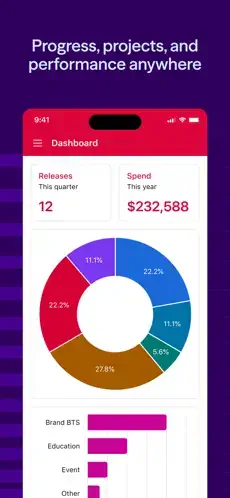
Airtable Interfaces let teams build focused dashboards and working screens on top of base data. Rather than exposing every table and technical field, an interface can show selected metrics, tasks, records, charts, approvals, or forms.
Airtable’s documentation says interface-only collaborators can view and interact with published interfaces without access to the underlying base on eligible paid plans. This is helpful for executive dashboards, client portals, marketing approval pages, sales pipelines, editorial review screens, bug-review boards, and content approval workflows.
Mobile Interfaces
The Airtable mobile app supports mobile optimized interfaces. Users can review assignments, edit records, submit forms, approve or reject assets, comment on work, update statuses, and search project information.
However, Airtable notes that interface creators cannot configure or edit the interface layout from the mobile app. Mobile is primarily intended for contributors and end users.
Attachments and Media
Airtable records can include attachments such as images, PDFs, documents, videos, audio files, screenshots, and design assets. This is particularly useful for content teams, product teams, recruiters, photographers, event organizers, and agencies.
Airtable Design and User Experience
Airtable uses a clean, spreadsheet inspired interface. The visual design is functional rather than decorative, but its color coded fields, record cards, views, attachments, and dashboards make complex data easier to understand.
Design Strengths
The familiar spreadsheet-style starting point reduces the learning curve. Attractive calendar, gallery, Kanban, timeline, and Gantt views make data visual and accessible. Strong visual organization through field types and color labels helps users scan information quickly. Forms and interfaces simplify complex databases for nontechnical users. Attachments can make records more visual and informative. The platform is flexible enough for personal or professional workflows. The desktop and web experience is excellent for large datasets.
Airtable’s design is especially effective when data has multiple relationships. For example, a marketing campaign can link assets, tasks, creators, deadlines, budgets, and channels without needing several unrelated spreadsheets.
Design Weaknesses
The iOS experience is more limited than the web and desktop environment. There is less screen space for large tables. Some views or advanced tools are difficult to use on iPhone. Navigation across complex bases can be slower. Managing many attachments can be difficult. There is limited ability to configure interfaces from mobile. Workflows can be cumbersome when changing multiple records.
Airtable is best built and maintained from a desktop browser or computer app, then used on mobile for updates, approvals, quick data entry, and review.
What Users Say About Airtable
What Users Appreciate
Users value easy-to-understand spreadsheet-style tables. Powerful filtering, grouping, sorting, and views make data management efficient. Strong cloud synchronization keeps information current. Custom workflows support many different industries. The useful free plan works for small projects. Flexible visual views, including calendars and Kanban boards, support different working styles. Collaboration and forms enable team workflows. The platform works for both personal tracking and business operations.
One App Store reviewer said they had used Airtable for sitcom-joke tracking, staff recruiting, quantitative research, and dictionary design. Another praised its flexibility, cloud integration, filters, sorting, grouping, and multiple views.
What Users Complain About
Mobile apps are less capable than web and desktop versions. Large datasets can be difficult to navigate on a phone. Some users want easier multi-attachment uploads. Moving records between tables can be cumbersome. Free plan visualization options may be limited. Complex bases can have a learning curve. Advanced features, interfaces, and permission controls can depend on paid plans.
The balanced take is this. The overall feedback is highly positive, but the important distinction is this. Airtable as a platform receives strong praise, while some iOS users want a more complete mobile experience.

Airtable Tips That Transform Your Workflow
Starting with Airtable feels like opening a blank spreadsheet with superpowers. But that power can be overwhelming. Here is how experienced users turn Airtable from a fancy spreadsheet into a workflow engine.
Start with a template. This is the most common mistake new users make. They open Airtable, see the blank base, and start building from scratch. Use a content calendar, CRM, project tracker, inventory, or event planning template instead. Templates teach you Airtable’s structure and save hours of setup time. You can always customize later.
Design the fields before adding hundreds of records. Decide early which information you need to track: status, date, owner, priority, category, URL, attachment, and notes. Adding fields after you have hundreds of records is more difficult. A well designed base grows with you. A poorly designed one becomes a mess.
Use linked records instead of duplicate text. Link a writer, client, keyword, or category to a shared table instead of typing the same information repeatedly. This reduces errors and keeps data consistent. When you update a writer’s email in one place, it updates everywhere that writer is linked.
Create a My Tasks view. Filter records by collaborator, incomplete status, and deadline to create a practical personal work queue. This view helps you focus on what matters without sorting through everyone else’s work. Add it to your sidebar for quick access.
Use a Kanban view for workflow status. Columns such as Idea, Research, Draft, Editing, Approved, Scheduled, and Published are ideal for blog content production. Kanban views make workflow stages visible and actionable. Drag and drop records between columns as they progress.
Lock master views. Lock shared production views so accidental filter or sorting changes do not disrupt the whole team. A locked view ensures everyone sees the same data in the same way. This prevents confusion when a collaborator accidentally changes a filter and everyone panics.
Use forms for clean data intake. Create separate forms for content requests, client leads, feedback, event registrations, or bug reports. External form users can submit information without needing access to the underlying database. Forms keep data structured and complete. Every submission creates a new record with exactly the fields you need.
Build interfaces for nontechnical users. A client or executive may need a simple dashboard, not a full relational database with dozens of technical fields. Interfaces hide complexity and show only what matters. Interface-only collaborators can view and interact with published interfaces without access to the underlying base.
Add attachments carefully on mobile. App Store feedback suggests that attaching many photos one at a time can be slow, so use desktop for bulk asset management whenever possible. Mobile is best for reviewing, not bulk uploading. Upload images in batches from your computer.
Use automation only after your manual workflow works. First make sure your status fields, ownership rules, and views are reliable. Then automate notifications and repetitive updates. Automation amplifies a working system; it does not fix a broken one. Test your manual workflow for a week before setting up automations.
Avoid turning Airtable into an enterprise database without planning. Airtable is powerful, but a poorly designed base can become confusing. Split unrelated processes into separate bases when appropriate. Keep each base focused on one workflow. A single base with 20 tables is harder to manage than three bases with five tables each.
Use mobile for review and updates. Use the desktop version for large scale structure, interface creation, base design, large imports, and complex record editing. Mobile is ideal for checking status, approving work, and quick edits. The Airtable app shines for on the go updates, not for building complex structures.
Airtable Similar Apps
Airtable is powerful, but it is not the only option. Here is how it compares to other popular tools.
| App | Best For | Main Difference from Airtable |
|---|---|---|
| Notion | Team wikis, docs, lightweight databases | Stronger writing and knowledge base experience; less database native |
| Google Sheets | Free spreadsheets | Easier for formulas and simple data, but weaker for relations, forms, and visual workflows |
| Microsoft Lists | Microsoft 365 business tracking | Better for Microsoft based teams; less flexible visual database design |
| Coda | Documents with data and automation | Blends documents and tables more tightly; better for formula heavy docs |
| Smartsheet | Project delivery and spreadsheet planning | More project management oriented and familiar for spreadsheet teams |
| ClickUp | Tasks, goals, and formal project management | Better for execution, workload, and task reporting |
| monday.com | Work management and team workflows | Strong prebuilt project workflows; less database focused |
| Baserow | Open source Airtable style databases | Better for self hosting and data control |
| NocoDB | Self-hosted database interface | Better for connecting to existing databases and technical teams |
| Stackby | Budget friendly Airtable style database | Similar table workflow with a spreadsheet first approach |
| Zapier Tables | Automation connected data tables | Strong option for workflows driven by Zapier automation |
Which one wins? It depends on your needs. The Airtable app wins on relational database power and visual views. Notion wins on writing and knowledge management. Google Sheets wins on simplicity and cost. Smartsheet wins on project management. Stackby is a close Airtable style alternative for budget conscious users. If you need a document plus data workflow, Coda offers a tighter blend of documents and tables. If you prefer open source solutions with self hosting, Baserow or NocoDB might suit you better.
Airtable App Pricing and Availability
Airtable is free to download on iOS, Android, and web. The free plan includes basic features for small projects and individual use with limited records and attachments. Most users can get started without paying anything.
Paid plans are available with additional features such as more records, automations, interfaces, and permissions. Prices vary by region and plan. Always check the current price before subscribing.
The iOS app requires iOS 15.0 or later and is compatible with iPhone and iPad. Desktop versions are available for Windows and Mac. The web version works in any browser.
Conclusion
Airtable is one of the best no-code database tools for people who want more structure than a spreadsheet and more flexibility than a traditional project management app. Its strongest features are linked records, customizable fields, multiple views, forms, interfaces, automations, and permissions.
Its greatest strength is relational power without coding. Its greatest weakness is that the mobile experience lags behind desktop. It is excellent for building a blog-content calendar, client database, production tracker, marketing workflow, inventory system, or collaborative research library.
Airtable fits content teams, marketing departments, product managers, researchers, event planners, recruiters, small business owners, and anyone who needs to organize structured information. It does not fit users who only need simple notes or a basic to-do list. It does not fit people who need a fully featured mobile experience. It does not fit users who dislike configuring software.
Airtable gives you the power of a database without requiring coding knowledge. But power comes with complexity. You build the structure. You maintain the relationships. The result is a system that connects your information in ways spreadsheets cannot.
You have probably managed projects in spreadsheets that do not talk to each other. What if the solution was not a more complex project management tool, but a smarter database? Airtable solves that by giving you relational power without code. But the solution only works if you invest in designing your base thoughtfully. The question is not whether Airtable works. The question is whether you are ready to build a system that actually connects your work.
FAQ
Where can I get the Airtable download and start organizing my projects?
The Airtable download is available for free on the App Store for iPhone and iPad. You can also access it through the official website at airtable.com. The app works on iOS, Android, web browsers, and desktop. Most users start with the web version to explore the interface and set up their bases, then download the mobile app for on the go access. The core experience is consistent across platforms, though desktop is best for building complex structures.
Is Airtable really free, or do I need a subscription?
Airtable offers a generous free plan that covers basic features for small projects and individual use. The free version includes unlimited bases, up to 1,200 records per base, and 2 GB of attachments per base. It supports grid, calendar, Kanban, gallery, and form views. Paid plans add more records, attachments, automations, interfaces, and permissions. Business and Enterprise plans include advanced collaboration and control features. Check airtable.com/pricing for current rates because they update periodically.
What are the most effective Airtable tips for beginners?
The best way to start is simple. Begin with a template instead of building from zero. Design your fields before adding hundreds of records so your base has a solid structure. Use linked records instead of duplicate text to keep data consistent. Create a My Tasks view filtered by collaborator and incomplete status. Use Kanban views for workflow status columns like Idea, Draft, Editing, and Published. Lock master views so accidental changes do not disrupt the team. Use forms for clean data intake from external contributors. For detailed guidance, visit the Airtable wiki at support.airtable.com for documentation and troubleshooting guides.
How do I contact Airtable support if something goes wrong?
If you run into issues with the app, bases, automations, or billing, you can reach Airtable’s support team through the official website. Visit airtable.com and look for the Help section, or use the in-app Help menu. The developer email address for support inquiries is support@airtable.com. For technical questions, billing issues, or bug reports, that email connects you directly to the support team. They typically respond within a few business days. The Airtable help center at support.airtable.com also offers detailed documentation, video tutorials, and community forums.