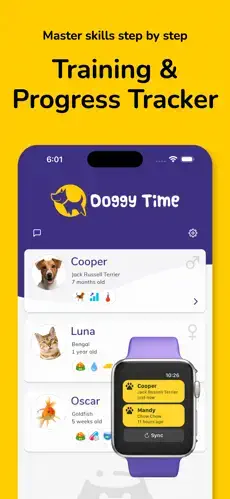
Doggy Time is not a game about virtual puppies. It is a practical training tool for real ones.
Doggy Time dog training and pet care logging app from Kidplay Technologies LLC helps owners track potty training, walks, health, routines, and multi pet care in one shared place. No more guessing when the last potty break happened or wondering if the puppy ate enough. The app provides puppy potty logs, training timers, and caregiver sharing features. Doggy Time turns chaotic puppy raising into a structured routine that everyone involved can follow.
What Exactly Is Doggy Time?
Doggy Time is a comprehensive dog training and pet care logging app designed for consistency, reminders, and progress tracking. Think of it as a training coach and care coordinator rolled into one mobile app.
The core idea is structured tracking. You log every event. Potty breaks. Meals. Training sessions. Sleep. The app learns your pet’s patterns and helps you build better routines. It started as a puppy potty log but now supports cats, rabbits, birds, and 35+ other pets.
This makes Doggy Time useful for more than just new puppy owners. Anyone with a pet can benefit from the structure and reminders the app provides.
At the time of this post, Doggy Time holds a 4.6 star rating on the Apple App Store from 575 ratings in select regions. The app size is roughly 80 MB depending on your device. Age rating is 4+ with no objectionable content. For a similar experience, check out DogLog.
Who Benefits Most From Using Doggy Time?
Doggy Time is not for everyone. But for certain people, it becomes essential.
New puppy owners building routines are the primary audience. Potty training requires consistency. Doggy Time provides the reminders and logs to make that consistency possible. No more accidents because you lost track of time.
Households with multiple pets find the app helpful. Create separate profiles for each pet. Track their individual needs. No confusion about who ate what or when.
Couples sharing training responsibilities benefit from the shared logging. Both partners see the same updates. No double feeding. No missed training sessions.
Pet sitters and walkers who need clear instructions also benefit. Share access with them. They log activities. You check in remotely.
Anyone managing medication schedules or vet appointments will appreciate the reminder system. Set notifications for monthly flea treatments or annual checkups. The app handles the remembering.
Doggy Time Core Features
Puppy Potty Log With Customizable Reminders
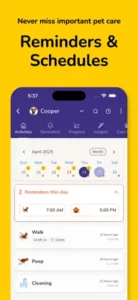
Track every potty break. Set reminders for regular intervals. Reduce accidents during early training. This is the feature that new puppy owners appreciate most.
Obedience Training Progress Tracking
Log training sessions for commands like sit, stay, come, and down. Track success rates over time. See which commands need more work.
Training Timers for Crate, Sleep, and Socialization
Set timers for crate training sessions. Track sleep patterns. Monitor socialization progress. Timers keep you on schedule.
Step by Step Training Guides
Built in guides for new puppy owners. Learn the basics of potty training, crate training, and obedience without searching the internet.
Vaccination and Medical Alerts
Set reminders for vaccinations and medical appointments. Never miss a booster shot or annual checkup again.
Medication, Nutrition, and Allergy Tracking
Log medications, dietary changes, and allergy notes. Share this information with your vet during visits.
Weight, Growth, and Milestone Tracking
Track your pet’s weight over time. Log growth milestones. Spot trends before they become problems.
Grooming and Veterinary Appointment Logs
Schedule and log grooming appointments. Keep a history of vet visits. Everything in one place.
GPS Walk Tracking With Distance and Duration
Track walks using GPS. See distance, duration, and route. Compare activity levels over time.
Activity Timers and Daily Exercise Goals
Set daily exercise goals. Use activity timers to track play sessions. Ensure your pet gets enough physical activity.
Unlimited Pet Profiles for Multi-Pet Households
Create profiles for every pet in your household. Track their individual needs separately. No data mixing.
Wear OS Support, Caregiver Assignment, and Data Export
Log events from your smartwatch. Assign caregivers with different permission levels. Export data for vet visits or record keeping.
Doggy Time Graphics and Visual Design
Doggy Time uses a practical, mobile first design that prioritizes logging speed and readability over flashy visuals. This is a utility app. It does not need to impress. It needs to work.
The interface is structured around activity entries, timers, charts, and reminders. You open the app and immediately see today’s log. Logging an event takes seconds. The layout reduces friction for busy pet owners.
Its visual style is straightforward and utility focused, which suits a training app meant for frequent daily use. You will not get lost in menus or distracted by animations. Just clear information when you need it.
How Doggy Time Works
The daily flow is simple. Log an event using quick entries or training timers. Add notes or photos if needed. The app tracks patterns over time.
Charts and reminders help you spot trends. See how often your puppy needs a potty break. Track improvement in obedience training. Monitor weight changes.
Share updates with caregivers in real time. Everyone in your shared circle sees the same information. No conflicting reports. No missed communications.
Review progress through growth and milestone tracking. See how far your puppy has come. Celebrate small wins. Adjust training plans based on data.
What Users Actually Say about Doggy Time app
User feedback is generally positive. One reviewer praised the app for toilet training a new puppy, saying it helped them remember potty and drink times while building a routine. That is the core value. Consistency leads to results.
Another review mentioned lag in sync between users, which suggests the app is useful but not flawless in real time collaboration. Most users seem willing to overlook this for the training benefits.
Doggy Time Tips
You could just download Doggy Time and start logging. But a few Doggy Time tips will help you unlock its full potential and build better training habits faster.
Start logging from day one for useful routine history. The first day you bring your puppy home is when the app becomes most valuable. Log every potty break, meal, and nap. The data builds a complete picture of your puppy’s natural schedule.
Use potty reminders during early puppy training. Set intervals based on your puppy’s age. Puppies need to go out frequently. Reminders prevent accidents and speed up potty training success.
Track meals, sleep, and potty times together. These three data points reveal patterns. You might notice your puppy needs a potty break exactly 20 minutes after eating. That insight comes from tracking all three together.
Share access with everyone who helps care for the pet. Partners, kids, pet sitters, and walkers should all have access. The log stays consistent when everyone contributes.
Use GPS walk tracking to compare route length. See how far you walked. Compare distance and duration across weeks. Increase activity gradually as your puppy grows.
Add medication and vaccination reminders early. Set them the day you get the prescription or appointment date. Never miss a dose or booster shot again.
Review charts weekly to identify changes in training progress. A quick weekly review shows what is working and what needs adjustment. Adjust your training plan based on real data.
Create separate profiles for multiple pets. If you have more than one pet, keep their records clean. Separate profiles prevent data mixing and confusion.
One more thing. If you are searching for Doggy Time codes, here is the reality. The Doggy Time app does not rely on promo codes or redemption systems. It is a straightforward utility tool. No codes needed. Just download and start logging.
Apps Like Doggy Time
If Doggy Time does not fit your needs or you want to compare options, you have alternatives. The best Doggy Time similar apps share the same focus on potty logging, reminders, charts, and shared access.
| App | Main Similarity |
|---|---|
| DogLog | Pet tracking with Pack sharing and statistics |
| DogNote | Pet journal with Family Hub and activity feed |
| PetNoter | Shared pet care coordination with notes and photos |
| Puppy Potty Log | Simple potty tracking focused on new puppies |
| 11pets Care | Comprehensive pet health tracker with vet records |
None of these replace Doggy Time exactly. Each has strengths. DogLog offers strong family coordination. DogNote focuses on daily activity logging. Puppy Potty Log specializes in early training.
For most new puppy owners, Doggy Time strikes the best balance between training tools and general care tracking. The step by step training guides and training timers are standout features that competitors lack.
If you want something simpler, Puppy Potty Log works for early training only. If you need more medical detail, 11pets Care goes deeper. But for structured training with shared coordination, Doggy Time remains one of the strongest options.
Doggy Time Community
Doggy Time is not a social network. You will not find public feeds, followers, or sharing buttons. The app focuses on something more useful for pet owners. Private coordination.
Caregiver sharing is the core social feature. Invite family members, pet sitters, and walkers to join your pet’s care circle. Everyone sees the same activity log. Everyone receives notifications. No one misses important updates.
Multi-user sync keeps everyone in the household aligned. When you log a potty break, your partner sees it immediately. When the sitter logs a walk, you see it from work. That real time visibility eliminates the “did you feed the dog?” conversations.
Private collaboration replaces public networking. There is no public feed. No social media integration. No strangers seeing your pet’s data. That is intentional. Training progress, medication schedules, and health notes should stay private.
Conclusion
Doggy Time solves a simple but critical problem that many new pet owners face. Building consistent training habits is hard without structure. This app provides that structure.
The strongest angle is training focus. While other pet apps track care, Doggy Time emphasizes training progress. Potty logs, obedience tracking, training timers, and step by step guides all point toward one goal. Better trained pets.
Who should download it? New puppy owners who need potty training support. Households with multiple pets who want separate records. Couples sharing training responsibilities. Anyone managing medication schedules or vet appointments. People who have ever wished for a personal trainer for their puppy.
Who should skip it? Single owners with adult dogs and no training needs. People who prefer pen and paper tracking. Anyone who does not want to log daily activities. Users looking for a social pet community or entertainment.
Doggy Time is not flashy. It does not need to be. It is a practical tool for practical people raising pets. If you have ever felt overwhelmed by puppy training, this app will probably help. Try it for a week. See if your puppy’s accidents decrease. They probably will.
FAQ
Where can I get Doggy Time download for my phone?
You can find Doggy Time download from the Official App Store.
Is there an official website or help page where I can learn more about the training features?
Yes. The official Doggy Time website is here: Official Doggy Time Website. You will find detailed guides on potty training, obedience tracking, and using the training timers. The site also explains how to set up multiple pet profiles.
Can I use Doggy Time for multiple pets at the same time?
Yes. The app supports unlimited pet profiles. As shown in the images, you can track a dog, cat, and even a goldfish all in one place. Each pet has its own activities, reminders, and progress tracking. Switch between profiles easily from the main screen.
Does Doggy Time work offline, or do I need an internet connection?
You can log events offline. The app stores everything locally and syncs when you reconnect. That means you can track walks and potty breaks even without cell service. All caregivers see updates once everyone is back online.