Signal is not trying to sell you anything. No ads. No data brokers. No profile building.
Signal messaging app that does not want your data. That should not feel rare. But it does.
What is Signal Messenger
Signal is a privacy focused messaging app from Signal Messenger LLC for secure texting, voice calls, video calls, group chats, and media sharing. Known for end to end encryption, a minimalist interface, and strong privacy controls. Built around private communication rather than social networking. No ads. No tracking. No data collection.
Every message you send is encrypted from your phone to the recipient’s phone. Not even Signal can read them. That is the standard. Not a setting you have to turn on. Not a premium feature. Just how the app works.
The Signal app does not collect metadata either. It does not know who you talk to, how often you talk, or where you are when you talk. Your phone number is the only identifier. That is it. Compare that to other messaging apps that log every contact, every timestamp, every IP address.
Signal Main Features
End to end encrypted messaging for texts and media. Send text. Send voice notes. Send photos. Send videos. All of it encrypted.
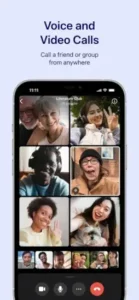
Encrypted voice and video calls, including group calls. The call quality is solid. Group calls support up to 40 people.
Group chats with admin controls and large participant limits. Set who can edit group info. Set who can send messages. Remove problem members.
Disappearing stories that expire after 24 hours. Stories are encrypted. They disappear. No screenshots without notification.
Media and file sharing including photos, videos, GIFs, and documents. Send PDFs. Send spreadsheets. Send presentations.
Privacy tools such as screen lock and registration lock. Lock the app with your phone’s biometrics. Prevent account takeover with a PIN.
Safety number verification to confirm contacts. Compare a QR code or number string with someone in person. Know for certain you are talking to the right person.
Cross platform support with phone and desktop syncing. Use Signal on your phone, tablet, and computer. All conversations sync.
Signal App Looks and Feels
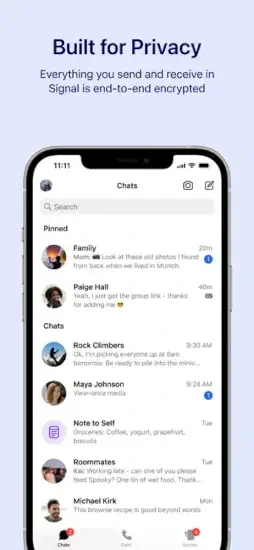
A stripped down interface with a focus on conversation rather than clutter. The chat list, message view, and compose flow are designed to feel clean and immediate. That supports the app’s privacy first identity. The visual style is intentionally understated. That simplicity helps users focus on secure communication. But it can also feel less feature rich than more social, media heavy messaging apps.
There are no animations. No colorful themes. No stickers that dance across the screen. Just blue chat bubbles on a neutral background. Some people call it boring. Others call it honest. The Signal app does not want to distract you. It wants to get out of the way so you can talk.
The settings menu is where the power lives. Screen lock. Registration lock. Disappearing message timers. Relay calls through servers to hide your IP address. These are not buried. They are right there. Signal trusts you to care about them.
Signal User Reviews
User feedback is generally positive around privacy, reliability, and clarity of purpose. Many users like that Signal feels less commercial than other messengers and that its features are strong without becoming distracting. The Signal app review threads on Reddit and the Play Store often mention switching from WhatsApp because of privacy concerns.
The most common criticism is that the app can feel plain or less customizable than rivals like WhatsApp or Telegram. No chat wallpaper options beyond a solid color. No animated emoji. No stories from brands. Even so, many reviewers consider that a fair tradeoff for the app’s security and simplicity.
As of April 2026, Signal holds a 4.7 star rating on Google Play from over 1 million reviews. The app size is roughly 196 MB depending on your device. Age range is listed as Everyone 10 and up due to user generated content and online interactions.
Looking for something similar? Try Threema. It is a paid app with a similar privacy first approach. Swiss based. Open source. Smaller user base.
So here is a question. If privacy matters to you, why are you still using the app that scans your messages for ads?
How the Signal App Works
Signal is not a game, so it does not have game mechanics in the traditional sense. Its interaction model is straightforward. Open a conversation. Send a secure message or call. Manage privacy settings as needed. That is it. No feed to scroll. No algorithm to fight. No suggested friends to ignore.
The app’s loop is centered on trust and communication rather than rewards or competition. Features like verification, disappearing messages, and screen lock reinforce that privacy first rhythm. You set up Signal with your phone number. No email. No social login. That number is your identity.
When you message someone on Signal, the app generates a unique encryption key for that conversation. That key lives only on your devices and theirs. Not on Signal’s servers. That is why even Signal cannot read your messages. The technology is called the Signal Protocol. It is open source. Anyone can inspect the code. Security researchers have done so for years and found no backdoors.
The Signal app also encrypts your calls. Voice and video. Same protection. Same open source protocol. Call quality is comparable to other messaging apps. Sometimes better because Signal has fewer users competing for bandwidth.
Signal Tips
Turn on screen lock to keep the app protected if your phone is unlocked. Settings > Privacy > Screen Lock. Choose how quickly it activates. Immediately. One minute. Five minutes. Someone picks up your phone. They cannot open Signal without your face or fingerprint.
Use registration lock so your account is harder to take over. Settings > Account > Registration Lock. This prevents someone from transferring your number to a new device without your PIN. If a scammer tries to port your number to their phone, they hit a wall. They need your PIN. They do not have it.
Verify safety numbers with important contacts for extra assurance. Compare the numbers in person or over a trusted channel. Match them exactly. A verified contact shows a checkmark. You know for certain you are talking to the right person. No man in the middle.
Use disappearing messages for conversations that should not stay in chat history. Set timers from 5 seconds to 4 weeks. The messages vanish after being viewed. Great for sharing sensitive information. Great for conversations you do not want sitting on your phone forever.
Configure group admin permissions carefully if you manage a large community chat. Set who can edit group info. Set who can send messages. Set who can add new members. Signal groups are not public free for alls. You control the space.
Use desktop syncing only on devices you trust. Link a computer by scanning a QR code. Unlink it when you are done. Go to Settings > Linked Devices. See every computer connected to your account. Remove any you do not recognize.
Keep Signal updated so you get the latest privacy and call features. The app updates frequently. Each update fixes bugs and adds security improvements. Turn on auto updates. Do not delay.
One more thing. There are no Signal codes for free stickers or premium features. No promo codes. No secret giveaways. The app is completely free. Funded by donations. Any website claiming to offer Signal codes is fake.
Apps Like Signal
WhatsApp : private messaging, calls, and group chats. Larger user base. Owned by Meta. Less privacy focused by default. Encryption exists but metadata is collected.
Telegram : messaging, groups, media sharing, and channels. More features. Cloud based. Encryption is not default for all chats. Secret chats are encrypted. Normal chats are not.
iMessage : secure messaging with call and media support. Apple only. Works well within the Apple ecosystem. Not cross platform. Encryption is strong but closed source.
Threema : privacy focused encrypted communication. Paid app. Swiss based. Smaller user base. No phone number required. Uses an ID instead.
Wire : secure messaging for personal and team use. Business focused. Open source. Less consumer adoption. Good for enterprise teams.
If you are searching for Signal similar apps, start with Threema. Same privacy commitment. Different business model. You pay once and own it.
Signal Community
Signal is more community oriented than it first appears because group chats can support large conversations, admin controls, and private coordination. It is often used by activists, organizers, and communities that need secure communication for group planning. Journalists use it to source tips. Lawyers use it to discuss cases. Families use it to share medical information.
Its social layer is private rather than public. Instead of feeds or follower culture, Signal supports trusted circles, direct communication, and organized group discussion. No likes. No comments. No public profiles. Just conversations with people you choose.
The Signal app also includes a built note to self feature. Send yourself a message. It syncs across devices. Great for saving links, reminders, or files you need later. That is not a social feature, but it makes the app more useful for daily life.
Conclusion
Every other messaging app asks you to trust them. Signal proves you do not have to.
Is that enough to make you switch?
FAQ
Where can I get the Signal download for my phone?
Download Signal from the official Apple App Store.
Is there an official Signal website for documentation and news?
Yes. Signal Messenger LLC maintains an official website at: https://signal.org/ . That is where they publish security updates, feature announcements, and transparency reports. The site also includes official blog posts about encryption and privacy.
I have an account issue or need technical support. Who do I contact?
For account problems, registration issues, or technical bugs, contact Signal support through their help center https://support.signal.org/hc/en-us .
Where can I find a wiki with detailed Signal guides and troubleshooting?
The community wiki and fan maintained documentation are available at: Signal Wiki. Learn how to verify safety numbers. Understand how registration lock works. Fix common sync problems between devices.
Does Signal work internationally and how much storage does it need?
Yes, Signal works anywhere with an internet connection. Calls and messages use data, not your phone plan’s minutes or SMS. The app works behind censorship tools in some regions. The app takes about 196 MB on your device. Message history and media can add more storage over time. Clear old conversations in Settings > Data and Storage to free up space.