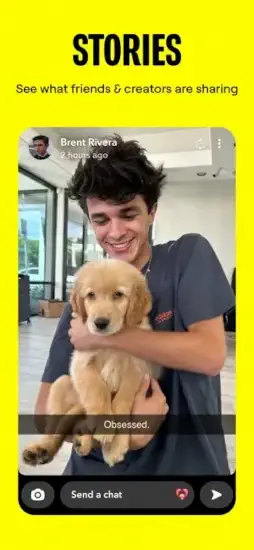
Snapchat launched with a simple idea. Send a photo. It disappears in seconds. That was the pitch. It worked.
Snapchat Eleven years later, hundreds of millions of people still open that yellow icon every day.
What Is Snapchat
Snapchat is a camera first social app from Snap, Inc. for sending disappearing snaps, chatting, posting Stories, and using creative AR lenses and filters. Built around fast visual communication, self expression, and lightweight mobile first sharing. The camera opens first. That tells you everything about what the app values.
You do not scroll through a feed when you open Snapchat. You see yourself on screen, ready to capture something. That design choice is deliberate. The app wants you to create, not consume. Take a photo. Add a filter. Draw on it. Send it to a friend. The whole interaction takes fifteen seconds.
The disappearing aspect changes how people communicate. There is less pressure to look perfect. Less worry about saying the wrong thing. The message vanishes. The moment passes. That freedom makes conversations feel more casual and more honest.
Snapchat Main Features
Snaps: photo and short video messages with text, drawings, stickers, and effects. You can draw on your snap before sending. Add music. Add a timer for how long the recipient can view it.
Stories: time limited posts shared with friends or wider audiences. A story is a collection of snaps that stay visible for 24 hours. Your friends can view them multiple times. No pressure to reply immediately.
Chat and voice or video calling: direct communication with friends. Text messages in Snapchat are also ephemeral by default. They disappear after being viewed unless you save them. Video calls support AR lenses. You can call someone with a dog filter on your face.
Filters and lenses: face tracking and AR effects for creative selfies and videos. Lenses track your face in real time. Add bunny ears. Change your skin tone. Swap your face with someone else. Filters are static overlays that add color grading or location tags.
World Lenses: AR objects placed into real world scenes. Put a dancing hot dog on your kitchen table. Leave a virtual flower on a park bench. These objects stay in place as you move your phone around them.
Disappearing messages: the ephemeral model that defines the app. Every snap has a viewing time. One to ten seconds. After that, it is gone. Screenshots are detected and the sender gets notified.
Bitmoji integration: personalized avatars used across the app. Create a cartoon version of yourself. Your Bitmoji appears on the map, in chat, and in certain lenses. It gives the app a personal touch without using your real photo.
AR Games and Game Lenses: interactive experiences mixing play, camera, and social sharing. Play a game of pool on your coffee table. Have a dance off with a friend’s face on screen. These games use your camera and your friend’s video feed at the same time.
Privacy controls: screenshot notifications and message view timing features. You know when someone screenshots your snap. You know when someone replays it. You can set messages to delete immediately after viewing or remain for 24 hours.
Snapchat Looks and Feels
Bright, playful, highly visual design language built around the camera. The interface is optimized for vertical content. The layout encourages quick camera use, quick sharing, and minimal friction between capturing and posting.
The visual identity is strongly tied to yellow branding, simple icons, and energetic AR effects. The design favors youthful creativity over formal structure. That makes it feel more like a live visual playground than a traditional social feed.
Swiping left takes you to chat. Swiping right takes you to Stories. Swiping up on the camera opens your Memories. Swiping down brings settings. The gestures become second nature after a few days.
Snapchat User Reviews:
User feedback tends to praise Snapchat for being fun, easy to use, and highly creative, especially because of its filters, lenses, and quick sharing flow. Many users also like the streak system and the sense of casual, ongoing connection with friends. The Snapchat app review threads often mention how the app feels more personal than Instagram.
The most common complaints focus on ads, interface changes, account issues, and occasional frustration with support or content moderation. Snapchat has redesigned its layout multiple times. Each change annoys a segment of users. Opinions can be polarizing, even though many users still love the core experience.
Snapchat holds a 4.5 star rating on App Store from over 5.7 million reviews. The app size is roughly 3710 MB depending on your device and downloaded lenses. Age range is listed as Teen due to mature content and location sharing features.
Looking for something similar? Try Instagram. It also have Stories, filters, and disappearing messages. Different audience. More polished. Less playful.
So here is a question. If photos disappear anyway, why do people still care about getting the perfect snap?
How Snapchat App Work
Snapchat is not a game, so it does not have game mechanics in the usual sense. Its core interaction loop is sending snaps, viewing stories, chatting, and using camera based creative tools. You open the app. The camera appears. You take a photo or video. You send it to a friend. They open it. It disappears. That cycle repeats dozens of times per day for active users.
However, Snapchat does include game like elements through streaks, AR game lenses, and social interaction loops that reward frequent engagement. These features keep users coming back because the app turns communication into a light daily habit. Send a snap. Get a snap back. Keep the streak alive.
Streaks are the most addictive part of the Snapchat app. A streak counts how many consecutive days you have snapped back and forth with a friend. Hit fifty days. Hit one hundred days. Hit one thousand days. The number appears next to their name. Break the streak by missing a day and the number resets to zero. That small pressure keeps people opening the app every single day.
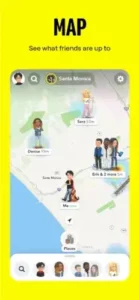
The Snap Map is another layer. Share your location with friends. See where they are. Zoom out to see public stories from events around the world. You can go into Ghost Mode to hide your location entirely.
Snapchat Tips
Use camera shortcuts and hold to capture habits to create snaps faster. Tap once for a photo. Hold for a video. Release to send. That is it. You can also tap the circle button to take a photo. Hold the circle button to record video. The button expands as you hold it.
Save important moments to Memories instead of relying on chat history alone. Snaps disappear. Memories do not. Use the save button before sending. The save button looks like a down arrow. Tap it and your snap goes to Memories. You can also save snaps you receive by pressing and holding on them.
Try AR lenses and world lenses for more creative posts. Open the camera. Tap a face. Scroll through lenses. Tap the screen to try world lenses that place objects in your room. New lenses appear every day. Some are sponsored. Some are made by Snapchat. Some are from community creators.
Keep an eye on streaks if you want to maintain regular contact with friends. A streak counter appears next to friends you have snapped every day for multiple days. Miss a day and the streak resets. Send any snap to keep it alive. It does not need to be good. It just needs to send.
Use Stories for broader sharing and direct snaps for more personal communication. Stories go to all your friends. Snaps go to one person or a small group. Stories stay for 24 hours. Snaps disappear after being viewed once or twice depending on your settings.
Adjust privacy settings carefully if you want more control over who can contact you or view your content. Settings > Privacy Controls. Set who can send you snaps. Set who can view your story. Set who can see your location on the map. The default settings are relatively open. Tighten them if you want more privacy.
Explore Game Lenses when you want a more playful, interactive experience. Open the camera. Tap the game controller icon. Pick a game. Play with friends in real time over video. Your face appears on screen next to the game. You see your friend’s face on their side. It feels like sitting next to each other while playing on the same phone.
Snapchat Similar Apps
Instagram : Stories, short videos, filters, and visual sharing. Larger audience. More permanent content. Better for building a following. Less playful. More polished.
TikTok : vertical video first social discovery. Algorithm driven feed. Less focus on friends. More focus on trends. Better for going viral. Worse for private conversations.
BeReal : casual, spontaneous photo sharing. One post per day. No filters. No editing. The anti Snapchat. Feels more authentic. Less fun.
Telegram : messaging with media and group communication. No disappearing by default. More privacy focused. Better for large groups. Worse for visual creativity.
Messenger : private chat, voice or video calling, and social messaging. Facebook integrated. Less creative tools. Better for cross platform communication. Worse for ephemeral content.
Snapchat Community and Social Features
Snapchat is very community driven because its features are built around friends, streaks, Stories, and shared AR experiences. The platform also supports creator content, public stories, and interactive game lenses that make it feel socially active rather than purely one to one.
Discover is the public side of Snapchat. Publishers and creators post short videos, articles, and shows. You swipe right from the camera to get there. It feels like a separate app inside Snapchat. Some users never touch it. Others spend hours there.
Its social strength comes from immediacy. People use it to maintain daily contact, share moments quickly, and interact in a way that feels more personal than a public social feed. No like counts. No public comment sections. Just snaps back and forth. That lack of public validation changes how people behave. You post for your friends, not for strangers.
The Snapchat app has a friend emoji system. Best friends. Mutual best friends. Super BFFs. The emojis change based on how much you interact with someone. Seeing a pink heart next to a name means something. Losing it means something too.
Conclusion
Every social app wants your attention forever. Snapchat wants it for ten seconds at a time.
Is that a feature or a limitation?
FAQ
Where can I get the Snapchat download for my phone?
Download Snapchat from the official App Store
Is there an official Snapchat website for feature updates and news?
Yes. Snap, Inc. maintains an official Snapchat newsroom and help site. That is where they announce new lenses, privacy updates, and platform changes before anywhere else.
I have an account issue or cannot log in. Who do I contact?
For account problems, lost access, or security concerns, contact Snapchat support through their help center. Go to Settings > Support > Contact Us in the app for the fastest response. Include your username and a clear description of the issue.
Does Snapchat work on older phones and how much storage does it need?
Snapchat runs on most phones from the last five years. The minimum requirement is Android 8 or iOS 14. Storage space is the bigger concern. The app takes about 361 MB on your device. Lenses and Memories can add more. Clear your cache regularly in Settings to free up space.