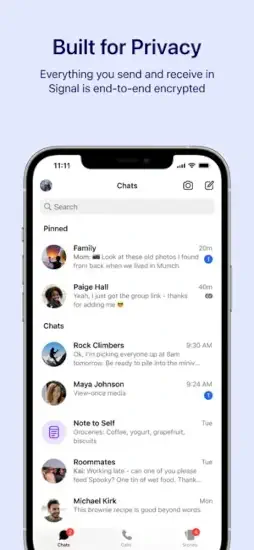
Signal is a free, privacy first messaging app from Signal Messenger, LLC.
Signal combines end to end encrypted messaging, voice and video calls, group chats, Stories, disappearing messages and optional encrypted backups into one communication app
What Signal Actually Is
If you have used WhatsApp, Telegram or iMessage, you already know the baseline. You have heard Signal is the private option. Maybe you have delayed switching because you worry about backups, losing messages or whether the app is too complicated. You want a private messenger that still works like a normal messenger. Signal promises exactly that, but it asks you to trade a few conveniences for real privacy.
Users praise the privacy and security, smooth interface, group chats and calls, Stories and nonprofit model. Critics point to backup limitations, storage related bugs, limited accessibility support, large app size and feature overload.
How Signal Works
Set up an account by creating or signing in to a Signal account. Browse the chat list in a list-based layout with group chats and Stories. Send texts, voice messages, photos, videos, GIFs and files. Make voice and video calls, including group calls up to 50 people. Join or create group chats up to 1,000 people. Share image, text and video Stories that disappear after 24 hours. Set messages to disappear after a chosen time. Enable optional encrypted backups.
The Encrypted Messaging Foundation
End-to-end encryption keeps messages and calls private. Signal sends texts, voice messages, photos, videos, GIFs and files. Encryption is not an optional feature. It is the default.
Why does this matter? Because most messaging apps treat privacy as a setting. Signal treats it as the starting point. One reviewer praises the app for end to end encryption and privacy.
Calls, Group Chats and Group Calls
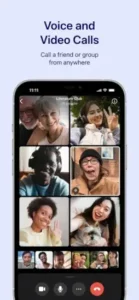
Voice and video calls are encrypted. Group chats support up to 1,000 people. Group calls support up to 50 people.
The scale is enough for families, teams and communities. Group communication is where Signal becomes a daily app rather than a special purpose tool.
Stories and Disappearing Messages
Signal lets you share image, text and video Stories that disappear after 24 hours. You can set messages to disappear after a chosen time.
This reduces long term message history. Disappearing messages are built into the app rather than added as an extension. The ephemeral layer supports conversations that are not meant to be permanent.
Open Source Protocol and Nonprofit Model
Signal uses the Signal Protocol, which has been vetted by cryptographers. It is supported by donations, not ads or investors. This reduces ad-driven incentives.
The nonprofit model means the app does not need to monetize your data. Trust is the product. The funding model protects it.
Secure Backups and Storage
Signal offers optional encrypted backups. Signal Secure Backups are listed at $1.99. Backups are optional. The app works without them.
A reviewer says the app has backup limitations and data loss concerns. Another reviewer says running out of storage space can cause “Problem Retrieving Data” errors.
Privacy Settings and Username Support
Privacy settings let users control who can find them. Username support reduces the need to share a phone number. Disappearing messages and Stories can be tuned to user preferences.
The settings exist, but they require attention. Privacy is not automatic in every dimension. The app gives you the tools.
Signal Graphics
Design Strengths
Clean chat layout that is easy to browse and navigate. Privacy focused design built around encryption, disappearing messages and privacy settings. Group chats and calls supporting up to 1,000 and 50 people respectively. Stories with image, text and video support that disappear after 24 hours. Multi language support including English and 43 additional languages.
Design Limitations
Backup limitations. A reviewer says the app has backup limitations and data loss concerns. Storage related bugs. A reviewer says running out of storage space can cause “Problem Retrieving Data” errors.
No declared accessibility support. Signal has not indicated which Apple accessibility features the app supports. Large app size at 252.4 MB. Feature overload. Messaging, calls, group chats, Stories and privacy settings can make the app feel busy for new users.
Signal User Reviews
The 4.7 out of 5 rating from 1.1 million ratings reflects broad appeal across privacy, security and interface.
Positive include privacy and security, interface, group chats and calls, Stories and nonprofit model. One reviewer praises the app for end to end encryption and privacy. Another praises the app for a smooth and pleasant interface.
Negative include backup limitations, storage related bugs, no declared accessibility support, large app size and feature overload. One reviewer says the app has backup limitations and data loss concerns. Another says running out of storage space can cause “Problem Retrieving Data” errors.
Signal Tips
For Managing Messaging Efficiently
Use disappearing messages. Set messages to disappear after a chosen time so the conversation does not stay on the device indefinitely. It is useful for sensitive topics and quick logistics.
Use group chats. Join or create group chats up to 1,000 people. The scale is large enough for communities and small enough to stay manageable.
Use group calls. Make group calls up to 50 people. It is one of the few encrypted group call options available on mobile.
Use Stories. Share image, text and video Stories that disappear after 24 hours. It is a lighter way to share updates without cluttering a chat.
Use secure backups. Enable optional encrypted backups if you want to preserve message history. The feature costs $1.99 and protects the backup with encryption.
For Using Privacy and Security
Use end to end encryption. Keep messages and calls private. Encryption is the default. Do not disable it.
Use the open source protocol. Build trust in privacy. The Signal Protocol has been vetted by cryptographers and other apps use it as a foundation.
Use the nonprofit model. Support the app through donations. The app does not sell ads or data, which means the funding has to come from users.
Use multi language support. Switch to your preferred language. Signal supports English and 43 additional languages.
Use Wallet for passes. Get all your passes in one place.
For Managing Storage and Privacy
Set a storage budget. The app includes in-app purchases for secure backups. Decide whether the backup tier is worth the cost for your usage.
Review privacy and location settings. Control what data is collected and how location is used.
Use Family Sharing if appropriate. Some in-app purchases and subscriptions may be shareable with your family group.
Use Siri for messaging. Signal works with Siri to help you get things done.
Check usernames and phone number visibility. Signal allows you to control who can find you by phone number. If privacy matters, review that setting before sharing your number widely.
Signal Similar Apps
WhatsApp is the most direct comparison because it also uses the Signal Protocol for encryption. The difference is reach and ownership. WhatsApp is owned by Meta, has billions of users and makes onboarding effortless for anyone with a phone number. Signal is smaller, nonprofit and does not collect metadata for advertising. If your contacts are already on WhatsApp, the convenience is hard to beat. If you want the same encryption without the corporate data layer, Signal is the upgrade.
Telegram wins on channels, large groups and features. The app supports communities with hundreds of thousands of members and the interface is faster and more flexible than Signal in several ways. The catch is that Telegram does not enable end to end encryption by default. Secret Chats exist, but regular chats and groups are not encrypted end to end. Signal encrypts everything by default. If privacy is the priority, Signal is the safer choice. If scale and feature depth matter more, Telegram wins.
Session is the app for people who do not want to share a phone number at all. It uses a decentralized network and does not require an email or phone number to register. The trade-off is a smaller user base, slower message delivery and a less polished interface. Session wins on anonymity. Signal wins on reliability and everyday usability.
Threema is the paid option. It costs a small one time fee, requires no phone number or email and is based in Switzerland. The app is popular in privacy conscious workplaces and among users who want to pay for the product rather than be the product. Threema wins on anonymity and business adoption. Signal wins on price, group calls and user base.
SimpleX Chat takes privacy further than Signal by removing user identifiers entirely. There are no phone numbers, no usernames and no persistent identity on the server. The app is more complex to set up and the smaller user base means you will likely use it for specific conversations rather than as a daily messenger. SimpleX wins on anonymity. Signal wins on usability and features.
Zangi offers encrypted messaging and calls with a focus on privacy and offline functionality. It is less well known than Signal and has a smaller user base, but it supports features like offline messaging that Signal does not. Zangi wins on offline use cases. Signal wins on open source transparency and community trust.
Apple Messages is the default for anyone in the Apple ecosystem. iMessage is encrypted end to end and the app is deeply integrated with iPhone, iPad and Mac. The limitation is that it only works well with other Apple users. Blue-bubble conversations are private. Green bubble SMS conversations are not. Signal wins on cross platform support and consistent encryption regardless of the recipient’s device.
If you want a similar app with a different focus, WhatsApp is worth a look. It offers messaging and calls with a larger user base and easier onboarding and it runs on the same platforms as Signal.
Signal’s main differentiator is that it combines end to end encrypted messaging, voice and video calls, group chats, Stories, disappearing messages and optional encrypted backups in one communication app. WhatsApp wins on reach and convenience. Telegram wins on channels and large groups. Session wins on anonymity. But if you want one app that treats privacy as the default rather than a setting, Signal occupies a space few others attempt.
Can people on Signal see my phone number?
By default, anyone who has your number saved in their contacts can find you on Signal and send a message request. That is how the app has worked for years and it is what makes onboarding painless for most people. But you are not stuck with that default.
In Signal’s privacy settings, you can change “Who can find me by number” to “Nobody.” When you do that, someone who types your number into Signal sees a message saying the number is not associated with an account. They cannot message you unless you give them your exact username, a QR code or a unique link. The trade-off is real: you become harder to find, which means you have to actively share your username with the people you want to talk to. Signal’s own documentation notes that this makes the app “more complicated” for your contacts. But if you want to control who reaches you, the option exists.
Is Signal 100% private?
No app is 100% private in every scenario and Signal does not claim to be. What it does claim is that your messages are end to end encrypted, that the server cannot see who you are talking to (thanks to Sealed Sender) and that the protocol uses perfect forward secrecy so that seizing one phone does not unlock past conversations. Cryptographers have vetted the protocol and other apps like WhatsApp and Google Messages use the same encryption foundation.
The limits are practical, not cryptographic. Someone can screenshot your chat and share it. Someone can photograph your screen with another camera. Signal blocks screenshots in some contexts now, but it cannot stop every form of capture. And if your phone is hacked, the encryption does not matter. Signal is the gold standard for messaging privacy, but it is not a shield against every threat model.
Who uses the Signal app?
The short answer is: more people than you probably think and the list is growing. Signal is relied on by journalists, government employees, political dissidents and security researchers who need to protect sensitive communications . But it is not just a niche tool for people with something to hide.
In the Netherlands, Signal now has 2.3 million users, overtaking Telegram. Daily active users tripled in a year, from 300,000 to 900,000. About 7% of Signal users there have left WhatsApp entirely. The growth is driven by distrust of commercial tech platforms and a desire for communication that is not mined for data. In Finland, Signal has topped the download charts in the communication category. The people using Signal are not a monolith. They are privacy conscious professionals, families who want a safer group chat and anyone who has decided that the convenience of WhatsApp is not worth the data trade-off.
Signal is not for everyone. If you need searchable message archives or if you cannot trust the security of your own device, the app will not solve those problems. But if you want a messaging tool that was built from the ground up to protect the conversation and not monetize it, the answers above should make the decision easier. The app does not ask you to trust it. It asks you to verify it.
What is the downside of Signal?
The honest answer is that Signal is designed for privacy, not for convenience or record keeping. If you are legally required to preserve messages, Signal is a bad fit. It is built to securely delete data when you are done with it, not to keep it. Disappearing messages can vanish and there is no cloud backup of your chat history that you can retrieve later.
There is also the phone number requirement. Signal still needs a phone number to register, even if you use a username to chat. That is a barrier for people who want fully anonymous accounts. And there is the platform problem: Signal’s ability to protect your messages depends on the security of your phone. If your device is compromised, the encryption does not save you. The app has also had to fight against operating system AI agents that try to scan screens, which shows that even the most private app is constrained by the environment it runs in.
Conclusion
Every other messaging app asks you to trust them. Signal proves you do not have to.
Is that enough to make you switch?
FAQ
Where can I get the Signal download for my phone?
Download Signal from the official Apple App Store.
Is there an official Signal website for documentation and news?
Yes. Signal Messenger LLC maintains an official website at: https://signal.org/ . That is where they publish security updates, feature announcements and transparency reports. The site also includes official blog posts about encryption and privacy.
I have an account issue or need technical support. Who do I contact?
For account problems, registration issues, or technical bugs, contact Signal support through their help center https://support.signal.org/hc/en-us .
Where can I find a wiki with detailed Signal guides and troubleshooting?
The community wiki and fan maintained documentation are available at: Signal Wiki. Learn how to verify safety numbers. Understand how registration lock works. Fix common sync problems between devices.
Does Signal work internationally and how much storage does it need?
Yes, Signal works anywhere with an internet connection. Calls and messages use data, not your phone plan’s minutes or SMS. The app works behind censorship tools in some regions. The app takes about 196 MB on your device. Message history and media can add more storage over time. Clear old conversations in Settings > Data and Storage to free up space.