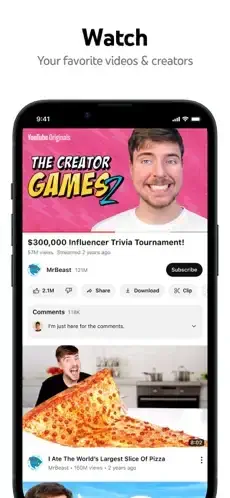
YouTube app pulled you in. You open it to check one video. Two hours later, you are watching a documentary about deep sea creatures and a guy restoring a rusty knife.
YouTube has been around since 2005. Twenty one years later, it is the second most visited website in the world behind Google Search. Shorts compete directly with TikTok for your attention. Live streaming rivals Twitch for gaming content. Music competes with Spotify for your listening time. The app is no longer just for cat videos and viral clips. It is a full entertainment ecosystem.
YouTube is a complex ecosystem. Home feed with personalized recommendations. Subscriptions tab with chronological updates from channels you follow. Shorts for vertical quick hits. Live for real time broadcasts. Music for audio streaming. Creator tools for uploading and monetizing. Understanding how to control what you see, save videos efficiently, and use hidden features helps you waste less time and find better content that actually matters to you.
The app holds a 4.7 star rating on the App Store based on over 47 million reviews. Size sits around 400 MB depending on cached data. Age range stretches from young children watching cartoons to seniors following tutorials. If you prefer short form vertical video without long-form content, TikTok offers a different experience
What Is YouTube?
YouTube is a free video sharing platform developed by Google that lets users watch, upload, share and comment on billions of videos across music, gaming, news, education, entertainment and more. It features subscriptions, Shorts, live streaming, community tabs and optional YouTube Premium.
Think of it as the world’s largest television network, library and stage combined. Anyone with a camera and an internet connection can publish. Anyone with a screen can watch. The library never closes. Unlike traditional television, there are no schedules and no gatekeepers deciding what airs. The audience decides what rises.
Casual viewers use it for entertainment and music. Students use it for tutorials and lectures. Professionals use it for industry insights and skill development. Gamers use it for gameplay and reviews. Music fans use it for concerts and new releases. News consumers use it for live coverage and analysis. Creators use it to build audiences and income. Educators use it to share knowledge. Businesses use it for advertising and brand building.
How YouTube Works
YouTube organizes content through five core elements: videos, channels, subscriptions, playlists and recommendations. Videos are individual pieces of content. Channels group videos from a single creator. Subscriptions deliver updates when channels publish. Playlists organize videos for later. Recommendations shape what you see next.
The viewing loop is straightforward. Create a free Google account or sign in. Browse Home, Trending or Subscriptions. Search for specific videos, channels or topics. Watch videos with optional closed captions, likes and comments. Subscribe to channels for updates. Save videos to Watch Later. Interact with creators through comments and Community posts. Watch live streams and join live chat. Optionally subscribe to YouTube Premium.
The creator loop follows a similar pattern. Upload videos with titles, descriptions, tags and thumbnails. Build an audience through consistent publishing. Engage viewers through comments and Community posts. Monetize through ads, memberships, and Super Chat.
The recommendation engine drives the entire experience. The platform rewards consistent engagement. Viewers who subscribe, like, comment and save videos get more personalized recommendations. The algorithm learns what keeps you watching and serves more of it. This is the engine that shapes what you see every time you open the app.
YouTube Key Features
Video Library
Watch billions of videos across music, gaming, news, education, entertainment, sports and more. The library is the largest collection of video content ever assembled. Almost any topic you can name has a video about it. From historical documentaries to DIY repairs to language lessons, the depth is unmatched.
Subscriptions
Subscribe to channels to get updates on new uploads and live streams. Subscriptions put your favorite creators in one place. The Subscriptions tab shows new content from channels you follow. This creates a personalized feed that updates as creators publish.
Shorts
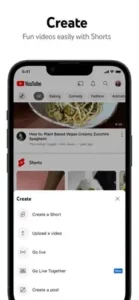
Watch and create short-form videos under 60 seconds with music, effects and editing tools. Shorts offer quick, engaging content and a fast way to discover new channels. The format competes directly with TikTok and Instagram Reels. Shorts have become a major discovery mechanism for creators and a significant source of viewing time for users.
Live Streaming
Watch live streams from creators, news outlets, sports leagues and events. Live streaming brings real time interaction to the platform. Viewers can participate in live chat during streams. From product launches to gaming sessions to breaking news, live streaming adds immediacy that recorded video cannot match.
Community Tab
Interact with creators via posts, polls and images. The Community tab gives creators a way to engage beyond video uploads. Polls let viewers vote on decisions. Posts share updates between uploads. This feature builds a sense of connection between creators and their audience.
Search and Recommendations
Search for specific videos or browse personalized recommendations based on watch history. Recommendations appear on the Home tab and in the sidebar. They shape what you watch next. The search function supports filters for upload date, duration, features and sorting options.
Playlists and Watch Later
Create and manage playlists to organize videos for later viewing. Save videos to Watch Later for quick access. Playlists help organize content by topic, mood or project. Watch Later is a simple queue for videos you want to see but have not watched yet.
Comments and Likes
Comment on videos, like or dislike and reply to other viewers. Comments create conversation around content. Likes signal approval to the algorithm and the creator. Comments can be sorted by top or newest and creators can pin specific comments.
Upload and Edit
Upload your own videos with titles, descriptions, tags, thumbnails and basic editing tools. The upload process is accessible to beginners and offers enough control for experienced creators. Basic trimming, blurring and end screens are available directly in the app.
Live Chat
Participate in live chat during live streams with real time messages and emojis. Live chat creates a sense of community during events and streams. Moderators can manage chat to reduce spam and inappropriate content.
Super Chat and Memberships
Support creators with Super Chat paid messages and channel memberships. Super Chat highlights your message during live streams. Memberships offer monthly perks and badges. These features let viewers support creators directly.
YouTube Premium
Optional subscription at $13.99 per month for ad-free viewing, background play, offline downloads and YouTube Music Premium. Premium removes most ads and adds features not available on the free tier. It is designed for users who want an uninterrupted experience.
Picture in Picture
Watch videos in a small window while using other apps. This is a Premium feature on mobile. It allows multitasking without losing video playback. The floating window can be moved around the screen while you use other apps.
Casting
Cast videos to Chromecast, smart TVs and other devices. Casting brings the mobile experience to a larger screen. The controls stay on your phone while the video plays on the TV.
Offline Downloads
Download videos for offline viewing. This is a Premium feature. It is useful for travel, commutes and areas with limited connectivity. Downloaded videos remain available for a set period before needing to reconnect.
Background Play
Play videos in the background while using other apps or with the screen off. This is a Premium feature. It is useful for music, podcasts and audio focused content. Background play turns YouTube into a music and podcast player.
Kids Mode
Restricted mode for family friendly content with parental controls. Kids Mode limits content to age appropriate material. Parents can set time limits and review watch history.
Accessibility Features
Closed captions, audio descriptions and keyboard navigation support. These features make content accessible to a wider audience. Captions are available in multiple languages and can be auto generated or uploaded by creators.
What Users Say About YouTube
What Users Appreciate
Users value the vast content library across every topic. Personalized recommendations based on watch history keep content relevant. Shorts provide short form video discovery. Live streaming covers creators, news outlets, sports leagues and events. The Community tab allows interaction with creators. Subscriptions deliver channel updates and live streams. Playlists and Watch Later support organized viewing. Comments and likes enable viewer interaction. Upload and edit tools serve creators. Live chat builds community during streams. Super Chat and channel memberships support creators.
YouTube Premium offers ad-free viewing and offline downloads. Picture in Picture enables multitasking. Casting works with Chromecast and smart TVs. Kids Mode provides family-friendly content. Accessibility features including closed captions widen access.
What Users Complain About
Users report ads frequency too high, even with Premium. Built-in ads in some videos cannot be skipped. Autoplay starts videos unexpectedly. Buffering issues occur on slower connections. Recent UI changes make it harder to find features. Premium pricing increases make it less affordable. Subscribing through the App Store costs 30 percent more. Saving videos to Watch Later requires connecting a phone. The scroll time before video auto resumes has shortened. Reporting videos has become harder. “Recently uploaded” shows longest videos instead of newest.
YouTube Tips That Improve Your Viewing Experience
YouTube rewards users who know how to navigate it. Most people open the app, tap the first video and let autoplay take over. That works for casual watching, but it rarely delivers the best experience. Here is how to take control.
Use search effectively. Specific keywords, filters, and sorting options find videos faster than scrolling. Filter by upload date, duration, features like 4K or live and sort by relevance or view count. Search is faster than browsing when you know what you want.
Subscribe to channels. Subscribe to channels you enjoy to get updates on new uploads and live streams. Subscriptions put your favorite creators in one place. The Subscriptions tab becomes a personalized feed that updates as creators publish. This reduces reliance on the algorithm to surface content you actually want.
Create playlists. Organize videos into playlists for easy access and sharing. Playlists help group content by topic, mood or project. A workout playlist. A cooking playlist. A research playlist for work. When you return to a topic, everything is already organized.
Save to Watch Later. Save videos you want to watch later without cluttering your playlists. Watch Later is a quick way to build a queue. It is the simplest way to bookmark a video without committing to a category.
Use Shorts for discovery. Browse Shorts for quick, engaging content and new channel discovery. Shorts surface creators you might not find otherwise. The format works well for sampling content before committing to longer videos.
Participate in live chat. Engage with creators and other viewers during live streams. Live chat creates a sense of community during events. It is also a way to ask questions in real time when creators are responsive.
Support creators with Super Chat. Use Super Chat to highlight your messages during live streams. It is a direct way to support creators. Your message appears prominently in the chat and creators often acknowledge Super Chats by name.
Consider YouTube Premium. If ads are frustrating, Premium offers ad-free viewing, background play and offline downloads. Be aware of built-in ads and pricing increases. Some videos have sponsored segments baked in that Premium cannot remove. Weigh the cost against how much time you spend on the platform.
Use dark mode. Enable dark mode for reduced eye strain during long viewing sessions. It also saves battery on OLED screens.
Cast to TV. Use Chromecast or smart TV casting for a bigger screen experience. The controls stay on your phone while the video plays on the TV.
Download for offline viewing. Use Premium offline downloads to watch videos without internet. This is useful for flights, commutes, and areas with unreliable connectivity.
Use Kids Mode. Enable Kids Mode for family friendly content with parental controls. Parents can set time limits and review watch history. It is a useful feature for households with young viewers.
YouTube Similar Apps Worth Knowing
| App | Best For | Main Difference from YouTube |
|---|---|---|
| TikTok | Short form videos | Focused on short form, algorithm driven feed |
| Vimeo | Professional creators | Ad-free, high quality hosting, no algorithmic feed |
| Twitch | Live streaming (gaming) | Focused on live streams, gaming community |
| Dailymotion | General video sharing | Smaller audience, less content restriction |
| Rumble | Free speech focused content | Less content moderation, competitive monetization |
| Facebook Watch | Social video sharing | Integrated with Facebook social network |
| Instagram Reels | Short form visual content | Integrated with Instagram social network |
| PeerTube | Decentralized video sharing | Open source, community driven, no ads |
| Odysee | Blockchain based video sharing | Decentralized, cryptocurrency rewards |
| BitChute | Free speech video sharing | Less content moderation, P2P technology |
Which one wins? It depends on your needs. YouTube wins on library size and discovery. TikTok wins on short form engagement. Vimeo wins on professional presentation. Twitch wins on live gaming. Each platform serves a different purpose. If you need the largest audience and the deepest library, YouTube remains the default. If you need a focused short form experience, TikTok offers a different path. If you want ad-free hosting for professional work, Vimeo is worth considering.
YouTube App Pricing
YouTube is free to download on iOS, Android and web. The free version includes watching videos, subscribing, commenting, and uploading.
Paid plans are available through the App Store. YouTube Premium offers ad-free viewing, background play, offline downloads, and YouTube Music Premium for $13.99 per month. In-app purchases range from $1.99 for channel memberships to $13.99 per month for Premium.
Important: Some users report that ads appear frequently even with Premium, with some videos having built-in ads that cannot be skipped. Some users report that subscribing through the App Store means paying 30 percent more for Premium due to Apple’s commission. Subscribing through the web version of YouTube avoids this markup.
Conclusion
YouTube is an outstanding video sharing platform that combines a vast content library, personalized recommendations, Shorts, live streaming and community features. Its core strength is the combination of billions of videos across every topic, personalized recommendations, Shorts for short form discovery, live streaming from creators and events, and community interaction.
Its greatest strength is access to more video content than any platform in history. Its greatest weakness is the friction that comes with that access. Ads interrupt. Autoplay pulls. Premium costs. Recent UI changes frustrate.
YouTube fits casual viewers, students, professionals, gamers, music fans, news consumers, creators, educators and businesses. It does not fit people who dislike ads and are unwilling to pay for Premium. It does not fit users who prefer ad-free platforms like Vimeo. It does not fit viewers who want a curated, algorithm free experience.
YouTube gives you access to more video content than any platform in history. But access comes with tradeoffs. Ads interrupt. Autoplay pulls. Premium costs. Whether those tradeoffs are worth it depends on how much you value the library and how much friction you are willing to accept.
Frequently Asked Questions About YouTube
Is YouTube free to use, or do I need to pay for Premium?
YouTube is completely free to download and use. The free version includes access to all videos, channels, Shorts, live streams, playlists, and search. Ads play before and during videos. YouTube Premium removes all ads, adds background play, and includes YouTube Music for a monthly subscription. Most people use the free version. You can start your YouTube download from the App Store.
What is the difference between Shorts and regular videos?
Shorts are vertical videos under 60 seconds in 9:16 aspect ratio. They appear in the Shorts feed and are designed for quick, swipeable content similar to TikTok. Regular videos are horizontal or any length, appear in the home feed and subscriptions, and can be monetized through ads. Shorts have their own monetization fund separate from regular video ads.
How do I stop YouTube from showing me videos I do not want to see?
Tap the three dots on any video thumbnail. Select “Not interested” to see fewer videos like that. Select “Don’t recommend channel” to hide that channel completely from your feed. Clear your watch history in Settings > History & Privacy to reset recommendations. Pause watch history to stop YouTube from using your history for recommendations.
Can I listen to YouTube with my screen off?
Background play is a YouTube Premium feature only. Free users cannot play videos with the screen off or while using other apps. Premium users can listen to audio in the background. The only workaround is to keep the app open and your screen on.
Where can I find official information and get support if I have issues?
The official YouTube Help Center has articles on every feature. The YouTube Creator Academy teaches uploading and growth strategies. For account recovery, copyright issues, or technical problems, contact YouTube support through the help center. Official website: https://www.youtube.com