
Microsoft Outlook is a free email, calendar, contacts and productivity app from Microsoft.

Microsoft Outlook combines email, calendar, files, contacts, Copilot AI assistance and Microsoft 365 integration into one productivity app designed for both personal and business use. It holds a 4.8 out of 5 rating from 9.4 million U.S. App Store ratings. The download sits at 499.3 MB, and the age rating is 4+. The real story is how a corporate email client grew into a complete productivity hub with calendar, files, contacts, and AI assistance built into one app.
What Microsoft Outlook Is
If you have used Outlook at work, you already know the shape of it. Maybe you tried the mobile app and found it useful but frustrating in specific ways. Maybe you are weighing Outlook against Gmail or Apple Mail. Outlook promises a complete email and calendar experience, but the mobile version has notable gaps.
Users praise secure email, AI features, multiple accounts, calendar integration and file integration. Critics point to calendar color coding, signature limitations, mobile only limitations, limited accessibility support, large app size and feature overload.
The Email Foundation
Browse the inbox in a list-based layout with smart inbox and swipe actions. Smart inbox helps sort between messages to act on and everything else. Swipe actions quickly schedule, delete and archive messages.
The email foundation is the core. Everything else builds on it. Why does this matter? Because email management is still the primary reason people open Outlook. One reviewer praises the service for secure emails.
Copilot and AI Assistance
Copilot summarizes threads, drafts emails, and coaches writing. It adds AI assistance to the email workflow. Useful for long threads and unfamiliar topics. The AI layer is the app’s biggest recent addition.
Copilot works best when you give it specific instructions. The listing highlights Copilot, Summarize, Coaching, and drafting.
Calendar and Meeting Availability
Share availability and find times to meet. Calendar integration keeps scheduling in one app. One reviewer says the calendar lacks categorization, color coding and that colors do not match across platforms.
It is useful for work teams that schedule meetings frequently. Calendar limitations show up in multiple reviews.
Files, Contacts and Attachments
Find files, contacts, and trips. View and attach files from email, OneDrive, Dropbox and more. Open Word, Excel or PowerPoint attachments to edit and attach back.
The file integration keeps documents accessible without switching apps. One reviewer says they cannot attach an Outlook email to an email, delete an attachment, change folder names, or view zip files on mobile.
Multiple Accounts and Microsoft 365 Integration
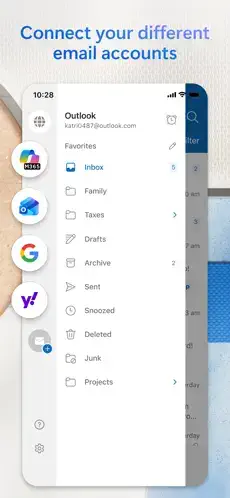
Outlook works with Exchange, Office 365, Outlook.com, Hotmail, Gmail, Yahoo and iCloud. Microsoft 365 includes 1TB storage, Word, Excel, PowerPoint, Outlook, and OneNote.
The multiple account support is essential for anyone juggling work and personal email. The Microsoft 365 integration turns Outlook into a productivity suite. The subscription tiers range from Basic at $1.99** to Family at **$12.99.
Signature Limitations and Mobile Constraints
A reviewer wants the ability to load a signature with graphics and logos. A reviewer says they cannot perform several actions on mobile that work on desktop.
The mobile app is useful but not a full replacement for the desktop version. Signature limitations matter for business users who need branded emails. Mobile-only limitations affect daily workflows.
How Microsoft Outlook Works
Set up an account by creating or signing in to a Microsoft account. Browse the inbox in a list based layout with smart inbox and swipe actions. Use Copilot to summarize threads, draft emails and coach writing. Manage calendar by sharing availability and finding times to meet. Manage files, contacts and trips. Use attachments to view and attach files from email, OneDrive, Dropbox and more. Use Office integration to open Word, Excel or PowerPoint attachments, edit and attach back. Use Microsoft 365 to access 1TB storage, Word, Excel, PowerPoint, Outlook and OneNote.
Microsoft Outlook Graphics
Design Strengths
Clean inbox layout that is easy to browse and navigate. AI-powered tools including Copilot, Summarize, Coaching and drafting. Multiple accounts from different providers in one app. Calendar integration for sharing availability and finding times to meet. File integration for viewing and attaching files from email, OneDrive, Dropbox, and more. Multi language support including English and 46 additional languages.
Design Limitations
Signature limitations. A reviewer wants the ability to load a signature with graphics and logos.
Mobile-only limitations. A reviewer says they cannot attach an Outlook email to an email, delete an attachment, change folder names or view zip files on mobile.
No declared accessibility support. Microsoft has not indicated which Apple accessibility features the app supports. Large app size at 499.3 MB. Feature overload. Email, calendar, files, contacts, Copilot and Microsoft 365 can make the app feel busy for new users.
Microsoft Outlook User Reviews
Positive reviews include secure email, AI features, multiple accounts, calendar integration and file integration. One reviewer praises the service for secure emails. The listing highlights Copilot, Summarize, Coaching, and drafting.
Negative reviews include calendar color-coding, signature limitations, mobile only limitations, no declared accessibility support, large app size and feature overload. One reviewer says the calendar lacks categorization and color coding, and that colors do not match across platforms. Another wants the ability to load a signature with graphics and logos. A third says they cannot attach an Outlook email to an email, delete an attachment, change folder names, or view zip files on mobile.

Microsoft Outlook Tips
For Managing Email Efficiently
Use smart inbox. Sort between messages to act on and everything else. It keeps important mail visible without digging through a cluttered list.
Use swipe actions. Quickly schedule, delete and archive messages. Once the gestures become habit, clearing the inbox takes seconds.
Use unsubscribe. Reduce unwanted email without hunting for the sender’s opt out link.
Use search. Find files, contacts and trips across your account. It is faster than scrolling through folders.
Use Copilot. Summarize threads, draft emails and coach writing. It is especially useful for long threads and unfamiliar topics.
For Using Calendar and Files
Use meeting availability. Share availability and find times to meet. It removes the back and forth of scheduling.
Use attachments. View and attach files from email, OneDrive, Dropbox and more.
Use Office integration. Open Word, Excel or PowerPoint attachments to edit and attach back without leaving the app.
Use Microsoft 365. Access 1TB storage, Word, Excel, PowerPoint, Outlook and OneNote.
Use Siri for email. Outlook works with Siri to help you get things done.
For Managing Privacy and Subscriptions
Set a subscription budget. The app includes in-app purchases for Microsoft 365 subscriptions. Decide your plan before the renewal date.
Review privacy and location settings. Control what data is collected and how location is used.
Use Family Sharing if appropriate. Some in-app purchases and subscriptions may be shareable with your family group.
Use Wallet for passes. Get all your passes in one place.
Use Authenticator for security. Protect your online identity with two factor authentication.
Microsoft Outlook Similar Apps
| App | Best For | Difference from Microsoft Outlook |
|---|---|---|
| Gmail | Email, AI, spam protection, multiple accounts | More consumer and AI focused; Outlook is more business and Microsoft 365 focused |
| Yahoo Mail | Organized inbox and bulk delete | More focused on inbox organization; Outlook is more business and Microsoft 365 focused |
| Edison Mail | Fast, secure, organized inbox | More focused on inbox organization; Outlook is more business and Microsoft 365 focused |
| Apple Mail | iPhone and iPad email management | More integrated with Apple devices; Outlook offers stronger Microsoft 365 integration |
| mail.com | Email and cloud storage | More focused on email and cloud; Outlook is more business and Microsoft 365 focused |
| Contacts Sync | Google, Outlook, and more | More focused on contacts; Outlook is more email and calendar focused |
| Email App for Outlook | Outlook and other mail services | More focused on email; Outlook is more business and Microsoft 365 focused |
| Microsoft OneDrive | File and photo cloud storage | More file management focused; Outlook is more email and calendar focused |
| Verizon Cloud | Productivity | More cloud focused; Outlook is more email and calendar focused |
| Google Drive | Store, access, and scan files | More file management focused; Outlook is more email and calendar focused |
If you want a similar app with a different focus, Gmail is worth a look. It offers email, AI, spam protection and multiple accounts with a consumer focus, and it runs on the same platforms as Outlook.
Microsoft Outlook’s main differentiator is that it combines email, calendar, files, contacts, Copilot AI assistance and Microsoft 365 integration in one productivity app. Gmail wins on consumer AI features and Google ecosystem integration. Apple Mail wins on device integration. Yahoo Mail wins on bulk inbox organization. But if you want one app that covers email, calendar, files, contacts and Microsoft 365 together, Outlook occupies a space few others attempt.
Conclusion
Microsoft Outlook is for users who want secure email, calendar integration, file access, Copilot AI assistance and Microsoft 365 integration in one app. It frustrates those who need calendar color coding, rich signatures or full mobile functionality for attachments and folder management.
If you want the most complete email app for Microsoft users, Outlook delivers. If you want a more consumer friendly email experience or stronger AI integration, Gmail may serve you better.
Download it. Set it as your default. Try Copilot. The ecosystem integration is the point. The question is whether the mobile limitations match what you need from an email app.
FAQ
Where can I find the official Microsoft Outlook download?
Microsoft Outlook is available to download from the Official App Store.. The app is published by Microsoft, and the official website at microsoft.com/outlook hosts feature details, setup guides and support resources. The download sits around 499.3 MB, and the age rating is 4+.
Is there a Microsoft Outlook wiki or community resource I can reference?
Yes. The Microsoft Outlook Wiki on Fandom covers features, setup guides, and troubleshooting tips. The Wikipedia entry for Microsoft Outlook covers the software’s history and development timeline. For official help, the Microsoft Support website and the in-app help center remain the most reliable sources. For community advice, Reddit and Microsoft’s own community forums are the most practical options.
What devices and operating systems does Microsoft Outlook support?
Microsoft Outlook runs on iPhone and iPad with iOS 16 or later. It also works on Apple Watch and Apple Vision, and on Android devices through the Google Play Store. The app requires an internet connection for email, calendar, and file syncing. The 4+ age rating reflects general productivity content with no objectionable material. It includes in-app purchases for Microsoft 365 subscriptions.