
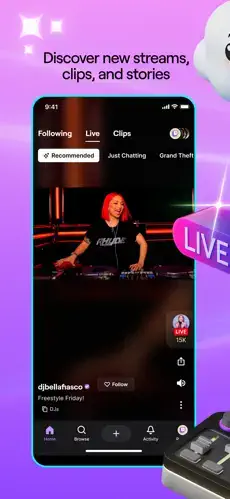
Twitch is a live streaming platform where viewers watch creators play games, chat in real time, stream IRL content, join communities and support creators through Bits and subscriptions.

Twitch holds a 4.7 out of 5 rating from 2.8 million U.S. App Store ratings and earned Apple Editors’ Choice recognition. The download sits at 496 MB, and the age rating is 13+. It is best known for gaming, but it also hosts music, creative work, travel, outdoors and other live content.
What Twitch Actually Is
If you have watched a stream before, you already know the pull. Maybe you have heard about Twitch through a friend, a game you follow or a creator you know from YouTube. Maybe you opened the app and found the interface confusing. Twitch promises live interaction, but the interface does not explain itself.
Users praise the live viewing and background listening, broad content variety, interactive chat, Apple device integration and accessibility features. Critics point to the feed first layout, navigation difficulties, watch streak bugs, player and chat glitches, support concerns, data and privacy concerns and moderation and safety concerns.
The Live Stream Foundation
Watch creators broadcast games, music, creative work, travel and more. Twitch lets viewers experience content in real time. The stream is the center of the experience.
Why does this matter? Because live content creates a shared moment that recorded video cannot replicate. The audience watches together. One reviewer says they prefer Twitch over other live streaming apps, especially for background viewing.
Chat and Real Time Interaction
Send messages while watching a stream. This makes viewing interactive and social. Chat is where the community lives during a stream. Emotes give communities a distinct identity.
Chat is the reason many viewers stay. The game on screen matters, but the conversation alongside it is what keeps people coming back.
Followers, Clips and VODs
Follow streamers to keep up with favorite channels. Save and share short highlights from streams using Clips. Watch past broadcasts after they end using VODs.
This lets viewers catch up on missed streams. The archive layer means live content does not disappear completely. One review notes that the new Home Screen makes it harder to find unfinished streams and older videos.
Channel Points and Loyalty Rewards
Earn points by watching and use them for channel rewards. This adds a light loyalty system. It rewards consistent viewership without requiring payment. Channel specific rewards give viewers something to work toward.
Channel Points are the free path to engagement. They do not replace Bits, but they reward loyalty without spending money.
Bits, Subscriptions and Creator Support
Send optional paid cheers to support streamers using Bits. Support channels and unlock subscriber benefits through Subscriptions. This adds recurring creator support.
The support economy is optional but structured. Users should set a spending budget before engaging with Bits or Subscriptions.
Content Variety Beyond Gaming
Twitch includes gaming, music, creative work, travel and live animal cams. Apple’s Editors’ Choice description highlights League of Legends, Roblox, live animal cams and Bob Ross content.
Broad categories help viewers find streams beyond their usual interests. The platform is not only for gamers, even if it started there.
Apple Device Integration and Accessibility
Supports iPhone, iPad, Apple TV, and SharePlay. Share experiences through FaceTime or Messages. Accessibility tools include VoiceOver, Voice Control, captions, dark interface, contrast and reduced motion.
The accessibility support is listed in the App Store, which is more than many apps disclose. Broad language support includes English and 27 additional languages.
Interface Strengths
Live-first layout with streams and chat at the center. Broad content categories across gaming, music, creative work, travel and live animal cams. Apple device integration through iPhone, iPad, Apple TV and SharePlay.
Accessibility features including VoiceOver, Voice Control, captions, dark interface, contrast and reduced motion. Broad language support with English and 27 additional languages.
Interface Limitations
Feed first layout. A reviewer criticizes the new Feed being the first thing users see when opening the app, saying it can interrupt a stream they already wanted to watch.
Navigation complaints. A review says the new Home Screen feels like Instagram Reels with live streams, making it harder to find unfinished streams and older videos.
Watch streak bugs reported. A user reports that watch streaks stopped displaying or registering properly in-app. This is an individual account report, not confirmation of a general defect.
Player and chat glitches. A user reports chat buffer issues and player control failures when network conditions change or when using tiled apps. Large app size at 496 MB.
How Twitch Works
Browse or follow channels using Browse to find streams by game, category or creator. Watch a live stream and chat with other viewers in real time. Interact with chat using messages, emotes and community conversation. Earn Channel Points by watching eligible streams for channel specific rewards. Support creators with Bits or subscriptions, depending on availability and region. Save highlights using Clips. Watch VODs to catch up on past broadcasts if a channel has them enabled. Use co-op features through FaceTime or Messages.
Twitch User Reviews
Positive themes include live viewing and background listening, broad content variety, interactive chat, Apple device integration and accessibility features. One reviewer says they prefer Twitch over other live streaming apps, especially for background viewing. Apple’s Editors’ Choice description highlights League of Legends, Roblox, live animal cams, and Bob Ross content.
Negative themes include feed-first layout, navigation difficulties, watch-streak bugs, player and chat glitches, support concerns, data and privacy concerns, and moderation and safety concerns. One reviewer says the Feed is the first thing users see when opening the app, which can interrupt a stream they already wanted to watch. Another says the new Home Screen feels like Instagram Reels with live streams. A third reports chat buffer issues, player control failures and stuck menus.

Twitch Tips
For Watching and Discovering
Use Browse to find categories. Browse helps users find streams by game, category or creator. The Browse tab is more reliable than the Home feed for finding specific content. The Home feed pushes what the algorithm wants. Browse shows what you want.
Follow streamers you enjoy. This makes it easier to return when they go live. The notification system is the fastest way back into a favorite channel.
Use clips to save highlights. Clips let viewers save and share short memorable moments. If a stream ends before you finish watching, the clip may already exist. You do not have to sit through a four hour VOD to find the good part.
Use VODs to catch up. Past broadcasts can be watched after they end, depending on channel settings. Not every streamer enables VODs, so check the channel page before assuming the archive exists.
Enable background audio if you want to listen without watching. One reviewer says they prefer Twitch for background viewing. The app does not demand your eyes the way video on demand platforms do.
For Interacting Safely
Use chat intentionally. Send messages, use emotes and participate in community conversation. Chat culture varies by channel. Some are welcoming. Some are not. Finding the right community matters more than finding the biggest one.
Earn Channel Points. Watch eligible streams to earn points for channel specific rewards. These rewards are free and do not require spending money.
Support creators with Bits or subscriptions only if you want to. These are optional purchases. A subscription supports the streamer. A Bit is a one time cheer. Neither is required to enjoy the stream.
Set a spending budget. Bits and Sub Tokens are optional purchases listed in the App Store. Decide your monthly limit before you start cheering. The cheers add up faster than most people expect.
Avoid buying under pressure. If a streak or reward requires a difficult threshold, pause before purchasing. The pressure is part of the design.
Report or block unwanted interactions. Use in-app safety tools if a post, message, or account makes you uncomfortable.
Review privacy and chat settings. Control who can contact you and what information you share.
Twitch Similar Apps
| App | Best For | Difference from Twitch |
|---|---|---|
| KICK | Live streaming and chat | Similar live streaming focus, with a different ecosystem and feature set |
| YouTube | Long form video and creator channels | Better for long form video; Twitch is more focused on live streams and chat |
| TikTok | Short form video discovery and creation | More video algorithm focused; Twitch is more focused on live streams and chat |
| Photos, Stories, Reels and social sharing | More photo and short-video oriented; Twitch is more focused on live streams and chat | |
| Discord | Community chat and voice | More community and voice oriented; Twitch is more focused on live video |
| Medal | Game clipping and sharing | More focused on clips; Twitch is more focused on live streams and chat |
| Likee | Short video and live streams | More short video oriented; Twitch is more focused on live streams and chat |
| Funimate | Music video and motion editing | More editing focused; Twitch is more focused on live streams and chat |
| Alight Motion | Motion design and video effects | More editing focused; Twitch is more focused on live streams and chat |
| Video Star | Music video editing | More editing focused; Twitch is more focused on live streams and chat |
If you want a similar app with a different focus, YouTube is worth a look. It offers long form video and creator channels, and it runs on the same platforms as Twitch.
Twitch’s main differentiator is that it combines live streams, chat, clips, VODs, Channel Points, Bits, subscriptions, emotes and community features in one app. YouTube wins on recorded content and search. KICK wins on a different streaming ecosystem. Discord wins on community voice chat. But if you want one app built entirely around live streaming and real time chat interaction, Twitch occupies a space few others attempt.
Conclusion
Twitch rewards viewers who want live interaction, gaming, music, creative work and community features. It frustrates those who dislike layout changes, chat culture or spending money on Bits and subscriptions. If you want the most complete live streaming platform with real community interaction, Twitch delivers. If you want recorded content or a simpler viewing experience, YouTube may serve you better.
FAQ
Where can I find the official Twitch download?
Twitch is available to download from free from the Official App Store.. The the official website at twitch.tv hosts live streams, account settings, and support resources. The download sits around 496 MB, and the age rating is 13+.
How do I contact Twitch support if I run into a problem?
Twitch handles customer support through the official help portal at help.twitch.tv. The in-app settings menu connects users to reporting tools and troubleshooting guides. For billing issues with Bits or subscriptions through the App Store, Apple Support is the faster route since purchases run through Apple’s system.
Is there a Twitch wiki or community resource I can reference?
Yes. The Twitch Wiki entry for Twitch covers the platform’s origins, Amazon acquisition, and major feature rollouts. For technical help, the official Twitch Help Center remains the most reliable source. For community culture and streamer guides, Reddit and creator forums are the most practical.
What devices and operating systems does Twitch support?
Twitch runs on iPhone and iPad with iOS 15 or later. It also works on Android devices through the Google Play Store, and on Apple TV for living room viewing. The app requires an internet connection for live streams, chat, clips and VODs. The 13+ age rating reflects violence, mature themes, simulated gambling and user generated content. Twitch lists accessibility support including VoiceOver, Voice Control, captions, dark interface, contrast and reduced motion.