TickTick is a productivity app by Appest Limited that combines tasks, reminders, calendar views, habits, countdowns, notes, collaboration, a Pomodoro timer, an Eisenhower Matrix, widgets and AI assisted task capture.

TickTick holds a 4.9 out of 5 rating from 46,000 App Store ratings and carries Apple Editors’ Choice status. The app weighs around 328 MB on iOS, has a 4+ age rating, and runs on iPhone, iPad, Apple Watch and Apple Vision.
Those numbers suggest something rare in productivity software. A tool that people actually stick with. So is TickTick genuinely the all in one productivity app it claims to be, or is it a jack of all trades that does nothing particularly well?
How TickTick Works
Capture tasks manually, through Siri AI, by voice, through email, from Telegram or by pasting a batch list. Organize with lists, tags, priorities, notes, attachments, subtasks and reminders. Schedule with dates, start times, deadlines, recurrence rules, countdowns, location reminders or calendar blocks. View in context through Today, Tomorrow, Next 7 Days, Calendar, Agenda, Kanban, Matrix, Smart Lists or search filters. Focus with the Pomodoro timer and track focus duration. Track habits separately and review statistics or widgets. Collaborate through shared lists, assignments and comments. Review and refine with sorting, grouping, and recurring schedule adjustments.
Why One App for Tasks, Calendar, Habits and Focus Beats Juggling Five
Most people reading this have used task apps before. Maybe Todoist, Apple Reminders, Notion or a paper planner. Maybe there is a calendar app, a separate habit tracker and a Pomodoro timer all fighting for attention on the home screen.
TickTick targets that exact fragmentation. It tries to replace all of them. Users praise the all in one feature set, widget design, calendar tools, habits, focus timer and Eisenhower Matrix. Critics point to login prompts, premium feature gates, and complexity for minimalist users.
The Task Management Foundation
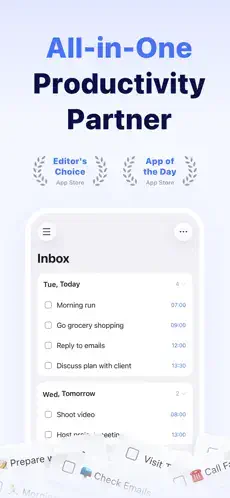
Lists, tasks, subtasks, checklists and notes form the base structure. Tags classify tasks by context, project, person or location. Four priority levels separate critical work from noise. Smart Lists like Today, Tomorrow, Next 7 Days, Assigned to Me and Completed reduce manual sorting. Flexible recurring tasks handle routines, bills, workouts and recurring work.
Why does this matter? Because task management only works when capturing and organizing take less effort than remembering.
Calendar Views and Time Blocking
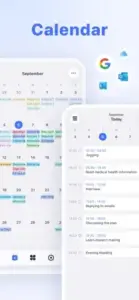
Yearly, monthly, weekly, daily, agenda, multi day, multi week and grid formats give users options for how they see their time. Calendar subscriptions pull in Google, Outlook, iCloud and other external events. Time blocking becomes possible when tasks and appointments live in the same view. Overloaded days become visible before they happen.
Recent updates improved recurring event handling with options to edit only the current event or apply changes to future instances.
Reminders That Actually Fire
Multiple reminders per task. Premium supports up to five. Location reminders trigger tasks based on where you are. Constant habit reminders keep recurring routines visible. Natural language capture reduces task entry friction.
This layer prevents the gap between planning and follow through. A task without a reminder is a task you will probably forget.
Habits, Countdowns and Long Term Tracking
The habit tracker supports streaks, goals and statistics. The countdown tool tracks birthdays, anniversaries, deadlines, and important dates. Free users get up to five habits and five countdowns. Premium removes those limits. Habit widgets show tracking without opening the app.
This is where TickTick moves beyond a simple to do list into routine building territory. It tracks not just what you need to do but who you are trying to become.
Focus Timer and the Eisenhower Matrix
The Pomodoro timer runs 25-minute or customized focus sessions. Focus time can sync to Apple Health through HealthKit integration. The Eisenhower Matrix sorts tasks by urgency and importance. The Matrix helps users focus on what matters rather than what is loudest.
This combination separates TickTick from task apps that stop at checkboxes. It does not just store tasks. It helps you decide which ones deserve your attention.
AI Features and Capture Tools
AI Assistant creates tasks, breaks down projects and organizes lists from a single instruction. AI voice task creation turns spoken requests into structured tasks. Audio summary transcribes and summarizes audio attachments. Siri AI integration lets users create and find tasks hands free.
Users should verify dates, priorities and generated steps before acting on AI output. AI assists the planning process. It does not replace judgment.
Collaboration and Sharing
Shared lists let households, teams and event planners coordinate. Free users get one shared member. Premium allows up to 29. Assign tasks, add comments, attach files and track shared responsibilities. SharePlay support enables collaborative planning through FaceTime or Messages. Email-to-task and Telegram integration extend capture beyond the app.
Widgets, Live Activities and Apple Integration
Home screen and lock-screen widgets for calendar, daily tasks, matrix, habits and focus. Live Activities keep tasks and focus information visible on the lock screen. Extra large widgets display more tasks and schedules without opening the app. Apple Watch support for reminders and quick actions. StandBy and landscape mode support arrived in recent updates.
Free Versus Premium
The free plan covers basic personal productivity. Premium unlocks up to 299 lists, 999 tasks per list, 199 subtasks per task, five reminders per task, more habits and countdowns, custom Smart Lists, grid calendar view, calendar subscriptions and expanded sharing.
App Store listings show TickTick Premium at $4.99 per month** or **$49.99 annually. Heavy planners will hit free tier limits quickly. Casual users may not.
Design Strengths
Highly customizable visual layout with colors, tags, lists and views. Strong widget design praised by reviewers. Light and dark mode support. Multiple task views including list, calendar, agenda, Kanban, grid, Matrix, focus and habit. Apple device integration through Siri, Live Activities, StandBy, Apple Watch and SharePlay. Editor improvements with formatting, highlighting, collapsible headings and smaller font options.
Design Limitations
Feature overload for beginners. The app includes tasks, reminders, calendar, habits, focus, countdowns, Smart Lists, Matrix, AI, collaboration and integrations. New users may need time to find the right workflow.
Cloud first concern. One reviewer wanted easier local or offline only use without repeated login prompts. Accessibility disclosure is incomplete. Appest Limited has not indicated supported Apple accessibility features. Premium boundaries can feel arbitrary when basic planning features sit behind a paywall.
TickTick User Reviews
Positive themes include the all in one productivity system, high quality widgets, batch import, simple but powerful interface, personalization, habit gamification, affordable Premium and frequent updates. One reviewer called it “THE ONE,” citing a focus timer, Eisenhower matrix, task management, habit tracker, mood tracker, customizable reminders, notes management and calendar in a single app.
Negative themes include repeated sign-in requests, complexity for minimalist users, premium feature gates, and AI caution. One reviewer said: “The only thing that needs to be changed is when they ask you to login every time you refresh.”