
Diarly promises to make journaling stick. You want to journal. You know it is good for you. Less stress. More clarity. Better memory. Science backs this up. But you have tried before. You buy a beautiful leather notebook. Write for three days. Stop. The blank pages stare at you. You try a free app from the App Store. The ads annoy you every few sentences. The interface is ugly and cluttered.

Diarly promises something different. Private, so your thoughts stay yours. Beautiful, so you want to open it. Flexible, so you can write your way. The question is whether it finally makes journaling stick for good.
Journaling apps exploded as people looked for mental health tools during stressful times. Day One led the premium market with rich features and a large community. Journey focused on cross platform support for Android and Windows users. Penzu emphasized privacy with email based entries. Diarly combined beautiful design, strong privacy, and rich media in one app. It was built for people who care about how their journal looks and feels.
Diarly is not just a digital notebook where you type and forget. It is a personal archive of your life. You write entries with a distraction free editor. You add photos and videos to capture moments words cannot describe. You see your life plotted on a map or spread across a timeline. You lock everything with encryption so only you can read it. Understanding the features helps you build a journaling habit that actually lasts beyond January.
Diarly app holds a 4.7 star rating on the App Store based on over 1.4K reviews. Size sits around 165 MB depending on cached content. Age range stretches from young adults documenting their daily lives to older users preserving family memories. If you prefer a journaling app with a larger community and more features, Day One offers a premium experience
What Is Diarly ?
A private journaling app for iPhone, iPad, and Mac. Simple daily reflection without complexity. Strong privacy with optional encryption for your entries. Rich customization with themes and fonts. Flexible media based entries with photos, videos, and audio notes. One app for all your journaling needs.
People who want a digital diary with real privacy protection. Writers who prefer markdown formatting over rich text editors. Anyone who wants to add photos and videos to their memories, not just text. Those who want to see their life on a map or calendar over time. People who have tried other apps and given up.
Diarly balances simplicity and depth in a way few apps achieve. It feels lightweight when you are writing, with no distractions or clutter. But it also supports structured journaling through calendar views, map views, timeline views, tags, reminders, and import tools from other journal apps.
Free unlimited entries with basic features including text formatting and one device. Premium adds sync across Apple devices, end to end encryption, export options, AI tools, and audio transcription.
Diarly 2026 : What’s New
Daily Prompts
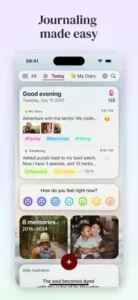
Get prompts to make journaling easier on busy days when you have nothing to write. Weather automatically added to entries. Location data from where you are. Calendar events from your schedule. Health data integration from Apple Health. The prompts give you something to write about even on uninspired days.
Calendar View
See your entries on a monthly calendar at a glance. Spot gaps where you did not write for days or weeks. Jump to any day to read what you wrote.
Map View
See entries plotted on a world map. Great for travel journals where you want to remember locations. Zoom into specific cities. See where you wrote about that trip to Paris or Tokyo.
Timeline View
Scroll through entries in chronological order like a story. See your life unfold as you swipe. The view is simple but powerful.
Media Attachments
Unlimited photos, images, videos, and audio notes. Annotation tools for pictures and PDF documents. Rich media makes entries more memorable than text alone.
Tags
Organize entries by topic with custom tags. #gratitude for thankful moments. #travel for trips. #work for career reflections. #health for fitness and wellness. Filter by tags to see patterns in your life.
Import Support
Import from Day One, Penzu, Evernote, WordPress, MacJournal, Journey, Momento, Chronicle, Stoic, and more. You do not have to start from scratch when switching.
Diarly Core Features:
Writing Interface
Clean, distraction free editor with no toolbars or sidebars. Markdown support for fast formatting. Bold, italics, lists, headers, all with simple symbols. The editor stays out of your way so you can write.
Rich Media
Add unlimited photos from your photo library. Take new photos within the app using the camera. Record audio notes for voice journaling. Attach videos and PDFs for important documents. Annotate images with drawing tools.
Privacy and Security
Optional encryption for your entries using industry standards. Password lock for the app with Face ID or Touch ID support. Your journal stays yours. No one else can read it.
Calendar View
See entries on a month calendar with dots indicating writing days. Jump to any date to read that day’s entry. See writing streaks at a glance.
Map View
Entries plotted on a world map with pins. Zoom into specific locations. Tap a pin to read what you wrote there. Great for travel memories.
Timeline View
Chronological scroll through all entries in order. Swipe through your life like a book. The view is simple and powerful.
Tags
Add custom tags to any entry. Filter the timeline or map by tags. See all entries about travel or work or health or gratitude.
Reminders
Set daily reminders to write at a specific time. Choose frequency and time. The reminder helps build the habit until it becomes automatic.
Statistics
Track your writing streaks day by day. See how many entries per month and per year. See total word count. The stats show your consistency.
Search
Search by text in entries. Search by tags you created. Search by location data. Find old memories quickly without scrolling.
Diarly Privacy and Security
End to End Encryption
Optional encryption for your entire journal is available. Your entries are encrypted on your device and in iCloud storage. No one else can read them, not even Diarly.
Password Lock
Lock the app with a password of your choice. Face ID and Touch ID supported for convenience. The lock prevents access if someone has your phone.
Local Storage
Entries stay on your device and your private iCloud account. No company servers are involved. Diarly cannot read your entries even if they wanted to.
No Ads
The free version has no advertisements whatsoever. The experience is clean and focused. Your journal is never interrupted.
Private by Design
No social features are built into the app. No sharing feeds. No public profiles. The app is for you and you only.
Export Options
Export your journal as PDF, plain text, or JSON format. You own your data completely. You can leave anytime.
Diarly Graphics and Design
Visual Style
Minimalist and calm throughout the app. Clean lines with plenty of white space. The writing experience is distraction free and peaceful.
Themes
Dark mode for night writing in bed. Light mode for daytime writing at a desk. Custom themes available in premium. Choose what is easy on your eyes.
Typography
Multiple font options including serif and sans serif. Adjustable font size for readability. Good typography makes reading your own journal pleasant.
Layout
Three column layout on iPad for efficient navigation. Two column on Mac for desktop writing. Single column on iPhone for focus. Adapts to your device.
Media Display
Photos appear inline within your entries. Videos play within the app without leaving. Audio notes have standard player controls. The media is integrated seamlessly.
Animations
Subtle transitions between views. Gentle page flips. No jarring movements or effects. The app feels smooth and polished.
Performance
Runs on most iPhones from iPhone 8 and newer. Syncs via iCloud automatically. The app is fast and responsive.
Diarly Similar Apps
You have choices in the journaling space. The App Store lists several options, each with different strengths. The table below shows where Diarly fits among the competition.
| App | Main Similarity |
|---|---|
| Day One | Premium journaling and rich media entries |
| Journey | Cross device journal organization |
| Penzu | Private diary and writing focused tools |
| Stoic | Reflection, mood, and self care journaling |
| Daylio | Mood tracking with lightweight journal entry features |
The Differentiation
Day One has the largest user base of any journaling app. More features including multiple photos per entry and advanced printing. Higher price for premium. Journey focuses on cross platform including Android and Windows devices. Penzu emphasizes privacy with email based entries and military grade encryption. Stoic combines journaling with mental health exercises like breathing and gratitude. Daylio is lightweight mood tracking with minimal writing, just tapping icons.
Diarly stands out for its balance of beautiful design, strong privacy, and fair pricing. The import tools make switching from other apps like Day One or Penzu easy. You do not lose your history.
If you search Diarly similar apps, these five appear most often. Each does something well. Diarly does beautiful design and privacy better than most.
Diarly Free vs Premium
Free Version
Unlimited entries with no cap on how much you write. Basic text formatting with markdown support. One device only, no syncing across iPhone, iPad, and Mac. No encryption for your entries. No export options for your data. Basic themes only. Enough for casual journaling on a single device.
Premium Version
Sync across iPhone, iPad, and Mac so your journal is everywhere. End to end encryption for privacy. Export to PDF, text, or JSON formats. Custom themes for personalization. Advanced typography options. Audio transcription for voice notes. AI powered insights about your writing. Statistics and streaks to track consistency.
Premium Plus
Adds even more features beyond standard premium. Advanced AI for deeper insights. More export options. Priority support for faster responses.
Price
Monthly subscription available. Yearly subscription at a discount. One time purchase option for lifetime access without recurring fees.
Value Proposition
Free version is generous for users with one device. Premium is worth it for sync across Apple devices and encryption for privacy.
Importing from Other Apps
Supported Apps
Day One is fully supported. Penzu works. Evernote imports easily. WordPress blogs can be imported. MacJournal is supported. Journey works. Momento is supported. Chronicle works. Stoic is supported. And more. The list of supported apps is extensive.
How It Works
Export your entries from the old app in a compatible format. Open Diarly and use the file import menu. Your entries are preserved with their original dates. The process takes minutes.
What Transfers
Entry text comes across intact. Entry dates are preserved exactly. Photos and videos attached to entries transfer. Tags you created transfer. Location data from where you wrote transfers. The import preserves all metadata.
Why Switch
Better design that is more pleasant to use. Better privacy with optional encryption. Fairer pricing without subscription fatigue. The import tool removes the barrier to switching.
Manual Import
Add old entries manually if import is not supported for your app. Copy and paste text from old entries. Add photos one by one. The process is slower but works.
Diarly Tips and Tricks for 2026
Use Daily Prompts to Make Journaling Easier on Busy Days
Prompts give you a starting point when you have writer’s block. Weather from your location appears automatically. Calendar events from your schedule appear. Write about what happened today.
Add Location, Weather, and Calendar Data to Make Entries More Detailed
The data adds context that text alone cannot convey. Years later, you will remember the weather on that day. You will remember where you were. The data enriches your memories.
Use Markdown Formatting for Fast, Clean, Structured Notes
Markdown is faster than clicking toolbar buttons. Use hashtags for headings like # Heading. Use asterisks for bold like bold text. Use dashes for lists. The formatting is simple.
Import Old Journals Instead of Starting from Scratch
Bring your past entries with you. Do not lose your history from other apps. The import tool works well for most supported apps. Your journal stays complete.
Enable Encryption or Password Lock if Privacy Is Your Main Concern
Keep your journal private from anyone else. No one can read your entries even if they have your phone. The lock gives you peace of mind.
Use Timeline and Map Views to Revisit Memories by Date or Place
See your life as a story unfolding over time. See where you traveled on a map. The views are powerful for reflection.
Attach Photos, Audio Notes, or PDFs to Build a Richer Personal Archive
A photo is worth many words in an entry. Record audio of your child’s laugh. Attach PDFs of important documents like medical records. The media makes entries richer.
Set Reminders or Goals to Build a Consistent Writing Habit
Write every day even if only one sentence. The habit is more important than the length of the entry. Consistency transforms journaling.
Use Tags to Organize Entries by Theme
Tag entries as #gratitude for thankful moments. #travel for trips. #work for career reflections. Later, filter by tag to see patterns in your life. What do you write about most?
Write for Yourself, Not for an Audience
No one else will ever read your journal. Be honest about your feelings. Be vulnerable about your struggles. The journal is for you only.
Diarly Common Issues and Fixes
Sync Not Working
Check iCloud settings on all your devices. Ensure you have Premium subscription for sync. The free version is limited to one device only.
Import Fails
Check the file format of your export. Use a supported export format from the old app. Contact Diarly support for help with specific apps.
Encryption Issues
Remember your encryption password carefully. A lost password cannot be recovered. Keep it stored somewhere safe.
Photos Not Showing
Check the file size of your photos. Large photos may take time to load from iCloud. Compress images if needed.
App Slow
An older device may struggle with large journals. Close other running apps. Update iOS to the latest version. Restart your device.
Diarly Integration
Apple Health
Write about your workouts in your journal. Health data appears automatically in entries. See how exercise affects your mood over time.
Apple Calendar
Calendar events appear as prompts when you write. Write about meetings and appointments you attended. The context helps you remember.
Apple Shortcuts
Automate journaling with Shortcuts app. Create entry templates for different moods. Log data automatically from other apps.
Weather
Weather data automatically added to each entry. Know if it was raining on your wedding day. Know if it was sunny for that hike.
Location
Location data from your device appears in entries. See where you were when you wrote. Great for travel memories.
Focus Modes
Integrates with iOS Focus modes. Journal during your reading focus or personal time. The app respects your focus settings.
Conclusion: Should You Use Diarly in 2026?
The honest answer is yes, if you want a beautiful, private journaling app that you will actually use. Diarly balances simplicity and depth better than competitors. The free version is generous enough for most users. Premium adds sync across Apple devices and encryption for privacy. The import tools make switching from other apps easy without losing your history. The app is built for people who want to write.
What works: Beautiful, distraction free design that encourages writing. Strong privacy with optional encryption. Rich media with photos, videos, and audio notes. Multiple views including calendar, map, and timeline. Import from many other journal apps. Fair pricing with a free tier. Free version is generous for single device users.
What does not: Sync across devices requires Premium subscription. Some advanced features need Premium. Import can be finicky with certain file formats. Smaller community than Day One with fewer shared templates.
What do you want from a journaling app? If you want beauty, privacy, and flexibility in how you write, Diarly delivers. If you want the largest community and most pre built features, Day One may fit your needs better.
Frequently Asked Questions About Diarly
Is Diarly free to use?
Yes. Diarly is free to download and use. The free version includes unlimited entries, basic text formatting, and support for one device. You can journal as much as you want without paying. Premium adds sync across iPhone, iPad, and Mac, end to end encryption, export options, and custom themes. You can start your Diarly download from the Official App Store.
Can I import my old journal entries from other apps like Day One?
Yes. Diarly supports importing from Day One, Penzu, Evernote, WordPress, MacJournal, Journey, Momento, Chronicle, Stoic, and more. Export your entries from the old app, then import them into Diarly. Your text, dates, photos, tags, and location data are preserved. The import tool makes switching easy.
Is my journal private and secure?
Yes. Diarly offers optional end to end encryption for your entries. You can also lock the app with a password, Face ID, or Touch ID. Your entries stay on your device and your private iCloud account. No company servers are involved. Diarly cannot read your entries. The free version has no ads.
What is the difference between Diarly and Day One?
Day One has a larger user base and more built in features like multiple photos per entry and advanced printing. Higher price. Diarly focuses on beautiful design, strong privacy, and fair pricing. Diarly offers end to end encryption and a generous free version. Import tools let you switch from Day One easily.
Where can I find official information and get support if I have issues?
The official Diarly website has information about features and updates. The Diarly Help Center answers common questions about sync, import, and encryption. For technical problems or account issues, contact Diarly support through the website. Official website: https://diarly.app