
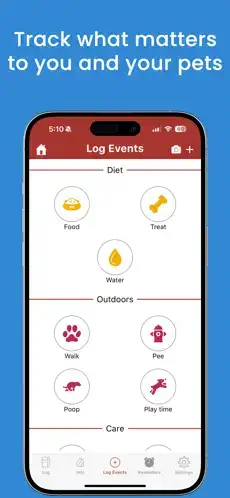
DogLog is not a game about virtual pets. It is a practical tool for real ones.

DogLog app helps dog owners, families, walkers, and sitters log walks, food, medicine, training, sleep, and notes in one shared place. No more texting “did you walk the dog?” or guessing when the last meal happened. Everyone sees the same updates instantly. The Pack system brings all caretakers together. The statistics page shows trends over time. DogLog turns daily pet care into a coordinated routine that everyone involved can follow.
What Exactly Is DogLog?
DogLog is a pet tracking app designed for dog owners who share care responsibilities with others. Think of it as a shared dashboard for your dog’s daily life, one that keeps everyone informed without constant messages.
The core idea is shared visibility. Everyone in your Pack sees the same activity feed. Walk logged at 8 AM. Breakfast at 8:15. Medicine given at 9. No confusion. No repeated questions. The app tracks walks, feeding, medication, training sessions, sleep patterns, and custom events. You can also add comments to clarify unusual behavior or training progress.
This makes DogLog useful for more than just dogs. The Google Play listing confirms support for cats and other pets too. The name says dog, but the app adapts to whatever animal needs care.
DogLog holds a 4.8 star rating on the Google Play Store from over 1,800 reviews. The app size is roughly 40 MB depending on your device. Age rating is Everyone with no objectionable content. For a similar experience, check out DogNote.
Who Benefits Most From Using DogLog?
DogLog is not for everyone. But for certain people, it becomes essential.
Households with multiple pet owners are the primary audience. When two or three people share responsibility for a dog, coordination gets messy. DogLog eliminates the “I thought you fed them” argument.
Couples splitting pet duties find the app helpful for the same reason. You can both log activities and check what the other person already did. No double feeding. No missed medications.
Dog walkers and pet sitters also benefit. Instead of leaving written instructions, owners can share their Pack with the sitter. The sitter logs walks, feedings, and notes. The owner checks in remotely. Everyone stays on the same page.
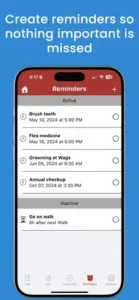
Anyone managing medication schedules or vet appointments will appreciate the reminder system. Set a notification for a monthly flea treatment or an annual checkup. The app handles the remembering so you do not have to.
Core Features That Define DogLog
Pack Sharing System for Multiple Caretakers
Invite everyone involved in your dog’s care into one shared Pack. Partners, kids, pet sitters, and walkers all contribute to the same feed. No separate apps. No confusion.
Activity Logging With Comments
Log every activity with optional comments. Add context to a walk, note unusual behavior after a meal, or track training progress. Comments make each log more useful.
Notifications When Activities Are Logged
Everyone in the Pack gets notified when an activity is logged. No need to check the app constantly. Updates come to you.
Reminders for Chores, Medications, and Appointments
Set reminders for vaccinations, vet visits, grooming, and medication schedules. The app notifies everyone in the Pack. No one forgets.
Statistics Page for Trends and Routine Insight
The statistics page turns your logs into useful data. See eating patterns, sleep trends, and walk frequency over time. Spot changes before they become problems.
Photo and Message Sharing
Add photos to any log. Share messages with other caretakers. The app becomes a communication hub alongside a tracking tool.
Data Export for Vet Visits
Export the full activity history. Hand it to your vet during checkups. They see eating patterns, medication schedules, and weight changes in one document.
Profile Sharing With Security Controls (PIN, Expiration)
Share your dog’s profile securely with sitters or walkers. Set a PIN for access. Add an expiration date so access ends automatically after the sitting period.
DogLog Graphics and Visual Design
DogLog uses an easy to use interface focused on speed, clarity, and low stress for everyday logging. This is not a flashy app. It does not need to be. The design prioritizes practical organization over decorative visuals.
Everything is structured around Packs, activities, reminders, and stats. You open the app and immediately see today’s activity. Logging an event takes seconds. The layout reduces friction for busy pet owners who do not have time to navigate complex menus.
The design appears practical rather than flashy, which fits an app used for repeated daily check ins and shared care coordination. The clean layout helps users find what they need quickly.
How DogLog Works (The Daily Flow)
The daily flow is simple. Create a Pack and invite caretakers. Log an activity. Add notes or photos if needed. Everyone in the Pack sees the update immediately.
Over time, statistics build up. The app turns your logs into trends. Eating patterns emerge. Sleep schedules become clear. Walk frequency shows up in graphs.
Reminders trigger automatically based on your settings. A notification appears when it is time for a walk, feeding, or medication. Tap it. Log the event. Move on with your day.
The app supports follow up actions through search, filters, and exports. That makes the care record more useful over time, not just a daily log.
What Users Say about DogLog App
User feedback appears very positive overall. One App Store review called DogLog “substantially well put together” and praised its ease of use and customizability.
That same review highlights the Pack feature as especially useful for multiple people contributing to a dog’s care. The reviewer noted how the app eliminated the constant back and forth about who did what.
The Google Play listing shows a strong rating of 4.6 from over 1,100 reviews. That is a high score for any utility app and suggests broad approval from users.
Users consistently value the organization and shared coordination. Reviews mention how the app simplifies household communication. The statistics page also gets positive mentions for helping owners spot trends.
Tips to Get the Most From DogLog
You could just download DogLog and start logging. But a few DogLog tips will help you unlock its full potential and keep your household perfectly coordinated.
Set up the Pack early. This is the most important step. Invite every person involved in your dog’s care before you log anything. Partners, kids, pet sitters, dog walkers. Everyone needs access from day one.
Use custom events for dog specific habits. The app includes standard options like walks and feedings. But you can create custom events for anything else. Training milestones. Medication schedules. Grooming appointments. Behavior notes. Make the app match your dog’s unique needs.
Log meals, walks, and medicine consistently. The statistics page only becomes useful with consistent data. Log every meal. Every walk. Every dose. Over time, patterns emerge that help you spot changes early.
Add comments to clarify unusual behavior. A comment like “seemed lethargic after walk” or “ate slower than usual” adds context that numbers alone cannot provide. Comments turn raw logs into useful history.
Turn on reminders for vaccinations and appointments. Set them once. The app notifies everyone in the Pack. No one forgets annual checkups or monthly flea treatments.
Export records before vet visits. The export feature compiles everything into a clean document. Eating patterns. Medication schedules. Sleep history. Notes. Give it to your vet at checkups. They get a complete picture without asking twenty questions.
Use profile sharing for sitters and walkers. When you hand your dog to a sitter, share your DogLog profile with them. Set a PIN for access. Add an expiration date so access ends automatically after the sitting period. Secure and simple.
Review statistics page for trends. The statistics page turns your logs into useful data. See eating patterns, sleep trends, and walk frequency over time. Spot changes before they become problems.
Apps Like DogLog
If DogLog does not fit your needs or you want to compare options, you have alternatives. The best DogLog similar apps share the same focus on Pack sharing, reminders, stats, and exports.
| App | Main Similarity |
|---|---|
| DogNote | Pet journal with Family Hub and activity feed |
| PetNoter | Shared pet care coordination with notes and photos |
| Pet Note | Simple tracking for walks, feedings, and medication |
| 11pets Care | Comprehensive pet health tracker with vet records |
| Pawtrack | GPS tracking plus care logging for active dogs |
None of these replace DogLog exactly. Each has strengths. DogNote offers strong family coordination. PetNoter focuses on simplicity. 11pets Care includes detailed medical record storage.
For most families, DogLog strikes the best balance between features and ease of use. The Pack system and statistics page are standout features that many competitors lack.
If you want something simpler, Pet Note works well for single caregivers. If you need more medical detail, 11pets Care goes deeper. But for shared household coordination with trend tracking, DogLog remains one of the strongest options.
DogLog Community
DogLog is not a social network. You will not find public feeds, followers, or sharing buttons. The app focuses on something more useful for pet owners. Private coordination.
The Pack system is the core social feature. Every caregiver sees the same activity feed. Everyone can log events. Everyone receives notifications. That shared visibility creates accountability without anyone feeling watched. You are not checking on each other. You are checking the app.
This works especially well for couples and households. No more “I thought you walked the dog” arguments. The app shows who did what and when. It removes the guesswork from shared pet care.
Pet sitters and dog walkers can join temporarily. Share your profile with them. Set a PIN. Add an expiration date. They log activities. You check in remotely. When you return, their access ends automatically.
There is no public sharing. No social media integration. No way for strangers to see your dog’s data. That is intentional. Pet care involves medication schedules, health notes, and personal routines. That information should stay private.
Conclusion
DogLog solves a simple problem that most dog owners do not realize they have. Coordinating pet care across multiple people is harder than it looks. This app makes it look easy.
The strongest angle is clarity. Everyone sees the same information. Notifications keep everyone updated. Statistics build a complete picture over time. The export feature gives you a complete record for vet visits. All of this adds up to less stress and more confidence in your dog’s care routine.
Who should download it? Households with two or more dog caregivers. Couples who split pet duties. Anyone managing medication schedules or vet appointments. Dog sitters and walkers who want clear communication with owners. People who have ever texted “did you walk the dog?” and waited for a reply.
Who should skip it? Single dog owners with no shared responsibilities. People who prefer pen and paper tracking. Anyone who does not want to log daily activities. Users looking for a social pet community or entertainment.
DogLog is not flashy. It does not need to be. It is a practical tool for practical people. If you have ever felt overwhelmed by pet care coordination, this app will probably help. Try it for a week. See if the arguments about who walked the dog disappear. They probably will.
FAQ
Where can I get DogLog download for my phone?
You can find DogLog download from the Official App Store.
Is there an official website or help page where I can learn more about the features?
Yes. The official DogLog website is here: Official DogLog Website. You will find detailed guides, feature breakdowns, and setup instructions. The site also explains the Pack system and how to invite multiple caregivers.
I have a question about my account or ran into a bug. Who do I contact for support?
Visit contact page at developer website https://www.doglogapp.com/contact-us .
Can I use DogLog for multiple pets, or is it only for one dog?
The app supports multiple pets. You can create separate profiles for each dog, cat, or other animal in your household. Each pet has its own activity log, reminders, and statistics page. Switch between profiles easily from the main screen.
What happens to my data if I switch phones or lose my device?
Your data syncs to the cloud if you create an account. Log in on your new phone and everything reappears. Logs, reminders, Pack members, and statistics all transfer over. No data loss. No manual backups needed.