
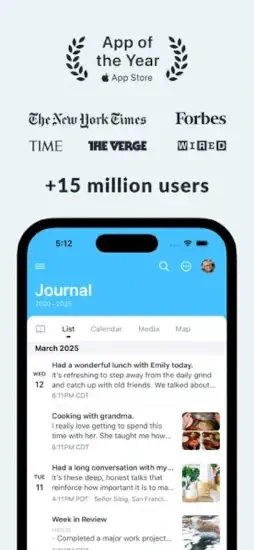
Day One waiting for you to finally start that journal. You have tried journaling before. You bought a nice notebook with a leather cover. You wrote for three days. Then you stopped. The notebook sits on your shelf. Blank pages staring back at you every time you walk by.

Day One is a memory preservation tool. Multiple journals for different parts of your life. Rich media attachments that capture more than words. Automatic context like location and weather that makes entries vivid years later. Search and tags to find anything you wrote. Understanding how to use it helps you build a journaling habit that actually lasts beyond the first week.
The app holds a 4.8 star rating on the App Store based on over 117,000 reviews. Size sits around 335 MB depending on cached content. Age range stretches from young adults documenting their lives to older users preserving family memories. If you prefer a free journaling app built into your phone, Apple Journal offers basic journaling.
What Is Day One?
A digital journaling app. Record daily thoughts, photos, audio, video and locations in a private diary. Create multiple journals for different parts of your life. Organize with tags and search. Revisit memories through calendar views. The app is built for reflection, not productivity.
The Writing Experience That Removes Excuses
Day One’s editor is built for speed. Rich text formatting, Markdown support and a clean layout mean you spend more time writing and less time fighting the interface.
The app captures context automatically. Location, weather, moon phase, step count and even the currently playing song attach to entries without manual input. This data turns a simple note into a memory with texture.
Templates and prompts reduce the friction of starting. The prompt library covers reflection, gratitude, fitness and creativity. You can answer in two sentences or twenty. The goal is consistency, not perfection.
Audio recording with transcription is the quiet hero. Tap the microphone, speak your mind and the app converts it to text. This feature works well for people who journal during commutes or before sleep.
The Memory System That Keeps You Coming Back
“On This Day” resurfaces past entries with photos, audio and location data. This feature transforms journaling from a one way archive into a loop of reflection. You write today. You revisit a year from now. The habit reinforces itself.
Streaks and reminders build consistency without guilt. The app nudges you with notifications. You can set reminders through text message or phone notifications .
Unlimited journals and collections (Silver and Gold) let you separate work, personal, travel and gratitude logs. Each journal has its own color and name. You can view them individually or as a unified timeline.
Printed journals turn digital entries into physical keepsakes. Paid users get a discount on printing. Silver members get 25 percent off. Gold members get 35 percent off .
Privacy and Sync Without the Hand Waving
End to end encryption protects paid tiers. Your entries stay yours. Even the free tier includes encryption.
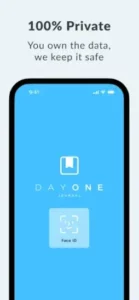
Passcode and biometric lock add another layer. Sensitive entries stay behind Face ID or a passcode.
Cross-platform sync works across iOS, macOS, Android and web on Silver and Gold plans. Free users get access on one device.
Optional data export keeps your archive portable. You can export in PDF, JSON or plain text. Day One encourages regular backups for continuity .
Pricing That Separates Casual Writers From Serious Archivists
Basic (Free) includes unlimited text entries, unlimited journals, one photo per entry, daily prompts, templates, On This Day memories, streaks and end to end encryption .
Silver ($49.99 per year or $8.99 per month) adds unlimited photos and videos (up to 30 per entry), sync across all devices, audio recording and transcription, PDF embedding, drawings, Strava and Zapier integrations and 25 percent off printed journals.
Gold ($74.99 per year) adds Daily Chat for guided reflection, reflective AI summaries, Go Deeper prompts, entry summaries, title suggestions, image generation and 35 percent off printed journals.
Legacy plan transitions have frustrated long time users. Shared journals may require a current subscription. Know what you are signing up for (always check the website for the latest changes in prices.
AI Features That Support Reflection Without Replacing Your Voice
Gold tier unlocks Daily Chat. This feature offers a guided, conversational way to reflect on your day. Instead of staring at a blank page, you talk through what happened and the app helps shape it into an entry.
Entry summaries help you spot patterns across weeks and months. The AI reads your entries and surfaces themes you might have missed.
Smart title suggestions save time on naming entries. The AI proposes titles based on content.
Image generation adds visual context when words fall short. You describe a scene and the app creates an image to accompany it.
AI features are optional. When you use them, your content is processed only at that moment and is never used to train AI models. Use AI sparingly. The goal is to deepen reflection, not outsource it.
Day One Tips To Help You Build the Habit
Building a journaling habit with Day One app does not require willpower. It requires systems that make writing easier than skipping it. Here is what works.
Start small and lower the bar. Write two or three sentences daily. That is enough. The Day One tips that matter most revolve around consistency, not volume. Use the built-in prompts when the blank page feels heavy. The Daily Prompt Library offers questions like “What made me smile today?” or “What am I avoiding?” Answer in one sentence if that is all you have. The app does not grade you.
Create templates for recurring entries. Morning routines, evening reflections, trip logs, gratitude lists. Templates remove the decision of what to write about. Open the app, select a template, fill in the blanks. Speed matters when motivation dips. Day One allows unlimited templates on all tiers.
Enable automatic context. Let location, weather, and activity enrich entries without extra effort. The app captures this data silently. You do not think about it. Later, you see that you wrote about feeling grateful on a sunny day after a long walk, and the details add texture to the memory.
Check “On This Day” weekly. Seeing past entries reinforces why the habit matters. You wrote something six months ago that you forgot. The app resurfaces it. That moment of recognition is the reward that keeps you writing.
Add a photo or quick audio note when text feels hard. Multimedia entries often capture more than words alone. A single photo of your desk at 11 PM says more than a paragraph about working late. Audio transcription means you can speak your entry and let the app convert it to text.
Protect privacy with passcode lock and encryption. If you write about sensitive topics, enable Face ID or a passcode. End to end encryption is included on all tiers. Your entries stay yours.
Export periodically. Even the best apps benefit from a personal backup. Day One allows export in PDF, JSON, or plain text. Do this monthly if your archive matters to you. It takes two minutes and prevents heartbreak.
Try AI features on Gold sparingly. Daily Chat and entry summaries can spark reflection. Use them when you feel stuck. Do not let them replace your own voice. The goal is to deepen your journaling, not outsource it.
Day One Similar Apps
| App | Best For | Main Difference from Day One |
|---|---|---|
| Journey | Android and web households | Similar multimedia journaling, strong cross platform support, subscription based |
| Diarium | One time purchase preference | Voice to text, varied media, no subscription required |
| Grid Diary | Structured prompts | Grid based questions, less long form focus, good for quick daily check-ins |
| Stoic | Philosophy grounded routines | Morning and evening prompts, mood logging, calm design |
| Reflectly | AI guided mood check-ins | Lighter, gamified approach, less emphasis on long form media archive |
| Penzu | Privacy first web journaling | Strong privacy focus, web centric, simpler media support |
| Apple Journal | Native iOS simplicity | Built-in, calm, less multimedia depth than Day One |
| Jour | Adaptive AI conversation | Conversational AI rather than static prompts |
| Presently | Gratitude-specific journaling | Focused on gratitude, less general-purpose |
| Gratitude Genie | Gratitude plus mood tracking | Gratitude centric, less multimedia archive |
Day One sits at the top for long form, multimedia journaling on iPhone and beyond. The New York Times Wirecutter named it the best journaling app for most people, and that recommendation holds.
Journey competes well on Android and web. It offers similar multimedia support and cross platform sync. If you live in a mixed device household, Journey deserves a look.
Diarium appeals to people who refuse subscriptions. Pay once, own it forever. The voice to text feature works well, and the media support is solid. If subscription fatigue is real for you, Diarium is the answer.
Grid Diary works for people who want structure without a blank page. The app presents a grid of prompts each day. Fill in the boxes. Done. Less long form, more daily check-in.
Stoic brings philosophy into the routine. Morning and evening prompts draw from Stoic principles. Mood logging and calm design make it feel less like an app and more like a ritual.
Reflectly takes a lighter approach. AI-guided mood check-ins and a gamified interface appeal to people who want journaling to feel less heavy.
Penzu focuses on privacy. Web first, simple media support, strong encryption. If you journal mostly on a computer, Penzu works.
Apple Journal offers a native iOS experience. It is built into the ecosystem, calm and simple. But it lacks the multimedia depth and cross platform reach of Day One.
Day One remains the clearest answer for someone who wants a serious, durable journal that grows with them. The app does not try to be everything. It tries to be the best at one thing. Capturing your life with enough richness that you will want to revisit it years from now.
Conclusion
Remember the tension from the beginning. Most journaling apps fail because they add friction instead of removing it. They ask you to decide what to write, where to write it and how to format it. Day One removes those decisions. One tap. One page. One entry.
Day One rewards people who want to build a long term archive of their lives. It punishes those who expect premium features without paying or who need flawless sync on a free plan. The app does not hide its pricing. It does not pretend the free tier is enough for everyone.
If you have tried journaling before and quit, the problem may not have been you. It may have been the tool. Day One asks a simple question. Are you willing to write two sentences a day to build something you will thank yourself for in ten years?
Download the free version. Write for a week. See if the habit sticks. The question is not whether Day One is the best journaling app. It is whether you are ready to start.

Frequently Asked Questions About Day One
Is Day One free to use?
Day One has a free version with basic features. The free version includes one journal, text only entries, basic search, and no cloud sync. Premium adds unlimited journals, photos, audio, video, cloud sync, encryption, templates, and export options. The free version lets you test the habit before paying. Premium is worth it for serious journalers. You can start your Day One download from the App Store.
What is the difference between Day One and Apple Journal?
Apple Journal is free and built into iOS, but has fewer features. Day One offers multiple journals, audio and video attachments, automatic location and weather data, end to end encryption, cross platform sync with Android and Mac, and export to PDF or printed books. Apple Journal is good for basic text journaling. Day One is for people who want rich media, organization, and long term memory keeping.
Can I add photos, audio, and video to my journal entries?
Yes, but photos, audio, and video attachments are premium features. Free users can only add text. Premium users can attach unlimited photos, record voice memos directly in entries, and add video clips. The media becomes part of the memory and appears inline when you read entries later.
Is my data private and secure?
Yes. Day One uses end to end encryption for premium users. Your entries are encrypted before they leave your device. Day One cannot read your entries. The company does not sell your data. No ads. No tracking. The free version has basic encryption. Premium adds full end to end encryption.
Where can I find official information and get support if I have issues?
The official Day One website has information about features, pricing, and company updates. The help center answers common questions about sync, backups, and account issues. For technical problems or subscription questions, contact Day One support through the website. Official website: https://dayoneapp.com