
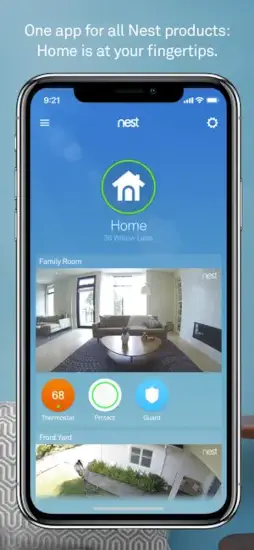
Nest official mobile app by Nest Labs (now part of Google) lets you control and monitor your Nest smart home devices from one place.

Nest can control Thermostats. Cameras. Doorbells. Smoke and CO alarms. Security systems. All centralized. You can adjust temperature from across the room or across the country. You can check who is at the front door while sitting at your desk. You can get alerts when smoke is detected or when motion is spotted. This is smart home control, not entertainment. And it works.
What Exactly Is the Nest App?
The Nest app is the official mobile application from Nest Labs, now part of Google, that centralizes control of your Nest smart home devices. It connects your phone to your Nest hardware so you can adjust temperature, view live camera feeds, receive alerts, and manage your home’s security status from anywhere.
The app supports multiple homes and up to 20 thermostats per account. It integrates with Nest Aware subscriptions for advanced camera features like video history and intelligent alerts. While originally a standalone Nest product, it now operates within the broader Google Nest ecosystem, though some users still distinguish it from the Google Home app.
Think of it as the command center for your Nest devices. Everything you need to manage your home’s climate, safety, and security lives in one place.
At the time of this post, Nest holds a 4.6 star rating on the Apple App Store from millions of ratings. The app size is roughly 251 MB depending on your device. Age rating is 4+ with no objectionable content. For a similar experience, check out Google Home.
Who Benefits Most From Using Nest?
The Nest app has a specific audience, and it serves them well.
Homeowners and renters with Nest hardware are the primary users. If you have a Nest Thermostat, Nest Cam, Nest Doorbell, Nest Protect, or Nest Secure, this app is essential.
People who want centralized control of climate, security, and safety will appreciate having everything in one place. No need to open multiple apps for different devices.
Users interested in energy savings through thermostat scheduling and Home/Away Assist will find real value. The app learns your habits and adjusts automatically. Savings add up over time.
Anyone who values remote access to cameras and security alerts will feel more secure. Check in on your home from anywhere. Get alerts when something happens.
Families managing multiple homes or devices will benefit from multi-home support. Switch between properties and manage each one separately.
Core Features That Define Nest
Thermostat Control With Scheduling and Energy History
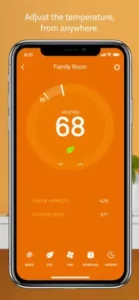
Adjust your thermostat from anywhere. Set schedules. Check energy history. Receive safety temperature alerts for extreme highs and lows.
Live Camera Feeds With Motion and Sound Alerts
View real-time video from Nest Cam and Nest Doorbell. Get motion and sound alerts. Keep an eye on your home from anywhere.
Video History With Nest Aware Subscription
Recorded clips available with Nest Aware. Skip between motion and sound events. Use enhanced search tools. Review what you missed.
Nest Secure and Sensor Integration
Arm and disarm your alarm. Get door and window sensor notifications. Manage entry delays. Keep your home secure.
Nest Protect Smoke and CO Alarm Integration
Receive smoke and CO alerts. Hush alarms remotely. Test all alarms with one tap. Peace of mind for fire and carbon monoxide safety.
Two Way Audio Through Cameras and Doorbells
Talk and listen through your camera or doorbell. Speak to visitors. Scare off intruders. Communicate with delivery people.
Weather Display and Indoor Humidity
See outdoor conditions and indoor humidity alongside thermostat controls. Know what is happening outside without leaving the app.
Multi Home Support
Switch between different properties. Manage devices for each home separately. Perfect for second homes or rental properties.
Web Access for Browser Management
Log in via browser to manage devices without the mobile app. Access your home from any computer.
Home/Away Assist for Automatic Adjustments
Automatically adjust settings based on whether you are home or away. Save energy. Improve security. The app handles it.
Nest Graphics and Visual Design
The Nest app uses a clean, minimalist interface with large, glanceable cards for each device and a strong focus on live status. You see temperature, camera preview, and alarm state at a glance. No digging through menus for basic information.
Navigation is organized around home overview, individual device, and settings. A gear icon for device-specific options and a house icon for global home status. The structure is logical but not always intuitive.
Users praise the visual polish and beautiful weather and temperature displays. The app looks good. It feels polished. But some criticize confusing navigation and difficulty finding specific settings quickly. The visual design is a strength. The navigation is a weakness.
How Nest Works (The Daily Flow)
The interaction loop is simple. Open the app to see your home’s overview. Thermostat status. Camera previews. Alarm state. Everything visible at a glance.
Tap a device to adjust settings. Change the temperature. View camera footage. Arm the alarm. Check energy history. Each device has its own control panel.
Receive alerts for motion, sound, smoke and CO, or temperature extremes. Take action from notifications. No need to open the app first. Alerts come to you.
Manage multiple homes and devices via settings and account menus. Switch between properties. Add new devices. Update settings. Everything is accessible.
What Users Actually Say about Nest App
The Nest app holds a high App Store rating around 4.6 out of 5 from millions of ratings. Many users call it essential for managing their smart home.
Positive feedback highlights reliable thermostat control, excellent camera quality, seamless integration across devices, and meaningful energy savings over time. Users appreciate the convenience and the peace of mind.
Negative reviews focus on slow app responsiveness, confusing navigation, subscription costs for Nest Aware, frustration with energy-saving programs, and bugs like unrecognized cameras or schedule issues. These are common pain points.
Trustpilot and similar sites show more polarized sentiment. Some users report poor customer service experiences and billing frustrations, especially around subscriptions and regional availability.
Tips to Get the Most From Nest
You could just download the app and start using it. But a few Nest tips will help you get more out of your devices and avoid common frustrations.
Use Home/Away Assist for automatic energy and security adjustments. The app learns your routines. It adjusts the thermostat when you leave. It arms your security system. Set it once. Let it work.
Set Safety Temperatures to prevent frozen pipes or overheating. Extreme temperatures damage homes. Set alerts for highs and lows. If you have pets, this is even more important. The Nest app watches the temperature so you do not have to.
Organize cameras by room for clear alerts. Name your cameras clearly. “Front Door.” “Backyard.” “Baby Room.” When an alert comes, you know exactly where to look. No guessing.
Leverage Nest Aware wisely for cameras you truly need. Nest Aware adds video history and intelligent alerts. Subscribe only for the cameras you monitor closely. Doorbells and baby monitors are good candidates. Garage cameras may not need it.
Use web access as backup if the app is slow. The app can lag. When it does, log in through a browser. Access your devices. Check video history. Manage settings. The web version works when the app struggles.
Test alarms regularly with one-tap test. Nest Protect has a one-tap test feature. Use it monthly. Ensure every detector works. Replace batteries when needed. Safety first.
Review energy history for usage and savings insights. Check weekly and monthly reports. See how schedule changes affect usage. Adjust your habits. Save money over time.
Keep firmware updated to reduce bugs. Outdated firmware causes problems. Enable automatic updates. Check for updates manually if something feels off. New firmware fixes bugs and improves performance.
Apps Like Nest
If Nest does not fit your needs or you want to compare options, you have alternatives. The best Nest similar apps share the same focus on device control, camera management, and home automation.
| App | Main Similarity |
|---|---|
| Google Home | Central control for smart devices, including some Nest products |
| Ring App | Security cameras, doorbells, and alarm monitoring |
| Arlo Secure | Camera management, alerts, and video history |
| ecobee | Smart thermostat control and energy insights |
| SmartThings / HomeKit | Multi brand smart home control hubs |
None of these replace Nest exactly. Each has strengths. Google Home offers broader Google device integration. Ring focuses on security. Arlo specializes in cameras. ecobee is thermostat-first.
For most Nest device owners, the Nest app remains the best choice. It offers deeper integration with Nest hardware than any alternative.
If you have a mix of brands, Google Home or SmartThings may be better. If you only have Nest devices, stick with the Nest app.
Nest Community
The Nest app itself has no built-in social features. No chats. No feeds. No shared spaces. It is a personal home management tool.
The community exists outside the app. Forums. Reddit. Support threads. Users share Nest tips. They troubleshoot issues. They discuss Nest Aware value. They debate Google Home migration.
Shared homes and family accounts provide indirect social interaction. Multiple people can control the same devices. Family members manage the home together. But there is no public Nest social layer.
If you need support, Reddit and Google support forums are your best options. The community is active. Questions get answered quickly.
Conclusion
The Nest app remains the go to control hub for Nest devices. It is not perfect. But for Nest hardware owners, it is essential.
The strongest angle is integration. The app works seamlessly with Nest devices. Thermostats. Cameras. Doorbells. Alarms. All in one place. The clean interface makes daily use simple. The energy insights help you save money. The alerts give you peace of mind.
Who should download it? Homeowners and renters with Nest hardware. People who want centralized control of climate, security, and safety. Users interested in energy savings. Anyone who values remote access to cameras and security alerts. Families managing multiple homes or devices.
Who should skip it? People without Nest devices. Those who prefer Google Home for all smart home control. Anyone frustrated by subscription costs for Nest Aware. If you do not own Nest hardware, this app is useless.
Nest is not trying to be the most exciting app on your phone. It is trying to be the most useful for your home. And for Nest owners, it succeeds. Download it. Connect your devices. Set your schedules. Let the app handle the rest.
FAQ
Where can I get Nest download for my phone?
You can find Nest download on the Official App Store.
Is there an official website or help page where I can learn more about setup and troubleshooting?
Yes. The official Nest website is here: Official Nest Website.
What is Nest Aware, and is it worth the cost?
Nest Aware is a subscription service that adds video history, intelligent alerts, and enhanced features to your Nest cameras and doorbells. It is worth it if you rely on cameras for security and want to review recorded footage. If you only need live viewing, you can skip it.
Do I need the Nest app if I already have Google Home?
It depends. The Nest app offers deeper control for some Nest devices, especially thermostats and older cameras. Google Home covers basic control. Many users keep both, but Google is gradually moving features to the Home app. Check device compatibility before choosing.