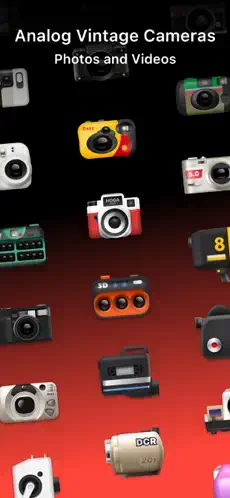
DAZZ CAM recreates the feel of holding and shooting with actual vintage cameras.
DAZZ CAM has earned a 4.8 star rating from over 112,000 reviews on the App Store . The app requires approximately 150MB of storage space and carries a 4+ age rating, making it accessible to most users.
What Is DAZZ CAM?
DAZZ CAM is a vintage camera app available on iPhone and Android devices . Rather than applying generic filters, it emulates the experience of using classic film cameras, disposable cameras, instant cameras, VHS camcorders, compact digital cameras, and other retro formats.
The developer behind DAZZ CAM is DAZZ PTE. LTD., a software company focused on recreating vintage photography experiences for mobile devices. The app positions itself as more than a photo editor. It is a camera replacement that changes how you capture images.
The app places itself in the growing market of retro photography tools. It competes with apps like OldRoll, FIMO, and NOMO CAM by offering a wide range of camera styles with a simple workflow . For users who want the look of vintage photography without buying a physical camera or learning complex editing software, DAZZ CAM consolidates those options into a single download.
DAZZ CAM Main Features
Film and Camera Modes
DAZZ CAM’s signature feature is its collection of virtual cameras, each with a distinct personality. The app includes categories such as Vintage 135 film, 120 film, instant photography, toy and disposable cameras, half frame photography, digital CCD-style cameras, 3D photography, and video cameras .
Each camera produces a different look with unique colors, grain, frames, and textures. You are not applying a filter to a photo. You are choosing a camera that shapes how you compose, shoot, and experience the image.
One Tap Vintage Effects
DAZZ CAM is built around quick results. Its camera styles automatically combine elements such as film like color, grain, dust, scratches, glow, light leaks, chromatic aberration, blur, vignettes, date stamps, film borders, and retro color shifts .
This makes the app approachable for users who do not want to adjust dozens of sliders. The processing happens in the background, leaving you to focus on composition.
Photo Editing and Import
Users can capture new photos or import existing images from the camera roll. Selected cameras allow imported photos to be processed through DAZZ CAM’s retro effects . The import feature is useful when you want to apply a film look to an older photo, edit several images for a social media carousel, create a consistent travel album, or compare multiple camera styles without retaking the image.
Video Effects
DAZZ CAM supports retro video formats such as 8mm film, 16mm film, VHS, DCR style digital video, movie camera looks, and slide projector effects . These modes are useful for short travel clips, party videos, fashion content, music edits, and nostalgic social media posts.
Negative Saving and Reprocessing
Some cameras let users save the negative and process it again with different exposure or color temperature settings. This feature gives more flexibility than a one time filter because the same capture can produce multiple versions . Availability depends on the camera selected.
Double Exposure
DAZZ CAM can layer two photographs to create a double exposure image. This can produce creative combinations such as a portrait merged with trees, architecture, clouds, or colored lights . This feature adds a creative layer that most photo apps lack.
Manual Controls
Although the app emphasizes simplicity, it includes selected manual controls such as color temperature, tint, exposure compensation, ISO, shutter speed, focal length, stabilization, composition grids, flash, and timer . The controls available depend on the camera mode.
Lens and Accessory Effects
DAZZ CAM includes accessories that simulate additional optical effects such as fisheye lens, starburst lens, prism lens, ND filter, color flash filters, and other camera specific accessories . These tools can change the image’s shape, light behavior, and overall atmosphere.
DAZZ Pro Subscription
DAZZ Pro unlocks the full camera and accessory collection. The App Store listing shows both subscription and one time purchase options, including Dazz Pro and individual camera or accessory purchases . The United States listing currently displays Dazz Pro at US$6.99 and a one time purchase at US$19.99, along with separately priced cameras and accessories. Prices can vary by region and change over time.
DAZZ CAM Graphics and Visual Design
DAZZ CAM uses a camera-first interface inspired by physical cameras from earlier decades. Instead of presenting one standard editing dashboard, the app organizes its visual experience around separate camera bodies and shooting formats.
The interface includes camera specific viewfinders, film format selections, flash and timer controls, lens and accessory panels, retro frames, date stamp options, film style previews, and video camera interfaces .
Design strengths include a clean and approachable interface, strong separation between camera styles, attractive retro colors and textures, fast access to common controls, real time visual feedback, a good balance between one tap editing and manual adjustment, and camera modes that create a recognizable visual identity .
The design supports DAZZ CAM’s central promise: users should feel as if they are choosing a camera, not merely selecting a filter.
Design weaknesses relate to navigation and device optimization. The large number of cameras can be overwhelming for new users. The app may also encourage users to purchase more cameras before they understand which styles best suit their photography. Some reviewers have noted limitations around iPad optimization and certain device layouts. In the United States App Store reviews, a developer response says that the application was not fully adapted for iPad and recommends using an iPhone for the best experience .
DAZZ CAM User Reviews and Community Feedback
DAZZ CAM receives generally strong user feedback.
What users like: The convincing film and disposable camera aesthetics receive consistent praise. Users appreciate the large selection of photo and video cameras, simple one tap workflow, attractive date formats and frames, useful retro effects for parties and special events, good free experience before upgrading, frequent updates and new features, and controls that are easier to understand than professional editing software .
Several App Store reviewers praise DAZZ CAM for making smartphone images feel more like film photographs. One reviewer says that the app is useful at parties and special events, while another praises the ability to save both the original and edited versions . An independent review also praised DAZZ CAM’s subtle grain, organic looking lighting, and broader camera selection compared with simpler disposable camera apps .
Common complaints: Many cameras and accessories require Dazz Pro. Subscription and purchase costs can become expensive for users who want the complete catalog. Some users want more control over date formats. iPad support and orientation may be limited. Certain camera modes may have different export or editing capabilities. Manual controls are not equally available across every camera. Users may encounter differences between the iOS and Android versions .
The review consensus is that DAZZ CAM delivers strong visual results with relatively little effort, but advanced users may want more uniform controls and a clearer pricing structure.
DAZZ CAM Camera and Editing Mechanics
DAZZ CAM’s workflow is different from conventional photo editors. The camera choice is made before or during capture. The camera selection influences the image’s colors, texture, frame, and overall mood.
The basic workflow: Open DAZZ CAM. Choose a camera or video format. Preview the look in the viewfinder. Adjust available settings such as flash, exposure, or white balance. Capture a photo or video. Apply camera-specific effects automatically. Save the original, edited result, or both. Share the final image or clip .
Camera-first editing: DAZZ CAM encourages users to decide on a visual direction before taking a photograph. A 135 film style, instant camera, CCD profile, VHS mode, or 3D camera can change how you approach composition and lighting. This is different from taking a completely neutral image and choosing a filter later.
Automatic versus manual control: DAZZ CAM is accessible because most camera modes automatically apply their visual character. Advanced users can refine certain elements, including exposure compensation, ISO, shutter speed, color temperature, tint, focal length, stabilization, and lens effects . However, these controls are not necessarily available on every camera.
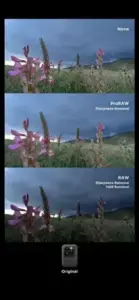
Retro imperfection: The app uses grain, dust, light leaks, scratches, blur, glow, and chromatic aberration to create a less clinically digital result. The strongest images usually use these effects as supporting details rather than as heavy overlays .
DAZZ CAM Tips and Tricks
Getting the most out of DAZZ CAM is about understanding how each camera works and matching it to what you are shooting. These DAZZ CAM tips will help you capture better images faster.
Pick a camera based on the subject. Use 135 film for everyday portraits and street photography. Try 120 film for softer, more deliberate compositions. Use instant formats for portraits, events, and group photos. Choose CCD or compact-digital styles for Y2K photography. Use VHS or 8mm for moving footage and nostalgic videos. Try fisheye or prism effects for experimental compositions.
Save the original photo. Enable the option to save both the original and edited image. This allows you to send a clean version to someone who does not like the retro treatment and protects the original if you later want to try another camera. An App Store reviewer specifically recommends this workflow.
Use exposure before adding effects. Correct exposure and white balance first when those controls are available. A strong film effect cannot fully repair an image that is too bright, too dark, or heavily color-shifted. Get the basics right before applying the vintage look.
Use grain carefully. Subtle grain can make a photo feel more natural, while excessive grain can hide facial detail, product labels, or small text. Test the effect at full image size before exporting. Less is often more.
Match the frame to the composition. If a camera adds a border or date stamp, leave enough space around the subject. Avoid placing faces or important objects directly against the edge. The frame should complement the image, not crowd it.
Try the timer for portraits. The timer is useful for self-portraits, group photos, and stable low-angle shots. Place the phone securely and test the countdown before taking the final image. This small step improves your framing and reduces camera shake.
Use a grid for architecture. Composition grids can help keep horizons, walls, and vertical lines straight. This is especially valuable when using fisheye, wide angle, or distorted cameras. Straight lines make a big difference in architectural photography.
Use double exposure with different brightness levels. A dark subject against a lighter background often combines more clearly with a second image containing texture or detail. Trees, clouds, windows, and city lights are good second exposures. The contrast between subjects makes the effect visible.
Save negatives when available. If a camera supports negative saving, preserve the negative before reprocessing. This lets you experiment with different exposure or color-temperature settings without losing the initial capture. You get multiple versions from one shot.
Test video export. Before recording a long clip, check the camera’s resolution, aspect ratio, stabilization, audio, and export behavior. Video features can vary by mode and app version. A quick test saves you from disappointment later.
Use one camera for a visual series. For a consistent Instagram carousel, portfolio, or travel diary, use one main camera throughout the series. Mixing too many styles can make the images feel disconnected. Consistency strengthens your visual storytelling.
Check subscription details. Dazz Pro may be offered as a subscription or one-time purchase, depending on the platform and region. Check the current App Store listing before subscribing, and review your device’s subscription settings to manage renewal. Know what you are signing up for.
For users searching for DAZZ CAM codes, check the app’s official social media channels and community forums. The developer occasionally releases promotional codes for free camera access or premium features through these platforms.
DAZZ CAM vs Similar Apps
| App | Best for | Difference from DAZZ CAM |
|---|---|---|
| OldRoll | Large range of vintage camera simulations | Similar variety with stronger focus on camera simulation |
| FIMO | Film roll and analog point-and-shoot photography | More focused on dedicated film rolls and physical-film workflow |
| NOMO CAM | Polaroid and classic camera interaction | Stronger emphasis on simulated development and camera interfaces |
| Huji Cam | Simple 1990s disposable-camera look | Easier but much more limited |
| VSCO | Film inspired presets and manual editing | Better for detailed editing and creator discovery |
| Tezza | Photo and video editing for social content | More templates, overlays, batch tools, and design features |
| RNI Films | Controlled film emulation | Better for accurate color processing |
| Hipstamatic | Customizable camera, lens, and film combinations | More focused on building combinations from separate components |
How DAZZ CAM Compares
DAZZ CAM stands out for its wide variety and simple workflow. Where Huji Cam gives you one disposable camera look, DAZZ CAM gives you dozens of camera styles, each with its own interface and visual character. OldRoll offers similar variety, but DAZZ CAM’s interface is more accessible. FIMO focuses on film rolls, while DAZZ CAM offers both photo and video cameras. VSCO gives you more manual editing control, but DAZZ CAM’s camera first approach is more immersive.
What Makes DAZZ CAM Unique
The combination of photo and video cameras in one app is a differentiator. You are not just selecting a filter. You are choosing a camera that changes how you compose, shoot, and experience the image. The double exposure, negative saving, and lens accessories add creative depth. The one-tap workflow makes it accessible to beginners.
Who Should Choose Which App
DAZZ CAM is the right choice if you want a wide range of vintage styles with a simple workflow. If you prefer a simple, straightforward disposable camera look, Huji Cam might work better. If you want a very large range of simulated cameras, OldRoll offers more variety. If you need advanced manual editing controls, VSCO or RNI Films are better options. For users asking about DAZZ CAM similar apps, alternatives include OldRoll, FIMO, and NOMO CAM. However, none offer the same combination of photo and video variety with a simple workflow.
DAZZ CAM Pricing and Monetization
DAZZ CAM is free to download, but in-app purchases and subscription options unlock the full experience.
Free Version. The free version gives you access to a selection of cameras. You can test the app and decide if the vintage photography style suits you. Some features are restricted.
DAZZ Pro Subscription. The App Store listing shows Dazz Pro at US$6.99. This unlocks the full camera and accessory collection, providing access to all cameras and future updates. It is the most cost-effective option if you plan to use the app regularly.
One-Time Purchase. A one time purchase option is available at US$19.99. This provides permanent access to Dazz Pro features without recurring payments. This is a good option if you prefer owning software outright.
Individual Camera and Accessory Purchases. Individual cameras and accessories are priced separately, typically ranging from approximately US$0.99 to US$2.99. This is a good option if you only want one or two specific styles.
Regional Price Variations. Prices can differ between countries. The App Store listing displays regional pricing based on local currency.
What Is Included in Free versus Paid Access. The free version is a trial. Paid access gives you the complete camera library, accessories, and future updates. For users wondering about DAZZ CAM pricing, the subscription and one time purchase options provide flexibility. The free version lets you evaluate the app before committing financially.
DAZZ CAM Pros and Cons
What Works
-
Convincing vintage aesthetics. The grain, light leaks, dust, and scratches look authentic. The processing feels genuine.
-
Wide selection of photo and video cameras. You get many options for different moods and subjects. This variety keeps the app interesting.
-
Simple one-tap workflow. The app is easy to use. Beginners can start shooting immediately without reading instructions.
-
Useful retro effects for parties and special events. The app excels at capturing casual, nostalgic moments.
-
Good free experience before upgrading. You can test the app without commitment. The free version gives you a real sense of what the app offers.
-
Frequent updates and new features. The developer continues to improve the app and add new content.
-
Double exposure and negative saving. These creative tools add depth and flexibility.
-
Lens and accessory effects. Fisheye, prism, and starburst effects expand creative possibilities.
What Does Not
-
Many cameras require Dazz Pro. The free version gives you a taste, but full access requires payment.
-
Subscription and purchase costs add up. The complete catalog can become expensive for users who want everything.
-
Limited iPad optimization. The app works best on iPhone. iPad users may experience layout issues.
-
Manual controls not equally available. Some cameras lack advanced settings. Features vary by mode.
-
iOS and Android version differences. Features may vary between platforms. Check your specific version.
-
Large camera library can be overwhelming. New users may struggle to find their preferred style. Navigation could be improved.
Conclusion
If you enjoy vintage photography, retro aesthetics, and the feel of using classic cameras, DAZZ CAM is worth downloading. The app offers convincing vintage effects that few competitors match. You can shoot a 135 film style for portraits, switch to an instant camera for events, and use VHS or 8mm for travel videos, all in one app.
If you prefer a simple, straightforward photo app with one consistent look, DAZZ CAM might feel overwhelming. The camera library is large, and navigating it takes time. If you dislike subscription models, the pricing structure may also be a turnoff. If you need advanced manual editing controls, VSCO or Lightroom are better options.
DAZZ CAM app is best for casual photographers, social media creators, travelers, and anyone interested in vintage photography aesthetics. It is less suitable for users who need a completely free app or a highly advanced professional editing workflow.
The final DAZZ CAM verdict is positive. The app delivers on its promise of recreating vintage photography experiences. The free version lets you test it without risk. If the vintage look appeals to you, download it, try a few cameras, and see if it clicks.
DAZZ CAM does not reinvent photography. But it makes the process more enjoyable. And sometimes, that is enough.
Frequently Asked Questions
Where can I download DAZZ CAM for my phone?
You can get the DAZZ CAM download directly from the official Apple App Store. The app is free to download and requires approximately 143.8 MB of storage space. The app works on most devices running iOS 16.0 or later.
Is there an official website or support page for DAZZ CAM?
Yes. The developer, DAZZ PTE. LTD., maintains a terms and conditions page at dazz.ltd/dazz/terms_and_conditions.html and a privacy policy at dazz.ltd/dazz/privacy_policy.html . For community discussions and user feedback, the App Store and Google Play reviews serve as informal forums where users share their experiences and camera recommendations.
How do I contact support if I run into issues?
For technical problems, subscription questions, or purchase restoration issues, reach out through the official support channels. You can email the developer directly at dazz.camera[at]gmail.com . Include your device model, operating system version, and a description of the issue to get the fastest response.
Does DAZZ CAM work offline?
Yes. DAZZ CAM works offline after you have downloaded the app and any cameras you want to use. You do not need an active internet connection to capture photos or apply vintage effects. However, some features like importing photos, DAZZ Pro subscription verification, and new camera downloads require an internet connection. The app’s core photography functionality remains available without Wi-Fi.
Is DAZZ CAM completely free, or are there costs involved?
DAZZ CAM is free to download and provides access to a limited selection of cameras . However, the app includes in-app purchases and a subscription option. DAZZ Pro provides access to all cameras, accessories, future updates, and imported-photo tools . The App Store offers a DAZZ Pro subscription at $6.99 USD and a one-time purchase at $19.99 USD . Individual cameras and accessories range from approximately $0.99 to $2.99 USD . The Android version offers monthly and annual subscription plans . The free version lets you test the app and decide if the vintage photography style suits your needs before committing financially.