VSCO has been a staple in the mobile photography world for years, and the numbers show why creators keep coming back.
With a 4.7 star rating from approximately 277,000 ratings on the App Store, it is clear that VSCO app photo and video editor has found its audience. The app requires iOS 15.0 or later and takes up approximately 333 MB of space. Rated for ages 13 and up, it is a creative tool that appeals to photographers, artists, and casual users alike.
What Is VSCO?
VSCO is a mobile photography and video editing app developed by Visual Supply Company. It combines film-inspired presets, professional editing tools, video effects, creative collage features, and a photography focused social community. The app is available as a free download with optional in-app purchases and paid membership plans.
Unlike highly engagement driven networks, VSCO is positioned as a lower pressure creative platform for photographers and visual artists. Users can edit photos, publish work, discover creators, save favorite images, repost content, and participate in themed creative communities. The App Store listing identifies Visual Supply Company as the developer and lists support for iPhone, iPad, Apple Vision, and iOS 15 or later.
Key Features That Set VSCO Apart
Photo Editing with 200+ Presets
VSCO’s most recognizable feature is its collection of film inspired presets. The company currently advertises more than 200 presets, including styles inspired by analog film, portrait photography, black-and-white photography, vintage color, and cinematic grading.
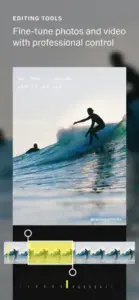
The editor also includes manual controls such as exposure, contrast, highlights and shadows, saturation, white balance, HSL color adjustments, skin tone, grain, fade, vignette, sharpening and clarity, crop, rotate, straighten, and skew. Advanced tools include split toning, borders and text, dodge and burn, blur, bloom, and halation effects. This combination lets beginners apply a preset quickly while giving experienced users the ability to refine color, light, texture, and composition.
Video Editing Tools
VSCO also supports video editing with tools designed to create a consistent visual style across photos and clips. Users can trim videos, adjust playback speed, reverse footage, control volume, and apply color or film effects. The app also includes creative video effects such as VHS style treatments, digital glitches, kaleidoscope effects, chromatic effects, grain, light leaks, and film frame overlays.
AI Editing Tools
VSCO’s AI Lab includes tools such as prompt based editing, object removal, and image upscaling. These features are intended to speed up editing while preserving the user’s overall creative direction. Because AI tools and subscription access can change, readers should check the current app listing before publishing exact claims about which AI features are free or paid.
Collage and Montage
The collage maker allows users to combine images, shapes, colors, text, and effects in a layered composition. Opacity controls can be used to create overlays and double exposure effects. Montage is designed for more experimental visual storytelling. Users can combine photos, videos, shapes, and color elements to create a moving collage or short visual narrative.
Recipes
Recipes allow users to save a combination of edits and reuse the same look on future photos. This is especially useful for creators who want a consistent Instagram feed, travel album, portfolio, or brand identity. You can save your favorite editing combinations and apply them to new photos with one tap.
Desktop Editing
VSCO has expanded beyond mobile with a browser-based editing experience for Mac and PC. Pro users can sync work between supported mobile and desktop workflows, apply presets, and continue editing on a larger screen.
VSCO Graphics and Visual Design
VSCO uses a minimalist, image first interface that puts the photograph at the center of the editing experience. The design generally avoids unnecessary visual clutter, making the app feel more like a creative studio than a traditional social media feed. The editing workflow is straightforward: import an image into Studio, choose a preset, adjust its strength, refine the result with manual tools, and export or publish the final image.
The visual identity is strongly connected to analog photography. Grain, fade, halation, light leaks, distressed textures, and film-frame effects give digital images a softer or more nostalgic appearance. This is a major reason the app appeals to users who prefer editorial, vintage, cinematic, or muted aesthetics. The main design weakness is that some features may not be immediately obvious to new users, and some App Store reviewers report feed glitches, iPad layout problems, sign-in issues, and difficulty discovering friends.
VSCO User Reviews
What Users Like
The film inspired presets create attractive results quickly. The interface is clean and relatively easy to navigate. Users can edit without relying entirely on a complicated desktop program. The app encourages artistic exploration and visual inspiration. The community feels less focused on public popularity metrics than platforms built around likes and follower counts. Recipes can help maintain a consistent editing style.
VSCO users often highlight how the app helps smartphone photos feel less like a “perfect representation” and more like a “creative choice,” adding character back to images that computational photography can make feel overly polished and bland.
Common Complaints
Many advanced presets and tools require a paid subscription. Some users report crashes, feed glitches, or problems with account access. Friend discovery and search can feel limited. The app’s cloud and camera-roll relationship may confuse users who delete original images from their device. Some photographers may find the editing controls less comprehensive than those in desktop focused programs.
VSCO Tips and Tricks
Starting any creative app comes with a learning curve. VSCO is no different. These VSCO tips will save you time, frustration, and wasted effort.
Use presets as a starting point, not final edit. Do not assume the strongest preset setting is the best result. Reduce the intensity first, then adjust exposure, white balance, and contrast to match the original lighting. A preset at 50-70% strength often looks more natural than one at 100%.
Create a consistent visual style with Recipes. Choose a small group of presets for a specific project. For example, use one warm preset for travel photography and one muted preset for portraits. Save the finished combination as a Recipe for faster editing. This is especially useful for creators who want a consistent Instagram feed, travel album, or brand identity.
Correct light before color. Adjust exposure, highlights, shadows, and white balance before adding grain or film effects. Texture cannot fix an image that is badly overexposed or has an unwanted color cast. Light correction should always come first.
Use HSL selectively for specific adjustments. HSL is useful for changing one color without affecting the entire photograph. For example, you can reduce the saturation of distracting green foliage while preserving skin tones and warmer subjects. This tool gives you precise control over your color palette.
Keep film effects subtle. Grain, halation, fade, and light leaks work best when they support the photograph rather than dominate it. Apply one or two effects carefully instead of stacking every available overlay. Less is often more with analog style effects.
Protect original files. VSCO’s Studio drafts are references to files in the camera roll. The original image on your phone is unaffected as a version is imported into VSCO before you begin editing, but there isn’t a history function so you can’t undo edits if you go too far. Keep important originals backed up separately.
Use the community for references. Search for a preset or visual style and examine how other creators use it. This can help you understand how the same filter behaves with portraits, landscapes, indoor scenes, and low-light images. Learning from others accelerates your own growth.
Edit in batches when possible. For a series of related photos, establish one base edit and adapt it rather than starting from scratch every time. This is useful for events, travel albums, product images, and social-media content.
Use Spaces for focused feedback. Spaces can be public or private collaborative groups organized around a theme or interest. They are useful for connecting with photographers who share a particular style or project. You can get feedback, share work, and discover new techniques.
For users searching for VSCO tips, these strategies will help you get the most out of the app. For VSCO app users wondering how to elevate their editing, start with these nine rules.
VSCO vs Similar Apps
| App | Best for | How it differs from VSCO |
|---|---|---|
| Adobe Lightroom | Detailed color correction and professional workflows | More technically extensive, but usually more complex for beginners. Offers better organization and desktop integration. |
| Snapseed | Free manual photo editing | Offers strong adjustment tools without VSCO’s same film focused community. Completely free with no subscription. |
| Darkroom | Apple device photo editing | Well suited to users who want deeper editing within the Apple ecosystem. Offers RAW editing and advanced color tools. |
| Afterlight | Creative filters and film effects | Focuses heavily on artistic effects and analog-style treatments. Has a more playful, experimental approach. |
| CapCut | Short form video editing | Better suited to fast social videos, transitions, captions, and templates. Less focused on photography. |
| Editing and social publishing | More engagement focused and less centered on a dedicated photography workflow. Built around likes and followers. |
What Makes VSCO Unique
The combination of film inspired presets, clean interface, and creative community sets VSCO apart. Most editing apps focus on either tools or community. VSCO balances both. The analog aesthetic is another differentiator. No other app captures the feel of film photography quite like VSCO.
The lower pressure community is a major advantage. You are not competing for likes and followers. You are sharing your creative vision with like-minded photographers.
Who Should Choose Which App
If you want detailed color correction and professional workflows, Lightroom is the better choice. If you want a completely free editing experience, Snapseed works well. If you want short-form video editing, CapCut fits.
For users looking for VSCO similar apps, the list includes Lightroom, Snapseed, Darkroom, Afterlight, and CapCut. But if you want film inspired presets and a creative community, VSCO stands apart.
VSCO Community
The VSCO community is built around visual discovery rather than aggressive engagement competition. Users can publish images, follow creators, favorite work, repost images, participate in discussions, search for content, and explore curated photography.
The app also includes Discover pages with curated photography, creator profiles, search for people and images, reposts and private favorites, discussions on eligible posts, creative prompts and challenges, Spaces for themed or collaborative groups, photo walks and community activities, and portfolio and professional profile tools.
One notable difference is that VSCO presents itself as a lower pressure alternative to platforms where likes and follower counts dominate the experience. The service is described as more artistic and less focused on popularity metrics than Instagram, although its social interaction tools are also less extensive.
For professional photographers, VSCO has expanded into portfolio sites, client galleries, business tools, and photographer focused networking. These features make the platform more than a simple filter app, although some professional tools may require a paid plan.
VSCO Pros and Cons
What Works
-
Film-inspired presets. Over 200 presets that create attractive results quickly.
-
Clean interface. Minimalist design puts photos at the center.
-
Recipes. Save and reuse editing combinations for consistent style.
-
Video editing. Creative effects like VHS, glitch, and film-frame overlays.
-
AI tools. Prompt-based editing, object removal, and upscaling.
-
Creative community. Lower-pressure alternative to engagement-focused platforms.
What needs work
-
Subscription restrictions. Many advanced presets and tools require payment.
-
Interface learning curve. Some users find icons confusing.
-
Technical issues. Crashes, feed glitches, and account access problems reported.
-
Limited discovery. Friend search and discovery can feel constrained.
-
No history function. Edits cannot be undone once applied.
The Bottom Line
VSCO delivers where it matters most. The film inspired presets, clean interface, and creative community create a compelling package. The subscription model and interface quirks are the trade-offs. If you can tolerate some friction, the experience is worth it.
Conclusion
If you want a mobile photo and video editor with film-inspired presets, a clean interface, and a photography focused community, VSCO is a solid choice. The app gives you over 200 presets, manual editing controls, video effects, AI tools, Recipes for consistent style, and a lower pressure creative platform. The analog inspired aesthetic and community features make it stand out from other editing apps.
If you need extensive free tools, professional-grade editing, or a completely free workflow, VSCO might not be your app. The subscription restrictions and occasional technical issues are real drawbacks. Some users will find the interface less intuitive than Snapseed or Lightroom.
VSCO app is best for creators who value visual style and creative expression over extensive technical control. It rewards experimentation, consistency, and community engagement. The community features give the platform staying power beyond just editing.
Should you download VSCO? If you enjoy film-inspired photography and want a creative community, yes. Give it a week. Try some presets. Create a Recipe. See how it feels. The app is free, so you lose nothing by trying.
For the final VSCO verdict, it earns a recommendation for photographers, creators, and casual users who value aesthetic editing and creative discovery. VSCO does not replace professional desktop tools. But it delivers a polished, engaging mobile editing experience that keeps you coming back.
Download it. Import your first photo. Apply a preset. You will know within an hour whether this is your kind of app.
Frequently Asked Questions
Where can I download VSCO for my phone?
You can get the VSCO download directly from the official App Store . It requires iOS 16 or newer, with approximately 333 MB of storage space . The free version gives you essential editing tools and 15 presets, while the paid membership unlocks 200+ presets and advanced features .
Is there an official website or support page for VSCO?
Yes, VSCO’s official website is at vsco.co, where you can access the web version and browse the community . For support, visit vs.co/help to submit a ticket . The official App Store provide the most accurate and up to date information about features, pricing, and compatibility . You can also find user generated guides on the VSCO wiki.
How do I contact VSCO support if I run into issues?
For technical problems, account access issues, subscription questions, or feature-related concerns, VSCO provides support through their Help Center at vs.co/help . You can submit a ticket there, and the support team typically responds through email. Before contacting support, ensure your device is running iOS 16 or newer, and that you have the latest version of the app installed .
Does VSCO work offline or on desktop?
VSCO works on mobile devices and through a web browser at vsco.co . The mobile apps are fully functional offline for editing photos you already have in your Studio. However, features like the community feed, Discover pages, Spaces, and cloud sync require an internet connection . For desktop users, the web version lets you access your account and edit through a browser, but the mobile apps provide the full editing experience .
Is VSCO free, or does it require a subscription?
The app is free to download with a Starter plan that gives you essential editing tools and 15 presets . The free version includes exposure, contrast, crop, fade, and other basic adjustments. For the full library of 200+ presets, AI editing tools like object removal and upscaling, HSL, Dodge & Burn, Split Tone, and collaborative Spaces, you need a VSCO Membership. You can start with a free 7 day trial before committing .