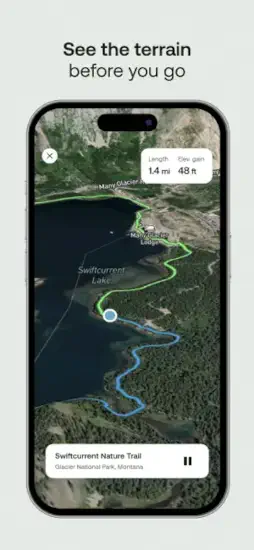
AllTrails help you hike that trail you saw on social media. But where does it actually start? Is the path clear? Will you lose signal halfway?
AllTrails is an outdoor navigation and trail discovery app that helps you find hikes, biking routes, and running trails, then plan them with maps, filters, and safety tools.
What Exactly Is AllTrails?
This is an outdoor navigation app, not a game. You do not collect points or beat levels. You find real trails and walk them.
Find trails near you
The app helps you find trails you never knew existed near you. That wooded area twenty minutes from your house? There might be three hidden trails. AllTrails shows you where.
One app, three activities
It works for hiking, biking, and running. One app covers all three activities. Filter by what you want to do, and the map adjusts.
Your GPS safety net
AllTrails acts as a GPS companion for unfamiliar routes. Open the map. Follow the line. The app tracks your location and shows if you stray off path. No more guessing which fork to take.
For anyone searching AllTrails hiking app reviews, the main takeaway is confidence. People use this app to explore places they would never go alone otherwise.
How the App AllTrails Works
The workflow is simple. Search, browse, read, navigate, record.
Search for trails
Search for trails by city, park, or name. Type “Mount Tam” or “Central Park.” The app returns every trail in that area.
Browse route details
Browse route details including length, elevation, and difficulty. A two mile flat loop is easy. A ten mile climb with 2,000 feet of gain is hard. You see the numbers before you leave the house.
Read community reviews
Read community reviews about current conditions. Other hikers post updates. “Trail is muddy after the bridge.” “Parking lot full by 8am.” “Watch for poison oak on the east side.” That information saves you from bad days.
Navigate on the trail
Use maps to navigate while on the trail. The app shows your location as a blue dot on the trail line. Stray off path? The dot moves away from the line. Turn around before you get lost.
Record your outing
Record your outing for fitness tracking. Distance. Elevation gain. Pace. Moving time. The app saves every hike to your profile.
AllTrails Core Features That Matter
Here is what actually makes AllTrails useful.
Trail search and discovery
Trail search by city, park, or trail name. The database covers over 400,000 trails worldwide. Chances are your local path is in there.
Custom routes and map building for personalized outings. Don’t like the suggested loop? Draw your own line on the map. The app calculates distance and elevation for your custom route.
Offline and safety features
Offline maps for subscribers. No cell signal? Download the map before you leave. The app works completely offline. This alone makes the paid version worth considering.
Wrong turn alerts and extra safety tools. Stray off the route by more than a few meters? The app buzzes your phone. Back on track in seconds instead of wandering for twenty minutes.
Filtering and planning tools
Trail filtering and discovery tools. Filter by length, difficulty, elevation gain, route type (loop or out and back), and activity (hike, bike, run). Dog friendly trails are a separate filter.
Route planning for hiking, biking, and running. The app does not assume you only hike. Select your activity first. The trail list changes to match.
Community and fitness tracking
Community trail reviews and ratings. Each trail has a star rating and written reviews. Read the most recent ones. Conditions change weekly.
Fitness tracking details including distance, elevation gain, and pace. The recording feature turns your phone into a sports watch. No extra device needed.
Navigation and pricing
Navigation assistance for unfamiliar trails. The blue dot follows the red line. Simple enough for beginners. Reliable enough for backcountry.
Free download with subscription option for premium features. The free version works for basic discovery. Offline maps and wrong turn alerts require AllTrails Plus.
For users looking at AllTrails Plus features, the subscription adds offline downloads, wrong turn notifications, live sharing with friends, and printable maps.
AllTrails Graphics and Design
The app prioritizes function over beauty.
Map first interface
Practical map first design. Nothing flashy here. The app prioritizes function over beauty.
Information density
The interface focuses on maps, route search, and trail information. Those three things take up most of the screen. No wasted space on animations or decorative elements.
Data heavy layout
Data heavy because users need terrain and safety info at a glance. Elevation profiles. Trail surface type. Water sources. Parking information. All displayed clearly.
The clutter criticism
Some users find the experience cluttered, especially with subscription prompts. The free version shows upgrade buttons frequently. That annoys people who just want to browse.
AllTrails UI design choices prioritize utility. You open the app to answer one question: where can I walk today? The app answers that question within three taps.
What AllTrails Users Say (Good and Bad)
Public sentiment is split. Here is the honest breakdown.
What works well
Positive: Great for trail discovery and route planning. Users consistently say they found hidden gems they would never have seen otherwise.
Positive: Helpful for tracking hikes for fitness and performance. The recording feature competes with dedicated fitness apps.
What frustrates people
Negative: Subscription pricing frustrates some users. The free version works but feels limited once you see what Plus offers.
Negative: Battery drain and unreliable route accuracy reported. GPS tracking burns power. Some users report the trail line being off by a few meters.
Negative: Usability complaints about cluttered interface. Too many buttons. Too many prompts. The app tries to do a lot, and that shows.
The bottom line on user feedback
Overall split: People love the convenience. Others dislike the paywall and app friction. The value depends on how often you hike. Once a week? Plus is worth it. Once a year? Stick with free.
AllTrails app reviews on Reddit show a clear pattern. Frequent hikers recommend Plus. Casual walkers say free is fine. Battery complaints come from people using old phones.
How the Workflow Flows
Here is the step by step from opening the app to finishing your hike.
Step 1 – Search for trails
Search for trails in your area. Open the app. The map centers on your current location. Trails appear as colored lines.
Step 2 – Compare and filter
Compare maps and read community notes. Tap a trail. See length, elevation, and star rating. Read the three most recent reviews. Check for warnings about closures or bad conditions.
Filter by activity type, difficulty, or length. Not feeling a ten mile climb today? Set max length to three miles. Filter out hard difficulty. The list updates instantly.
Step 3 – Download offline maps
Download offline maps before heading out. This requires AllTrails Plus. Select the trail. Hit download. The map saves to your phone. No signal needed on the trail.
Step 4 – Navigate on the trail
Navigate using the app while on the trail. Start recording. Follow the blue dot along the red line. Check your progress at junctions. The app buzzes if you leave the route.
Step 5 – Record and review
Record your route for fitness data. At the end of the hike, stop recording. The app shows distance, moving time, elevation gain, and pace. Save it to your profile.
Review your outing and add your own notes. Write a condition update for other hikers. “Bridge out at mile two.” “Lots of wildflowers in April.” Your note helps the next person.
AllTrails trail navigation is straightforward enough for a first time hiker. Open map. Follow dot. Do not leave the line. That simplicity is the app’s superpower.
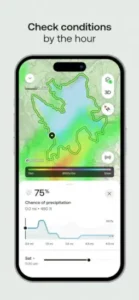
AllTrails Practical Tips to Get Better Results
Small habits make a big difference with this app.
Before you leave home
Download offline maps before going out if you expect poor cell coverage. Do this on wifi. A full area download can be several hundred megabytes.
Use filters to narrow trails by difficulty, length, or activity type. The default map shows everything. Filtering removes the noise.
Check community reviews before heading to a trail. Other hikers mention conditions and detours. The most recent review is usually the most useful.
On the trail
Watch battery use. The app can drain power quickly. Put your phone in low power mode. Bring a small battery pack for longer hikes.
Compare distance and elevation stats if you are tracking fitness goals. The app shows real time numbers. Check them at rest stops.
Plan return routes carefully when exploring unfamiliar areas. The app shows the full loop. Know where the halfway point is before you start.
General advice
Use the app for route vetting. Keep a backup navigation method for remote trails. Paper map. Another phone. A GPS watch. AllTrails is reliable, but electronics fail.
The free version may be enough for basic trail discovery before paying for extras. Try free for a month. If you hit a situation where offline maps would have helped, upgrade then.
For users searching AllTrails tips specifically, the number one piece of community advice is to read the three most recent reviews. Trail conditions change faster than the app updates the official status.
AllTrails Similar Apps Worth Comparing
Not every navigation app works the same way. Here is how AllTrails compares.
Direct competitors
| App | Main Similarity |
|---|---|
| Gaia GPS | Outdoor route planning and navigation. Stronger for backcountry trips. More complex interface. |
| Komoot | Trail discovery and turn by turn outdoor guidance. Popular in Europe. Better for cycling. |
| Hiking Project | Trail maps and user trail info. Focused specifically on hiking. Smaller database. |
| Strava | Fitness tracking and route logging for running and cycling. Better for performance data. Weaker for navigation. |
| Outdooractive | Trail planning and community route content. Good for multi day trips. Less polished interface. |
Which one should you pick?
Start with Gaia GPS if you go deep into backcountry areas with no signal. Start with Komoot if you live in Europe or cycle more than you hike. Start with Strava if you care more about fitness stats than navigation.
Stay with AllTrails if you want the largest trail database and the simplest navigation interface.
AllTrails vs Gaia GPS is the most common comparison. AllTrails wins on ease of use and community reviews. Gaia GPS wins on advanced mapping features.
AllTrails Community
The app does not have friend lists or social feeds. The community value comes from shared knowledge.
What the community provides
That makes it valuable for discovering whether a trail is crowded, muddy, confusing, or especially scenic. One review can save you from a bad hike.
Shared outdoor culture
It also has the feel of a shared outdoor community rather than a multiplayer app. The social value comes from user contributions and trail vetting, not from competing with friends.
No leaderboards. No challenges. Just thousands of people leaving notes for each other about which trails are worth walking.
Who Should Use AllTrails App?
Good fit for
Hikers, bikers, and runners who want to find new routes. If you walk the same path every week because you do not know what else is nearby, this app solves that problem.
People who explore unfamiliar areas without local knowledge. Traveling to a new city? Open AllTrails. Find the best walking paths within ten minutes.
Anyone who wants trail details before leaving the house. Length, elevation, difficulty, parking, dog rules. All visible from your couch.
Not a good fit for
People who only walk the same paved path every day. You already know your route. The app offers nothing new.
Users who refuse to pay for premium offline features. The free version works. But if you hike in areas without cell signal, you need Plus. No way around that.
Backcountry experts with advanced navigation skills. You probably already use Gaia GPS or a dedicated GPS device. AllTrails may feel too basic.
AllTrails Additional Information:
| Info | Detail |
|---|---|
| App Store rating | 4.9 stars (iOS) |
| Google Play rating | 4.7 stars |
| Total reviews | Approximately 1.4 million across both stores |
| App size | Approximately 290 MB |
| Age range | 4+ (no restricted content) |
| Similar app to try | Gaia GPS |
Conclusion
Strengths
The trail database is enormous. Over 400,000 routes. Discovery and filtering work well. Offline maps and wrong turn alerts add real safety value for premium users. Community reviews provide current conditions that official sources miss.
Weaknesses
Subscription pricing pushes people away. Battery drain is real on longer hikes. Some users report route accuracy issues. The interface can feel cluttered, especially with upgrade prompts everywhere.
You saw that trail on social media. It looked beautiful. But you had no idea where the trailhead was or if the path was even walkable.
Now you have the map. The reviews. The offline navigation. The wrong turn alerts.
The only question left is whether you will keep watching other people’s hiking videos or finally go find your own trail.
FAQ
Where do I get AllTrails download, and is it really free to use?
Yes, the app costs nothing to install. You can start finding trails near you today. Download AllTrails app from the Official App Store.
Is there an official website where I can browse trails before I decide to download?
Yes. You can search trails, read reviews, and plan routes entirely on desktop. Visit: Official AllTrails Website.
How accurate are the trail maps, and where can I see the community data behind them?
The fan wiki breaks down how trail data is collected, verified, and updated by users. It also compares accuracy across different national parks.
Who do I contact for feedback, feature requests, or subscription billing questions?
Send a detailed message to the support team. Include your device model and app version. They usually respond within two business days. Contact: https://support.alltrails.com/