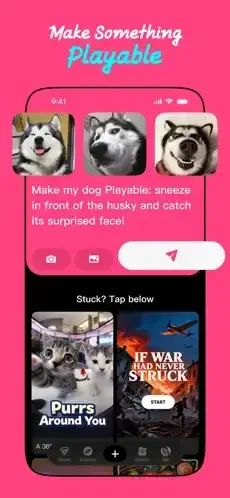
Loopit promises to turn your imagination into interactive playable experiences. You have an idea for a game in your head. A funny meme that should move when tapped. A satisfying ASMR toy with popping bubbles. A simple puzzle that makes you think. But you cannot code a single line. You do not know Unity or Unreal Engine.
Loopit promises to solve that problem completely. Describe your idea in plain English. AI generates the playable experience in seconds. No coding. No game engines. No tutorials. Just your imagination and a text prompt. The question is whether the AI is smart enough to understand what you actually want or just produces generic nonsense that misses the point entirely.
No-code creation tools exploded as people wanted to make things without learning programming languages. Roblox Studio offered advanced game creation but still required learning the platform’s logic. Scratch taught coding basics to kids with visual blocks. HiberWorld focused on building social 3D worlds with friends. Loopit takes a completely different approach from all of them. Pure AI generation. Describe. Generate. Play. No learning curve at all. Just type and see what happens.
Loopit in 2026 is not a traditional game where you play through levels or compete on leaderboards. It is a creation platform built for speed and experimentation. You describe an idea in words. AI builds the interactive experience for you. You remix what others have already made. You share your creations with the community. Understanding how the AI works helps you write better prompts and get better results that actually match your vision.
Let us cover the basics before diving deeper. The app is new and does not yet have enough reviews for a stable rating on the App Store. Size sits around 150 MB depending on downloaded assets. Age range stretches from teenagers exploring creativity to adults who want a break from passive scrolling. If you prefer a more advanced game creation platform with deeper control, Roblox Studio offers powerful tools.
What Is Loopit, Actually?
An AI powered no-code creation app for mobile devices. Turn simple ideas into interactive mini experiences. Make memes that respond to taps. Create ASMR toys with satisfying feedback. Build puzzles, simulations, and mini games. All without writing a single line of code. Describe your idea in words. AI generates the logic and art automatically.
Who It Is For
Creative people who cannot code but want to make interactive content. Anyone who wants to make games or toys without a learning curve. People who enjoy remixing others’ ideas into something new. Those who want a break from passively scrolling through social media feeds.
The Creation Loop
Prompt → generate → test → remix → share. The loop is fast and iterative. You can create something interesting in seconds. No waiting for long processing times.
Free to Play
Download free. Create free. Share free. Monetization model is unclear in early reviews. Check the current version for any in app purchases.
Loopit 2026: What’s New
AI Powered Creation
Describe your idea in plain language, as if talking to a friend. AI generates the interactive experience from your words. No coding required at any step. The AI handles both game logic and visual art.
No-Code Editor
Users without any development experience can create. No learning curve for programming concepts. Simple interface with just a text box and buttons.
One Tap Remixing
Modify existing playables that others have made. Change mechanics, visuals, or entire ideas. Remixing is much faster than creating from scratch.
Multiple Formats
Support for many types of interactive content. Interactive memes that respond to taps. ASMR toys with satisfying feedback. Mini games with simple rules. Puzzles with logic. Simulations with cause and effect. Playable art for visual exploration.
Feed Style Discovery
Browse ideas from other users in a scrollable feed. Discover popular playables that others enjoy. Tap any playable to try it instantly. Tap remix to make your own version.
Touch First Experiences
Built around tapping, swiping, and other playful touch interactions. Designed specifically for mobile screens. Not ports of mouse based games.
Loopit Core Mechanics: How Creation Works
Describe Your Idea
Type a prompt describing what you want to make. “A cat that meows when you tap it.” “A puzzle where you match colored tiles.” “A stress ball that squishes and bounces back.” Be as specific as you can.
AI Generates
The app processes your prompt using AI. AI creates the interactive logic behind the playable. AI generates placeholder art to match your description. The result is a playable experience you can test immediately.
Test Your Playable
Interact with what the AI made for you. Tap on elements. Swipe across the screen. See if it matches your original idea. Identify what works and what does not.
Remix and Refine
Change things you do not like about the result. Adjust the mechanics to feel better. Add more interactions to make it deeper. Remix repeatedly until it feels right.
Share with Others
Publish your finished playable to the community. Other users can play what you made. Other users can remix your creation into something new.
Feed Discovery
Scroll through playables from other creators in the feed. Find inspiration for your next project. Remix their ideas into something completely new.
What You Can Create
Interactive Memes
Memes that respond to your taps and touches. Tap for a funny sound effect. Tap for an animation. Shareable and funny for social media.
ASMR Toys
Satisfying tactile experiences for touch screens. Pop bubbles with satisfying pops. Squeeze stress balls that deform and bounce back. Tap drums for sound feedback. Visual and audio feedback together.
Mini Games
Simple gameplay loops that are easy to understand. Tap to score points. Avoid obstacles that move. Match colors before time runs out. Short, casual experiences for quick play.
Puzzles
Logic puzzles that make you think. Drag and drop pieces into place. Match patterns to solve. Pattern recognition challenges. The puzzles are simple but engaging.
Simulations
Tiny interactive worlds with cause and effect. Tap to feed a virtual pet. Tap to water a growing plant. Simple systems that respond to your actions.
Playable Art
Visual experiences you can interact with. Abstract art that responds to your touch. Music visualizers that react to sound. Pure exploration without goals.
Loopit Graphics and Design
Visual Style
Clean, modern, creator-friendly interface throughout the app. Designed for fast creation with no friction. Bright and inviting colors.
Feed
Scrollable feed of playables made by other users. Thumbnails show previews of each playable. Tap any thumbnail to play immediately.
Creation Interface
Simple prompt box at the center. AI generation button next to it. Remix controls for modifying. No complicated menus or settings.
Playable Preview
See your creation immediately after generation. Test all interactions right away. Iterate quickly based on what you see.
Remix Actions
Easy buttons to modify existing playables. Change colors with a tap. Change sounds with a tap. Change behavior with new prompts.
Design Philosophy
Fast, light, and endlessly remixable. The design prioritizes speed over depth. Get from idea to playable in seconds.
Loopit Similar Games
You have choices in the no-code creation space. The App Store lists several options, each with different strengths. The table below shows where Loopit fits among the competition.
| App | Main Similarity |
|---|---|
| HiberWorld | User generated interactive content and social creation |
| Roblox Studio | Creating playable experiences, much more advanced |
| Scratch | No-code/low code creation for interactive ideas |
| Buildbox | Game creation without coding |
| HyperPad | Mobile-first interactive creation tools |
The Differentiation
HiberWorld focuses on 3D social worlds with avatars and chat. More complex with a learning curve. Roblox Studio is for advanced game development with scripting. Requires learning the platform’s tools and language. Scratch teaches coding concepts to kids with visual blocks. More educational than creative. Buildbox is for commercial mobile game development. More professional and expensive. HyperPad is for iPad creators with drag and drop logic. More advanced than Loopit.
Loopit stands out for pure AI generation and speed. No learning curve at all. Describe, generate, play. No other app does this.
If you search Loopit similar apps, these five appear most often. Each does something well. Loopit does AI generation faster than anyone.
Loopit Remixing and Community
Remix Culture
Users take existing playables from the feed. Modify them into new versions of their own. The app actively encourages remixing. Credit is automatic so original creators get recognition.
Feed Discovery
See what others have made in the scrollable feed. Most popular playables rise to the top of the feed. New creations appear in chronological order.
Collaborative Feel
The app feels like a creative community. Shared creativity is the core value. Building on each other’s ideas rather than competing.
Viral Potential
Good playables can spread through the feed. Remixes spread even further. The feed amplifies popular content organically.
Learning by Example
See how others solved creative problems. Remix their work to understand how it works. Learn the AI’s capabilities through experimentation.
Creator Recognition
Your username appears on your creations always. Remixes credit the original creator automatically. The system tracks attribution fairly.
Loopit Tips and Tricks
Start with Simple Ideas First
A meme toy or basic puzzle is best to start. Understand the app’s flow before getting complex. Learn what the AI can and cannot do.
Use Remixing to Iterate Quickly
Find a playable close to your idea in the feed. Remix it instead of starting from scratch. Modify one thing at a time.
Focus on Interactions That Feel Satisfying on Mobile
Swipes, taps, and loops work best. Mobile native interactions feel natural. Avoid complex gestures.
Try ASMR Style or Tactile Toy Ideas
These naturally invite repeated interaction from users. Satisfying feedback loops keep people playing. Bubbles, squishes, and pops work well.
Keep Your First Creations Short and Playful
Easy to test on your own. Easy to share with others. Short playables get more attention in the feed.
Look at Popular Feed Items for Ideas
See what people like and remix most. What gets the most engagement. Learn from successful creations.
Make Sure Your Playable Has a Clear Visual Hook
The first few seconds of interaction matter most. Grab attention immediately with visuals. Do not rely on text instructions.
Write Clear, Specific Prompts
“A button that changes color when tapped” works well. “Something fun” does not work at all. Be specific.
Test on Real Devices
Touch feels different than mouse clicks. Ensure interactions work well on phone screens. Test on both small and large phones.
Share Your Creations
Get feedback from the community. See what people remix about your work. Iterate based on response.
Loopit Common Issues and Fixes
AI Misunderstands Prompts
Be more specific with your wording. Use simple, direct language. Break complex ideas into smaller parts.
Generated Playable Not Fun
Remix it immediately instead of starting over. Adjust the mechanics one at a time. Add more interactions gradually.
Art Looks Generic
AI generated art is placeholder by default. Remix to customize the visuals. Add your own style and colors.
No Sound or Music
Check your device volume first. The AI may not generate sound automatically. Add sound manually in remix mode.
Playable Too Short
Remix to add more interactions and length. Extend the experience gradually. Add new mechanics.
Lag on Older Devices
Close other running apps. Restart the Loopit app. The playables are generally lightweight.
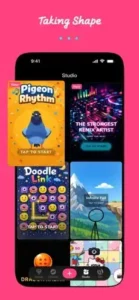
Loopit Community
Remix Culture
The app is built entirely around remixing others. Users build on each other’s creative work. Credit is automatic and fair.
Feed
Scroll through playables from other users. Like and comment on your favorites. Follow creators you like.
Profile
Your creations appear on your public profile. Others can see what you have made. Others can remix your work.
Collaborative Not Competitive
The vibe is sharing and remixing together. Not leaderboards or competition against each other. No scores or rankings.
Viral Loops
Good playables get remixed by many users. Remixes get remixed further. Content spreads organically through the feed.
No In-App Chat
Focus is on creations, not conversation between users. Community is implicit through actions, not words.
Conclusion:
If you want to create interactive content without learning to code. Loopit is not for serious game development that requires deep systems. It is for fun, fast, AI powered creation that takes seconds. The app is still new, but the concept is very promising. If you enjoy tinkering with ideas and remixing what others make, you will have genuine fun.
What works: AI generation from simple text prompts. No coding required at any step. Fast creation workflow from idea to playable. Remix culture encourages iteration. Feed discovery for finding inspiration. Low friction interface.
What does not: AI can misunderstand what you want. Generated art often looks generic. Limited depth compared to advanced tools. New app with a small community currently.
What do you want from a creation app? If you want to quickly make fun, interactive playables without any coding, Loopit delivers. If you want deep game development with full control, Roblox Studio or Unity are better choices.
Frequently Asked Questions About Loopit
Is Loopit free to use?
Yes. Loopit is free to download and use. You can create playables, remix existing ones, and share your creations without paying. The app is new, so monetization details may change. Check the current version for any optional in app purchases. You can start your Loopit download from the Official App Store.
How does the AI generation work in Loopit?
Type a prompt describing what you want to make. Use plain English, like talking to a friend. The AI processes your words and generates an interactive playable experience. It creates both the game logic and placeholder art. You can then remix and refine the result. More specific prompts get better results.
What is remixing in Loopit?
Remixing means taking an existing playable made by another user and modifying it into something new. You can change mechanics, visuals, sounds, or the entire idea. Remixing is faster than creating from scratch. The original creator gets automatic credit. The app encourages this collaborative process.
What kinds of playables can I make with Loopit?
You can make interactive memes that respond to taps. ASMR toys with satisfying sound and visual feedback. Mini games with simple rules. Puzzles that require logic. Simulations with cause and effect. Playable art for visual exploration. The range is broad.