Netflix is the world’s leading subscription video on demand platform, offering thousands of movies, TV shows, documentaries, live events and podcasts.
Netflix is not the only option anymore, but it is still the most polished. The interface works smoothly on every device. The recommendations are decent, though not perfect. The originals are hit or miss, but when they hit, they become cultural phenomena. Understanding how to use the features helps you get the most value from your subscription instead of just scrolling endlessly.
The app holds a 4.7 star rating on the App Store based on over 6.3 million reviews. Size sits around 300 MB depending on cached data. Age range stretches from children watching animated shows to adults bingeing dramas. If you prefer a streaming service focused on family franchises, Disney+ offers Marvel, Star Wars, and Pixar
How Netflix Works
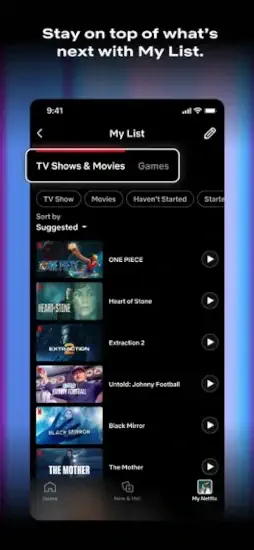
Choose a plan based on screens, downloads and extra member needs. Set up profiles for each household member. Browse through the home screen, search, My Netflix tab and recommendations. Stream instantly or download for offline viewing. Manage settings, parental controls and notifications from the app. Access Netflix Games through the main app or the separate controller app. Receive notifications for new episodes, releases and live events.
Why Netflix Still Dominates Streaming While Losing Loyal Subscribers
Most people reading this have paid for Netflix at some point. Some canceled and came back. Some still share an account with family. Others are comparing Netflix against Disney+, Prime Video or HBO Max, trying to figure out which service earns the monthly fee.
The answer is not as simple as it used to be. Netflix still has the largest library, the strongest originals and the smoothest app. It also has stricter sharing rules, rising prices and content that disappears without warning. Whether those trade-offs work for you depends on how you watch.
The Content Library That Still Sets the Standard
Thousands of titles across every major genre and format. Original series and films that regularly shape cultural conversation. A deep international catalog that rarely surfaces on the home screen but rewards viewers who search for it. Live comedy specials, sports and events push Netflix beyond on-demand viewing. Podcasts and Netflix Games add value that goes past passive watching.
Why does this matter? Content variety remains the one category where Netflix still outpaces nearly every rival.
The App on iPhone and iPad
The dark-themed interface is built for browsing and playback. Bottom shortcuts keep navigation quick. Recommendations pull from viewing history and ratings, which improves over time. The My Netflix tab consolidates My List, downloads and settings in one place. A new clips feed and updated gallery make discovery less random than it used to be. Regular updates focus on playback quality, bug fixes, and gallery improvements.
Downloads and Watching Without Wi-Fi
Titles can be downloaded for offline viewing. This feature carries real weight for flights, commutes and unreliable connections. The Standard with Ads plan does not include downloads. Managing storage matters because old downloads pile up quickly on mobile devices. Downloads alone keep many subscribers locked into Standard or Premium tiers.
Profiles, Parental Controls and Household Rules
Up to five profiles per account, depending on plan. Each profile gets its own recommendations and watchlist. Parental controls set maturity levels and PIN protection for kids. Household enforcement now ties accounts to a primary location. Travel access works within limits, but extended use outside the household can trigger verification.
Plans and What They Actually Cost
Standard with Ads runs $6.99 per month with two screens and no downloads. Standard costs $15.49 per month with two screens, downloads included and extra members at $7.99 each. Premium sits at $22.99 per month with four screens, downloads included and extra members at $7.99 each. In-app purchase listings show prices between $19.99 and $26.99 depending on region and bundles. Billing runs month to month with no contract.
Password Sharing and the Backlash That Followed
Accounts are now tied to a primary household. Extended use outside that household may require verification. Viewers outside the household need an extra member slot, which costs more.
Reviews describe the policy in blunt terms. “Nonsense” appear often enough to notice. Whether the policy feels fair depends on where you sit. Netflix frames it as protecting account integrity. Subscribers frame it as punishing families who live apart. This single change drove more negative reviews than any content decision in recent memory.
Netflix Games and the Value Beyond Video
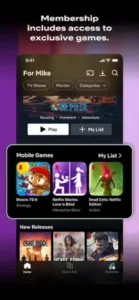
Mobile games come included with the subscription at no extra cost. Access runs through the main app or a separate Netflix Game Controller app. Some titles include multiplayer features. The game library keeps growing but stays smaller than dedicated gaming platforms. This feature matters most for subscribers who want more than passive viewing.
Live Events and Real Time Content
Live comedy specials, sports and other events stream directly through the app. This pushes Netflix into real time entertainment, a category it entered late. Notifications alert subscribers to upcoming live events. The category is still developing and not every event lands well.
Who Netflix Works Best For
Viewers who want one service with a huge, varied catalog. Households with several viewers who need separate profiles. Travelers who rely on offline downloads. Subscribers who value accessibility features like captions and audio descriptions. Anyone who wants original content that sparks conversation.
Who Netflix Works Less Well For
Viewers who share accounts across multiple households. Budget conscious subscribers who do not want ads. Large households that need more than two screens. Users frustrated by titles disappearing without warning. Anyone who wants tighter control over what shows up in recommendations.
Netflix Design Strengths and Rough Edges
Navigation feels smooth. Bottom shortcuts keep access quick. Personalized discovery improved with the clips feed and gallery updates. The dark interface reduces eye strain during late night viewing. Accessibility support is comprehensive, covering VoiceOver and Audio Descriptions. Regular updates address playback quality and bugs.
Content removal still frustrates users when favorites vanish without notice. Personalization controls remain thin. There is no way to filter out genres you dislike or mark titles as “not interested.” Household verification can lock users out while traveling. The ad-supported tier skips downloads entirely.
Netflix Tips
The Netflix app rewards users who know where to look. A few small habits separate subscribers who feel like they are getting their money’s worth from those who keep wondering why the monthly bill feels steep.
For New Subscribers
Choose the right plan before you commit. Two screens or four? Downloads or no downloads? The Standard with Ads plan saves money but strips offline viewing entirely. If you travel or commute, that trade-off matters more than the price difference suggests.
Set up profiles from day one. Separate profiles mean separate recommendations. When everyone shares one profile, the algorithm gets confused and starts suggesting content nobody actually wants to watch.
Use My List like a working queue, not a wishlist. Add titles you actually plan to watch. The list becomes a tool for remembering, not a graveyard of good intentions.
Download before you leave Wi-Fi. If you commute or fly, handle downloads while connected. Trying to download at the airport gate on spotty signal is a lesson you only need once.
Adjust parental controls early. Set maturity levels and PIN protection before children start browsing. Configuring upfront is far easier than fixing it after the fact.
For Getting More From Your Subscription
Open Netflix Games at least once. They come included at no extra cost, and most subscribers never touch them. That is free value sitting unused.
Know your screen limit. The Standard plan allows two simultaneous streams. In a busy household, that ceiling gets hit fast during prime-time hours.
Clear old downloads regularly. Mobile storage fills quickly. Deleting watched titles makes room for new ones and keeps the app running smoothly.
Browse international content by language or country. Foreign language series and films often sit below the algorithm’s radar. Searching directly surfaces titles that never appear on the home screen.
Check live events when they fit your schedule. Comedy specials and sports stream in real time. Notifications help, but opening the app directly catches events the algorithm might skip.
For When Something Breaks
Clear the app cache if playback stutters. If problems persist, delete and reinstall. Cache issues cause more streaming problems than connection issues in many cases.
Check household settings if you travel. Lockouts happen. Verifying your primary household location before contacting support saves time.
Use the FAST Speed Test app. Netflix offers it separately to diagnose connectivity issues affecting stream quality. It is a faster way to rule out your internet before blaming the app.
Update the app regularly. New features, bug fixes, and performance improvements arrive through updates. Skipping them causes avoidable problems.
Contact support through the right channel.
A Note on Netflix Codes
You may have seen references to Netflix codes floating around online. These are numeric genre codes that let you browse specific categories directly. They are not promotional codes and they do not unlock free subscriptions or hidden content. Typing a code into the search bar filters the catalog by genre. That is all they do. Any site claiming otherwise is misleading you.
Netflix secret codes to help you browse by genre.
Just add the code to this URL in your browser: https://www.netflix.com/browse/genre/XXXX (replace XXXX with the code) .
Note: Codes work best on a desktop or mobile browser; some may not function in the app itself . Availability also varies by region . You can also try to use them in search bar.
Sci-Fi & Fantasy (Parent Category Code: 1492)
| Sub-Genre | Code |
|---|---|
| Action Sci-Fi & Fantasy | 1568 |
| Anime Sci-Fi | 2729 |
| Classic Sci-Fi & Fantasy | 47147 |
| Cult Sci-Fi & Fantasy | 4734 |
| Fantasy Movies | 9744 |
| Sci-Fi Adventure | 6926 |
| Sci-Fi Dramas | 3916 |
| Sci-Fi Horror Movies | 1694 |
| Sci-Fi Thrillers | 11014 |
| Alien Sci-Fi | 3327 |
| Foreign Sci-Fi & Fantasy | 6485 |
| Supernatural Horror | 42023 |
| Supernatural Thrillers | 11140 |
Comedies (Parent Category Code: 6548)
| Sub-Genre | Code |
|---|---|
| Romantic Comedies | 5475 |
| Dark Comedies | 869 |
| Slapstick Comedies | 10256 |
| Screwball Comedies | 9702 |
| Satires | 4922 |
| Political Comedies | 2700 |
| Mockumentaries | 26 |
| Teen Comedies | 3519 |
| Stand-up Comedy | 11559 |
| Sports Comedies | 5286 |
| Foreign Comedies | 4426 |
| Late Night Comedies | 1402 |
More Genre Categories
| Main Category | Sub-Genre / Focus | Code |
|---|---|---|
| Action & Adventure (1365) | Action Thrillers | 43048 |
| Martial Arts Movies | 8985 | |
| Spy Action & Adventure | 10702 | |
| Westerns | 7700 | |
| Anime (7424) | Anime Action | 2653 |
| Anime Dramas | 452 | |
| Anime Horror | 10695 | |
| Crime & Thriller | Crime Thrillers | 10499 |
| Psychological Thrillers | 5505 | |
| Gangster Movies | 31851 | |
| Steamy Thrillers | 972 | |
| Horror (8711) | Deep Sea Horror | 45028 |
| Zombie Horror Movies | 75405 | |
| Vampire Horror Movies | 75804 | |
| Creature Features (Monsters) | 6895 | |
| Dramas (5763) | Biographical Dramas | 3179 |
| Courtroom Dramas | 2748 | |
| Period Pieces | 12123 | |
| Tearjerkers | 6384 | |
| Romance (8883) | Romantic Dramas | 1255 |
| Quirky Romance | 36103 | |
| Steamy Romantic Movies | 35800 | |
| Awards & Lists | Oscar Winners & Nominees | 2991699 |
| 90-Minute Movies | 81466194 | |
| Critically-acclaimed Movies | 3936070 |
Netflix Common Issues and Fixes
Buffering or Low Quality
Check your internet connection speed. Lower video quality in app settings. Restart the app. Restart your device. Close other apps using bandwidth.
Content Not Available in Your Region
Netflix has different regional libraries by country. Some content is not available everywhere due to licensing. Using a VPN to change region is against terms of service.
Downloaded Content Not Working
Re-download the title again. Check available storage space on your device. Update the app to the latest version. Downloads expire after time.
Password Sharing Blocked
Netflix now limits sharing to household members only. Extra members cost additional monthly fees. Set up a separate account for others outside your home.
Netflix Similar Apps Worth Knowing
If you are weighing Netflix similar apps against the original, the field is more crowded than ever. Each service has carved out a lane Netflix does not fully occupy.
| Service | Best For | Main Difference from Netflix |
|---|---|---|
| Disney+ | Disney, Marvel, Star Wars, Pixar content | Franchise focused, family friendly library |
| Amazon Prime Video | Prime members, original content, rentals | Bundled with Prime, includes rental and purchase options |
| Hulu | Current TV shows, next day episodes | Stronger for current-season TV, ad-supported tiers |
| HBO Max | HBO originals, Warner Bros. content | Premium cable style content, higher price point |
| Apple TV+ | Apple originals, high production value | Smaller library, focus on quality over quantity |
| Google TV | Aggregator across streaming services | Searches across platforms, not a content provider |
| Peacock | NBC Universal content, live sports | Free tier available, strong sports coverage |
| Paramount+ | CBS, Paramount, live sports | Strong live TV and sports integration |
| Viki | Asian dramas and international content | Specialized in Asian content with community subtitles |
| YouTube | User-generated content, free videos | Free tier available, different content model |
If you want a similar service with a different focus, Disney+ is worth a look. It offers franchise content from Disney, Marvel, Star Wars and Pixar, and it runs on the same platforms as Netflix.
Netflix’s clearest advantage is the combination of a massive global library, original content production, personalized recommendations and cross platform availability. No single competitor matches all four at once. But each one wins somewhere Netflix does not.
Conclusion:
if you watch enough content to justify the cost. Netflix is still the best all around streaming service available. The library is massive with thousands of titles. The originals are strong with many award-winning shows. The interface is polished and works on every device. The ad tier is cheaper for budget-conscious users who do not mind commercials. But the price increases and password sharing crackdown make it less attractive for casual viewers who only watch occasionally.
Open the app. Browse the library. Watch an episode. The content is there. The question is whether the policies around it still earn your monthly payment.
Frequently Asked Questions About Netflix
Is Netflix free to download?
The Netflix app is free to download, but you need a paid subscription to watch content. Plans start with Basic with Ads, Standard without Ads, and Premium with 4K. New users get a free trial period in some regions. You can start your Netflix download from the Official App Store.
What is the difference between Netflix plans?
Basic with Ads is the cheapest with commercials, no downloads, and 720p resolution. Standard without Ads has no commercials, downloads, 1080p, and two screens. Premium has 4K Ultra HD, spatial audio, downloads, and four screens. Extra member slots can be added for users outside your household.
Does Netflix have secret codes for browsing genres?
Yes. Netflix has hidden category codes that let you browse specific sub-genres. For example, code 1492 is for Sci-Fi & Fantasy, 6548 for Comedies, 8711 for Horror, and 8883 for Romance. Add the code after https://www.netflix.com/browse/genre/ in your browser. These codes work best on desktop or mobile browser, not always in the app.
What Netflix Originals should I watch?
Top Netflix Originals include Stranger Things (sci-fi horror), The Crown (historical drama), Bridgerton (period romance), Wednesday (Addams Family spin-off), Squid Game (Korean survival drama), and The Witcher (fantasy series). Netflix also produces stand-up comedy specials, documentaries, and animated series.
Where can I find official information and get support if I have issues?
The official Netflix Help Center has documentation, troubleshooting guides, and account management tools. The Netflix Media Center has information about originals and updates. For account recovery, billing issues, or technical support, contact Netflix customer service through the website. Official website: https://netflix.com