
Picsart app crossed 1 billion downloads for a reason.

Picsart started as a simple photo editor. Now it is an AI powered creative suite with 25+ AI tools, video editing, and a massive template library. The question is whether you are using it to its full potential or letting it gather digital dust.
Picsart is a creative hub. The January 2026 update added an AI Providers Hub with 20+ models, letting you choose between different AI engines for generation. Smart Crop identifies subjects automatically. Selective Blur gives you portrait mode effects on any photo. The free tier offers plenty. Gold unlocks unlimited AI tools and premium assets. Understanding what is new helps you decide whether to stick with free or finally upgrade.
Picsart app holds a 4.7 star rating on the App Store based on millions of reviews. Size sits around 270 MB depending on assets downloaded. Age range stretches from teenagers making social content to professionals creating marketing materials. If you prefer template based design with less photo editing, Canva offers a different approach.
What Picsart Actually Is
If you have used photo editors before, you know the landscape. Maybe you know Canva for design, VSCO for filters, or CapCut for video. You want one app that handles everything without juggling five subscriptions. Picsart promises exactly that with AI tools, templates, and editing features in one place.
Users praise the broad creative tools, AI features, templates and stickers, text and collage tools and multi language support. Critics point to performance issues, camera conflicts, subscription complexity, limited accessibility support, large app size and feature overload.
The Photo Editing Foundation
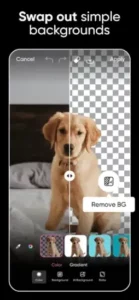
Retouch, enhance, and edit photos. This provides a broad photo editing workflow. AI Enhance boosts image quality. Background Remover creates clean cutouts. Object Remover deletes unwanted clutter.
Why does this matter? Because the photo editor is the core. Everything else builds on it. One reviewer says they use Picsart for all their editing and enjoy scrolling through filters for hours.
The AI Generation Layer
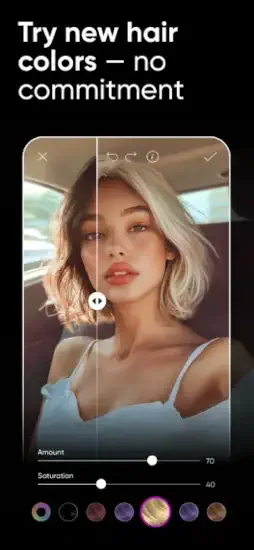
The AI image generator turns text into AI art, images, and GIFs. The AI video generator creates videos from text, images or ideas. AI Replace enables face swaps, hair color changes and selfie edits. AI Expand extends images beyond the frame. AI Try-On lets users experiment with outfits and styles.
The AI layer is the app’s strongest differentiator. It is also the feature most likely to justify the subscription price for regular users.
Video Editing and Creation
Edit clips, add music, effects and text. This lets users create short form videos in-app. Image to video tools add motion to static photos. Useful for social media content and quick edits.
Video editing is where Picsart competes directly with CapCut and InShot. The tools are not as deep as dedicated editors, but they are good enough for most social content.
Templates, Stickers and Design Tools
Templates provide customizable designs for logos, social posts, stories, business cards and posters. Sticker Maker lets users create custom stickers and use 60M+ stickers. Collage Maker creates photo grids and freestyle collages. Text Editor adds text with hundreds of fonts and styles.
This speeds up design projects and social posts. Templates are the fastest path from idea to finished post.
Picsart Spaces and Aura
Picsart Spaces lets users share ideas and get inspiration from other creators. Picsart Aura is a chat based AI creative partner that creates, edits, and refines visuals. It adds a social and community layer. Aura turns conversational prompts into finished visuals.
Community features are part of the creative workflow. Users can see what others are making and borrow ideas from the feed.
The Pricing and Subscription Reality
Picsart is free to download with in-app purchases. Picsart Gold Annual is $57.00**. Picsart Pro Annual is **$83.99. Picsart Gold Monthly is $12.99**. Picsart Pro Monthly is **$13.99. Picsart Pro Weekly is $11.99**. Picsart Gold Weekly is **$4.99. Picsart Plus Annual is $64.99**. Picsart Plus Monthly is **$11.99.
Prices and features vary by region, billing method or promotion. The multiple tiers are one of the app’s most confusing aspects for new users.
Picsart AI Providers Hub: What It Does
20+ AI Models
January 2026 update added multiple AI engines. Choose between them for different results. Some models better for realistic photos where you want natural edits. Some better for artistic styles where you want creative effects. The hub gives you options instead of one black box that might not work for your specific image.
Background Removal
One tap remove backgrounds. Works on people, products, pets. Clean edges around hair and fur. Minimal artifacts that you would have to clean up manually. The AI handles complex backgrounds better than older versions.
Object Removal
Remove unwanted objects from photos. People walking into your shot. Power lines crossing the sky. Blemishes on skin. The AI fills the space convincingly. Sometimes you cannot tell anything was removed.
AI Enhance
Fix lighting, color, and sharpness with one tap. Good for underexposed photos where you cannot see details. Good for washed-out photos where colors look faded. The AI adjusts levels automatically.
AI Replace
Change faces, hair color, clothing, or backgrounds. Type a prompt like “red dress” or “beach background.” The AI generates a replacement. Fun for creative edits. Useful for testing different looks.
Avatar Generator
Upload a selfie. Choose a style (anime, realistic, fantasy). The AI generates avatars in that style. Good for profile pictures across social media. Fun for creating characters.
If you prefer template based design with less photo editing, check out Canva for drag and drop creativity.
How Picsart Works
Choose a project type such as photo editing, video editing, collage making or AI generation. Import media from your library or camera. Use editing tools to apply filters, retouch, remove backgrounds, remove objects or adjust colors. Use AI tools to generate images or videos, create avatars or use AI Replace, AI Expand, or AI Try-On. Add text and stickers using the Text Editor and Sticker Maker. Use templates for logos, social posts, stories, business cards and posters. Create collages using photo grids or freestyle layouts. Save or share the project to social media.
Picsart Graphics
Design Strengths
Broad toolset combining photo editing, video editing, collage making, AI generation and design tools. Strong AI features through Aura, AI Playground, Gen AI Studio, AI avatars and AI Try-On. Templates and stickers including customizable designs and 60M+ stickers. Text and collage tools through the Text Editor and Collage Maker. Multi language support including English and 29 additional languages.
Design Limitations
Performance issues. A reviewer reports lagging, glitching, and crashes when creating projects. Camera conflicts. The same reviewer says the app can interfere with camera access when both are open. Subscription complexity. The listing shows multiple tiers including Gold, Pro and Plus, each with different features and prices.
No declared accessibility support. PicsArt, Inc. has not indicated which Apple accessibility features the app supports. Large app size at 270.5 MB. Feature overload. New users may need time to learn where tools are and how to use them.
Picsart User Reviews
Positive themes include broad creative tools, AI features, templates and stickers, text and collage tools and multi language support. One reviewer says they use Picsart for all their editing and enjoy scrolling through filters for hours. The listing highlights Aura, AI Playground, Gen AI Studio, AI avatars and AI Try-On.
Negative themes include performance issues, camera conflicts, subscription complexity, no declared accessibility support, large app size and feature overload. One reviewer reports lagging, glitching and crashes when creating projects. The same reviewer says the app can interfere with camera access when both are open.
Picsart Tips
For Editing Photos Faster
Use Background Remover for product shots. It can create clean cutouts and product images quickly. A tool that saves five minutes per edit is worth learning well.
Use Object Remover to clean up photos. Remove clutter and imperfections quickly. It handles small distractions better than large removals.
Use AI Enhance for clarity. Boost image quality before retouching. Starting with a clearer base makes every other tool work better.
Use AI Retouch for portraits. Perfect skin, face and detail enhancements. Keep the setting moderate. Over-retouching looks worse than no retouching.
Use AI Replace for creative edits. Try face swaps, hair color changes and selfie edits. The novelty tools are fun, but they are also where the most unrealistic results appear.
For Creating Videos and AI Content
Use AI video generator for short clips. Create videos from text, images or ideas. Short clips work better than long ones on mobile.
Use image to video tools for motion. Turn static images into moving content. Useful for social posts that need movement.
Use Aura for conversational AI creation. Chat your vision into visuals and refine in one conversation. Aura works best when you give specific instructions.
Use AI Playground and Gen AI Studio for exploration. Try new ideas and create faster with AI tools.
Use AI avatars for identity. Upload selfies to generate customized avatars in different styles.
For Designing and Sharing
Use templates for quick projects. Create logos, social posts, stories, business cards and posters. Templates are faster than building from scratch.
Use Sticker Maker for personalization. Create custom stickers or use the 60M+ sticker library.
Use Collage Maker for mood boards. Create photo grids or freestyle collages.
Use Text Editor for captions. Add text with hundreds of fonts and styles.
Use Picsart Spaces for inspiration. Share ideas and get inspiration from other creators.
Set a spending budget. The app includes multiple subscription tiers and AI credits. Decide your limit before the paywall appears.
Picsart Similar Apps
| App | Best For | Difference from Picsart |
|---|---|---|
| Canva | Graphic design and templates | More design and template focused; Picsart adds more photo and video editing and AI generation |
| Adobe Express | Quick design and social content | More template and design focused; Picsart adds more photo and video editing and AI generation |
| VSCO | Photo editing and filters | More photography focused; Picsart adds more AI and design tools |
| Lightroom | Photo editing and enhancement | More photography focused; Picsart adds more AI and design tools |
| Snapseed | Photo editing and enhancement | More photography focused; Picsart adds more AI and design tools |
| InShot | Video editing and collage | More video focused; Picsart adds more AI and design tools |
| CapCut | Video editing and creation | More video focused; Picsart adds more photo editing and design tools |
| Polish | Photo editing and retouching | More photo focused; Picsart adds more AI and design tools |
| Funimate | Music video and motion editing | More video focused; Picsart adds more photo editing and design tools |
| Video Star | Music video editing | More video focused; Picsart adds more photo editing and design tools |
If you want a similar app with a different focus, Canva is worth a look. It offers graphic design and templates, and it runs on the same platforms as Picsart.
Picsart’s main differentiator is that it combines photo editing, video editing, collage making, AI generation, templates, stickers, text and social sharing in one app. Canva wins on design templates. VSCO wins on photo filters. CapCut wins on video editing. But if you want one app that covers almost every creative task on mobile, Picsart occupies a space few others attempt.
Conclusion:
Picsart does everything: photos, videos, AI, templates. The free version is generous. Gold is worth it for heavy users. The January 2026 AI updates keep it competitive with newer apps.
What works: All in one for photos, video and AI. Generous free tier with no watermarks. Massive template and sticker library. AI tools work well for most everyday edits. Cross platform sync across devices. Regular updates with new features. No watermarks on free exports.
What does not: Subscription billing glitches reported by many users. Occasional crashes on complex edits. Gold pricing adds up to $60 to $140 yearly. AI results inconsistent across different image types. Video editing less powerful than CapCut for advanced projects.
What do you want from a creative app? If you want one app that does photos, video, and AI edits without learning multiple tools, Picsart delivers. If you specialize in just one area, Canva for templates or CapCut for video might fit better.
If you prefer template based design with less photo editing, check out Canva for drag and drop creativity.

Frequently Asked Questions About Picsart
Is Picsart really free, or do I need to pay to get useful features?
Picsart is free to download and use for basic editing. The free version includes the core photo editor, thousands of templates and stickers, collage maker, and basic video editing. No watermarks on exports. The main limitation is that AI tools like background removal, object erase, and AI replace have daily or monthly usage caps. Gold removes those caps and adds premium assets. For occasional edits, free is plenty. For daily creators, Gold is worth it. You can start your Picsart download from the App Store.
What is the AI Providers Hub in the January 2026 update?
The AI Providers Hub added 20+ AI models to choose from. Instead of one black box AI, you can pick different engines for different tasks. Some models work better for realistic photo edits. Others excel at artistic styles or object removal. The hub gives you control to get the best result for your specific image.
Can I use Picsart for video editing, or is it just for photos?
Picsart handles both. The video editor lets you trim clips, add effects and transitions, add music, and add captions. It is not as deep as CapCut for advanced video effects, but it is more than enough for quick social media content. Many creators use Picsart for photos and CapCut for video. But for one-stop editing, Picsart covers both.
How do I remove a background from a photo?
Open the image, tap the background removal tool (usually under AI tools or cutout), and the AI removes the background in one tap. Works on people, products, and pets. Clean edges around hair and fur. Gold users get unlimited removals. Free users have a limited number per day or month.
Where can I find official information and get support if I have billing issues?
The official Picsart website has documentation and tutorials. The support center answers common questions. For billing glitches, which are the most common complaint, contact support directly with your Apple receipt. Official website: https://picsart.com and PicsArt Wiki page.