Call of Duty: Mobile arrived in 2019 and did something people said was impossible. It put a console quality shooter on your phone.
Call of Duty: Mobile is not the game you first downloaded. New modes like DMZ Recon change how matches flow. The ranked system got rebuilt from complaints. Collaborations with Pop Team Epic and NieR pull in players who never touched shooters before. Understanding what changed helps you decide whether to reinstall or stay loyal to whatever you play now.
The game holds a 4.7 star rating on the App Store based on over 5 million reviews. Size sits around 3.5 GB with all resources downloaded, so clear space before installing. Age range stretches from teenagers grinding ranked to thirty somethings reliving console memories during commutes. If you prefer a different shooter, PUBG Mobile offers similar Battle Royale action with a 4.2 star rating.
What Call of Duty: Mobile Actually Is
If you know Call of Duty from console or PC, you already understand the appeal. If you have tried mobile shooters before and found them either too simple or too cluttered, Call of Duty: Mobile tries to land in the middle. It brings the familiar feel of the franchise to a touchscreen without stripping away the depth that makes the series work.
Players praise the content, familiarity, controls, modes and value for a free game. Critics point to storage requirements, matchmaking experiences, movement balance, battery drain and the time or money required to unlock and upgrade items.
The Multiplayer Core
Team Deathmatch, Domination and Kill Confirmed deliver short, repeatable PvP matches. Familiar maps include Shipment, Raid, Standoff and Nuketown. Custom loadouts let players choose weapons, attachments, operator skills, perks and equipment. The mode rewards aim, map knowledge and quick decisions.
Why does this matter? Because the 5v5 foundation gives new players a low-risk entry point before they commit to longer modes. A match lasts a few minutes. You can learn the controls, test weapons and figure out what works without losing an hour of progress.
Battle Royale and Survival Play
Battle Royale combines scavenging, exploration, survival and a shrinking play area. Solo, duo and squad play are available. Classes provide special equipment and a passive ability. First person or third person perspective options are available depending on mode settings.
It provides longer, more tactical matches than standard Multiplayer. The mode rewards positioning and rotation rather than pure aim. If you prefer strategy over reflex, this is where the game opens up.
DMZ: Recon and Extraction Risk
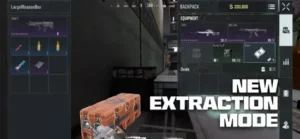
DMZ: Recon is a PvPvE extraction mode set on Serpent Island and Building 21. Players take contracts, fight hostile AI and enemy squads, collect loot, and try to extract. Successful runs contribute to progression and rewards.
Decisions matter here. How far to push. When to complete objectives. When to leave. This changes the stakes compared with standard Multiplayer. One bad decision can cost everything you collected. One smart extraction can fund your next several matches.
Zombies and PvE Alternatives
Zombies is a cooperative PvE mode where players fight waves of enemies together. It offers an alternative to competitive PvP. Availability and playlists can change by season, so check the in-game mode menu for the current offering.
It is useful for players who want the Call of Duty feel without the pressure of ranked matches. The mode adds variety to the rotation and gives players something to do when competitive play feels stale.
Ranked Play and Seasonal Progression
Ranked playlists provide structured progression for players who want a more serious ladder than casual matches. Seasonal content adds monthly themes, events, modes, maps and rewards. This keeps the game changing over time.
One reviewer appreciated the breadth of content without paying for console style add-ons. That sentiment shows up often. The free experience is genuinely generous.
Operators, Cosmetics and Clans
Players can unlock operators, outfits, weapon blueprints, charms and emotes. This supports collection and personalization. Clans and Clan Wars create longer-term group goals. Voice and text chat support squad coordination. Controller support offers an alternative to touch controls.
The cosmetic layer is deep, but it does not replace skill. Players who spend money look different. They do not automatically play better.
How Call of Duty: Mobile Works
Choose a mode and map. Build a loadout with weapons, attachments, operator skills, perks and equipment. Play the objective in objective based modes. Adapt loadouts between lives when the map or enemy team calls for it. Earn progression through matches and levels.
In Battle Royale, choose a class, scavenge, rotate, and survive. In DMZ: Recon, take contracts, collect loot and extract safely. In Zombies, work with teammates against waves of enemies.
Call of Duty: Mobile Graphics
Design Strengths
Recognizable maps and modes give returning Call of Duty players familiar settings. Adjustable controls allow players to customize button placement and play style. Choice of input through touch controls or supported controller. Flexible downloads let players choose additional maps and HD assets rather than downloading everything at once. Frequent visual refreshes through seasonal events, operators and themed content. Multiple match formats offer different pacing within one app.
Design Limitations
Storage can balloon. The base listing is 3.1 GB, but one reviewer reported an install approaching 15 GB after updates and downloadable content. That figure is an individual experience, not a guaranteed install size, but the pattern is real.
Battery and device demands are noticeable. One reviewer reported substantial battery drain. Performance and heat vary by device and graphics settings.
Mobile screen disadvantage concerns appear in reviews. A reviewer argued that tablet users have an advantage over phone users. This is a user reported concern, not a definitive statement about matchmaking rules.
Fast movement can feel demanding. Sliding and jump movement are frequently mentioned by players as a skill and balance issue.
Interface complexity affects new players. The app includes several modes, loadouts, seasonal systems and optional downloads. It takes time to learn where everything lives.
Call of Duty: Mobile User Reviews
Positive themes include lots to play, recognizable Call of Duty feel, good value for free players, customizable controls, co-op and team play and weapon customization. One reviewer said the game offered substantial content without paying for console style add-ons. Another praised the combination of Multiplayer, Battle Royale, Zombies, operators, and seasonal content.
Negative themes include storage, matchmaking, movement balance, progression grind, battery drain and bots and skill gap. One reviewer said casual matches sometimes paired them with much more experienced opponents. Another felt that weapon leveling could be slow compared with players who spend money on experience items. A third said bots make early matches easy while later fights feel less skill-dependent.
A careful reader should distinguish cosmetic spending from competitive advantages. The listing includes paid purchases, but player opinions about whether the economy affects competitive balance differ. Avoid treating p2w as an established fact without testing specific items and current modes.
Call of Duty: Mobile Tips
For Getting Started
Start with Multiplayer before ranked. Short matches are a low risk way to learn controls, recoil, maps and weapon behavior. Ranked play punishes experimentation. Casual lobbies do not.
Use the training range. Test sensitivity and weapon recoil before changing several settings at once. Changing five variables simultaneously makes it impossible to know what helped.
Customize the HUD. Put fire, aim, crouch and slide, jump, reload and equipment buttons where your fingers can reach them comfortably. Default layouts are a starting point, not a final answer.
Try different control schemes. Two-thumb controls are easy to learn. A multi finger layout may help once you are comfortable. Controller support is also available if you prefer analog sticks.
Download only the assets you need. Start with core files and preferred modes, then add maps or HD resources as needed to manage storage. The full install can balloon quickly if you grab everything at once.
For Multiplayer Strategy
Use separate loadouts for different roles. Save one close range build, one flexible rifle build and one objective or support build. Switching between saved loadouts takes seconds. Rebuilding from scratch mid match does not.
Change loadouts between lives when useful. A map’s sightlines or the team’s needs may call for a different weapon or equipment. The player who adapts faster usually wins the second half of the match.
Play the objective. In Domination or Hardpoint-style modes, controlling the objective can contribute more than chasing kills. The scoreboard does not care how many eliminations you have if the enemy holds the point.
Learn common routes and sightlines. Map knowledge helps you anticipate spawns, objective approaches and likely sniper positions. Familiarity beats raw aim when both players have similar reflexes.
Use cover and reposition. Avoid repeatedly challenging the same angle after an opponent has identified your position. The second peek from the same spot is usually the one that gets you killed.
For Battle Royale and Extraction
Choose a Battle Royale class for your squad’s needs. Consider whether your team needs mobility, information, defense or support. Classes include equipment and a passive skill. Picking a class that duplicates what three teammates already have wastes the slot.
Rotate before the zone forces you to. Moving early can reduce rushed fights and damage from the shrinking play area. The zone does not care about your loot priorities.
Treat DMZ: Recon loot as something to secure. In an extraction mode, surviving with a modest haul can be better than losing everything by pushing one more fight. Extraction shooters punish greed more than they punish caution.
Coordinate extraction decisions. Agree with your squad on a point to leave, and do not assume every teammate wants to continue deeper into the map. One player staying behind turns a clean extraction into a rescue mission.
Use voice chat for concise calls. Share enemy direction, objective status, loot needs and extraction plans rather than narrating every action. Short calls win fights. Long stories lose them.
For Progression and Spending
Focus on a small weapon pool. Leveling a few weapons you enjoy is more manageable than spreading experience across the whole arsenal. Mastery comes from repetition, not from owning everything.
Check what a purchase actually unlocks. Before buying, distinguish cosmetic content from weapons, upgrades, or progression items. The store does not always make the difference obvious.
Set a spending limit. Seasonal offers and premium content can accumulate. Decide your budget in advance. The battle pass refreshes. Your bank account does not.
Expect seasonal changes. Weapon balance, maps, events, and playlists can change, so revisit loadouts after updates. What worked last season may not work this season.
Take breaks if the game feels frustrating. Long sessions can amplify fatigue, battery drain and tilt. Stepping away for twenty minutes often fixes what another match would worsen.
Call of Duty: Mobile Similar Games
| Game | Best For | How It Differs from Call of Duty: Mobile |
|---|---|---|
| PUBG Mobile | Survival focused Battle Royale | More centered on large map survival and scavenging; Call of Duty: Mobile offers more traditional 5v5 modes and extraction play |
| Free Fire MAX | Fast, character driven Battle Royale | Short, ability focused matches and character skills; Call of Duty: Mobile has a broader mix of classic Multiplayer, BR, Zombies and DMZ |
| Critical Ops | Competitive mobile FPS | More focused on tactical 5v5 shooting than Call of Duty: Mobile’s many modes and progression systems |
| Standoff 2 | Competitive round-based FPS | Emphasizes tactical team rounds; Call of Duty: Mobile includes more varied playlists and Battle Royale |
| Arena Breakout | High stakes extraction shooter | Extraction and loot risk are central; Call of Duty: Mobile’s DMZ: Recon is one mode within a broader shooter |
| Blood Strike | Fast battle royale shooter | Focuses on rapid BR action and character abilities rather than a broad Call of Duty style playlist range |
| Modern Combat 5 | Campaign flavored mobile FPS | More traditional mission and multiplayer structure, with less of Call of Duty: Mobile’s current seasonal breadth |
| Fortnite | Building, creative play, and crossovers | More focused on construction and creator modes; Call of Duty: Mobile emphasizes gunplay and classic FPS modes |
If you want a similar game with a different focus, PUBG Mobile is worth a look. It offers survival focused battle royale with a heavier emphasis on large map tactics and it runs on the same platforms as Call of Duty: Mobile.
Call of Duty: Mobile’s main differentiator is the combination of classic 5v5 multiplayer, Battle Royale, Zombies and extraction gameplay in one mobile app, alongside recognizable Call of Duty maps and frequent seasonal content. PUBG Mobile wins on survival realism. Critical Ops wins on focused tactical shooting. Arena Breakout wins on high-stakes extraction tension. But if you want one app that covers almost every shooter mode, Call of Duty: Mobile occupies a space few others attempt.
Conclusion
If you want classic 5v5, Battle Royale, Zombies, and extraction in one mobile app, Call of Duty: Mobile delivers. If you want a more focused or survival-driven shooter, PUBG Mobile, Critical Ops, or Arena Breakout may serve you better.
Download it. Start with Multiplayer. Try Battle Royale once you are comfortable. Test DMZ: Recon if you want stakes. The content is there. The question is whether the storage, grind, and matchmaking match what you are willing to invest.
Frequently Asked Questions (FAQ) About Call of Duty: Mobile
Is Call of Duty: Mobile free to play, or do I need to spend money to compete?
The game is completely free to download and play. You can access multiplayer, Battle Royale, and DMZ Recon without spending anything. The Battle Pass costs money but offers cosmetic items and some weapons that eventually become available through free challenges. Skill matters more than spending. Good players with default weapons beat average players with Mythic guns every time. You can start your Call of Duty Mobile download from the App Store here: Call of Duty Mobile on the App Store
What devices run Call of Duty: Mobile well in 2026?
The game runs on most iPhones from the iPhone 8 and newer. Older devices handle multiplayer at reduced graphics settings. Newer models hit 120 FPS on maximum quality. File size sits around 3.5 GB with all resources downloaded. The developers optimize each update for battery life, so extended sessions stay manageable. If your phone runs other modern games smoothly, it runs Call of Duty Mobile.
How do I redeem codes for free rewards?
Open the game and look for the Events tab. Scroll to the Redemption Center option. Enter your code exactly as shown, including capital letters and numbers. Codes arrive during collaborations like Pop Team Epic and NieR, through social media posts, and during seasonal events. Follow the official Call of Duty Mobile accounts on Twitter and Facebook to catch codes before they expire.
Where can I find official information about updates and new seasons?
The official Call of Duty website publishes patch notes before each season launches. The community wiki tracks weapon stats, map changes, and meta shifts that players discover after updates. Facebook groups discuss strategies and share leaks. Official website: https://www.callofduty.com/mobile Wiki page: https://callofduty.fandom.com/wiki/Call_of_Duty:_Mobile
How do I contact support if I lose my account or have payment issues?
Account recovery goes through Activision Support. Keep your player ID and any purchase receipts saved. Response times vary but usually land within a few business days. For payment problems, include screenshots of the transaction.