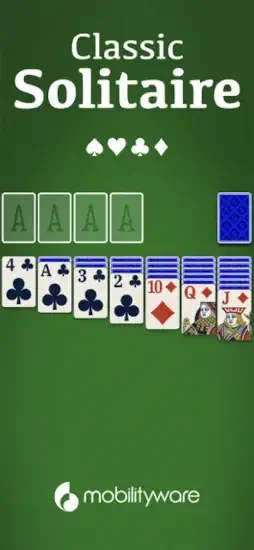
Solitaire is that game that you have played it before. On Windows 95. On your grandmother’s computer. On a plane with no internet. The game is timeless. But the mobile version you choose matters. Ads. Controls. Difficulty. Daily challenges.
Solitaire games exploded after smartphones replaced desktop computers. People wanted their old favorites on new devices. Microsoft Solitaire Collection brought the Windows classic to mobile with multiple game modes. Solitaire Grand Harvest added rewards and farming progression to keep players hooked. Spider Solitaire offered a different challenge with its own rule set. MobilityWare stayed focused on Klondike, the original solitaire, adding modern extras without changing what made the game work.
Solitaire by MobilityWare is a polished version of the classic you already know. Daily Challenges give you reasons to return each day. Multiplayer adds competition when you want it. Hints and undo remove the frustration of dead end moves. Understanding what makes this version different helps you decide whether it is your next time killer or just another card game.
The game holds a 4.7 star rating on the App Store based on over 2M reviews. Size sits around 402 MB depending on cached assets. Age range stretches from young adults learning the game to older players who have played solitaire for decades. If you prefer a solitaire experience with multiple game modes, Microsoft Solitaire Collection offers Klondike, Spider, and FreeCell.
What Is Solitaire by MobilityWare?
Solitaire by MobilityWare is one of the most popular and long standing Klondike solitaire apps on iOS and Android. It offers classic Draw 1 and Draw 3 modes, daily challenges, themed events, customizable card backs and backgrounds, statistics tracking, hints, and unlimited undos.
Think of it as the classic solitaire game you know, but with modern mobile features. Build four foundation piles from Ace to King in suit, move cards between tableau columns, and clear the board. The app adds daily challenges, customization, and helpful tools like hints and undos. Unlike flashy meta-games, this app focuses on the card play itself.
Solitaire fans appreciate the clean gameplay. Casual gamers enjoy the short sessions. Commuters use it to pass time. Seniors find the clear card design accessible. Anyone who enjoys classic card games with modern conveniences will find it familiar.
The platform is available on iOS and Android. The game is free to download with optional in-app purchases and subscriptions.
Here is the honest upfront limitation. Solitaire by MobilityWare has aggressive ads after almost every deal, confusing subscription models, forced Daily Goals, and ads even in paid versions. Recent updates have introduced cluttered layouts and technical issues that frustrate long time players.
How Solitaire by MobilityWare Works
Solitaire by MobilityWare operates through thirteen interconnected systems: tableau, foundations, stock, waste, moves, hints, undos, auto-complete, scoring, Daily Challenges, events, customization, and statistics tracking. The tableau has seven columns of cards. Foundations are four piles where cards are built from Ace to King in suit. Stock contains remaining cards dealt one or three at a time. Waste holds cards turned from the stock. Moves transfer cards between columns and foundations. Hints show possible moves. Undos reverse moves. Auto complete finishes obvious moves. Scoring options include Standard or Vegas rules. Daily Challenges offer unique deals. Events add themed objectives. Customization changes card backs and backgrounds. Statistics track performance.
The rules are simple but classic. Build four foundation piles from Ace to King in suit. Move cards between tableau columns in descending order with alternating colors. Only Kings can be moved to empty tableau columns. Draw from the stock one or three cards at a time. Play cards from the waste onto the tableau or foundations. Win by moving all cards to foundations.
The progression loop follows a clear pattern. Choose Draw 1 or Draw 3 mode, deal the tableau and stock, move cards between columns and to foundations, use hints or undos when stuck, complete the Daily Challenge or event for crowns and badges, track statistics and compete on leaderboards, customize card backs and backgrounds for variety, repeat.
The strategic element comes from managing the stock, planning sequences of moves, and deciding when to use undos or hints. Draw 3 mode is significantly harder than Draw 1 because you see fewer cards from the stock at a time.
Solitaire Key Features
Draw 1 and Draw 3 Modes
Players can choose between Draw 1 (easier) or Draw 3 (more challenging) dealing styles. Draw 1 reveals one card at a time from the stock, making it easier to plan moves. Draw 3 reveals three cards at a time, requiring more strategic thinking about which cards will appear next.
Daily Challenges
Each day presents a unique deal that all players receive. Completing the Daily Challenge earns a crown, and collecting crowns throughout the month unlocks trophies. However, some players report frustration with Daily Challenges that feel unsolvable, especially when the same deal repeats for weeks without changing.
Themed Events
Limited-time events add themed objectives, such as completing outdoor themed levels to earn a Trail badge. These events provide variety beyond standard random deals. Monthly themes change the Daily Challenge calendar appearance, and special events introduce exclusive themes and badges.
Customization and Themes
Players can customize card backs, backgrounds, and card face styles. Monthly themes change the Daily Challenge calendar appearance, and special events introduce exclusive themes and badges. Customization is a strong point for players who enjoy personalizing their experience. However, some recent reviews complain that new layouts and trophy bars clutter the interface and make it harder to access statistics quickly.
Statistics Tracker
The app tracks wins, losses, best times, and other performance metrics. This adds a personal progression layer for players who want to monitor their improvement over time.
Hints and Undos
Free hints and unlimited undos assist with difficult deals. The hint system shows possible moves but does not consider long-term strategy. Unlimited undos allow players to experiment without penalty.
Auto complete
The game automatically finishes when all remaining moves are obvious. This saves time at the end of a game without reducing the challenge of the main puzzle.
Scoring Options
Players can choose between Standard or Vegas scoring rules. Standard scoring rewards speed and efficiency, while Vegas scoring follows traditional casino style rules.
Portrait and Landscape Support
The game supports both portrait and landscape orientations, allowing players to choose their preferred viewing angle.
Leaderboards
Players can compete for high scores against other players, adding a light competitive layer.
Solitaire Graphics and Design
Solitaire by MobilityWare uses a clean, classic card aesthetic. Card faces are clear, backgrounds are customizable, and animations are subtle but satisfying. The design prioritizes readability and familiarity for players accustomed to physical cards.
Visual Strengths
Clear, readable card faces make the game easy to play. Customizable card backs and backgrounds allow personalization. Smooth tap and drag interactions feel responsive. Satisfying win animations, including dancing cards, reward success. Familiar solitaire tableau layout reduces the learning curve. Portrait and landscape support provide flexibility. Themed event visuals add variety without cluttering the core experience.
Design Weaknesses
Recent updates have introduced features that some long-time players find intrusive. Cluttered Daily Challenge calendar with hard-to-see crowns obscures information. Progress bars and trophy displays that obscure statistics reduce usability. Forced Daily Goals that some players find annoying interrupt the experience. Ads that interrupt the clean experience detract from gameplay. Confusing layout changes that make it harder to access familiar features frustrate loyal users.
What Players Say About Solitaire Game
What Players Appreciate
Players enjoy classic, clean Klondike gameplay. Draw 1 and Draw 3 modes provide varying difficulty. Daily Challenges and themed events add variety. Customizable card backs and backgrounds allow personalization. Unlimited undos and free hints assist without penalty. Statistics tracking and leaderboards add progression. Satisfying win animations reward success.
What Players Complain About
Excessive ads after almost every deal interrupt flow. Long or difficult-to-close ads frustrate players. Ads disguised as “update the app” messages mislead users. Ads appearing even in paid or subscription versions undermine trust. Forced Daily Goals that feel unnecessary add pressure. Cluttered new layout obscuring statistics reduces usability. Unsolvably difficult Daily Challenges that repeat create frustration. Technical issues such as freezes and crashes in recent updates affect reliability.
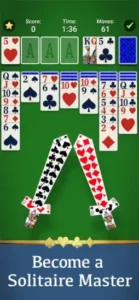
Solitaire Tips That Actually Improve Your Game
Starting with Solitaire by MobilityWare feels familiar. You deal cards, move them around, and build foundations. But most players struggle with win rates and getting stuck in unwinnable deals. Here is how experienced players improve their odds.
Prioritize freeing face down cards. Focus on moves that reveal hidden cards in the tableau. This increases your options and improves win probability. Hidden cards are your biggest unknown. Every face down card you reveal gives you more choices and better information.
Use Aces and Twos early. Move Aces and Twos to foundations as soon as possible to free up tableau space. Early foundation moves create more room to work. Aces and Twos are often blockers. Moving them early opens up the board.
Avoid empty columns unless necessary. Empty columns can only be filled with Kings, so use them strategically rather than casually. An empty column without a King is wasted space. Only create empty columns when you have a King ready to fill them.
Plan stock usage carefully. In Draw 3 mode, think ahead about which cards you will see next from the stock. Avoid moves that lock away critical cards. Stock management is key. You need to know what is coming to plan effectively.
Use hints sparingly. Hints show possible moves but do not consider long term strategy. Use them when truly stuck, not as a crutch for every decision. Hints are for emergencies. Overusing hints prevents you from learning the game.
Undo liberally in practice. Unlimited undos allow experimentation. If a move leads to a dead end, undo and try a different approach. Undo is your safety net. Use it to learn what works and what does not.
Complete Daily Challenges regularly. Daily Challenges provide variety and crowns toward monthly trophies. Even if you do not care about trophies, they offer fresh deals. Daily variety keeps the game interesting. Each day brings a new puzzle.
Customize for comfort. Adjust card backs, backgrounds, and orientation to match your preferences. A comfortable visual setup improves focus. Personalization matters. Play in the way that feels best for you.
Track your statistics. Use the statistics tracker to monitor win rates, best times, and improvement over time. This adds a personal progression layer. Stats show your growth. Watching your win rate improve is satisfying.
Consider ad-free options. If ads disrupt your experience too much, consider a subscription or one-time purchase to remove them. Many players say it is worth the cost for a clean experience. Ad-free is worth considering. A clean experience enhances enjoyment.
Report misbehaving ads. If you encounter ads that do not close properly or open the browser unexpectedly, use the in-game Support option to report them. The developer says ads should be easy to close after a short timer. Reporting helps fix issues. Your feedback matters.
Be cautious with forced Daily Goals. If Daily Goals feel intrusive, check settings or updates to see if they can be minimized. Some players find them annoying and prefer optional goals. Optional is better. You should play the way you want.
Solitaire Similar Games
Solitaire by MobilityWare offers polished Klondike, but it is not the only option. Here is how it compares to other popular games.
| Game | Best For | Main Difference from Solitaire by MobilityWare |
|---|---|---|
| Microsoft Solitaire Collection | Classic solitaire variants | Bundles Klondike, Spider, FreeCell, Pyramid, and TriPeaks with Xbox achievements |
| Solitaire Grand Harvest | Meta progression solitaire | Adds farm building progression and heavy monetization |
| Solitaire Cruise | Themed solitaire adventure | Uses travel themes and story progression |
| Solitaire TriPeaks by MobilityWare | TriPeaks variant | Uses TriPeaks rules instead of Klondike |
| Spider Solitaire by MobilityWare | Spider variant | Uses two to four decks and building in suit |
| Pyramid Solitaire by MobilityWare | Pyramid variant | Uses pyramid layout and pair sum to 13 rules |
| FreeCell by MobilityWare | FreeCell variant | Uses all cards face-up with free cells |
| Solitaire by MobilityWare+ | Ad-free Klondike | Paid version with no ads and weekend puzzle events |
| Classic Solitaire (generic) | Pure Klondike | Often lacks daily challenges and events |
| Solitaire Relax | Minimalist solitaire | Focuses on calm visuals and simple gameplay |
Which one wins? It depends on your preferences. The Solitaire game by MobilityWare wins on classic Klondike polish and daily challenges. Microsoft Solitaire Collection wins on variety with multiple game modes. Solitaire Grand Harvest wins on meta progression for players who enjoy farm building. Solitaire TriPeaks offers a different card game variant for variety. Solitaire Relax offers a minimalist experience for players who want calm visuals and simple gameplay without the extra features.
Conclusion
Solitaire by MobilityWare is a polished and feature rich implementation of classic Klondike solitaire. Its core gameplay is excellent, with Draw 1 and Draw 3 modes, unlimited undos, free hints, statistics tracking, and daily challenges. For players who want a traditional solitaire experience with modern conveniences, it is one of the best options available.
Its greatest strength is polished classic gameplay with modern features. Its main weakness is that polish comes with monetization pressure. The game is free, but many players report excessive ads, confusing subscription models, forced Daily Goals, and ads even in paid versions. If you can tolerate frequent ads or find a legitimate ad-free purchase, the underlying card game is outstanding.
Solitaire by MobilityWare fits solitaire fans, casual gamers, commuters, seniors, and anyone who enjoys classic card games with modern conveniences. It does not fit players who dislike frequent ads. It does not fit players who want a true ad-free experience without subscription confusion. It does not fit players who prefer minimalist, ad-free solitaire without daily goals.
Solitaire by MobilityWare gives you a polished Klondike experience with daily challenges and customization. But polish comes with interruptions. You deal, move, and win. The result is a game that rewards careful planning but tests your tolerance for ads.
You have probably played solitaire on a computer or phone before. What if the solution was not more complex games, but a clean, polished version of the classic you already love? Solitaire by MobilityWare solves that by offering traditional gameplay with modern conveniences. But the solution only works if you can tolerate the monetization. The question is not whether Solitaire works. The question is whether you are ready to deal through the interruptions.
Frequently Asked Questions About Solitaire by MobilityWare
Is Solitaire by MobilityWare free to play?
Yes. The app is free to download and play. The free version includes Classic Solitaire, Daily Challenges, Multiplayer, Draw 1 and Draw 3 modes, unlimited undo, and the hint system. Ads appear between games. You can play forever without paying. A one time purchase removes ads and unlocks extra themes. You can start your Solitaire download from the App Store.
What is the difference between Draw 1 and Draw 3?
Draw 1 shows one card from the stock at a time. More moves are available. Easier for beginners and relaxing play. Draw 3 shows three cards at a time, but only the top card is playable. Harder. Requires planning several moves ahead. Good for experienced players who want a challenge.
How does the hint system work?
Tap the hint button when you are stuck. The game highlights a possible move. The hint system does not solve the game for you. It points the way when you cannot see the next move. Good for learning strategy and finding moves you missed.
What are Daily Challenges?
A new solitaire layout appears every day. Complete the challenge to earn crowns. Monthly calendars track your progress. Daily Challenges often have unique layouts not found in Classic mode. Some are easier. Some are harder. The variety keeps the game fresh.
Where can I find official information and get support if I have issues?
The official MobilityWare website has information about the game and updates. For account issues, purchase problems, or technical support, contact MobilityWare through the website. Official website: https://www.mobilityware.com