
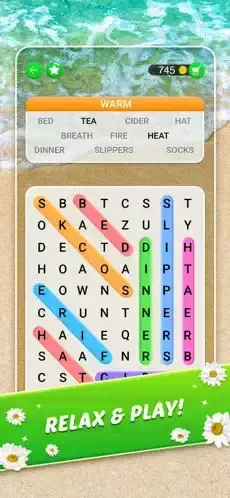
Word Search Explorer takes you back to school. You remember word searches from childhood. A grid of letters. A list of words to find. Simple. Satisfying. That feeling when your eyes finally spot “butterfly” hidden diagonally across the page.

Word Search Explorer takes that classic puzzle and adds themes, progression, and hundreds of levels. The question is whether it captures the relaxing charm of paper word searches or becomes another ad heavy mobile game that frustrates more than it entertains.
Word puzzle games exploded as people looked for calm, brain engaging activities on their phones during commutes and breaks. Wordscapes led the way with crossword style puzzles where you fill in missing letters. Word Connect focused on swiping letters to form words from a set. Word Search Explorer stayed true to the classic format while adding a quest like progression system. No anagrams. No missing letters. Just find the words in the grid.
Word Search Explorer is not just a word search app. It is a vocabulary building journey. You find words hidden in grids. You learn new terms along the way. You progress through themed levels that take you from ocean life to space exploration to world capitals. Understanding how the game works helps you enjoy it without getting frustrated by ads or difficult puzzles.
The game holds a 5 out 5 star rating on the App Store based on over 783,000 reviews. Size sits around 319 MB depending on downloaded assets. Age range stretches from young adults looking for brain training to older players who enjoy classic puzzle formats. If you prefer crossword style word puzzles with letter wheels, Wordscapes offers a different challenge
What Is Word Search Explorer?
A themed word search puzzle game. Find hidden words in letter grids by swiping across letters. Each puzzle has a theme like “Ocean Life,” “Space,” or “Cooking.” Match the theme to find the right words on the list. Complete all words on the list to finish the level. Simple. Relaxing. Satisfying.
Casual puzzle fans who enjoy word searches and pattern recognition. People who want a relaxing game without time pressure or fast reflexes. Older adults looking for brain exercise that is gentle but engaging. Anyone who likes vocabulary building games that teach new words while you play.
The game is presented as a quest or journey across different worlds. You travel through themes. Nature. Science. Food. History. Animals. Each world has multiple levels. The structure gives a sense of progression beyond just solving individual puzzles. You are not just playing. You are exploring.
Download free. Play free. Monetization comes from ads between levels and hint purchases. Free players can access all levels with patience. No levels are locked behind a paywall.
Word Search Explorer 2026: What’s New
Hundreds of Puzzles
The game has a huge content library. Hundreds of word search puzzles across dozens of themes. New puzzles added regularly through updates. You will not run out of levels quickly. The content keeps you busy for months.
Vocabulary Building Focus
The game emphasizes learning while playing. Each word you find adds to your vocabulary. Some words are common like “apple” and “ocean.” Others are more obscure like “anemone” or “constellation.” You learn as you play without feeling like you are studying.
Hint Support
Stuck on a word? Use a hint. The game reveals a letter or highlights the word location on the grid. Hints are limited but can be earned by watching ads or purchased. Use them wisely on the toughest boards.
Offline Play
You can play without internet connection. Good for flights, commutes, subway rides, or areas with poor reception. The game works offline completely. No need for constant connectivity.
Themed Progression
The quest structure takes you through different themes in order. Nature themes first. Then science. Then food. Then history. Then animals. Each theme introduces new vocabulary words related to that topic. The progression makes sense.
Word Search Explorer Core Gameplay Mechanics
The Grid
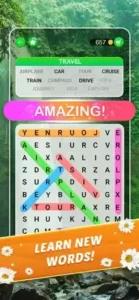
A letter grid fills most of the screen. Letters are arranged in rows and columns. Words can be hidden horizontally left to right or right to left. They can be vertically top to bottom or bottom to top. They can be diagonal in all four directions. The words are hidden everywhere.
The Word List
A list of words to find appears below or beside the grid. Each word belongs to the level’s theme. Find every word on the list to complete the level. Crossing off words feels satisfying.
Swipe Controls
Swipe your finger across the letters to select a word. Start on the first letter. Drag to the last letter. Release to confirm your selection. The app highlights the word if it is correct. The letters glow briefly. The word gets crossed off the list.
Theme Clues
The theme guides your search. If the theme is “Fruits,” you look for “apple,” “banana,” “orange,” “grape.” If the theme is “Space,” you look for “planet,” “star,” “moon,” “comet.” The theme narrows your focus. You are not searching randomly.
Bonus Words
Some grids have extra words not on the main list. Words that fit the theme but are not required. Finding bonus words gives extra rewards like coins or progress toward special goals. Bonuses help with progression even if they are not required to finish the level.
Progress Circles
Each completed word fills a progress circle at the top of the screen. Fill the circle completely to earn rewards. Bonus words also fill the circle. The circle tracks your overall progress through the level.
Word Search Explorer Difficulty and Progression
Early Levels
Easy and relaxing. Small grids maybe 10×10. Simple words like “cat,” “dog,” “fish.” Short word lists with 5 to 8 words. The early puzzles help you learn the controls and mechanics without frustration.
Mid Levels
Larger grids maybe 15×15. More words on the list. Some words are longer like “butterfly” or “helicopter.” The challenge increases gradually. You start needing to search more carefully and scan more methodically.
Late Levels
Complex grids maybe 20×20. Dense letter arrangements with fewer vowels. Obscure vocabulary words you may not know. The puzzles demand patience and careful scanning. Later levels are not for casual quick play. They require focus.
Theme Variety
Themes rotate every few levels to keep gameplay fresh. One level is ocean animals. Next level is musical instruments. Next level is world capitals. The variety prevents boredom. You never feel like you are doing the same puzzle repeatedly.
World Progression
The journey takes you through different worlds. Each world has a set of levels, usually 10 to 20. Complete a world to unlock the next world. The structure gives you clear goals and a sense of accomplishment.
Word Search Explorer Graphics and Design
Visual Style
Clean, easy to read interface. Letters are clear and well spaced. Grids are easy to scan without squinting. The design prioritizes readability over flashy effects. You are here to find words, not watch animations.
Color Scheme
Soothing colors throughout the app. Soft backgrounds that do not strain your eyes. High contrast between the letters and the grid background. Easy on the eyes for long play sessions. No neon colors.
Thematic Elements
Each theme has subtle visual touches. Ocean theme has blue tones and wave patterns. Space theme has dark backgrounds with tiny stars. The visuals reinforce the theme without distracting from the puzzle.
Animations
Subtle animations when you find a word. Words highlight briefly. Letters glow for a moment. The feedback is satisfying without being overwhelming. No long animations that waste your time.
Accessibility
Large letter sizes by default. Clear fonts that are easy to read. The game is designed for easy reading. Good for older players or anyone who struggles with small text on phone screens.
Performance
Runs on most iPhones from iPhone 7 and newer. Smooth swiping with no lag. No delay on letter selection. The app is lightweight and does not drain battery quickly.
Word Search Explorer Similar Games
You have choices in the word puzzle space. The App Store lists several options, each with a different approach. The table below shows where Word Search Explorer fits among the competition.
| Game | Main Similarity |
|---|---|
| Wordscapes | Vocabulary based word puzzle progression |
| Word Collect | Swipe to form words and level based structure |
| Word Connect | Simple letter connecting gameplay |
| Crossword Jam | Relaxing word building and themed puzzles |
| Word Search Journey | Classic word search format with progression |
The Differentiation
Wordscapes uses crossword style puzzles where you fill in missing letters from a wheel. Different mechanics but similar vocabulary focus. Word Collect has you swipe to form words from a set of letters, not from a grid. Word Connect is simpler with letter tubes instead of a grid. Crossword Jam is crossword style with clued words and no grid searching. Word Search Journey is almost identical in gameplay but with different themes and progression systems.
Word Search Explorer stands out for its clean, senior friendly interface and huge library of themes. The quest structure gives a sense of journey across different worlds. The vocabulary building angle adds educational value that many similar games ignore.
If you search Word Search Explorer similar games, these five appear most often. Each does something well. Word Search Explorer does classic word searches better than most.
Word Search Explorer Monetization: Free vs Paid
Free Version
Full gameplay access. All levels are open. Hundreds of puzzles available. Ads appear between levels as the trade off for free play. Hints are limited but can be earned through watching ads.
Ad Frequency
Ads appear after completing levels. Some players find the frequency frustrating, especially as they progress deeper into the game. The ad load does not increase with level difficulty, but the number of levels means more ads overall. Taking breaks between levels helps manage the frustration.
Hints
Hints help you find stuck words when you have been staring at the grid too long. Earn free hints by watching ads. Purchase hint packs through in app purchases. Use hints wisely on the most difficult puzzles. Do not waste them on words you could find with more patience.
Removing Ads
Some versions of the game offer ad removal through a one time purchase. Not all versions have this option. Check the in app store for your region.
Value Proposition
The free version is fully playable from level one to the end. Ads are the trade off for free access. Patient players can enjoy the entire game without spending a cent.
Word Search Explorer Tips and Tricks
Start by Scanning for the Longest Obvious Words First
Long words are easier to spot in the grid. They stand out among shorter letters. Find them first. Short words can be found later after the grid has fewer letters to scan.
Use the Theme to Narrow Down Likely Words Before Swiping
Read the theme at the top of the screen. Think about words related to that theme. Search for those specific words in the grid. The theme gives you a head start and focuses your attention.
Look for Bonus Words Even If They Are Not on the Main List
Bonus words fill progress circles faster. They give extra rewards. Scan for extra words even after completing the main list. The grid has more words than required.
Save Hints for the Toughest Boards Rather Than Using Them Too Early
Hints are limited. Use them when you are completely stuck after several minutes of searching. Do not waste them on easy words you could find with more patience.
Play in Short Sessions If You Want the Game to Stay Relaxing
Long sessions can feel repetitive. Short sessions of 10 to 15 minutes keep the game fresh. Take breaks between levels to avoid burnout.
Focus on Common Prefixes and Suffixes
Words often share prefixes like “un” or “re” or “pre.” Suffixes like “ing” or “ed” or “tion” are common in English. Look for these letter patterns in the grid.
If an Ad Heavy Section Starts to Annoy You, Take Breaks Between Levels
Ads are part of the free experience. Step away when you feel frustrated. Come back later with fresh patience.
Use the Game as Vocabulary Practice by Reading Every Solved Word Carefully
Pay attention to each word you find. Read its definition if you do not know it. Learn new terms. The educational angle adds value beyond entertainment.
Scan Backwards
Words can be spelled backwards in the grid. Look for words reversed. Train yourself to see patterns in both directions, not just left to right.
Look for Letter Clusters
Common letter pairs like “TH,” “ER,” “IN,” “ON,” “AN,” and “ING” appear often in English. Spotting these clusters helps you find longer words faster.
Word Search Explorer Community
Solo Gameplay
Word Search Explorer is mostly a solo experience. No built in chat. No friend lists. No leaderboards. You play against the puzzle, not against other people.
External Community
The community exists around the game, not inside it. YouTube walkthroughs show solutions for tough levels. App store reviews share opinions and tips. Discussion forums on Reddit and other sites help players stuck on specific puzzles.
Walkthrough Videos
YouTube creators post level solutions for popular word games. Search for “Word Search Explorer level 150” if you are stuck. Watch how other players found the hidden words.
Vocabulary Learning
Some players use the game for vocabulary practice. Discussing new words with friends or in forums adds a social element outside the app.
Not Heavily Social
The game is designed for solo relaxation. Social features are minimal by design. The focus is on the puzzles themselves.
Word Search Explorer Common Issues and Fixes
Too Many Ads
Ads appear between levels as the price of free play. Take breaks after every few levels. Play in short sessions. Consider ad removal purchase if available in your region.
Stuck on a Word
Use a hint if you have been searching for minutes. Scan the grid slowly in a pattern, row by row. Look for theme related words. Take a break and come back with fresh eyes.
Bonus Words Not Counting
Some words are not considered valid bonus words. The game has a specific dictionary. Not every real English word counts. Do not waste time on words that do not appear on the bonus list.
Grid Too Small on Older Phones
Pinch to zoom if the feature is available. The grid size is fixed on some devices. Upgrade to a larger phone for easier play on small screens.
Progress Not Saving
Check your internet connection. Sign in to your account if the game offers one. Reinstall the app as a last resort if progress keeps resetting.
Conclusion: Should You Play Word Search Explorer in 2026?
The honest answer is yes, if you enjoy word searches and want a relaxing mobile game. Word Search Explorer captures the classic puzzle feel from paper word searches. The themes keep it interesting across hundreds of levels. The vocabulary building is a nice bonus for your brain. The ads can be annoying, but the core gameplay is solid enough to overlook them.
What works: Classic word search mechanics done well with swipe controls. Hundreds of themed puzzles across dozens of topics. Clean, readable interface with large letters. No time pressure to rush you. Offline play for travel and commutes. Vocabulary building while having fun.
What does not: Ads can be frequent and frustrating between levels. Hints are limited unless you pay or watch more ads. Gameplay is repetitive over long sessions. No social features or leaderboards.
What do you want from a word puzzle game? If you want a relaxing, classic word search experience with hundreds of levels to work through, Word Search Explorer delivers. If you want fast paced action or no ads, look elsewhere.
Frequently Asked Questions About Word Search Explorer
Is Word Search Explorer really free to play?
Yes. Word Search Explorer is completely free to download and play. You can access all hundreds of levels without paying. The game shows ads between levels, which is how it stays free. Hints are limited but can be earned by watching ads or purchased. No levels are locked behind a paywall. You can start your Word Search Explorer download from the Official App Store.
How do you play Word Search Explorer?
Swipe your finger across the letter grid to select a word. Start on the first letter. Drag to the last letter. Release to confirm. The word must be on the list and match the level theme. Words can be horizontal, vertical, or diagonal. They can be forwards or backwards. Find every word on the list to complete the level.
What are bonus words, and why should I find them?
Bonus words are extra words hidden in the grid that are not on the main word list. They still fit the level theme. Finding bonus words fills your progress circle faster and gives extra rewards. They are optional but helpful for progressing through the game more quickly.
How do hints work, and when should I use them?
Hints reveal a letter or highlight where a word is hidden in the grid. You earn free hints by watching ads. You can also purchase hint packs. Save hints for the toughest boards when you have been searching for several minutes without finding the last few words. Do not waste them on easy words.
Where can I find official information and get support if I have issues?
The official PlaySimple Games website has information about their games. For account issues or technical problems, contact PlaySimple Games support through their website. Official website: https://playsimple.in/