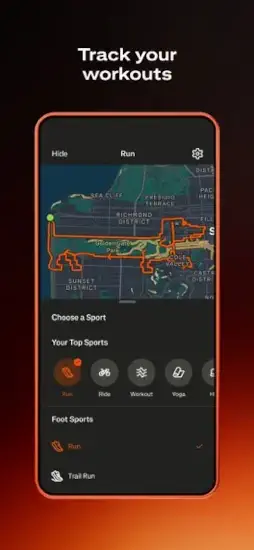
Strava answers a question you did not know you had. You finish a run. You know your time. You know your distance. But how does it compare to others on the same route
Strava answers that. It tracks your workouts with GPS. It shows you segments where you can compete against other athletes. It lets you see how you stack up against friends and strangers. The question is whether it is a genuine motivational tool or just another app that turns exercise into a popularity contest.
Fitness tracking apps exploded as people wanted to log their workouts and see progress. Nike Run Club focused on running with guided coaching. Garmin Connect integrated deeply with Garmin watches for serious athletes. MapMyRun offered route tracking with nutrition logging. Strava combined GPS logging with social competition into one platform.
Strava in 2026 is not just a workout logger. It is a social fitness platform. You record activities anywhere. You compare your times on segments against others. You give kudos to friends who post activities. You join challenges to stay motivated. Understanding the features helps you decide whether Strava or a simpler fitness tracker fits your needs and training goals.
The app holds a 4.8 star rating on the App Store based on over 354,000 reviews. Size sits around 475 MB depending on cached maps. Age range stretches from young runners posting daily activities to older cyclists tracking long rides. If you prefer a simpler running-focused app without social pressure, Nike Run Club offers guided
What Is Strava ?
A fitness tracking and social activity app for running, cycling, walking, hiking, and many other sports. GPS logging records your routes and stats. Community competition lets you compare your efforts with others. Route planning helps you discover new paths.
Who It Is For
Runners who want to track their pace and distance accurately. Cyclists who want to compare segment times on hills. Hikers who want to record trails for memory. Anyone who wants social motivation to exercise regularly.
The Two Sides
Workout tracker with GPS, pace, distance, elevation, and heart rate data. Social platform where athletes share activities, give kudos, and compete on segments. The same app serves both purposes.
Download free. Basic features free. Premium subscription unlocks advanced analytics, route planning, and segment leaderboards.
Strava 2026: What’s New
Redesigned Record Experience
New activity screen shows map and stats together on one screen. No more switching between different views. Easier to see your data while moving.
Dark Mode
Full dark theme available for the entire app. Easier on eyes for early morning or night runs. Saves battery on OLED screens.
Offline Route Maps
Premium feature. Download maps for offline use. Good for areas with poor cell service like mountains or rural roads.
Personal Heatmaps
See where you run most often across all your activities. Identify your favorite routes. Find gaps in your coverage.
Suggested Routes
Premium feature. AI suggests routes based on your activity history. Discover new paths tailored to your preferences.
Multi Bike Support
Track different bikes separately. See mileage per bike. Good for cyclists with road, mountain, commuter, and indoor bikes.
Strava Core Features: What You Actually Use
GPS Activity Recording
Record runs, rides, walks, hikes, and 30 plus other sports. Track distance, time, pace, speed, elevation gain, and heart rate with a sensor.
Real Time Stats
See your pace, distance, and time while you exercise. Audio cues for each mile or kilometer. Customizable data screens.
Route Discovery
Find popular routes near your location. See where others run and ride. Save routes to your phone for later.
Segment Leaderboards
Compete on specific route sections created by users. See your time compared to others who have done the same segment. Track your personal best.
Social Sharing
Share activities with your followers. Give kudos like likes to friends. Comment on activities. Post photos from your workouts.
Beacon Safety Feature
Share your real-time location with trusted contacts. Good for solo runs and rides in remote areas. Premium feature.
Privacy Controls
Control who sees your activities. Hide start and end points near your home. Create private profiles. Make activities private by default.
Strava Activity Tracking: How It Works
Start Recording
Open the app. Tap the record button. Choose your sport. Wait for GPS signal lock. Start moving.
During Activity
See your pace, distance, and time on screen. Auto-pause for stops at traffic lights. Voice cues for each mile or kilometer.
End Activity
Tap finish when done. Add photos from your workout. Write a description. Choose privacy setting. Save or discard.
Activity Summary
See map of your route. Pace and speed graphs. Elevation profile. Splits per mile or kilometer. Calories burned estimate.
Edit Activity
Crop the start or end to remove driving. Change sport type if misclassified. Hide private sections near home. Make activity public or private.
Upload from Devices
Sync with Garmin, Wahoo, Apple Watch, and other devices. Activities automatically upload to Strava. No manual entry needed.
Strava Segments: The Competitive Edge
What Are Segments
Specific sections of a route created by users. A hill climb. A straight flat section. A downhill. Any notable part of a route.
How Segments Work
Run or ride through a segment naturally. Strava automatically records your time. Compare to others who have done the same segment.
Leaderboards
See the top times for each segment. See your friends’ times. See how you rank overall. Filter by age, weight, or gender.
Personal Records
Strava tracks your best time on each segment over time. Try to beat your own PR. Progress measured in seconds.
Segment Exploration
Find popular segments near your location. Discover challenges. Compete without racing anyone directly.
Live Segments
Premium feature. See how you are doing against your PR and the segment leader in real time while you run or ride.
Strava Graphics and Design
Visual Style
Clean, map first design that puts your route at the center. Workout data is easy to read while you are moving. Practical rather than flashy. The design prioritizes function over decoration, which is exactly what you need mid run.
Activity Screen
Map and stats shown together on one screen. Current pace, distance, and time displayed clearly. Heart rate shown if you have a sensor connected. The redesigned Record experience is intuitive and easy to use.
Feed
Social feed showing activities from people you follow. Photos, maps, and stats for each workout. Kudos and comments below. The feed keeps you connected to your fitness community.
Profile
Your complete activity history in one place. Stats like total distance and elevation gain. Number of kudos received from others. Followers and following counts.
Dark Mode
Full dark theme available for night owls. Easier on eyes for early morning runs before sunrise. Saves battery on OLED screens.
Performance
Runs on most iPhones from iPhone 7 and newer. GPS accuracy depends on your phone’s hardware. Battery drain is significant on long activities.
Strava Similar Apps
| App | Main Similarity |
|---|---|
| Nike Run Club | Running tracking and training motivation |
| Garmin Connect | Activity logging, stats, and performance analysis |
| MapMyRun | Route tracking and workout history |
| adidas Running | Social fitness tracking and goal setting |
| Komoot | Route planning and outdoor navigation |
The Differentiation
Nike Run Club focuses on running with coaching and guided runs from professional athletes. Garmin Connect is for Garmin device users with deep performance metrics and body battery. MapMyRun has route tracking but less social competition and fewer users. adidas Running has similar social features but a smaller user base. Komoot focuses on route planning for hiking and cycling, not activity tracking.
Strava stands out for its segment leaderboards and social competition. No other fitness app makes comparing your performance with others so easy and addictive.
If you search Strava similar apps, these five appear most often. Each does something well. Strava does social fitness competition better than anyone.
Strava Free vs Premium: What You Get
Free Version
GPS activity recording for all sports. Basic stats including pace, distance, and time. Social feed and ability to give kudos. Segment leaderboards (view only, no live tracking). Limited route discovery. Beacon safety feature limited to 1 text per month.
Premium Version
Live segments with real-time feedback during your activity. Personal heatmaps showing your most frequent routes. Suggested routes based on your history. Offline maps for areas without cell service. Beacon unlimited sharing. Advanced stats like suffer score and grade adjusted pace. Fitness and freshness tracking. Training plans. Route creation from heatmaps.
Subscription Pricing
Monthly and yearly subscription options available. Free trial offered for new users.
What You Lose Without Premium
No live segments while running. No offline maps for remote areas. No suggested routes. Very limited Beacon safety. Only basic stats.
Value Proposition
Free version is good for basic tracking and social features. Premium is worth it for serious athletes who want segment competition, route planning, and advanced analytics.
Strava Tips and Tricks
Turn on Activity Recording Before You Start Moving
Start recording before you begin your workout. GPS needs time to lock onto satellites. Your start point will be accurate.
Use Privacy Settings if You Do Not Want to Share Every Detail
Hide your home address from your activity map. Create privacy zones around sensitive areas. Make activities private by default.
Try Segment Tracking to Compare Your Time with Other Athletes
Check segment leaderboards after your run or ride. See how you compare to others. Try to beat your personal record next time.
Build or Save Routes Before Long Runs or Rides to Avoid Getting Lost
Create routes on the Strava desktop website. Sync them to your phone. Follow the route on your device during your activity.
Enable Beacon When Exercising Alone for Extra Safety
Share your real time location with trusted contacts. They can see exactly where you are. Good for solo runs in unfamiliar areas.
Add Photos to Workouts for a Richer Activity Log
Take photos during your run or ride. Add them to the activity afterward. Remember the scenery and conditions.
Review Your Splits after Workouts to Understand Pacing Better
Check your mile or kilometer splits. See where you slowed down or sped up. Adjust your pacing strategy for next time.
Follow Friends or Local Athletes to Stay Motivated and Discover Better Routes
See what others are doing for workouts. Discover new routes they use. Get inspired by their consistency.
Connect with Other Devices for Better Data
Pair Strava with GPS watch or heart rate monitor. Get more accurate data than phone alone.
Join Challenges for Extra Motivation
Strava hosts monthly distance challenges. Walk, run, or ride a certain distance. Earn digital badges for completing them.
Strava Common Issues and Fixes
GPS Not Accurate
Check your phone location settings. Ensure location is enabled for Strava. Restart the app. Restart your phone. GPS accuracy improves with clear sky view.
Battery Drain
GPS tracking uses significant battery power. Lower screen brightness. Close other running apps. Use a dedicated GPS watch for very long activities.
Subscription Confusion
Free trial automatically converts to paid subscription. Cancel before the trial ends if you do not want to pay. Check your app store subscriptions regularly.
Segment Not Recording
Ensure you covered the entire segment from start to finish. GPS accuracy affects segment detection. Run or ride through the whole section without stopping.
Activities Not Syncing
Check your internet connection. Restart the Strava app. Disconnect and reconnect your device. Contact support if persists.
Conclusion: Should You Use Strava in 2026?
The honest answer is yes, if you want social motivation and segment competition. Strava is the best app for comparing your performance with other athletes. The free version is good for basic tracking of your workouts. Premium is worth it for serious athletes who want live segments and route planning. The community aspect keeps you coming back for more.
What works: GPS activity tracking for many sports. Segment leaderboards for competition with others. Social features with kudos and comments. Route discovery and planning tools. Beacon safety feature for solo exercise. Free version available with basic features.
What does not: Premium subscription required for advanced features. Battery drain on long activities with GPS. GPS accuracy can vary by phone model. Subscription confusion from automatic free trial conversion.
What do you want from a fitness app? If you want to compete with others and track your progress over time, Strava delivers. If you want a simple workout logger without social pressure, Nike Run Club or a basic tracker might fit better.
Video by Fix369
Frequently Asked Questions About Strava
Is Strava free to use?
Yes. Strava is free to download and use. The free version includes GPS activity recording, basic stats, social feed, kudos, segment leaderboards (view only), and limited route discovery. Premium subscription adds live segments, offline maps, suggested routes, personal heatmaps, advanced analytics, and Beacon safety. You can start your Strava download from the Official App Store .
What are Strava segments and how do they work?
Segments are specific sections of a route created by users, like a hill climb or a flat straight section. When you run or ride through a segment, Strava automatically records your time. You can compare your time to other athletes who have completed the same segment. Leaderboards show top times, friends’ times, and your personal record.
What is the difference between Strava free and premium?
Free version includes GPS tracking, basic stats, social feed, and segment leaderboards (view only). Premium adds live segments that give real-time feedback during your activity, offline maps for areas without cell service, suggested routes based on your history, personal heatmaps, advanced stats like grade adjusted pace, and unlimited Beacon safety location sharing.
Can I use Strava without internet connection?
You can record activities without internet connection. GPS works offline. However, maps may not load without data. To view maps offline, you need a premium subscription to download maps before your activity. The activity will sync to Strava when you reconnect to the internet.
Where can I find official information and get support if I have issues?
The official Strava website has information about features, updates, and subscription plans. The Strava Support Hub answers common questions about account, privacy, and technical issues. For account recovery or payment problems, contact Strava support through the website. Official website: https://www.strava.com