

Photomath is ready for the next math problem you cannot solve.


Photomath promises to fix that. Point your camera at the problem. The app shows step by step solutions. The question is whether it helps you understand the math or just gives you answers to copy without learning anything.
Math solver apps exploded as students turned to phones for homework help. Microsoft Math Solver offered similar scanning with integration into the Microsoft ecosystem. Symbolab focused on detailed step by step explanations, especially for calculus and advanced math. Mathway covered broad topics from arithmetic to statistics with quick answers. Photomath combined camera scanning with detailed solution breakdowns that show the reasoning behind each step.
Photomath in 2026 is not just an answer generator. It is a learning tool. You scan a problem. The app shows each step. You see why the solution works. The goal is understanding, not just completion. Understanding how to use it effectively helps you learn math instead of just getting homework done and forgetting everything by the next test.
The app holds a 4.8 star rating on the App Store based on over 733,000 reviews. Size sits around 31 MB depending on cached content. Age range stretches from elementary students learning arithmetic to college students studying calculus. If you prefer a more detailed step by step solver with a focus on advanced math, Symbolab offers similar features
What Is Photomath?
Photomath is a free to use math-learning app developed by Photomath, Inc. (acquired by Google) that uses your phone’s camera to scan printed or handwritten math problems and instantly provide step by step solutions. It covers topics from basic arithmetic to calculus, including algebra, trigonometry, statistics, and word problems.
Think of it as a personal math tutor in your pocket. Point your camera at a math problem, and the app shows you how to solve it step by step. It does not just give the answer; it explains the process, like a teacher walking you through each step. Unlike a calculator that only returns results, Photomath emphasizes understanding the reasoning behind each move.
Students use it to understand homework problems. Parents use it to help their children with math. Teachers use it as a teaching aid. Adult learners use it to refresh math skills. Anyone who needs help understanding math concepts will find it valuable.
The platform is available on iOS and Android. The app is free to download with optional in-app purchases and subscriptions.
Here is the honest upfront limitation. Photomath has a subscription paywall for advanced features including animated tutorials, word problem solutions, and contextual hints. Some users report confusion about what is free versus premium, camera recognition errors for messy handwriting, and concerns about students using the app to cheat rather than learn.
How Photomath Works
Photomath operates through ten interconnected systems: camera scanner, OCR recognition, equation parsing, step by step algorithms, animated tutorials, contextual hints, graphing engine, word problem AI, scientific calculator, and offline functionality. The camera scanner captures the problem. OCR recognition converts images to text. Equation parsing creates digital equations. Step by step algorithms generate solutions. Animated tutorials provide voice explanations. Contextual hints guide users toward the next step. Graphing engine visualizes functions. Word problem AI parses natural language. Scientific calculator enables manual input. Offline functionality works without internet.
The basic flow is straightforward. Open the app and select camera scan or manual input. Point your camera at a printed or handwritten math problem. The app recognizes the equation and displays the solution. Review step-by-step explanations to understand the process. Use animated tutorials or contextual hints for deeper learning (premium). Graph functions or explore alternative methods if available. Use the scientific calculator for manual equation input. Repeat for additional problems or homework assignments.
The educational value comes from engaging with the step-by-step process rather than just copying the final answer. The app rewards careful scanning and active engagement with explanations.
Photomath Key Features
Camera Scanner
The core feature. Point your phone at printed or handwritten math problems to scan and solve them instantly. The camera scanner uses OCR and computer vision to recognize equations, symbols, and handwritten text. It works best in good lighting with clear, well formed writing. Messy handwriting or poor lighting can reduce accuracy.
Step by Step Solutions
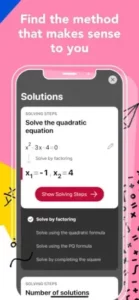
Detailed explanations showing how to reach the answer, not just the final result. Each step is clearly formatted and numbered, making it easy to follow the logic. Some problems show alternative approaches to reinforce understanding. This feature is available for many equation based problems in the free version.
Animated Tutorials with Voice
Computer generated voice explanations that mimic a tutor at a whiteboard. These animated tutorials walk through each step with visual and verbal explanations, helping users understand the reasoning behind each move. This is a premium feature that requires a Photomath Plus subscription.
Scientific Calculator
A built-in calculator for manual input of equations. If the camera struggles with messy handwriting, users can type equations directly into the calculator for a solution. This is useful for problems that are difficult to scan or for users who prefer manual input.
Graphing
Visual graphs for functions, inequalities, and equations (in some versions). This helps users visualize how functions behave and understand the relationship between equations and their graphical representations. Graphing is available in some versions and may be limited compared to dedicated graphing apps.
Word Problem Solutions
AI-powered recognition and solving of word problems (premium feature). The app parses natural language word problems and converts them into solvable equations, showing the step by step process. This is one of the most requested features and is only available with a subscription.
Contextual Hints
Hints that guide you toward the next step without giving away the full solution (premium feature). Instead of showing the entire solution, hints help users discover the next logical step on their own. This promotes active learning rather than passive answer-copying.
Offline Functionality
The app works without an internet connection for most features. This makes it useful for students studying in areas without reliable Wi-Fi. Once the app is downloaded, the core scanning and solving functions work offline.
Multiple Languages
Support for 32 languages, including English, Spanish, French, German, Chinese, and more. This makes the app accessible to a global audience of learners.
Photomath Graphics and Design
Photomath uses a clean, minimalist interface focused on the camera scanner and solution display. The design prioritizes clarity and ease of use, with large buttons, clear text, and intuitive navigation.
Visual Strengths
Clean, readable equation display makes solutions easy to follow. Clear step-by-step solution formatting breaks down complex problems. Intuitive camera scanner interface guides users through the scanning process. Smooth animations for solution transitions create a polished feel. Minimalist design that avoids clutter reduces distraction. Support for dark mode in some versions reduces eye strain. Clear distinction between free and premium features helps users understand what they are getting.
The camera scanner is the centerpiece of the design. Users simply point their phone at a problem, and the app overlays a scanning frame to guide alignment. Once scanned, the solution appears with animated step transitions.
Design Weaknesses
Camera recognition errors for messy handwriting frustrate users. Confusion about which features are free versus premium creates uncertainty. Occasional lag or slow scanning on older devices affects performance. Limited graphing capabilities compared to dedicated graphing apps reduce functionality. Subscription prompts that feel intrusive to some users interrupt the experience.
One reviewer said the camera sometimes picks up the wrong problem or area above the selected equation, leading to incorrect solutions. Another user complained that the app shows only one or two steps for free, requiring a membership to see the full solution.
What Users Say
What Users Appreciate
Users value accurate camera scanning and problem recognition. Detailed step by step explanations help with understanding. Multiple solving methods for complex problems provide different perspectives. Animated tutorials that mimic a personal tutor make learning engaging. Offline functionality for most features works without internet. Support for handwritten and printed problems makes it versatile. Wide range of math topics from arithmetic to calculus covers most school needs.
What Users Complain About
Subscription paywall for advanced explanations frustrates free users. Concerns about students using it to cheat on homework and tests raise ethical issues. Camera recognition errors for messy handwriting reduce accuracy. Occasional scanning of the wrong problem area leads to incorrect solutions. Confusion about which features are free versus premium creates uncertainty. Subscription billing issues, including automatic annual charges, frustrate users. Limited graphing compared to dedicated math apps reduces functionality.
Photomath Tips That Actually Help You Learn Math
Starting with Photomath feels like magic. Point your camera at a problem, and the answer appears. But the real value comes from understanding the process, not just getting the result. Here is how experienced users get the most out of Photomath as a learning tool.
Ensure good lighting and focus. Poor lighting or blurry images reduce recognition accuracy. Hold the phone steady and ensure the problem is well-lit. Lighting is the most common cause of scanning errors. A well-lit problem scans correctly every time.
Use printed problems when possible. Printed equations are recognized more accurately than messy handwriting. If handwriting is necessary, write clearly and neatly. Clarity matters for accuracy. Messy handwriting leads to wrong solutions.
Frame the problem carefully. Use the scanning frame to isolate the specific equation you want to solve. Avoid including unrelated text or multiple problems in one scan. Precision improves results. The app works best when focused on one problem at a time.
Review all steps, not just the answer. The educational value comes from understanding the process. Take time to read each step and ask yourself why it works. Learning comes from process, not just results. The steps are where the learning happens.
Use animated tutorials for difficult concepts. If a step is confusing, the animated tutorial with voice explanation can clarify the reasoning. Visual explanations help with understanding. Hearing and seeing the process reinforces learning.
Try alternative solving methods. Some problems show multiple approaches. Comparing methods can deepen your understanding. Different perspectives reinforce learning. Seeing the same problem solved differently builds flexibility.
Use the scientific calculator for manual input. If the camera struggles, manually type the equation into the calculator for a solution. Manual input is a reliable fallback. Typing the equation yourself reinforces the problem structure.
Graph functions to visualize solutions. For algebra and calculus problems, use the graphing feature to see how functions behave visually. Graphs make abstract concepts concrete. Seeing a function plotted helps you understand its behavior.
Practice without the app. After using Photomath to understand a concept, try solving similar problems without the app to reinforce learning. Practice builds mastery. The goal is to eventually not need the app.
Be honest about usage. Using Photomath to learn is valuable; using it solely to cheat on assignments undermines your education. Many teachers and parents express concern about misuse. Learn, don’t just copy. The app is a tool, not a shortcut.
Manage subscriptions carefully. If you subscribe, track renewal dates to avoid unexpected charges. Some users report automatic annual subscriptions without clear consent. Track your subscriptions. Know when you are being charged.
Report recognition errors. If the app consistently misreads certain symbols or handwriting styles, use the in-app support to report issues. The developer actively responds to feedback. Your feedback improves the app. Help make it better for everyone.
Photomath Similar Apps
Photomath offers accurate step by step solutions, but it is not the only option. Here is how it compares to other popular math apps.
| App | Best For | Main Difference from Photomath |
|---|---|---|
| Microsoft Math Solver | Free camera scanning and step by step solutions | Completely free with no premium tier; supports more input methods |
| Mathway | Advanced math problems with step by step solutions | Requires premium subscription for full steps; broader topic coverage |
| Socratic by Google | Concept learning across multiple subjects | Uses Google AI to find videos and explanations, not just math |
| Symbolab | Advanced calculus and algebra with detailed steps | Stronger for higher level math; some features require subscription |
| Desmos | Graphing calculator and visual math | Focuses on graphing and visualization rather than step by step solutions |
| Cymath | Free step by step solutions for algebra and calculus | Simpler interface; less advanced than Photomath for word problems |
| GauthMath | AI-powered math solver with camera input | Similar to Photomath but with different AI training data |
| QANDA | Homework help with tutor support | Includes live tutor support in addition to AI solving |
| Wolfram Alpha | Computational knowledge engine | More powerful for advanced math but less focused on step by step learning |
| Camera Math | Simple camera based math solver | Less polished than Photomath but free for basic use |
Which one wins? It depends on your needs. The Photomath app wins on accuracy, step by step explanations, and animated tutorials. Microsoft Math Solver wins on being completely free. Mathway wins on broader topic coverage. Desmos wins on graphing and visualization. Symbolab offers stronger capabilities for higher level math with detailed calculus and algebra steps for advanced students.
Conclusion
Photomath is an outstanding math-learning tool that successfully combines camera scanning, AI-powered problem recognition, and step by step explanations. Its core functionality is excellent, with accurate scanning, detailed solutions, and animated tutorials that mimic a personal tutor. For students who want to understand math concepts rather than just get answers, it is one of the best options available.
Its greatest strength is accurate problem solving with step by step explanations. Its main weakness is that advanced learning features require a subscription. The app is free for basic features, but many advanced explanations, word problem solutions, and animated tutorials require a Photomath Plus subscription. Some users report confusion about what is free versus premium, and there are concerns about automatic subscription charges. Additionally, many teachers and parents express concern about students using the app to cheat rather than learn.
Photomath fits students, parents helping with homework, teachers, adult learners, and anyone who needs help understanding math concepts. It does not fit users who want completely free features without a subscription. It does not fit users who prefer not to support subscription-based learning tools. It does not fit users who are concerned about the ethics of AI-powered homework help.
Photomath gives you a personal math tutor in your pocket with step-by-step explanations and animated tutorials. But tutoring comes with a subscription. You scan, learn, and understand. The result is a tool that rewards engagement and learning but tests your willingness to pay for advanced features.
You have probably struggled with math problems that seemed impossible to solve. What if the solution was not giving up, but having a personal tutor explain every step? Photomath solves that by offering step-by-step explanations and animated tutorials. But the solution only works if you use it to learn, not just to copy answers. The question is not whether Photomath works. The question is whether you are ready to use it as a learning tool.
Frequently Asked Questions About Photomath
Is Photomath free to use?
Photomath is free to download and use. The free version includes camera scanning for printed and handwritten problems, step-by-step solutions for many math topics, a basic scientific calculator, and some graph views. Premium features like animated step-by-step explanations, video tutorials, and additional solution methods require a subscription. The free version is sufficient for most homework help. You can start your Photomath download from the App Store.
What math topics does Photomath cover?
Photomath covers basic arithmetic (addition, subtraction, multiplication, division, fractions), algebra (linear equations, quadratics, factoring, systems of equations), trigonometry (functions, identities, angles), calculus (derivatives, integrals, limits), statistics (mean, median, standard deviation), and geometry (area, volume, coordinate geometry). It handles problems from elementary school through college-level math.
Does Photomath work with handwritten problems?
Yes. Photomath can scan both printed textbook problems and handwritten equations. Clean, legible handwriting works best. Good lighting helps recognition. The app allows you to edit scanned equations before solving if it misreads something. Messy writing may cause errors, but the recognition has improved significantly in recent updates.
How does Photomath help me learn, not just get answers?
Photomath shows step-by-step solutions so you can see the reasoning behind each transformation. You can follow along to understand where you went wrong. Some problems offer multiple solution methods like factoring, completing the square, or the quadratic formula. The app also includes interactive graphs to visualize equations and functions.
Where can I find official information and get support if I have issues?
The official Photomath website has information about features, subscription plans, and company updates. The help center answers common questions about scanning, account issues, and technical problems. For account recovery or technical support, contact Photomath through the website. Official website: https://photomath.com .