
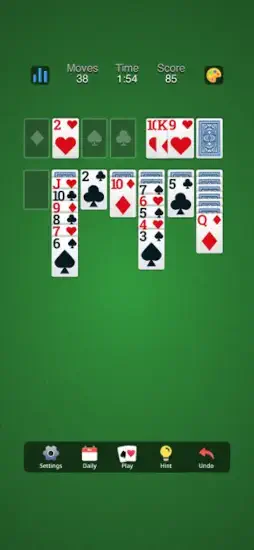
New Classic Solitaire Klondike brings back the simple joy of card games.

New Classic Solitaire Klondike game you remember from old Windows computers. Draw cards from the pile. Stack them in alternating colors. Build foundations from Ace to King. Traditional rules that have not changed in decades. Offline play so you can play anywhere without internet. Minimalist design that puts the cards front and center.
Solitaire apps exploded as people wanted the Windows classic on their phones during commutes and breaks. Microsoft Solitaire Collection added daily challenges and events and multiple game modes. Solitaire Grand Harvest added farming mechanics and progression systems. New Classic Solitaire Klondike stays pure to the original. No extras. No farming. No daily chores. Just the card game you already know and love.
New Classic Solitaire Klondike is not trying to reinvent anything about solitaire. It is the classic Klondike solitaire you already know from years of playing. Draw 1 card for an easier relaxing game. Draw 3 cards for more strategic challenge. Undo mistakes when you make a wrong move. Play offline without needing an internet connection. Understanding the basic strategy helps you win more games instead of getting stuck halfway through.
New Classic Solitaire Klondike holds a 4.9 star rating on the App Store based on over 82K reviews. Size sits around 435 MB depending on cached data. Age range stretches from young adults who discovered solitaire recently to older players who have played for decades. If you prefer a solitaire app with daily challenges and multiple game modes, Microsoft Solitaire Collection offers more features.
What Is New Classic Solitaire Klondike ?
A straightforward mobile Klondike solitaire app built for simplicity. Traditional 52 card rules that have not changed. Offline play without internet requirements. Minimalist, distraction free experience. No mini games. No flashy extras. Just classic card game relaxation.
Who It Is For
Players who want simple solitaire without complications or extra features. People who remember the Windows version from years ago. Anyone who wants to play offline on planes or trains. Classic card game fans who know the rules by heart.
The Rules
Standard Klondike solitaire rules. Build four foundation piles from Ace to King in order. Arrange cards in descending order on the tableau. Colors must alternate between red and black. The game you already know.
Download free. Play free without spending money. Monetization from ads that support the free model. Offline play available for ad free experience.
New Classic Solitaire Klondike 2026: What’s Included
Classic Klondike Rules
Build foundations from Ace to King as the goal. Tableau cards in descending order. Alternating colors between red and black. The game you already know from years of playing.
Draw Options
Draw 1 card for easier games with more moves. Draw 3 cards for more strategic challenge. Choose your difficulty based on your mood.
Landscape and Portrait
Play in either orientation on your phone. Landscape gives more screen space to see columns. Portrait works for one handed play.
Undo Button
Reverse mistakes instantly. Try different moves without penalty. Learn from errors by seeing what went wrong.
Offline Play
No internet connection required at all. Play on planes, trains, or anywhere without signal. The game works completely offline.
Small App Size
Lightweight download under 100 MB. Fast installation. Works on older devices with limited storage.
Free to Play
No cost to download or play ever. Ads support the free model for everyone.
New Classic Solitaire Klondike Core Gameplay Mechanics
The Goal
Build four foundation piles on the top right. One pile for each suit. Ace to King in order. Clear all cards from the tableau to win.
The Tableau
Seven columns of cards. First column has one card face up. Second column has one face down, one face up. Pattern continues to seven columns. Face down cards reveal when the card above moves.
The Stock
Cards not in the tableau sit in the stock pile. Draw from stock to add cards to play. Draw 1 mode shows one card at a time for easier play. Draw 3 mode shows three cards, only the top card is playable for more challenge.
Moving Cards
Move cards in descending order down the tableau. King to Queen to Jack to 10 and so on. Colors must alternate between red and black. Red on black. Black on red.
Empty Columns
Only a King card can start an empty column. Use empty columns strategically for moving long sequences. Very powerful in later game.
Foundations
Aces start the foundation piles. Cards added in order by suit. Complete all four suits to win the game.
Undo Feature
Reverse any move you make instantly. Experiment with different strategies without fear. Learn from mistakes by undoing and trying something else.
New Classic Solitaire Klondike Draw Options: Draw 1 vs Draw 3
Draw 1 Mode
Easier for casual players. More moves available overall. Every card drawn is playable if the rank and color match the tableau. Good for beginners or relaxing sessions when you do not want to think hard.
Draw 3 Mode
Harder for experienced players. More strategic depth required. Only the top card of three is playable at a time. You cannot access the other two cards until you play or discard the top card. Requires planning ahead.
Draw 3 Strategy
Do not play a card just because you can play it. Consider what cards are buried underneath in the stock. Sometimes passing on a playable card is better to reach cards below.
Draw 1 Strategy
Focus on revealing hidden face down cards first. Empty columns are very powerful. Move cards to open space whenever possible.
Which to Choose
Draw 1 for casual relaxing play. Draw 3 for strategic challenge. Switch based on your mood.
No Time Pressure
Both modes have no timer at all. Think at your own pace. No rushing.
New Classic Solitaire Klondike Graphics and Design
Visual Style
Classic, minimalistic design throughout. Emphasis on clarity and readability. Card faces are clear and easy to read. Suits are distinct from each other. No distractions anywhere.
Layout
Clean card table look with nothing extra. Cards are large enough to read easily. The layout prioritizes usability over decoration.
Orientation
Landscape for wider view showing more columns. Portrait for one handed play. Switch anytime.
Card Design
Traditional suits for hearts, diamonds, clubs, spades. Red and black colors. Standard font for numbers and letters. Familiar to any solitaire player.
Animations
Smooth card movements without lag. Cards slide into place satisfyingly. The animations are pleasant but not slow.
Performance
Runs on most iPhones from iPhone 7 and newer. Small app size under 100 MB. Fast loading with no waiting.
Accessibility
High contrast between cards and background. Easy to see for all ages. Good for players with vision concerns.
New Classic Solitaire Klondike Similar Games
You have choices in the solitaire space. The App Store lists several options, each with different features. The table below shows where New Classic Solitaire Klondike fits among the competition.
| Game | Main Similarity |
|---|---|
| Microsoft Solitaire Collection | Classic solitaire with modern presentation |
| Solitaire Grand Harvest | Casual solitaire with progression systems |
| Classic Solitaire Klondike | Same standard Klondike rules and flow |
| Spider Solitaire apps | Traditional card puzzle appeal |
| FreeCell apps | Another classic single player card format |
The Differentiation
Microsoft Solitaire Collection adds daily challenges, events, and multiple game modes like Spider and FreeCell. More features overall but more clutter. Solitaire Grand Harvest adds farming mechanics and reward systems. Progression keeps you playing. Classic Solitaire Klondike is very similar to this game but may have different monetization. Spider Solitaire is a different game with different rules and multiple suits. FreeCell is another classic card game but not Klondike solitaire.
New Classic Solitaire Klondike stands out for its pure, minimalist approach. No extra modes to confuse you. No farming mechanics. No daily chores. Just the classic game you already know.
If you search New Classic Solitaire Klondike similar games, these five appear most often. Each does something differently. New Classic Solitaire Klondike does pure Klondike solitaire better than most.
New Classic Solitaire Klondike Offline Play and Accessibility
Play Anywhere
No internet connection required at all. Airplane mode works perfectly. Commutes through tunnels without signal work. The game is always available.
Small App Size
Lightweight download under 100 MB. Works on older phones. Limited storage space is not an issue.
Quick Launch
App opens instantly with no waiting. Start playing immediately. No loading screens.
No Account Required
Just download and play right away. No sign up. No email. No password to remember.
Accessible for All Ages
Simple rules to learn. Clear visuals to see. No complex menus or settings.
Low Battery Drain
Efficient code that does not drain battery. Play for hours without significant battery loss.
New Classic Solitaire Klondike Tips and Tricks
Prioritize Uncovering Hidden Cards before Making Flashy Moves
Hidden face down cards block your progress. Reveal them as early as possible. Do not move cards just because you can move them.
Move Aces and Twos to the Foundation as Soon as Possible
Get them out of the tableau quickly. They only block other cards underneath. Foundations are safe places.
Use Undo to Test whether a Move Opens More Options Later
Try a move to see what happens. Undo if it does not help your position. Experiment freely without penalty.
Keep Alternating Colors in Mind
Do not trap important cards under wrong colors. Think about the color sequence before moving any card.
If the App Gives Draw Options, Test Whether Draw 1 or Draw 3 Is More Comfortable
Draw 1 for relaxation and casual play. Draw 3 for strategic challenge. Choose your style.
Use Portrait Mode for Quick Sessions and Landscape for More Room
Portrait fits one hand for playing anywhere. Landscape shows more columns on screen.
Play Offline for a Distraction Free Session
No notifications from other apps. No interruptions. Just solitaire.
Focus on Freeing Columns
Empty tableau spaces are very powerful. Only Kings can fill empty columns. Use empty columns to move long sequences.
Plan Several Moves Ahead
Look at what cards are under the ones you are moving. Think about consequences before you act.
Do Not Give Up
Not every game is winnable by design. That is solitaire. Start a new game.
New Classic Solitaire Klondike Common Issues and Fixes
Too Many Ads
Free version has advertisements. Play offline to avoid some ads. Consider ad removal purchase if available.
Game Not Winnable
Some deals are unwinnable by design. That is solitaire. Start a new game.
Stuck Moves
Use undo to backtrack your moves. Try a different sequence of moves. Restart the game.
Accidental Card Move
Use undo immediately after the mistake. The button reverses any move.
App Crashes
Update to the latest version. Restart your phone. Reinstall the app.
Cards Hard to See
Adjust screen brightness higher. Use landscape mode for larger cards.
New Classic Solitaire Klondike Community
Minimal Social Features
No leaderboards against other players. No friend lists. No chat. The app is purely solo.
External Community
Players discuss solitaire strategies on forums. App store reviews share feedback. YouTube has video tutorials.
Solo Focus
The game is designed for solitary relaxation. No pressure to compete.
No Account Needed
No sign up required. No social login. Just play.
Privacy
No data collection for social features. Simple and private.
Conclusion:
The honest answer is yes, if you want a simple, classic solitaire app without extra features. New Classic Solitaire Klondike is not for players who want daily challenges or farming mechanics. It is for people who want the traditional card game. Draw cards from the stock. Stack them on the tableau. Build foundations from Ace to King. The app is clean, offline friendly, and free to play.
What works: Classic Klondike rules done correctly. Draw 1 or Draw 3 options. Undo button for fixing mistakes. Offline play without internet. Small app size. Clean, readable card design.
What does not: Ads in the free version. No social features at all. No daily challenges. No progression system.
What do you want from a solitaire app? If you want the pure, classic Klondike experience without extra features, New Classic Solitaire Klondike delivers exactly that. If you want daily challenges and rewards for playing, Microsoft Solitaire Collection may fit your preferences better.
Frequently Asked Questions About New Classic Solitaire Klondike
Is New Classic Solitaire Klondike free to play?
Yes. New Classic Solitaire Klondike is completely free to download and play. The free version includes the full Klondike solitaire experience with Draw 1 and Draw 3 options, undo button, and offline play. Ads support the free model. You can play without spending money. You can start your New Classic Solitaire Klondike download from the Official App Store.
What is the difference between Draw 1 and Draw 3 in Klondike solitaire?
Draw 1 shows one card from the stock at a time. Every card is playable if it matches the tableau. Easier for casual play. Draw 3 shows three cards at a time, but only the top card is playable. You cannot reach the other two until you play or discard the top card. Harder and more strategic. Choose based on your skill level.
Can I play New Classic Solitaire Klondike offline?
Yes. The app works completely offline. No internet connection required. Play on airplanes, subways, commutes, or anywhere without signal. The game is always available.
What is the undo button for in New Classic Solitaire Klondike?
The undo button reverses your last move. Made a mistake? Tap undo. Tried a move that did not help? Tap undo. Experiment with different strategies without penalty. You can undo multiple moves to go back several steps.
Where can I find official information and get support if I have issues?
The official developer website has information about their solitaire games. The Klondike solitaire wiki has strategy guides and rules. For technical problems or account issues, contact the developer through their support page. Official website: https://www.homagames.com/