
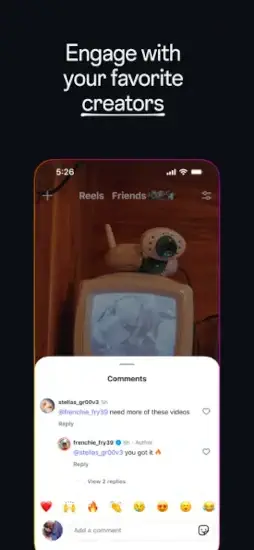
Instagram started with a simple promise. Apply a filter, post a square photo, see what your friends ate for lunch. That was 2010. Now you open the app and Reels autoplay before your thumb lands. Stories stack at the top waiting for taps.

Instagram outlasted Vine, Periscope, and dozens of clones. Meta runs it now. TikTok competes with it for your attention. Creators build careers inside its ecosystem while regular users wonder if the app still cares about casual sharing. The question is whether Instagram in 2026 serves people who just want to share photos or only those chasing engagement metrics.
The app holds a 4.7 star rating on the App Store based on over 29 million reviews. Size sits around 350 MB depending on your device and cached data. Age range stretches from teenagers making Reels to grandparents checking family photos
What Instagram Actually Is
If you have used Instagram before, you already know the pull. You have posted photos, watched Reels or sent memes to friends. Maybe you deleted the app and came back. Maybe you are weighing whether to start fresh with a new account or step away entirely. Instagram promises connection and creativity, but the costs are real.
Users praise the creative tools, broad content discovery, multiple sharing formats, private sharing options and visual identity. Critics point to account security and support, impersonation and moderation, account restrictions, privacy and data collection, location and battery use and limited accessibility support.
The Feed and Permanent Posts
Share photos, videos, and memories with followers. This creates a permanent profile and content archive. Feed posts stay on your profile indefinitely.
Why does this matter? Because Feed is the long-term identity layer. Stories disappear. Reels get buried. Feed stays.
Stories and the 24 Hour Format
Share photos or videos that disappear after 24 hours. Stories are useful for casual, temporary updates. They keep content low-pressure compared with permanent posts.
Stories are where daily life happens without the archive pressure. The format works because it asks less of you.
Reels and Short Form Discovery
Create and discover short, entertaining videos. Reels connect users with creators and personalized video content. The format drives most of the app’s current discovery.
Reels reward personality, timing, and trend awareness. They also reward consistency. The creators who post regularly see the results.
Direct Messages and Close Friends
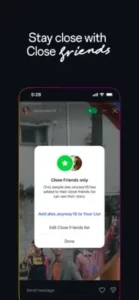
Chat privately or in groups. This supports private conversation and Close Friends sharing. Close Friends lets users share unfiltered moments with a selected group.
It gives users a smaller, more private audience for content they do not want public. That distinction matters. Not every post belongs to the full follower list.
Explore and Shopping Integration
Explore helps users find new accounts, creators, and interests. Shopping connects content discovery to brands, small businesses, and relevant products.
The line between content and commerce is thin. Users should distinguish organic recommendations from sponsored placements.
Creative Tools and Expression
Templates, music, stickers, and filters make posts and Stories more expressive. One reviewer suggests adding music to profiles and GIF profile photos, showing interest in more profile customization.
Creativity is part of the appeal. The tools are not just decoration. They are the reason people open the app instead of a plain camera roll.
Meta Verified and Paid Features
Meta Verified is an optional paid subscription with verification and support features. Instagram Badge is listed at $0.99 or $4.99. Meta Verified is listed at $14.99 in the App Store.
Availability varies by region and account type. Paid features add a layer some users find valuable and others ignore.
Interface Strengths
Visual first layout with photos, videos, Stories and Reels at the center. Easy content creation through templates, music, stickers and filters. Multiple content formats including permanent Feed posts, temporary Stories, short Reels and lightweight Notes. Strong discovery tools through Explore. Broad language support with English and 38 additional languages. Cross device support for iPhone and iPad.
Interface Limitations
Large app size at 638.1 MB. No declared accessibility support. Instagram, Inc. has not indicated which Apple accessibility features the app supports. Requires iOS 16.3 or later. Older devices may not be compatible.
Location use can affect battery. The listing says the app may use location even when it is not open. Feature heavy interface with Feed, Stories, Reels, Notes, DMs, Explore, shopping, and creator tools.
How Instagram Works
Create a profile with a photo, bio, and profile details. Follow accounts including friends, creators, brands or interest based accounts. Browse the Feed for posts from accounts you follow and recommended content. Watch Stories and Reels for temporary updates or short video discovery. Create content using templates, music, stickers, and filters. Interact through likes, comments, shares, saves and sending content to friends. Use Direct Messages for private or group chats, including Close Friends sharing. Discover new content through Explore. Adjust privacy and safety settings through account settings.
Instagram User Reviews
The 4.7 out of 5 rating from 30 million ratings reflects broad appeal, but the reviews show a clear divide between users who enjoy the platform and users who criticize security, moderation and support.
Positive themes include creative tools and personalization, broad content discovery, multiple sharing formats, private sharing options and strong visual identity. One reviewer suggests adding music to profiles and GIF profile photos, showing interest in more expressive profile options.
Negative themes include account security and support, impersonation and moderation, account restrictions, privacy and data collection, location and battery use and no declared accessibility support. One reviewer says their account was hacked and criticizes the lack of access to a human support representative. Another says a fake account using their photos and name was not removed despite multiple reports. A third says they were blocked from following, unfollowing, liking, and captioning photos, believing the system mistook them for a bot.
Instagram Tips
For Protecting Your Account
Use a strong, unique password. Do not reuse a password from another site or app. One breach on another service should never become a breach on Instagram.
Enable two factor authentication. This adds an extra layer of protection beyond your password. It is the single most effective step you can take.
Do not click suspicious login links. A reviewer describes clicking a verification link after receiving an unexpected WhatsApp message. Treat unexpected links as untrusted, especially when they ask for login details.
Check connected apps and sessions. Review where your account is logged in and remove unfamiliar sessions or apps. Old devices and forgotten logins are easy attack points.
Use a private account if privacy matters more than reach. This limits who can see your posts and stories.
Review message and story settings. Control who can message you, reply to your story or mention you. The default settings are not always the safest.
For Improving Your Content
Use a clear profile photo and bio. This helps people understand who you are or what your account is about. A blank bio tells visitors nothing.
Use Reels for discovery. The listing highlights Reels as a way to discover short, entertaining videos and creators. Reels carry most of the app’s current organic reach.
Use Stories for casual updates. Stories disappear after 24 hours, making them useful for everyday moments without permanent pressure.
Use Close Friends for personal posts. This lets you share with a smaller, selected group.
Use templates, music, stickers and filters. These tools make posts and Stories more expressive and give casual content a finished feel.
Use Explore to find new interests. The listing highlights Explore as a way to discover new accounts and content.
For Managing Time and Data
Set a screen time limit. Instagram’s endless feed can make long browsing sessions easy. Setting the limit before you open the app works better than trying to stop mid scroll.
Turn off location access if you do not need it. The listing says the app may use location even when it is not open, which can decrease battery life.
Review ad and data settings. Apple’s privacy label lists extensive data collection and tracking possibilities. Users who care about privacy should adjust these settings intentionally rather than accepting defaults.
Set a spending budget. The App Store lists Meta Verified at $14.99 and Instagram Badges at $0.99 or $4.99.
Report impersonation and harassment. Use in-app reporting tools, but do not assume a report will always lead to immediate removal.
Instagram Similar Apps
| App | Best For | Difference from Instagram |
|---|---|---|
| TikTok | Short form video discovery and creation | More video algorithm focused; Instagram combines Reels with Feed, Stories, messaging and shopping |
| Snapchat | Ephemeral messaging and camera first sharing | More focused on disappearing messages and camera effects; Instagram has a stronger permanent profile and shopping ecosystem |
| YouTube | Long form video and creator channels | Better for long form video; Instagram is more focused on photos, Stories, and short Reels |
| Visual ideas, tutorials, and inspiration | More focused on saving and organizing ideas than social interaction | |
| Threads | Text based conversations and public discussion | More text focused; Instagram is more visual and photo/video oriented |
| Friends, groups, events, and broader social networking | More group and event oriented; Instagram is more visual and creator focused | |
| Twitch | Live streams and creator communities | Better suited to live broadcasts than photo and short video sharing |
| VSCO | Photo editing and creative photography | More focused on editing and photography; Instagram is more focused on social sharing |
| CapCut | Video editing and creation | More focused on editing; Instagram is more focused on sharing and discovery |
| BeReal | Authentic daily photo sharing | More focused on daily photo prompts; Instagram has a broader content and creator ecosystem |
If you want a similar app with a different focus, TikTok is worth a look. It offers short-form video discovery and creation, and it runs on the same platforms as Instagram.
Instagram’s main differentiator is that it combines Feed, Stories, Reels, Direct Messages, Close Friends, Explore and shopping in one visual social app. TikTok wins on video discovery. Snapchat wins on ephemeral messaging. Pinterest wins on saved inspiration. But if you want one app that covers photos, short video, messaging, and shopping together, Instagram occupies a space few others attempt.
Conclusion
What do you want from Instagram? If you want to create polished content, the tools exist. If you want to see what friends share, the Friends tab delivers. If you want to scroll without participating, the algorithm will eventually stop showing you anything. Instagram rewards engagement. Decide what you give.
If you want the most complete visual social app available, Instagram delivers. If you want more privacy or less data collection, a simpler messenger or a private group app may serve you better.
Frequently Asked Questions About Instagram
Is Instagram still free to use in 2026?
Yes, Instagram remains completely free to download and use. You can post photos, share Stories, watch Reels, and message friends without spending anything. Meta offers optional subscriptions through Meta Verified that add features like Story Extend and account support, but the core experience costs nothing. You can start your Instagram download from the App Store here
How do I control what shows up in my feed?
Open your settings and look for “Your Algorithm.” This section lets you tell Instagram what you want more of and what you want less of. Tap preferences on posts you like. Tap on posts that miss the mark. The system learns from your direct input. You can also use the Friends tab to see only activity from people you follow, which cuts out suggested content entirely.
What happens to my data when I use Instagram AI features?
AI tools like Reel generation and face swap process your media on device or Meta servers depending on the feature. Face swap requires permission from both people before any image appears. The privacy settings menu lets you control data sharing and ad personalization. You can opt out of certain AI training features if privacy concerns you.
Where can I find official information about new features?
The official Instagram blog and Meta Newsroom publish updates first. The Instagram Help Center answers common questions. Community wikis track changes users notice before official announcements. Official website: https://about.instagram.com Wiki page: https://en.wikipedia.org/wiki/Instagram
How do I contact support if I get locked out of my account?
Account recovery goes through the Instagram Help Center. Tap “Need more help” on the login screen and follow the verification steps. Keep your recovery email and phone number updated. Response times vary from hours to days.