
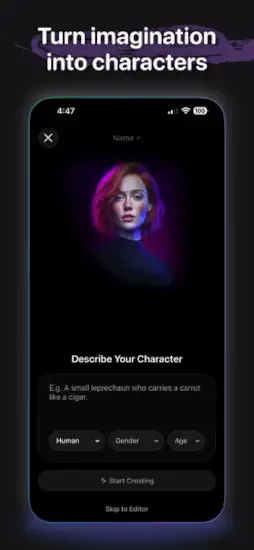
Cantina turn your imagination into shareable videos.

Cantina build an AI character with a few taps. Give it a voice and personality that feels unique. Generate videos in seconds without any animation skills. Chat with your creation like a real friend. The question is whether this AI app unlocks your creativity or just produces generic nonsense that looks like everything else on social media.
AI creation apps exploded as the technology became accessible to everyone without coding skills. Character.AI focused purely on chat conversations with no video output. Replika offered AI companionship with a single friend, not multiple characters. HeyGen generated avatar videos but lacked character persistence across chats. Cantina combines character creation, video generation, and social sharing all in one app. One place to build, chat, create, and share.
Cantina it is an AI character playground designed for social media creators. You build personalities from scratch. You script interactions between characters. You generate videos instantly. You share on TikTok, Instagram, and group chats. Understanding the creation loop helps you make compelling characters that audiences love instead of forgettable bots that no one follows.
Cantina app holds a 4.8 star rating on the App Store based on over 35,000 reviews. Size sits around 850 MB depending on downloaded assets. Age range stretches from young content creators experimenting with AI to older storytellers bringing their ideas to life. If you prefer a character chat app with no video generation, Character.AI offers a different experience
What Is Cantina? The Social AI Character Playground
A social AI creation app designed for content creators. Build characters with unique voices and distinct personalities. Generate short AI videos without animation skills. Chat or collaborate with those characters in real time. Share your creations on TikTok, Instagram, and group chats.
Who This App Is For
Content creators who want shareable AI videos for their audience. Social media influencers looking for fresh, unique content. Storytellers who want to bring their characters to life. Anyone curious about AI generated entertainment.
The Blend
Character creation meets video generation meets social interaction. One app for building, chatting, creating, and sharing.
Free to Play
Download free. Create free. Some features may have usage limits or premium options.
Cantina 2026: What’s Included in the App
Build AI Characters
Create characters with unique personalities, voices, identities, and styles from scratch. Give them a consistent point of view. Define their backstory and motivations.
Generate AI Videos
Produce high quality AI videos from your characters in seconds. Solo scenes with one character. Duos with two characters interacting. Full cast narratives with multiple characters.
Real Time Interaction
Chat with your characters live in real time. They respond according to their programmed personality. Voice activated bot interaction available.
Group Chats
Multiple friends and bots can chat together in one conversation. Create group chat rooms. Invite both human and AI participants.
Explore Characters
Browse characters made by other users in the community. Get inspiration for your own creations. Remix or interact with their characters.
AI Art and Selfies
Create AI art for your bots to establish their look. Generate “selfies” of your characters. Build a consistent visual identity.
Share Everywhere
Export videos directly to TikTok, Instagram, group chats, and more. Share from the app without saving to camera roll first.
Privacy and Moderation
Tools for rooms and group chat privacy. Control who can interact with your characters.
Creating AI Characters That Stand Out
Personality First
Start with a strong character concept before worrying about video output. Who are they as a person? What do they want in life? How do they talk to others? The personality drives everything.
Voice and Style
Give your character a clear voice and consistent point of view. Sarcastic characters stay sarcastic. Cheerful characters stay cheerful. Dramatic characters stay dramatic. Consistency makes them believable to audiences.
Visual Identity
Create AI art and selfies for your character. Establish their look early. Use the same visual style across all videos. Visual consistency builds recognition.
Backstory
Define their history and motivations in detail. Where did they come from? What drives their actions? The backstory informs how they respond to questions.
Catchphrases
Give them memorable lines that repeat. Repeatable phrases that fans will recognize and quote. Catchphrases help build a fandom around your character.
Interaction Style
Decide how they respond to users who chat with them. Friendly characters welcome everyone. Aloof characters are distant. Humorous characters make jokes. Aggressive characters challenge users.
Customization Options
Adjust voice pitch and tone in settings. Modify personality traits over time. Fine tune responses based on feedback.
Generating AI Videos from Your Characters
Solo Scenes
One character speaking or acting alone. Good for monologues, jokes, storytelling, or direct address to camera.
Duos
Two characters interacting with each other. Comedy sketches with back and forth. Dramatic conversations with conflict. Debates between opposing views.
Full Cast
Multiple characters in one scene together. Ensemble pieces with group dynamics. Complex narratives.
Script Input
Type what you want characters to say to each other. The AI generates video from your script automatically.
Voice Generation
Characters speak with the voices you designed for them. Natural sounding dialogue. Expressive delivery.
Visual Output
AI generated video of your characters speaking. Lip synced to dialogue accurately. Expressive animations.
Speed
Videos generate in seconds, not hours. Fast iteration allows experimentation.
Export Ready
Videos optimized for social media platforms. Square format for Instagram feed. Vertical format for TikTok and Reels.
Chatting and Interacting
Real Time Conversations
Chat with your characters live as if they were real people. They respond instantly to your messages. The conversation flows naturally without awkward pauses. It feels like texting a friend.
Voice Activation
Speak to your characters using your voice instead of typing. They hear your words and respond verbally. Hands free interaction for multitasking. Great for practicing conversations.
Personality Consistency
Characters remember their personality across all conversations. A sarcastic bot stays sarcastic every time you chat. A cheerful bot remains cheerful. Consistency makes them feel real.
Group Chats
Multiple characters and humans can talk in one conversation together. Watch AI characters interact with each other. Create group dynamics. Add both bots and real friends.
Friends and Bots Together
Invite your human friends to chat with your AI bots. Collaborative storytelling with mixed participants. Watch how bots and humans interact.
Moderation Tools
Control who can interact with your characters. Set room privacy for group chats. Report inappropriate behavior from other users.
Conversation History
Save and revisit past chats anytime. Use old conversations as inspiration for new videos. Never lose a good idea.
Character Growth
Bots can evolve based on your interactions with them. They learn from conversations over time. Your character develops as you chat.
Cantina Graphics and Design
Visual Style
Modern, social first, built around fast creation without clutter. Character cards show your bots. Chat style interactions are familiar. Streamlined video generation is quick.
Character Cards
Visual representation of each bot you create. Show personality traits at a glance. Quick access to chat or generate videos.
Chat Interface
Familiar messaging app style that everyone knows. Easy to use without instructions. Focus on conversation, not navigation.
Video Player
Clean playback with no distractions. Easy sharing controls. Optimized for mobile screens.
Creation Flow
From idea to character to video in minutes. No complex menus or confusing options. Fast iteration.
Explore Feed
Browse characters from other creators in the community. Like and comment on creations. Remix what others made.
Performance
Runs on most iPhones from iPhone 8 and newer. Fast generation speeds. Smooth chat experience.
Cantina Similar Apps
| App | Main Similarity |
|---|---|
| Character.AI | Character chat and personality driven interaction |
| Replika | AI companionship and conversational identity |
| HeyGen | AI video generation and avatar presentation |
| Pika | Fast AI video creation for social content |
| Talkie | Character driven AI social interaction |
The Differentiation
Character.AI focuses purely on chat conversations with no video generation option. Replika offers companionship with a single AI friend, not multiple characters. HeyGen generates avatar videos but lacks character chat features. Pika creates fast AI videos but has no character persistence across sessions. Talkie offers character interaction but less video focus than Cantina.
Cantina stands out for combining character creation, real time chat, and AI video generation all in one app. The social sharing focus is unique.
If you search Cantina similar apps, these five appear most often. Each does something differently. Cantina does character video creation better than most.
Cantina Sharing and Social Features
Export to Social Media
Share videos directly to TikTok, Instagram, and other platforms. Native sharing integration built in. No saving to camera roll first.
In-App Social Feed
Browse characters and videos from other creators. Like and comment on creations. Build a following within the app.
Collaboration
Work with other creators on projects. Combine your characters with theirs. Cross promote each other’s work.
Challenges and Trends
Participate in viral trends using your characters. Remix popular formats with your bots. Stay relevant.
Creator Profiles
Build a portfolio of your characters and videos. Followers can see all your work. Showcase your best creations.
Remixing
Take other creators’ characters and put them in your videos. Credit given automatically to original creator. Build on community work.
Community Growth
The app feels like a social network for AI characters. Active community of creators. Shared creativity.
Cantina Tips and Tricks for 2026
Start with a Strong Character Concept before Worrying about Video Output
Who is this character? What makes them interesting or unique? The personality drives everything else. Spend time here first.
Give Your Character a Clear Voice and Point of View so Interactions Feel Consistent
Sarcastic characters stay sarcastic always. Cheerful characters stay cheerful. Consistency builds audience trust.
Use Multi Character Scenes for More Dynamic Content
Duos and full casts are more engaging than solo scenes. Dialogue between characters creates drama. Interaction is interesting.
Try the Chat and Group Features First to Understand How the Bot Personality Behaves
Chat before you generate video. Learn how your character talks naturally. Discover their quirks.
Export Videos to the Platform Where Your Audience Already Lives
TikTok for short form vertical video. Instagram for Reels and feed. Go where your fans are.
Explore Other Creators’ Characters for Inspiration and Formatting Ideas
See what works for others in the community. Adapt successful formats for your characters.
Build Characters with a Memorable Hook or Dramatic Angle
A talking cat. A villain with a heart. A robot learning emotions. Hooks attract followers.
Use Moderation and Privacy Settings When Creating Rooms with Friends or Bots
Control who can join your rooms. Keep conversations safe. Report issues.
Post Consistently
Regular content builds audience over time. Daily or weekly schedule works best.
Engage with Your Community
Respond to comments on your videos. Take requests from followers. Build relationships.
Cantina Common Issues and Fixes
Character Personality Feels Generic
Spend more time on backstory and traits. Add specific quirks. Test with chat interactions.
Video Generation Quality Low
Check your script clarity. Simple direct dialogue works best. Avoid complex sentences.
Voice Not Matching Character
Adjust voice pitch and tone in settings. Test different voice options. Find the right fit.
Slow Generation
Video generation takes time for complex scenes. Be patient. Quality improves with processing time.
Character Forgets Past Conversations
Start a new chat session. Remind them of context from previous chats.
App Crashes
Update to latest version from App Store. Restart your phone. Reinstall the app.
Sharing Fails
Check internet connection first. Try different platform. Export to camera roll as backup.
Conclusion
if you want to create AI characters and turn them into shareable social media videos. Cantina is not for traditional video editors who want timeline control. It is for creators who want to experiment with AI generated content quickly. The combination of character creation, real time chat, and instant video generation is unique among apps. The social features help you build an audience around your characters. The fast creation loop encourages experimentation.
What works: Create AI characters with unique personalities. Chat with them in real time conversation. Generate videos in seconds with no animation skills. Share directly to TikTok and Instagram. Explore other creators’ work for inspiration. Fast creation loop from idea to post.
What does not: Character personality can feel generic without effort. Video quality varies depending on complexity. Some features may require payment or premium access. Learning curve for multi-character scenes.
What do you want from an AI creation app? If you want to build interesting characters and generate social media videos quickly, Cantina delivers. If you want professional video editing with timeline control or deep AI conversations that remember everything, look elsewhere.
Frequently Asked Questions About Cantina
Is Cantina free to use?
Yes. Cantina is free to download and use. You can create AI characters, chat with them, and generate short videos without paying. Some advanced features may have usage limits or premium options. The free version is generous for most creators. You can start your Cantina download from the Official App Store.
How do I create an AI character in Cantina?
Tap the create button and give your character a name. Describe their personality and traits in plain English. For example, “a small leprechaun who carries a carrot like a cigar.” Choose their gender and age. The AI generates a character with consistent voice, personality, and visual style based on your description.
Can I generate videos with my Cantina characters?
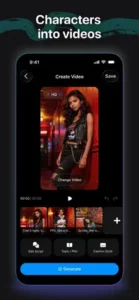
Yes. After creating a character, you can generate short AI videos. Write a script or describe what you want them to say. The AI creates video with lip synced dialogue and expressive animations. You can create solo scenes with one character or multi-character scenes with duos and full casts.
What can I do with the videos I make in Cantina?
Export your videos directly to TikTok, Instagram, and other social platforms. Share them in group chats with friends. Post them to your Cantina profile for followers to see. Use the videos as content for your social media channels. The app is designed for sharing.
Where can I find official information and get support if I have issues?
The official Cantina website has information about features and updates. The Cantina community wiki has character creation guides and tips. For account issues or technical problems, contact support through the website. Official website: https://cantina.com