Hubitat is a smart home platform built around local processing. Instead of sending your device commands to the cloud and back.
Hubitat executes automations directly on the hub connected to your network . This means faster response times, better privacy, and continued operation during internet outages.
The Hubitat Elevation hub acts as the brain of your system. It communicates with compatible devices using Zigbee and Z-Wave protocols, plus Wi-Fi and Matter support . The mobile app serves as your remote control, letting you manage devices, receive notifications, and create automations from anywhere . While some smart home systems depend entirely on cloud services, Hubitat keeps your data local and your automations running independentl.
What Is Hubitat and How Does It Work?
Your smart lights turn off automatically when you leave the house. The thermostat adjusts before you wake up. The door locks itself at bedtime. Then your internet drops, and suddenly nothing works. That frustration is exactly what Hubitat solves. Hubitat keeps your automations running even when the internet goes down because the processing happens locally on the hub, not in the cloud .
The Hubitat app has a rating of 2.8 out of 5 stars with an app size of approximately 30.2 MB on iOS. It is rated for ages 4 and older and requires iOS 12.1 or laterr . For those interested in similar platforms, SmartThings offers comparable smart home control capabilities.
Hubitat Key Features
Device Control
The app gives you control over connected devices from home or anywhere with internet access . You can turn lights on and off, adjust thermostats, lock doors, and check sensor status from a single interface. The Devices tab organizes everything by room for quick access . Compatible device types include switches, dimmers, bulbs, thermostats, window blinds, locks, sensors, and more .
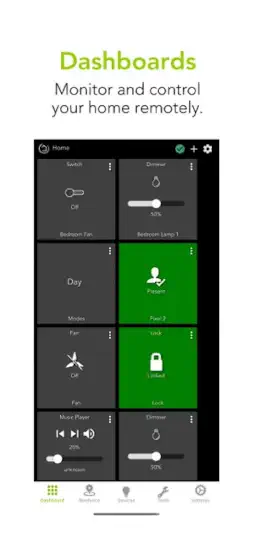
Customizable Dashboards
You can build personalized control panels that show exactly what matters to you . The Home tab displays favorite devices for one-tap control, while Easy Dashboard and Hubitat Dashboard offer more customized layouts . This flexibility lets you create views for different family members or specific rooms.
Automation and Rules
Automations are the heart of Hubitat. Built-in apps like Basic Rules, Room Lighting, and Rule Machine let you create simple or complex automations . Basic Rules works well for beginners: when a contact sensor opens, turn on a light. Rule Machine offers advanced logic with multiple triggers and conditions . The Hubitat Safety Monitor app handles intrusion alerts using motion or contact sensors . All automations run locally, ensuring speed and reliability .
Presence Detection and Geofencing
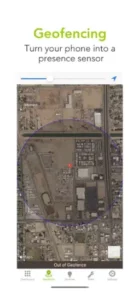
The mobile app uses your phone’s location to determine whether you are home or away . This presence detection triggers automations like turning lights on when you arrive or arming the security system when you leave. You set the geofence center and radius, and the app monitors your location even when running in the background . Some users report occasional reliability issues with geofencing, so testing before depending on it is recommended.
Push Notifications
You receive real time alerts for automation events, security triggers, and device status changes . Notifications keep you informed when a door opens, motion is detected, or a sensor activates. The app stores your last few notifications for quick reference .
Voice Assistant Integration
Hubitat works with Amazon Alexa and Google Assistant . You can control devices with voice commands, check device status, and trigger scenes. Voice assistants connect through cloud services, so commands still reach your hub reliably even when the internet is working.
Remote Access and Admin
With Remote Admin, an optional subscription service, you can access your hub from anywhere with an internet connection . This lets you view devices, manage settings, and check logs remotely. Without the subscription, you can still access the hub from devices on your local network .
Third Party Device Support
Hubitat supports an extensive list of brands including Philips Hue, IKEA, Sengled, Zooz, Aeotec, LIFX, Nanoleaf, Shelly, and many others . Community created drivers expand compatibility to devices not officially supported, giving users flexibility to build their ideal setup .
Interface and Design
The app takes a utility first approach. It is designed for clarity and function rather than visual flair. Some users describe the layout as basic or less polished than competing apps, but appreciate the straightforward, browser like behavior . The interface focuses on getting you to device controls and automation settings quickly. The web based administration interface offers deeper configuration options, with the mobile app serving as a companion for daily control .
How to Get Started in Hubitat
Download and Install
Download the Hubitat app from the Google Play Store or Apple App Store . Install the app, launch it, and log in with the Hubitat account you created during hub registration . The app requires iOS 12.1 or later or Android 9 or later.
Adding Devices
After connecting your Hubitat Elevation hub to your network, you add devices through the app or web interface . Use the Find by device type or Find by brand options to select and pair Zigbee, Z-Wave, or Matter devices . The hub searches for devices in pairing mode and adds them to your system .
Building Your First Dashboard
Open the Home tab or the Dashboard section in the app to organize your controls. Favorite devices appear on the Home tab for quick access . You can also create custom dashboards with specific device groupings and layouts using Hubitat Dashboard or Easy Dashboard options .
Creating Automations
Start simple. Use Basic Rules app to set a trigger (when a door opens) and an action (turn on a light) . Once comfortable, explore Room Lighting for lights based on motion or modes, or Rule Machine for complex logic chains . All automations run locally on your hub for fast, private execution .
Tips for Getting the Most Out of Hubitat
Setting up Hubitat is straightforward, but getting the most from it requires a few strategic choices. The platform rewards users who take time to configure things properly, and small adjustments can make a big difference in daily use.
Start with dashboards. Focus on the devices you interact with most frequently. Lights you turn on every morning, locks you check before bed, thermostats you adjust throughout the day. Build a clean layout that puts these controls front and center. Custom dashboards can be tailored for different family members or rooms, so everyone gets the view they need.
Keep automations local. This is where Hubitat shines. When your automations run on the hub rather than in the cloud, they respond faster and continue working even during internet outages. The Rule Machine app lets you build sophisticated automation chains, but staying local ensures speed and privacy. For devices that need voice control, you can still expose them to Alexa or Google Assistant while keeping the automation logic on the hub.
Test presence detection before relying on it. Geofencing works well for many users, but it can be inconsistent depending on phone settings and network conditions. Set up your geofence radius, test it over a few days, and adjust based on how reliably it triggers. Consider using multiple presence sensors for critical automations like security system arming.
Start with simple rules and build complexity gradually. Basic Rules handles common automations: when a door opens, turn on a light. Room Lighting works for motion-based lighting. As you get comfortable, explore Rule Machine for advanced logic with multiple conditions and triggers. Testing each automation after setup ensures everything works as expected before you depend on it.
Use the browser interface for deeper configuration. The mobile app handles daily control well, but the web interface offers more detailed settings. Many users keep both open, using the browser for setup and the app for quick control. The web interface provides access to logs, device details, and advanced automation options that the app simplifies.
Verify device support through community drivers if needed. Hubitat supports many brands out of the box, but some devices require custom drivers created by the community. Check the Hubitat community forum before buying new devices to see if others have successfully integrated them. Community drivers often add support for devices the manufacturer hasn’t officially listed.
Limit cloud exposure for voice assistant devices. When you connect Hubitat to Alexa or Google Assistant, you choose which devices to expose. Keep sensitive devices local and only expose what you actually need for voice control. This maintains the privacy benefits of local processing while still offering voice convenience.
Test remote access and notifications after setup. If you plan to use Remote Admin for off-site control, verify it works from your phone’s cellular connection before you need it. Test push notifications for critical automations like door openings or motion detection. Knowing everything works builds confidence in the system.
Explore community forums for automation ideas. The Hubitat community is active and generous with knowledge. Users share automation recipes, troubleshooting tips, and custom driver developments. These forums can help you solve problems, find new uses for your devices, and learn best practices from experienced users.
Review device compatibility lists before purchasing new devices. Not every Zigbee or Z-Wave device works perfectly with Hubitat. Check the official compatibility list and search the community forum for real user experiences. This saves frustration and ensures your new devices integrate smoothly into your existing setup.
How Hubitat Compares to Other Smart Home Platforms
Hubitat vs SmartThings
SmartThings offers a polished mobile experience and broader out-of-the-box device support. Hubitat gives you local processing and keeps automations running during internet outages. SmartThings relies more heavily on cloud services, which means slower response times and potential downtime. SmartThings users enjoy a more refined interface and easier setup, but Hubitat delivers faster automations and better privacy.
For automation flexibility, Hubitat wins with Rule Machine and local execution. SmartThings has improved its automation capabilities but still depends on cloud processing for many functions. Hubitat also supports community-created drivers that expand device compatibility beyond official lists, while SmartThings offers a more curated experience with limited custom driver support.
Hubitat vs Home Assistant
Both platforms target advanced users who want deep control over their smart homes. Home Assistant offers more customization and supports an enormous range of devices, but requires more technical knowledge to set up and maintain. Hubitat provides similar automation power with a gentler learning curve, making it accessible to enthusiasts who want local control without the complexity of Home Assistant’s YAML configuration.
The interface differences are significant. Home Assistant offers a modern, polished dashboard with multiple customization options and a mobile first approach. Hubitat’s interface is functional but basic, prioritizing utility over aesthetics. Many users combine both platforms, but for those who want local processing without ongoing maintenance overhead, Hubitat is the simpler choice.
Hubitat vs Google Home
Google Home excels as a voice assistant and central hub for broader smart home management. Its interface is clean and intuitive, and voice control works seamlessly across compatible devices. Hubitat focuses on automation and local processing rather than voice control or ecosystem integration.
For control approach, Hubitat gives you granular automation rules while Google Home offers simpler routines. Voice integration works both ways: you can control Hubitat devices through Google Assistant while keeping automation logic on the hub. The best approach is often using both platforms together, with Hubitat handling automations and Google Home providing voice access.
Hubitat vs Amazon Alexa
Amazon Alexa offers extensive voice control and routine capabilities with a user-friendly interface. Hubitat provides deeper automation control with local processing. Alexa’s smart home management covers device control and voice routines, but its automation capabilities don’t match Hubitat’s Rule Machine flexibility.
The device ecosystem difference is notable. Alexa works with thousands of third-party devices through cloud integrations, while Hubitat supports Zigbee, Z-Wave, and Matter devices natively. Hubitat owners often use Alexa for voice commands while keeping automations local for speed and privacy.
Hubitat vs Homey
Homey Pro offers an all-in-one solution with built-in radio modules for Zigbee, Z-Wave, and other protocols. Its app store provides curated automations and integrations that are easy to install. Hubitat takes a more modular approach, requiring users to build their own system but offering lower entry costs and community-driven expansion.
Homey’s automation flexibility comes from its app-based system with hundreds of ready-to-use flows. Hubitat’s Rule Machine gives you deeper customization but requires more manual configuration. Platform philosophy differs: Homey provides a polished, user-friendly experience out of the box, while Hubitat appeals to users who enjoy building and customizing their system.
Hubitat Community
The Hubitat community is one of the platform’s greatest assets. The official community forum hosts thousands of active users who share automation ideas, troubleshoot issues, and develop custom drivers. For a platform that depends on user initiative for full functionality, this peer support network is invaluable.
Community-created drivers extend device compatibility beyond official lists. Users develop drivers for new devices, share them, and offer support to others trying the same integrations. This collaborative approach means Hubitat can support devices that no other platform offers out of the box.
User troubleshooting threads provide detailed solutions for common problems. Whether you’re dealing with device pairing issues, presence detection reliability, or automation bugs, chances are someone has already solved it and posted the solution. The community also shares automation ideas that range from simple to sophisticated, giving you inspiration for your own setups.
The Hubitat team actively participates in the forum, providing official support and incorporating user feedback into platform updates. This engagement helps bridge the gap between community-driven development and official product direction.
What Users Are Saying about Hubitat
User feedback reveals a platform with dedicated fans and some notable frustrations. On the positive side, users consistently praise Hubitat’s local control, automation flexibility, and privacy focus. The ability to keep automations running during internet outages is a major selling point, especially for security critical systems. Advanced users appreciate Rule Machine’s depth and the platform’s customization potential.
Critical feedback focuses on the app interface, reliability concerns, and presence detection issues.
The broader reputation is that Hubitat offers powerful functionality but requires patience and effort. Users who invest time in configuration and use the web interface alongside the app generally report positive experiences. New users often find the learning curve steep but rewarding once they understand the platform’s capabilities.
Conclusion
Hubitat delivers a smart home platform that prioritizes privacy, speed, and automation flexibility through local processing. Its strengths include fast response times, continued operation during internet outages, advanced rule building with Rule Machine, and an active community that expands device compatibility through custom drivers.
The platform works best for users who value control over convenience and are willing to invest time in configuration. It suits tech savvy homeowners who want to build custom automations without depending on cloud services. For those seeking a polished, ready-to-use experience with minimal setup, other platforms like Homey or Google Home may be a better fit.
Hubitat offers something increasingly rare in the smart home market: true local control. Your data stays private. Your automations run reliably. Your system works even when the internet does not. For users who prioritize these qualities, Hubitat provides capabilities that cloud dependent platforms cannot match.
FAQ
Is the Hubitat app free to download and use?
Yes, the Hubitat app is completely free to download from the Apple App Store. You get access to device control, dashboard customization, presence detection, and push notifications without any subscription. However, the app requires a Hubitat Elevation hub to function, as it serves as a mobile companion rather than a standalone application . You can start with the free app and expand with optional services like Remote Admin for off-site access.
How do I get the Hubitat download on my phone?
For the official Hubitat download, visit the App Store on Apple devices. Search for “Hubitat” and select the official app from Hubitat, Inc. You can also use the direct link to Download Hubitat from the Official App Store. The app requires iOS 12.1 or later. Before downloading, ensure you have a Hubitat Elevation hub set up and connected to your network.
Do I need a subscription for the Hubitat app to work?
No, you do not need a subscription for basic functionality. The Hubitat app works with local automations running directly on your hub without any ongoing fees. The optional Remote Admin service, which provides secure access from outside your home network, does require a paid subscription. All other features, including device control, dashboard building, automation creation, and push notifications, work without subscription costs . This makes Hubitat more affordable than many cloud-dependent alternatives.
What devices work with the Hubitat app?
Hubitat supports an extensive range of devices using Zigbee, Z-Wave, Wi-Fi, and Matter protocols . Compatible brands include Philips Hue, IKEA, Sengled, Zooz, Aeotec, LIFX, Nanoleaf, Shelly, and many others. The platform also integrates with major voice assistants like Amazon Alexa, Google Assistant, and Apple HomeKit. For devices not officially listed, community-created drivers often add compatibility. Check the Hubitat community forum before purchasing new devices to verify they work with your setup.
Where can I find official documentation and support?
The official Hubitat website at hubitat.com provides documentation, product information, and setup guides. The Hubitat Community Forum at community.hubitat.com is the primary support resource, where thousands of users share automation ideas, troubleshooting tips, and custom drivers . For technical inquiries, contact Hubitat, Inc. via email at mobile.app@hubitat.com . The Hubitat Elevation hub has a 4.3 out of 5 star rating based on over 363,000 reviews on Trustpilot, reflecting the platform’s strong community reputation.