
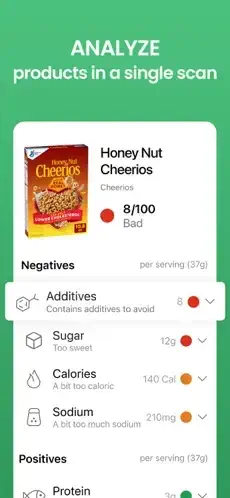
Yuka is ready for your next trip to the grocery store. You stand in the aisle. Two products. Similar price. One looks healthier. But the ingredient label is a wall of words you cannot pronounce. Artificial colors. Preservatives with long names. Sweeteners you have never heard of.

Yuka promises to fix that. Scan the barcode. Get an instant health rating. See why the product scored what it did. Find healthier alternatives right there in the app. The question is whether you can trust a free app to tell you what to eat and put on your skin.
Yuka is not a diet app. It is a decision making tool. You scan. It scores. You decide. The app rates products from excellent to poor based on nutritional quality, additives, and ingredient risks. A green score means the product is considered healthy. A red score means concerning ingredients. Understanding how it calculates scores helps you use it wisely instead of blindly following its ratings without question.
The app holds a 4.8 star rating on the App Store based on over 90,000 reviews. Size sits around 223 MB depending on cached data. Age range stretches from young adults learning about nutrition to parents shopping for families. If you prefer a beauty only scanner, Think Dirty offers cosmetic ingredient analysis.
What Is Yuka?
Yuka is a free, independent barcode scanning app launched in 2017 that rates the health impact of food and cosmetic products on a 0 to 100 scale, explains why ingredients are flagged and suggests healthier alternatives. It is available on iOS and Android.
Think of it as a translator for ingredient labels. You scan a barcode. Yuka gives you a score, explains the reasoning and shows better options. The goal is to make label reading fast and understandable at the shelf. Instead of decoding chemical names, you get a simple rating and a plain language explanation.
Health conscious shoppers use it to avoid additives and preservatives. Parents use it to check what they are feeding their kids. People with dietary restrictions use it to screen products quickly. Skincare enthusiasts use it to avoid irritants and endocrine disruptors. Anyone who wants to make faster decisions about what they buy will find it useful.
How Yuka Works
Yuka organizes its functionality through five core elements: scans, scores, ingredient explanations, alternatives and history. Scans are individual product lookups. Scores are 0 to 100 with color codes. Ingredient explanations describe additives and irritants. Alternatives suggest better-rated swaps. History tracks what you have scanned.
Barcode scanning is the entry point. Open Yuka and scan a product’s barcode. Instant 0 to 100 health score with color coding. Green for excellent. Light green for good. Orange for poor. Red for bad. The color code makes decisions fast when you are standing in an aisle. You do not need to read the full explanation to know if a product is worth buying.
The ingredient breakdown explains the reasoning. Yuka describes additives, irritants, endocrine disruptors, preservatives and nutritional red flags in plain language. This is the feature that separates Yuka from simple rating apps. It does not just give a score. It tells you why. Over time, users learn which ingredients to avoid and which are harmless.
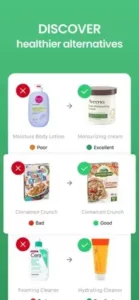
Healthier alternatives make Yuka actionable. When a product scores poorly, Yuka suggests similar, better rated items. The alternatives engine considers category and product type. A bad yogurt leads to a better yogurt. A poor shampoo leads to a better shampoo. Often a better swap is on the same shelf. This closes the gap between knowing a product is bad and knowing what to buy instead.
Top products lists help with discovery. Curated top 20 best rated items by category for quick discovery. Useful for pre-selecting clean staples before you shop. Instead of scanning every option in the store, you can check the top 20 list and know which brands to look for.
Free versus Premium shapes the experience. Free users get unlimited barcode scanning, product ratings, alternatives and basic scan history. Premium, which costs typically $10 to $15 per year, adds a search bar for looking up products without barcodes, offline mode for scanning in low signal stores, unlimited history and personal ingredient alerts for gluten, lactose, palm oil and other concerns.
The contribution loop grows the database. If a product is not in the database, you can submit details. Yuka analyzes and adds it. The database grows through user contributions. This makes Yuka more useful over time, especially in regions where coverage was initially thin.
Yuka Key Features
Barcode Scanner for Food and Cosmetics
Instant 0 to 100 health score with color coding from excellent to bad. Yuka covers both food and cosmetic products, which is unusual for a scanner app. Most competitors focus on one or the other. This dual coverage makes Yuka useful for both grocery shopping and skincare decisions. You do not need a separate app for each category.
Ingredient Breakdown
Explains additives, irritants, endocrine disruptors, preservatives and nutritional red flags in plain language. Instead of just saying an ingredient is bad, Yuka explains what it is and why it matters. This educational approach helps users learn over time. After a few months of scanning, many users can spot problematic ingredients without the app.
Healthier Alternatives
Suggests similar, better rated products when an item scores poorly. The alternatives are usually in the same category. A bad yogurt leads to a better yogurt. A poor shampoo leads to a better shampoo. This makes swapping easy without extra research. It turns Yuka from a critic into a guide.
Top Products Lists
Curated top 20 best rated items by category for quick discovery. Useful for pre-selecting clean staples before you shop. Instead of scanning every option in the store, you can check the top 20 list and know which brands to look for. This saves time and reduces decision fatigue.
Search and History
Free users get scan history. Premium adds a search bar for looking up products without barcodes and unlimited history. Search is useful when you want to check a product before you buy or when a barcode is hard to scan. History reduces the need to re-scan familiar products.
Personal Ingredient Alerts
Premium feature that lets you set alerts for gluten, lactose, palm oil and other ingredients. Important limitation. Yuka states these alerts do not factor trace allergens or cross contamination. For people with celiac disease or severe allergies, this means you still need to verify the package allergen statement. The alerts are a useful filter, not a guarantee.
Offline Mode
Premium feature for scanning in stores with poor cell service. Useful in large stores, basements, or rural areas where connectivity is unreliable. Offline mode ensures the app works when you need it most.
Community Contributions
If a product is not in the database, you can submit details. Yuka analyzes and adds it. This grows the database over time and helps other users. The contribution loop is one of Yuka’s strongest community features. It also gives users a sense of ownership over the app’s coverage.
Brand Call Outs
Users can flag brands about problematic ingredients. Counters show total consumer call outs per brand. This gives consumers a way to pressure brands to change formulations. It is a unique feature that most scanner apps do not offer. The counters can be confusing because they show total brand call outs rather than specific product issues.
Languages and Platforms
Available in English, French, German, Italian, Portuguese and Spanish. Available on iOS 15.5 and later and Android. This makes Yuka accessible to a wide international audience. The multilingual support reflects its European origins and growing global reach.
What Users Say About Yuka
What Users Appreciate
Users describe Yuka as life changing for label reading. It turns anxious shopping into confident choices. Clear explanations of additives and irritants make swapping easy. The pay what you feel Premium feels fair and the absence of ads maintains trust. Top Products lists and history speed up repeat shopping.
What Users Complain About
Database misses for niche, ethnic, and specialty items are common. Roughly half of products may be unrecognized in some stores. Gluten, lactose and palm oil alerts require Premium. Alerts do not factor trace allergens. Occasional misreads and outdated entries require users to report fixes. Brand call out counters can be confusing because they show total brand call outs rather than specific product issues.
Yuka Tips
Yuka rewards consistent scanning, smart use of alternatives and realistic expectations about coverage. The difference between a frustrating experience and a useful one comes down to how you use the app. Here is how experienced users get more out of every shopping trip.
Scan the same category repeatedly. You will quickly learn which brands consistently score excellent or good in your store. After a few trips, you will know which yogurt, cereal or shampoo brands you can trust without scanning every product. This saves time and reduces decision fatigue.
Use Alternatives proactively. When an item scores poor or bad, tap Alternatives before putting it back. Often a better swap is nearby. The alternatives engine is the most actionable feature in the app. It turns Yuka from a critic into a guide. Skipping this step wastes the app’s biggest advantage.
Contribute missing items. If a product is not found, submit details. This helps your local database and the community. Contributing takes a minute and improves coverage for everyone, especially in regions or stores where Yuka coverage is thin.
Combine with label reading for allergens. Because allergen alerts do not account for trace cross contamination, always verify the package allergen statement if you have severe allergies. Yuka is a filter, not a guarantee. For celiac disease or severe nut allergies, the package label remains the final authority.
Try Premium for offline and search. If you shop in low-signal stores or want name search and ingredient alerts, the pay what you feel Premium is typically $10 to $15 per year. The price is fair and the added features are genuinely useful for frequent shoppers. Offline mode alone justifies the cost for some users.
Check Top Products lists. Use category top 20 lists to pre-select clean staples before you shop. Instead of scanning every option in the store, check the list first and know which brands to look for. This is especially useful for staples like pasta, bread, or skincare basics.
Report errors. If an entry looks outdated or incorrect, report it. Yuka updates based on user feedback. The database stays accurate because users flag problems. A product that scores badly today might be reformulated tomorrow. Reporting keeps the ratings reliable.
Track your best swaps. Note which alternatives you actually bought and liked. Repeating what works beats experimenting randomly. Over time, you build a personal list of trusted products without relying on the app every time.
Use Yuka for both food and cosmetics. Most scanner apps focus on one or the other. Yuka covers both, which makes it more versatile. You can scan your shampoo, your moisturizer and your snacks in the same session. This dual coverage is one of Yuka’s strongest advantages over competitors.
Take breaks from scanning everything. Scanning every product can become obsessive. Use Yuka for the categories that matter most to you and trust your judgment for the rest. The app is a tool, not a rulebook. Over scanning leads to decision fatigue and stress.
Yuka Similar Apps
| App | Best For | Main Difference from Yuka |
|---|---|---|
| Open Food Facts | Open, community food database | Food only. Open source data. No cosmetics. No paywall for core features. |
| Fooducate | Letter grades and food diary | Food grades A to D. Includes tracking and diary. Less focus on cosmetics. |
| EWG Healthy Living | Food, personal care and household | Broader categories. EWG’s own rating methodology. |
| Think Dirty | Cosmetics and personal care safety | Cosmetics only. Dirty Meter 0 to 10. Deep ingredient safety focus. |
| CodeCheck | Food, cosmetics and sustainability | Adds environmental and sustainability scores plus allergen alerts. |
| Fig | Dietary restrictions and allergies | Filters products by restrictions. Not a cosmetics scanner. |
| FoodSwitch | Nutrition info and healthier swaps | Food only. Focuses on nutrition switches. |
| Bobby Approved | Ingredient based food ratings | Food only. Ingredient centric ratings. |
| Cronometer and MyFitnessPal | Nutrient tracking and diary | Deep nutrient logging. Barcode lookup is secondary to tracking. |
| Osana Scan | US grocery alternatives | Compares Yuka-style scanning with US-focused alternatives. |
Which one wins? It depends on your needs. Yuka wins on food and cosmetics combined in one app. Open Food Facts wins on open data and free access. Think Dirty wins on cosmetic ingredient depth. CodeCheck wins on sustainability scoring. Fig wins on allergy and dietary restriction filtering. If you want a single scanner for both food and cosmetics, Yuka remains one of the strongest options.
Yuka App Pricing
Yuka is free to download on iOS and Android.
The free tier includes unlimited barcode scanning, product ratings, alternatives and basic history. Premium is pay what you feel and typically costs $10 to $15 per year or 10 euros in the EU. Premium adds a search bar, offline mode, unlimited history and personal ingredient alerts for gluten, lactose, palm oil, and other ingredients.
Yuka does not run ads. The app is independent and does not accept advertising from brands. This is a deliberate choice that preserves trust in the ratings.
Conclusion
Yuka is a polished, independent scanner that makes label reading fast and understandable. Its 0 to 100 scoring, plain language explanationsand healthier alternatives genuinely reduce shopping anxiety for many users. The pay what you feel Premium is fair and ad-free.
Its greatest strength is the combination of food and cosmetic scanning in one app with clear explanations. Its greatest weakness is the database gaps for niche and ethnic brands plus the Premium gated allergen alerts that do not account for trace cross contamination. The main drawbacks are database misses, Premium gating, occasional outdated entries, and the trace allergen caveat.
Yuka fits health conscious shoppers, parents, people with dietary restrictions, skincare enthusiasts, and anyone who wants to make faster decisions about what they buy. It does not fit users who want a complete product database without gaps. It does not fit people with severe allergies who need guaranteed allergen accuracy. It does not fit users who want a fully free app with no Premium features.
Yuka delivers a practical, trustworthy tool for making better shopping decisions. But the database gaps and Premium gated alerts mean it works best alongside careful label reading. The core scoring works. The coverage and allergen accuracy need continued improvement.
You have probably stood in a grocery aisle wondering what half the ingredients on a label actually do. What if the solution was an app that gave you a clear score and explained the reasoning in plain language? Yuka solves that by turning confusing labels into actionable ratings. But the solution only works if you understand the limits. The question is not whether Yuka works. The question is whether it covers the products you actually buy.
Frequently Asked Questions About Yuka
Is Yuka really free to use?
Yes. Yuka is completely free to download and use. No subscription. No ads. No paywalls. You can scan unlimited products, see health ratings, read ingredient breakdowns, and discover healthier alternatives without paying anything. The app makes money through affiliate links when you buy recommended products. You never pay. You can start your Yuka download from the App Store.
How does Yuka calculate its health scores?
Yuka scores products from 0 to 100 based on nutritional quality and additives for food, or ingredient risk levels for cosmetics. For food, the score considers calories, sugar, saturated fat, salt, and additives. For cosmetics, it evaluates each ingredient for health risks including endocrine disruptors and allergens. The score color codes: green for excellent (75+), light green for good (50-74), orange for mediocre (25-49), and red for poor (0-24).
Can I use Yuka for both food and beauty products?
Yes. Yuka covers both categories. Scan food barcodes at the grocery store to see nutritional ratings and additive concerns. Scan cosmetics, skincare, haircare, makeup, and sunscreen at the pharmacy or beauty store. The app analyzes ingredient labels for both types of products. One app for the grocery store and the pharmacy.
What should I do when a product scores poorly?
Yuka suggests healthier alternatives when a product gets a poor score. Look for the alternatives section on the product page. The app shows similar products with better scores. You can click through to purchase directly from affiliate partners. Use the feature to find better options without starting your search over.
Where can I find official information and get support if I have issues?
The official Yuka website has information about the app, scoring methodology, and company news. The help center answers common questions about scanning, account issues, and product database. For technical problems or feature requests, contact Yuka support through the website. Official website: https://yuka.io