
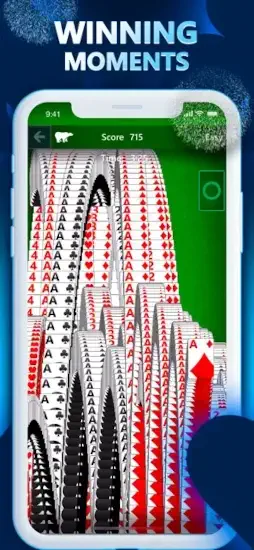
Microsoft Solitaire Collection game that has been on Windows for decades now fits in your pocket. Same feel. New features.


Microsoft Solitaire Collection is the official modern version of the game that shipped with Windows in 1990 and became the most played computer game in history. It bundles five classic card games into one free app, syncs your progress across devices through Xbox accounts, and adds daily challenges, events and achievements that keep the experience fresh .
Microsoft Solitaire Collection holds a 4.7 star rating on App Store across roughly 255,000 reviews, with over 10 million downloads. The age rating is 4+ on the App Store.
Player sentiment leans positive. Fans celebrate the variety, polish, and nostalgia. Critics point to long ads in the free version, occasional sync issues, and glitches in specific challenge packs.
What Microsoft Solitaire Collection Gets Right (And Where It Tests Your Patience)
Five Games in One App
The core offering is simple. Five distinct card games, each with its own rhythm and skill set .
Klondike remains the classic. Build foundations from Ace to King by suit. Draw one card or three depending on your patience. Spider challenges you to build same suit sequences in the tableau, clearing full suits to remove them from play. FreeCell deals every card face up, giving you four free cells to maneuver and a puzzle that rewards planning over luck .
Pyramid asks you to pair cards that add up to 13, unlocking buried cards as you clear the tableau. TriPeaks lets you select cards one higher or lower than the waste pile, chaining combos for higher scores.
The variety keeps the app from growing stale. Each mode has its own learning curve and its own satisfying rhythm. You can spend a week on Spider, then switch to FreeCell when you want something more strategic.
Daily Challenges and Events
Five new guaranteed solvable challenges arrive every day across all modes . Multiple difficulty levels let you choose how much brain power to spend. Easy challenges work for a quick break. Expert challenges demand real focus.
Timed events with leaderboards give goals beyond casual play. XP and level progression reward consistent play. Achievements and Gamescore tie into the broader Xbox ecosystem.
The daily structure creates a reason to return. Not because the game demands it, but because there is always something new waiting.
Cloud Sync and Cross Device Play
Sign in with a Microsoft or Xbox account to save progress. Continue games across Windows, iOS and Android. Leaderboards let you compete with friends and global players.
Cloud saves mean you never lose a half-finished deal. Start a Spider game on your phone during a commute. Finish it on your PC that evening. The progress carries over.
Sync issues do occur. Some players report progress not appearing on new devices, particularly with Sudoku awards in the broader Microsoft casual games suite. The fix usually involves signing out and back in or ensuring both devices are online with the same account.
Customization and Visual Polish
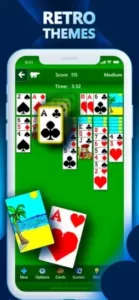
Themes and card backs add personality. Retro decks, Xbox branding, seasonal bundles. Bright, modern visuals replace the dated look of older Solitaire apps.
The iconic jumping cards victory screen remains intact. That small detail matters for anyone who grew up with the original.
In-game music and sound effects can be toggled for focus or atmosphere. Smooth animations make dealing and moving cards feel responsive. You can pick themes and card backs that reduce eye strain during long sessions.
The Ad Question
The free version includes ads between games. Some run 30 to 60 seconds. Ads repeat frequently. The same commercials show up again and again.
Premium removes ads entirely. It also doubles Daily Challenge coins, unlocks past challenges and provides unlimited Solitaire Solver. Premium costs $1.99 per month or $9.99 per year. Included with Game Pass.
The trade-off is simple. Free costs time. Premium costs money. If you play daily, Premium pays for itself in saved minutes.
Glitches and Frustrations
Some Spider Solitaire packs in Star Club have reported glitches. Cards refuse to move correctly in certain challenge layouts. Hint and solver behavior occasionally produces confusing results.
Sync issues appear in reviews, though often resolved with signing out and back in. A restart option is not always available when a game becomes unwinnable.
Microsoft responds to reviews and directs players to support channels. Fixes take time, but the development team does engage with the community.
You do not need to remember where you left off. Open the app on your phone during lunch. Finish that same game on your laptop at night. The progress follows you. That sounds small, but for anyone who plays solitaire regularly, it changes the experience entirely.
The app keeps the core gameplay you already know. Move cards. Build sequences. Clear the board. But it adds layers that make you want to come back. Daily challenges. XP levels. Achievements. Events. None of it gets in the way of a quick game, but all of it gives you a reason to play one more round.
Microsoft Solitaire Collection Tips
You do not need to spend money to enjoy Microsoft Solitaire Collection. The game rewards patience, pattern recognition, and a few smart habits that keep sessions flowing.
Start with Daily Challenges. Every day brings five new guaranteed solvable deals across all modes. They work as a warm-up before harder games and keep your streak alive. The rewards add up if you stay consistent.
Use hints sparingly. Hints exist for a reason, but leaning on them too often turns a puzzle into a walkthrough. Save them for genuine dead ends. Premium unlocks unlimited Solitaire Solver if you want to study optimal moves without limits.
Focus on one mode at a time. Klondike, Spider, FreeCell, Pyramid and TriPeaks each have their own logic. Jumping between all five in one session slows your improvement. Spend a week with Spider. Then switch to FreeCell. You will notice patterns faster and win more consistently.
Chain combos in TriPeaks and Pyramid. These modes reward momentum. In TriPeaks, selecting cards in sequence builds multipliers that boost your score. In Pyramid, clearing pairs efficiently unlocks buried cards and opens new paths. Plan two or three moves ahead instead of grabbing the first available pair.
Customize themes and card backs. This sounds minor until you play for an hour. A theme that reduces glare or a card back with clear suit indicators eases eye strain during longer sessions . Find what works for your screen and lighting.
Sign in with Microsoft to sync progress across devices. The account keeps your wins, levels and achievements consistent across Windows, iOS and Android . Start a game on your phone. Finish it on your PC. Cloud saves handle the rest.
Consider Premium if ads disrupt your flow. The yearly plan at $9.99 offers better value than monthly. Premium removes ads, doubles Daily Challenge coins, unlocks past challenges and provides unlimited Solver. If you play daily, the time saved adds up fast.
Microsoft Solitaire Collection Similar Games
| Game | Best For | Main Difference from Microsoft Solitaire Collection |
|---|---|---|
| Solitaire Grand Harvest | Casual progression with a farm meta game | Adds farming elements, heavier in-app purchases, Klondike focus |
| Solitaire by MobilityWare | Clean Klondike and Spider | Fewer modes, one time ad removal option, no cloud sync |
| Minimalist offline Solitaire apps | Single mode focus without internet | No achievements, no events, no cross device progress |
| Pyramid or TriPeaks specific apps | Fans of one mode only | Narrow scope, simpler presentation, no bundled variety |
| FreeCell specific apps | FreeCell purists | Deep FreeCell only, no other modes, no daily challenges |
Microsoft Solitaire Collection sits at the top of the official offerings. Five modes, cloud sync, achievements, daily challenges and ongoing events create a complete package. Third party apps may offer ad-free experiences for a one time fee, but few match the feature set. The trade-off is clear. You accept ads in the free tier or pay for Premium to remove them. Either way, you get more variety and polish than almost any single mode alternative.
Conclusion
Solitaire has been on screens for over three decades. This app carries that legacy forward with modern features and cross device convenience.
Microsoft Solitaire Collection offers the best official version of these games. The variety, polish and cloud sync justify the download. The ads in the free tier are the price of admission. Premium removes that friction for a reasonable yearly fee .
If you want a card game that respects your brain and fills spare minutes without demanding anything, this app delivers. If you cannot tolerate ads or occasional glitches, third party alternatives exist.
Download it. Sign in. Play a hand of Klondike. The game that filled office breaks in 1990 still works in 2026.
Video by iOSTouchplayHD

FAQ
Where can I get the Microsoft Solitaire Collection download for my phone?
Download Microsoft Solitaire Collection from App Store
Is there an official Microsoft website for Solitaire Collection updates and support?
Yes. Microsoft maintains a product page for Solitaire Collection. Find it at: https://support.xbox.com/en-US/game/microsoft-casual-games/microsoft-solitaire-collection/support/browse.
I need help with a syncing issue or a missing achievement. Who do I contact?
For account problems, progress loss or technical bugs, contact Microsoft support through their help desk. https://support.xbox.com/en-US/game/microsoft-casual-games/forms/microsoft-casual-games-support. Include a description of what happened. For faster help, use the in app feedback option under settings.
Where can I find a wiki with strategy guides for all five modes?
The community wiki and strategy guides are available at: Microsoft Solitaire Collection Wiki. The wiki covers Klondike, Spider, FreeCell, Pyramid and TriPeaks. Each mode has basic rules, advanced strategies and example boards. New players use it to learn. Experienced players use it to optimize their win rates.
Does Microsoft Solitaire Collection work offline and how much space does it take?
Yes, the game works fully offline once installed. No wifi needed for standard games. Daily challenges and events do require a connection. As of April 2026, the app takes about 136 MB on your device. Check the Play Store listing for the most current size before downloading.