
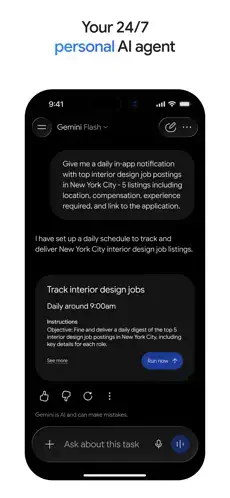
Google Gemini is a practical tool where you get things done faster.


Google Gemini AI assistant app lets you chat, generate content, analyze files, and orchestrate tasks across Google services like Gmail, Docs, Calendar, Maps, YouTube, and more. Formerly known as Bard, Gemini brings conversational AI, app integrations, and a refreshed visual design into a single mobile experience. The iOS app is a free download that lets you chat with Gemini, upload files and images, and connect to Google apps so it can summarize emails, plan events, build playlists, and more. And it starts with a free tier.
What Exactly Is Google Gemini?
Google Gemini is Google’s consumer AI assistant built on the Gemini family of models, including Gemini 3.5 Flash and Gemini Omni, available on the web and as mobile apps for Android and iOS. It is Google’s cross-platform AI assistant app that lets you chat, generate content, analyze files, and orchestrate tasks across Google services like Gmail, Docs, Calendar, Maps, YouTube, and more.
Gemini offers a free tier with core chat and file tools, plus paid plans like Google AI Plus, Pro, and Ultra that unlock more powerful models (Gemini Omni, 2.5 Pro), bigger context windows, video generation, and higher usage limits. Think of it as your AI sidekick that lives inside the Google ecosystem.
Google Gemini holds a 4.7 star rating on the Apple App Store from approximately 2M ratings. The app size is roughly 301 MB depending on your device. Age rating is 12+ for infrequent mild mature themes. For a similar experience, check out ChatGPT.
Who Benefits Most From Using Google Gemini?
Google Gemini has a broad audience, and it serves them well.
Professionals needing to summarize emails, plan events, and draft content will find the app integrations invaluable. Gemini can pull from Gmail, Calendar, and Docs to get things done.
Students and researchers analyzing documents and generating study materials will use the file upload and analysis features. Upload PDFs, spreadsheets, or presentations. Get summaries, quizzes, and explanations.
Creative users generating images, videos, and soundtracks will appreciate the media capabilities. Generate and edit photos. Create cinematic videos and custom soundtracks on paid plans.
Anyone who wants to automate tasks across Google services will save time. Let Gemini handle recurring workflows. Connect it to your favorite Google apps.
Users who prefer conversational AI for brainstorming and problem-solving will enjoy the natural chat interface. Talk through ideas. Get feedback. Refine your thinking.
Core Features That Define Google Gemini
Chat Based AI Assistant With Natural Language Conversation
Ask questions, brainstorm ideas, draft emails, summarize articles, and rewrite or translate text via natural-language chat. Gemini can fact check responses by pulling in live web search results and inline citations, reducing hallucinations.
File and Content Analysis (Documents, Spreadsheets, PDFs, Images, Videos)
Upload documents, spreadsheets, presentations, PDFs, images, and videos. Gemini can summarize, extract insights, generate quiz questions, and explain content in simpler terms. Developers can import code snippets for explanation, debugging, or refactoring.
Image and Media Capabilities (Generation, Editing, Video Creation)
Analyze images, objects, diagrams, and screenshots with explanations or ideas. Generate and edit photos with “Nano Banana 2,” including lighting controls, mockup blending, poster design, and diagrams. On paid plans, create cinematic videos and custom soundtracks (Lyria 3) from prompts, and animate photos into short video clips.
Gemini Live (Voice and Screen Sharing)
Talk things out in real time with Gemini Live, using voice conversations. Share your screen or camera to discuss exactly what you are seeing, a document, a design, or a map.
Gemini Apps (Integrations With Gmail, Calendar, Drive, Maps, YouTube Music)
Connect Gemini to Gmail, Calendar, Google Drive, Google Photos, Maps, YouTube Music, and more for multi-app help in one prompt. Summarize emails from specific contacts, add items to Google Keep grocery lists, plan routes in Google Maps, and build playlists in YouTube Music.
Gems (Custom AI Personas for Specific Tasks)
Create customized Gems like mini agents tuned for specific tasks: coding helper, workout planner, language tutor, or writing coach.
Productivity and Research Tools (Deep Research, NotebookLM)
Deep Research mode for longer, multi source research tasks with outlines, timelines, and interactive visuals. NotebookLM integration for research notebooks grounded in specific source sets.
Paid Plans With Larger Context Windows and Higher Limits
Google AI Plus, Pro, and Ultra plans unlock Gemini Omni or 2.5 Pro, larger context windows, scheduled actions, video generation, and higher daily limits.
Google Gemini Graphics and Visual Design
Gemini’s app design has undergone a major Neural Expressive and Liquid Glass-inspired overhaul. The new UI centers around a blue and white gradient homepage with a large greeting, like “ask away” or “the mic is yours,” and a prominent chat box.
Suggestion chips below the input field were removed. Instead, core actions, attachments, dictation, and Live are inline with the text field, keeping the interface cleaner. A sidebar now hosts your account, settings, model picker, chats, images, videos, library, notebooks, and recent chats, making navigation consistent across Android and iOS.
On iOS, the app uses a translucent, Liquid Glass-like aesthetic, giving a modern, layered look under the gradient and cards that many reviewers see as stylish. Some power users have criticized the redesign for making certain controls, like model picker and tools menu, harder to discover, but overall it is described as cleaner and closer to the iOS design language.
How Google Gemini Works
The daily flow is straightforward. Prompt: Type, speak, or share screen content to ask questions or request tasks. Use natural language. Gemini understands.
Review: Read Gemini’s answer, including text, images, timelines, and links. Refine the conversation with follow-ups. Dig deeper.
Act: Use Gemini’s outputs in Google apps, Gmail drafts, Maps routes, playlists, Docs outlines, or export and share results.
Automate: For advanced users and paid plans, set up scheduled actions, research workflows, or Gems to handle recurring work.
What Users Actually Say about Google Gemini
Positive praise includes users calling Gemini a powerful AI assistant for brainstorming, summarizing, and everyday tasks, often calling it one of the best chat-style AI apps currently available. Many appreciate tight integration with Google services, especially email summarization, calendar planning, and file analysis from Drive. The new design and multi-modal features, including images, voice, and screen sharing, are often mentioned as making Gemini feel more like a full AI workspace than just a chatbot.
Common criticisms include some Android power users describing the Neural Expressive redesign as a letdown: certain buttons, model picker, and tools are less obvious, and combining attachments and tools can be confusing. Not all Google Assistant voice features are yet available in the Gemini app, so some users miss legacy behaviors and need to switch back for specific tasks. As with all large models, Gemini can still produce incorrect or biased answers.
Overall, user sentiment is that Gemini is highly capable and improving quickly, but both UI and feature parity with Assistant are still evolving.

Tips to Get the Most From Google Gemini
You could just open the app and start chatting. But a few Google Gemini tips will help you unlock its full potential and get more from this AI assistant.
Connect Google apps for real productivity. Turn on Gemini Apps for Gmail, Calendar, Maps, YouTube Music, Photos, and Drive. One prompt can summarize emails, plan events, and create playlists or routes. Let Gemini work across your Google ecosystem.
Use Gemini Live for complex tasks with screen sharing. When brainstorming or debugging, talk through ideas with Gemini Live. Share your screen or camera so the AI sees exactly what you are referring to. It is like having a colleague look over your shoulder.
Create Gems for recurring workflows. Set up custom Gems tuned for specific roles like content editor, exam tutor, or workout planner. No need to re-explain your preferences every time. Save time. Stay consistent.
Upload files for deeper insights instead of pasting text. Upload documents, spreadsheets, and PDFs. Ask Gemini to summarize, extract key metrics, or create practice quizzes. File analysis is more powerful than pasting raw text.
Start with the free plan, upgrade if needed. Try the free tier for everyday tasks. If you often handle big projects, code, or media, consider Google AI Plus, Pro, or Ultra for larger context windows and video or sound generation.
Keep an eye on limitations and citations. Use Gemini’s citations and cross-check important factual answers. Treat it as a powerful assistant, not an infallible oracle. Verify critical information.
Customize the UI via the sidebar. On mobile, the sidebar holds account, settings, tools, and model picker. If you cannot find something, check there. It is the control center for your Gemini experience.
Apps Like Google Gemini
If Google Gemini does not fit your needs or you want to compare options, you have alternatives. The best Google Gemini similar apps share the same focus on conversational AI, file analysis, and cross-platform availability.
| App / Service | Main Similarity |
|---|---|
| ChatGPT (OpenAI) | General purpose AI assistant for chat, writing, code, and analysis |
| Microsoft Copilot | AI assistant integrated with Microsoft 365 and Windows |
| Perplexity | AI-powered answer engine focusing on browsing and citations |
| Anthropic Claude | AI chatbot known for long context, structured reasoning |
None of these replace Google Gemini exactly. Each has strengths. ChatGPT offers broader third-party integrations and a larger ecosystem. Copilot is deeply integrated with Microsoft 365. Perplexity excels at web search and citations. Claude is known for long-context reasoning and structured outputs.
For most users, Google Gemini strikes the best balance between Google ecosystem integration, multi-modal capabilities, and free tier access. The Gemini Apps and Gems features set it apart from competitors.
If you are already in the Google ecosystem, Gemini is the natural fit. If you use Microsoft heavily, Copilot may be better. If you prioritize web search and citations, Perplexity is worth considering.
Conclusion
Google Gemini is Google’s next-generation assistant and creative studio, turning your phone into a hub where chat, apps, and automation intersect. It is not perfect, but for users in the Google ecosystem, it is one of the most powerful AI tools available.
The strongest angle is integration. The app works seamlessly with Google services. Gmail, Calendar, Drive, Maps, YouTube Music. All connected. The multi-modal capabilities handle text, images, voice, and video. The Gems feature lets you create custom AI personas. The free tier gives you access to core features.
Who should download it? Professionals needing to summarize emails, plan events, and draft content. Students and researchers analyzing documents and generating study materials. Creative users generating images, videos, and soundtracks. Anyone who wants to automate tasks across Google services. Users who prefer conversational AI for brainstorming and problem-solving.
Who should skip it? People who prefer a more private AI assistant with less Google integration. Those who use Microsoft or Apple ecosystems heavily. Anyone who does not trust AI-generated content. If you do not use Google services, Gemini loses its main advantage.
Google Gemini is not trying to be a perfect AI. It is trying to be the most useful AI for Google users. And for millions of people, it is. Download it. Start a chat. Upload a file. Create a Gem. Automate a task. That is the loop. That is the Gemini.
FAQ
Where can I get Google Gemini download for my phone?
You can get Google Gemini download from the Official Apple Store.
What is the difference between the free and paid versions of Gemini?
The free version includes core chat, file uploads, and basic Google app integrations. Paid plans (Google AI Plus, Pro, Ultra) unlock more powerful models (Gemini Omni, 2.5 Pro), larger context windows, video generation, higher usage limits, and scheduled actions.
Does Gemini replace Google Assistant, and can I switch back?
On Android, Gemini can replace Google Assistant as the default assistant when you opt in. You can switch back to Assistant in settings. On iOS, Gemini works alongside Siri and other Google apps without replacing anything.