
Cal AI track what you eat. But typing every ingredient into an app feels like a second job.

Cal AI is an AI powered nutrition app that uses a photo, barcode, label, or text input to estimate calories and macros quickly.
What Exactly Is Cal AI?
This is an AI powered calorie tracker, not a manual logging tool. You do not spend five minutes searching for “medium banana” or measuring spoonfuls of peanut butter.
The app is built for people who want less typing and more automation. Open it. Point your camera at a plate of food. Snap a photo. Get nutrition estimates.
That is the value proposition. Speed over precision. Convenience over perfection.
Cal AI positions itself as a faster alternative to traditional calorie counters like MyFitnessPal or Lose It. Those apps work well. They also demand your time. This app asks for a photo and a confirmation tap.
For anyone searching Cal AI calorie tracker comparisons, the main difference is the photo first approach. Other apps added photo scanning as a feature. Cal AI built the entire experience around it.
How the Cal AI App Works
First, you answer onboarding questions. Age. Weight. Height. Activity level. Goal. Lose weight. Maintain. Gain muscle. The app calculates a daily calorie target.
Second, you take a photo of your meal. Natural lighting helps. A flat plate is better than a bowl. The AI estimates volume based on visual cues like plate size and portion shape.
Third, the AI estimates volume and ingredients. It looks at what is on the plate. Rice. Chicken. Broccoli. Sauce. It makes a best guess.
Fourth, you receive calorie and macro breakdown. Protein. Carbs. Fat. Total calories. The number appears in seconds.
Fifth, you edit or confirm the result to train the AI. If the app guessed wrong, correct it. That correction feeds back into the model. The more you correct, the better it gets.
That feedback loop is what separates Cal AI from a simple photo scanner. The app learns your eating patterns over time.
Cal AI Core Features That Matter
Photo based calorie scanning.
The headline feature. Point, shoot, receive numbers.
Barcode scanning for packaged foods.
More accurate than photo estimation. Scan a granola bar box. Get exact macros.
Nutrition label scanning.
Point at the label on a cereal box or frozen dinner. The app reads the numbers directly.
Manual food and recipe entry.
For people who want precision. Type in your homemade lasagna ingredients once. Save it as a meal.
Personalized onboarding and goal setting.
The app asks detailed questions before you log your first meal. That personalization affects your daily calorie target.
Macro tracking for calories, protein, carbs, and fat.
Not just calories. The full breakdown appears for every meal.
Fitness product integration and exercise tracking.
Connect your workout data. The app adjusts calorie recommendations based on activity.
AI correction loop so the app learns from your edits.
Each correction improves future estimates. After two weeks of consistent use, the app gets noticeably more accurate.
Daily progress dashboard and milestone badges.
See your remaining calories. Track streaks. Earn badges for logging consistently.
Premium subscription on top of free download.
The free version works. Premium adds extra features like water tracking and advanced analytics.
For users looking for Cal AI premium features, the subscription unlocks meal planning, recipe import, and exportable reports.
Cal AI Graphics and Design
Clean, aesthetic interface. That is the first thing reviewers mention. The app does not look like a spreadsheet. It looks like a modern fitness app.
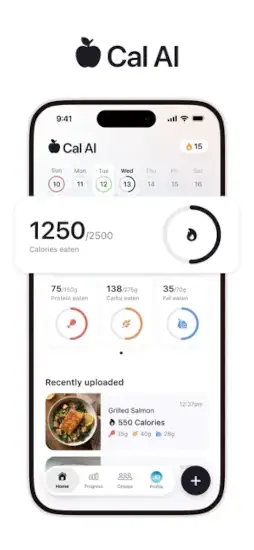
Dashboard shows calories and macros clearly. A circular progress bar for calories. A breakdown row for protein, carbs, and fat. All visible without scrolling.
Visuals make nutrition data feel less overwhelming. Colors indicate status. Green for good. Yellow for close to limit. Red for over. You understand your day at a glance.
Onboarding is long but structured for personalization. Ten to fifteen questions. They take three minutes. That time investment pays off because the app knows your goals before you start logging.
Cal AI design choices prioritize speed. Large buttons. Big text. High contrast. You can use this app while eating dinner without squinting.
What Users Say About Cal AI App
Positive: Easy to use. Much faster than manual logging. Users consistently say they actually track meals now because the friction is low.
Positive: Interface looks polished and modern. The app feels premium even on the free tier.
Negative: Recognition can be inconsistent across meals. Mixed dishes like stir fry or casseroles confuse the AI. Soups are difficult. Anything where ingredients blend together visually.
Negative: Some users report undercounting or needing frequent corrections. A bowl of pasta might get estimated as half the actual calories. Without corrections, the daily total is wrong.
Overall : People love the concept and UX. Accuracy and corrections are the main friction points. The app is not a set it and forget it tool. It requires oversight, especially in the first two weeks.
For anyone reading Cal AI app reviews before downloading, the consensus is clear. Great for simple meals. Good for packaged foods. Mixed results for complex home cooking.
How the Workflow Flows
Set goals during onboarding.
The app asks about your body, activity level, and target weight. That establishes your daily calorie budget.
Scan or photograph food throughout the day.
Breakfast gets a photo. Lunch gets a barcode scan. Dinner gets a photo. Snacks get manual entry.
Review AI estimates.
The app shows you what it thinks is on the plate. You confirm or reject.
Edit when needed.
Change the portion size. Swap an ingredient. Add a missing item. Each edit trains the model.
Track progress over days and weeks.
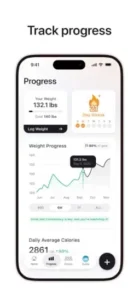
The dashboard shows weekly averages. You see patterns. Monday high carb. Wednesday high protein. The data helps you adjust.
Earn milestone badges for staying consistent.
Seven days in a row. Twenty meals logged. Fifty corrections made. Small rewards that keep you opening the app.
Cal AI workout tracking integration means your exercise feeds into the same dashboard. Burned 300 calories on a run? That adds to your available budget for dinner.
You already take photos of your food for social media. Why not let those same photos do the work of tracking your nutrition?
The app is on your phone. The camera is ready. Your next meal is waiting to be scanned. The only question is whether you want to keep guessing your calories or finally know the real numbers.
Cal AI Practical Tips to Get Better Results
You can download Cal AI app right now and start snapping photos. But a few small habits separate people who give up after three days from people who still track six months later.
Take clear, well lit food photos for better recognition.
Natural window light works best. Avoid shadows across the plate. Do not use flash. The AI needs to see individual ingredients. A dim, blurry photo gives bad estimates.
Use barcode scanning for packaged foods instead of photo estimation.
That granola bar has a barcode for a reason. Scan it. The app pulls exact nutrition data. Photo estimation for packaged food adds unnecessary uncertainty.
Correct the AI carefully after each scan so your log stays accurate.
The app learns from your edits. If you let wrong estimates slide, the AI never improves. Take three seconds to fix the portion size or swap an ingredient. Future scans get better.
Use the onboarding questions to personalize your targets.
Rushing through the setup means generic recommendations. Answer honestly. Activity level matters. Weight goal matters. Meal frequency matters. The extra two minutes here saves weeks of wrong calorie targets.
Save recurring meals if the app supports that workflow.
Eat the same breakfast every day? Save it as a meal. One tap logs your oatmeal, banana, and coffee. No photo needed. No corrections required.
Cross check scans of nutrition labels when precision matters.
The app reads most labels correctly. Sometimes it misreads a number. 210 calories becomes 120. Compare the scan result to the actual label before confirming.
Treat the app as a convenience tool, not a medical grade instrument.
Cal AI calorie tracker accuracy is good for a photo based app. It is not laboratory equipment. For medical conditions requiring precise nutrition, consult a professional.
Pair it with an exercise tracker for a fuller fitness picture.
The app integrates with fitness products. Your morning run adds to your available calorie budget. Your evening walk shows up in the dashboard. The full picture helps you make better decisions.
For users searching Cal AI tips specifically, the number one piece of community advice is patience. The app needs about two weeks of corrections to learn your eating patterns. Most negative reviews come from people who gave up on day three.
And no, there are no Cal AI codes for free premium that work across all users. The app occasionally runs promotional trials through Instagram. Follow their official account. Do not trust third party sites claiming to offer lifetime codes.
Cal AI Similar Apps Worth Comparing
Not every calorie tracker works the same way. These five alternatives to Cal AI similar apps searches come up most often.
| App | Main Similarity |
|---|---|
| MyFitnessPal | Food logging and macro tracking. Largest food database available. Barcode scanning included. Free tier is generous. |
| Lose It! | Calorie counting and weight goals. Barcode scanning included. Strong community features. |
| Cronometer | Detailed nutrition breakdowns. Best for micronutrient tracking. Good for people who want to see vitamin and mineral data. |
| Lifesum | Goal based diet tracking with clean UX. Focuses on meal ratings and healthy eating patterns. |
| AI meal scan apps | Photo recognition and automated food logging. Smaller category. Snapcal and FoodLens are the main competitors. |
Start with MyFitnessPal if you want the largest database and do not mind manual entry. Start with Lose It if you want barcode scanning plus social accountability. Stay with Cal AI if speed and automation matter more than perfect precision.
Cal AI vs MyFitnessPal is the most common comparison. One prioritizes speed. The other prioritizes database depth. Choose based on your patience for typing.
Cal AI Community
Cal AI does not have friend lists or social feeds. You will not see what your contacts ate for lunch. That is intentional. The app stays focused on personal tracking.
Its strongest presence is on Instagram and the official website. The Instagram account posts user success stories, feature announcements, and before and after photos. It feels encouraging without being pushy.
User success stories are featured regularly. People share their progress. The app reposts them. That creates a sense of shared journey even without direct social features.
Email support is available through the App Store listing. Response times are usually within one to two business days. Users report getting helpful answers about syncing issues and misread labels.
Cal AI community features are lighter than fitness apps with friend networks like Fitbit or MyFitnessPal. There are no challenges. No leaderboards. No groups. Just individual progress and occasional shared wins on social media.
Testimonials help build trust in the AI accuracy over time. Seeing other people’s corrections logs and weight loss results makes new users more willing to stick with the correction process during the first two weeks.
Who Should Use Cal AI App?
Use Cal AI if:
-
You find manual food logging too slow or annoying.
-
You are trying to lose weight or stay accountable with less daily effort.
-
You want a visual, photo first tracking experience.
-
You eat simple meals with visible ingredients.
-
You are willing to correct the AI for the first two weeks.
Skip Cal AI if:
-
You need medical grade nutrition precision for a health condition.
-
You prefer typing every ingredient manually to stay in control.
-
You eat mostly complex mixed dishes like soups, casseroles, or curries.
-
You want social features like friend challenges or group accountability.
-
You expect perfect recognition from day one.
Cal AI app design serves a specific person. Someone who wants calorie tracking to take ten seconds per meal, not two minutes. Someone who values consistency over perfection. Someone willing to train the AI through corrections.
If that sounds like you, the app will likely work well. If you want set it and forget it accuracy, no photo based app currently delivers that.
Conclusion
Let us call this what it is. A fast, beautiful, slightly imperfect shortcut for calorie tracking.
Strengths: The interface is clean. Scanning options are fast. Automation reduces friction dramatically compared to manual entry apps. The correction loop means the app gets better the more you use it.
Weakness: Recognition accuracy still requires manual fixes sometimes. Complex meals confuse the AI. Portion estimation can be off by 20 to 30 percent without corrections.
This app makes calorie tracking feel much less tedious than older manual entry tools. It is not medical grade. But for someone who currently tracks nothing because manual logging feels like a chore, Cal AI is a genuine improvement.
The photo is on your phone. The meal is in front of you. The calorie estimate takes three seconds.
The only question left is whether you want to keep guessing or finally start knowing.
FAQ
Where do I get Cal AI download, and is it really free to use?
Yes, the app costs nothing to install. You can start snapping photos of your meals today. Download Cal AI from the Official App Store.
Is there an official website where I can learn more before I decide to download?
Yes. The site explains how the AI works, shows feature updates, and shares user success stories. Visit: Official Cal AI Website
Who do I contact for feedback, feature requests, or billing questions?
Send a detailed message to the support team. Include your device model and app version. They usually respond within two business days. Contact: support[at]calai.app